
Python读取Excel数据并根据列名取值
一直想将自己接触到的东西梳理一遍,可就是迈不出第一步,希望从这篇总结开始不要再做行动的矮人了。
最近测试过程中需要用到python读取excel用例数据,于是去了解和学习了下xlrd库,这里只记录使用过程中读取excel数据相关操作。
一、安装xlrd库
可以下载xlrd库包到本地安装,也可以通过pip命令安装,这里我选择pip命令:
pip install xlrd
二、使用xlrd读取excel数据
具体详细的操作可以参考xlrd库操作说明文档,以下是两种读取excel数据的方法:
1、根据Excel中sheet名称读取数据:
 def readExcelDataByName(fileName, sheetName):

     table = None

     errorMsg = None

     try:

         data = xlrd.open_workbook(fileName)

         table = data.sheet_by_name(sheetName)

     except Exception, msg:

         errorMsg = msg
     return table, errorMsg
2、根据Excel中sheet的序号获取:
 def readExcelDataByIndex(fileName, sheetIndex):

     table = None

     errorMsg = ""

     try:

         data = xlrd.open_workbook(fileName)

         table = data.sheet_by_index(sheetIndex)

     except Exception, msg:

         errorMsg = msg

     return table, errorMsg
3、根据列名获取相应序号,由于有时读取excel中列数据时,需要通过列头名称获取相应的列中的值,所以写了下面这个返回列名所在表格中的index。然后就可以直接通过table.cell_value(i, getColumnIndex(table,'列名'))获取列的值。
 def getColumnIndex(table, columnName):

     columnIndex = None

     for i in range(table.ncols):

         if(table.cell_value(0, i) == columnName):

             columnIndex = i

             break

      return columnIndex
下面加入需要读取如下excel表格中的数据,在读取数据时直接根据列名去获取相应的值。

根据列名读取相应的值,代码如下:
 #!/usr/bin/python

 # coding=utf-8

 __author__ = 'Paul'

 import xlrd

 import chardet

 import traceback

 def getColumnIndex(table, columnName):

     columnIndex = None

     #print table

     for i in range(table.ncols):

         #print columnName

         #print table.cell_value(0, i)

         if(table.cell_value(0, i) == columnName):

             columnIndex = i

             break

     return columnIndex

 def readExcelDataByName(fileName, sheetName):

     #print fileName

     table = None

     errorMsg = ""

     try:

         data = xlrd.open_workbook(fileName)

         table = data.sheet_by_name(sheetName)

     except Exception, msg:

         errorMsg = msg

     return table, errorMsg

 def readExcelDataByIndex(fileName, sheetIndex):

     table = None

     errorMsg = ""

     try:

         data = xlrd.open_workbook(fileName)

         table = data.sheet_by_index(sheetIndex)

     except Exception, msg:

         errorMsg = msg

     return table, errorMsg

 if __name__ == '__main__':

     #example

     xlsfile= 'F:/test_AutoTesting/TestCase/RunList.xlsx'

     table = readExcelDataByName(xlsfile, 'Sheet1')[0]

     #获取第一行的值

     testcase_id = table.cell_value(1, getColumnIndex(table,'TestCaseID'))

     app_config = table.cell_value(1, getColumnIndex(table,'APPConfig'))

     print u'测试用例ID为:%s'%(testcase_id)

     print u'配置信息为:%s'%(app_config)
得出结果如下:
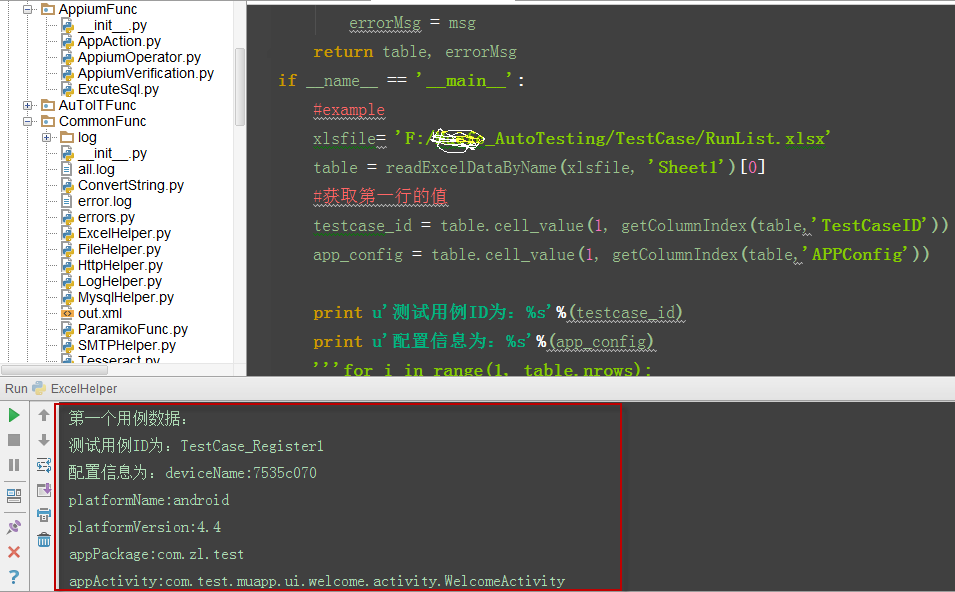
4、读取excel中的文本或数值转换成了float的问题
有时Excel中的值为20,但读取出来的值却变成了20.0,这与我们想要的不大一致,特别是做UI自动化测试过程中需要下拉选择值时就完全选不出想要的选项了。目前我想到的是通过下面的语句来处理:
if isinstance(inputValue,float):    #判断读取到的值是否为float

    if inputValue==int(inputValue): #判断读取到的值与转成int后的值是否相等,如果相等则转成int

    inputValue = int(inputValue)

    inputValue = str(inputValue) #转成str
Python读取Excel数据并根据列名取值的更多相关文章
- python 读取excel数据并将测试结果填入Excel
python 读取excel数据并将测试结果填入Excel 读取一个Excel中的一条数据用例,请求接口,然后返回结果并反填到excel中.过程中会生成请求回来的文本,当然还会生成一个xml文件.具体 ...
- Python读取excel 数据
1.安装xlrd 2.官网 通过官网来查看如何使用python读取Excel,python excel官网: http://www.python-excel.org/ 实例: (1)Excel内容 把 ...
- Python读取Excel数据
今天一同学给我发来一个Excel文件,让我帮他找一些信息,打开一开 8000多条数据.自己手工处理是不可能完成的的啦.作为一名程序员,当然要用程序来处理.处理生活中的问题当然是Python最为方便啦. ...
- python读取excel数据并以第一行标题加内容组成字典格式返回
excel结构如图所示: 代码: import xlrd ''' 通用获取excel数据 @:param path excel文件路径 @:param sheet_name excel文件里面shee ...
- python读取excel数据为json格式(兼容xls\xlsx)
做自动化时需要从excel读取数据: 本文实现将excel文件数据读取为json格式,方便自动化调用 读取xls文件 使用xlrd读取xls文件代码: import xlrd def read_xls ...
- python读取excel数据,并可视化展现
#-*- coding: utf-8 -*- import pandas as pda import matplotlib.pyplot as pyl import matplotlib.font_m ...
- python 读取excel数据
import xlrd book = xlrd.open_workbook(file_path)#打开文件 sheet = book.sheet_by_index(0) #获取第一个工作簿 print ...
- Python 读取Excel数据 xlrd
#导入相关模块 from xlrd import open_workbook #打开excel file = open_workbook("test.xlsx") #获取sheet ...
- python 读取excel数据插入到另外一个excel
#-*-coding:utf-8-*- import xlrd import xlwt def excel_copy(dir_from, dir_to, sheet_name): '''从一个exce ...
随机推荐
- ThinkPHP 3 的CURD介绍
本节课大纲: 一.ThinkPHP 3 的CURD介绍 (了解) 二.ThinkPHP 3 读取数据 (重点) 对数据的读取 Read $m=new Model('User'); $m=M('User ...
- 脑波设备mindwave数据流二次开发示例
数据流开发神念科技提供了两个文件ThinkGearStreamParse.h和ThinkGearStreamParse.cpp两个文件,主要接口为: 宏定义: /* Data CODE definit ...
- passwordauthentication yes
ssh ip disconnected:no supported authentication methods available(server sent:publickey,gssapi-keyex ...
- ZOJ 3822 Domination
题意: 一个棋盘假设每行每列都有棋子那么这个棋盘达到目标状态 如今随机放棋子 问达到目标状态的期望步数 思路: 用概率来做 计算第k步达到目标状态的概率 进而求期望 概率计算方法就是dp ...
- HDU OJ 5437 Alisha’s Party 2015online A
题目:click here 题意: 邀请k个朋友,每个朋友带有礼物价值不一,m次开门,每次开门让一定人数p(如果门外人数少于p,全都进去)进来,当最后所有人都到了还会再开一次门,让还没进来的人进来,每 ...
- C语言:类似linux内核的分等级DEBUG宏(打印宏)
总结几种log打印printf函数的宏定义 http://blog.chinaunix.net/uid-20564848-id-73402.html #include <stdio.h> ...
- 如何在Mac系统安装eclipse并运行java程序?
链接地址:http://jingyan.baidu.com/article/7f41ecece8ef5b593c095c71.html eclipse现在也有 Mac版了,我们快来试一试吧!现在我将带 ...
- HDU3496-Watch The Movie
描述: New semester is coming, and DuoDuo has to go to school tomorrow. She decides to have fun tonight ...
- DAO以及获取自动生成主键值
package com.alibaba.sql; import java.lang.reflect.InvocationTargetException; import java.sql.Connect ...
- 常用SQL的优化
导入数据 对于MyISAM存储引擎的表,可以通过以下方式快速地导入大量数据 alter table tbl_name disable keys; //关闭表非唯一索引的更新 ...