
文件搜索查找功能VC++
1.搜索指定文件夹下的文件名和路径
#undef UNICODE

#include <iostream>

#include <string>

#include <vector>

#include <memory>

#include <cstring>

#include <windows.h>

std::shared_ptr<std::vector<std::string> >  fileList(const std::string& folder_path)

{

    static std::shared_ptr<std::vector<std::string> >

        folder_files(new std::vector<std::string>); //返回指针, 需要迭代使用

    WIN32_FIND_DATA FindData;

    HANDLE hError;

    int file_count();

    std::string file_path(folder_path); //路径名

    std::string full_file_path; //全路径名

    file_path.append("/*.*");

    hError = FindFirstFile(file_path.c_str(), &FindData);

    if (hError == INVALID_HANDLE_VALUE) {

        std::cout << "failed to search files." << std::endl;

        return nullptr;

    }

    while(FindNextFile(hError, &FindData))

    {

        //过虑".", "..", "-q"

        if( == strcmp(FindData.cFileName, ".") ||

             == strcmp(FindData.cFileName, "..") ||

             == strcmp(FindData.cFileName, "-q"))

        {

            continue;

        }

        //完整路径

        full_file_path.append(folder_path);

        full_file_path.append("/");

        full_file_path.append(FindData.cFileName);

        ++file_count;

        if (FindData.dwFileAttributes & FILE_ATTRIBUTE_DIRECTORY){

            //std::cout << file_count << " " << full_file_path << "<Dir>" << std::endl;

            fileList(full_file_path);

        }else{

            folder_files->push_back(full_file_path);

            //std::cout << file_count << " " << full_file_path << std::endl;

        }

        full_file_path.clear(); //清空目录

    }

    return folder_files;

}

int main(void)

{

    std::shared_ptr<std::vector<std::string> > folder_files;

    folder_files = fileList("E:/bf");

    if (folder_files) {

        for (size_t i=; i != folder_files->size(); ++i) {

            std::cout << i+ << " : " << (*folder_files)[i] << std::endl;

        }

    }

    return ;

}
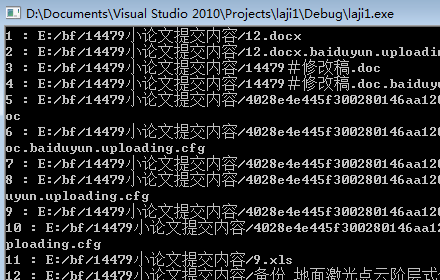
#include<afx.h>

#include<stdio.h>

#include<string.h>

#include<iostream>

using namespace std;

int _tmain(int argc, _TCHAR* argv[])

{

    TCHAR  filePath[]=L"*.*";

    CFileFind finder;

    BOOL bFinderResult = finder.FindFile(filePath);

    //std::cout << filePath << std::endl;

    while (bFinderResult!=false)

    {

        bFinderResult=finder.FindNextFileW();

        CString szRepeter = finder.GetFileName();

        //const int iSize = szRepeter.GetLength();

        char bufFileName[];

        WideCharToMultiByte(, , szRepeter, , bufFileName, , NULL, false);

        //fFileName = (LPCTSTR)szRepeter;

        std::cout << bufFileName << std::endl;

    }

    system("pause");

    return ;

}
//注意要设置共享MFC中使用.
更多可以参看:http://www.jizhuomi.com/software/340.html
文件搜索查找功能VC++的更多相关文章
- IDEA+控制台使用搜索\查找功能
- Linux如何搜索查找文件里面内容
在Linux系统当中,如何搜.索查找文件里面的内容呢? 这个应该是系统维护.管理当中遇到最常见的需求.那么下面介绍,总结一下如何搜索.查找文件当中的内容. 搜索.查找文件当中的内容,一般最常用的是gr ...
- 有关文件夹与文件的查找,删除等功能 在 os 模块中实现
最近在写的程序频繁地与文件操作打交道,这块比较弱,还好在百度上找到一篇不错的文章,这是原文传送门,我对原文稍做了些改动. 有关文件夹与文件的查找,删除等功能 在 os 模块中实现.使用时需先导入这个模 ...
- IDEA文件查找功能失效(ctrl+shift+N)
由于断电.蓝屏引起的强制关机等情况,会导出IDEA文件查找功能失效,Enter file name窗口输入的文字显示红色,无法查出需要的文件. 解决方法: 可以点击File,选择Invalidate ...
- Linux下文件搜索、查找、查看命令
Linux下文件搜索.查找.查看命令 1.最强大的搜索命令:find 查找各种文件的命令 2.在文件资料中查找文件:locate 3.搜索命令所在的目录及别名信息:which 4.搜索命令所在的目录及 ...
- Xcode编辑器之filter查找功能和查看最近修改的文件
一,前言 有时候,我们的项目过大,创建类过多就会造成“目标文件”不好查找.这时候通过“filter”进行目录结构筛选无疑是最好的选择. 二,什么是filiter filiter 顾名思义为“过滤”,“ ...
- VS2010类似Eclipse文件查找功能-定位到
快捷键:Ctrl + , 打开定位到窗口,可以在文件或类文件中查找内容.
- Linux常用命令学习2---(文件搜索命令locate find、命令搜索命令whereis which、字符串搜索命令grep、帮助命令man)
1.文件搜索命令:locate [文件名] 在后台数据库中按文件名搜索,搜索速度比find快,耗费资源更少 例子:locate test.txt,就会显示文件名包含 test.txt的所 ...
- FindinFiles - Windows文件内查找插件
FindInFiles for Windows 今天分享一个不错的插件工具:FindInFiles.如其名,其功能和Visual Studio的Ctrl+H快捷键类似,方便Windows使用者在资源管 ...
随机推荐
- textarea高度自适应问题
textarea中的文字如果过多,就会产生滚动条,一本分文本被遮盖住,不能看到所有的文本. 那么,如何才能让textarea的高度随输入内容多少,可以自动的改变高度呢? 解决思想: 1 利用conte ...
- Android混淆配置文件规范
#打开project.properties文件中的proguard.config. -optimizationpasses 5 # 指定代码的压缩级别 -dontusemixedcaseclassna ...
- Sicily 1790. Single Round Match
高进度求余 或者 将一个数奇位上的数字与偶位上的数字分别加起来,再求它们的差,如果这个差是11的倍数(包括0),那么,原来这个数就一定能被11整除. #include <iostream> ...
- 在windows下安装mysql
本文主要讲mysql解压版在windows下的安装和配置,在官网http://www.mysql.com/下载mysql-cluster-gpl-7.3.7-winx64.zip,然后将mysql解压 ...
- Python之路第十一天,高级(3)-Python操作 Memcached、Redis
Memcached Memcached 是一个高性能的分布式内存对象缓存系统,用于动态Web应用以减轻数据库负载.它通过在内存中缓存数据和对象来减少读取数据库的次数,从而提高动态.数据库驱动网站的速度 ...
- 【python】中文的输出,打印,文件编码问题解决方法
直接在python中输入中文的字符串会报编译错误SyntaxError: Non-ASCII character,因为python文件默认编码方式是ASCII.如果想要打印中文字符,有两种方式: 1. ...
- ZigBee 协议规范
ZigBee协议栈体系结构由应用层.应用汇聚层. 网络层.数据链路层和物理层组成,如下图所示: 图1 ZigBee 协议栈体系的层次结构 应用层定义了各种类型的应用业务,是协议栈的最 ...
- JIRA官方:JIRA定制工作流
定制适合项目的工作流 JIRA提供了一个缺省工作流和一系列问题类型,非常适合缺陷追踪和软件开发.在使用中你可以随时根据实际情况对流程进行调整,确保流程能够快速的适应坏境变化. 使你的工作流图形化 使用 ...
- poj 2393 Yogurt factory(dp+贪心)
奶牛们建了一家酸奶厂,在N周内每周需要出货Y_i单位酸奶,第i周成本为C_i,储存费为每周S.求总体最低成本. 贪心策略是维持每周的最低单位成本,每周可能用上周剩下的,也可能生产新的.于是该周单位成本 ...
- Linux启动新进程的几种方法及比较
有时候,我们需要在自己的程序(进程)中启动另一个程序(进程)来帮助我们完成一些工作,那么我们需要怎么才能在自己的进程中启动其他的进程呢?在Linux中提供了不少的方法来实现这一点,下面就来介绍一个这些 ...