
Android_(服务)Vibrator振动器
Vibrator振动器是Android给我们提供的用于机身震动的一个服务,例如当收到推送消息的时候我们可以设置震动提醒,也可以运用到游戏当中增强玩家互动性
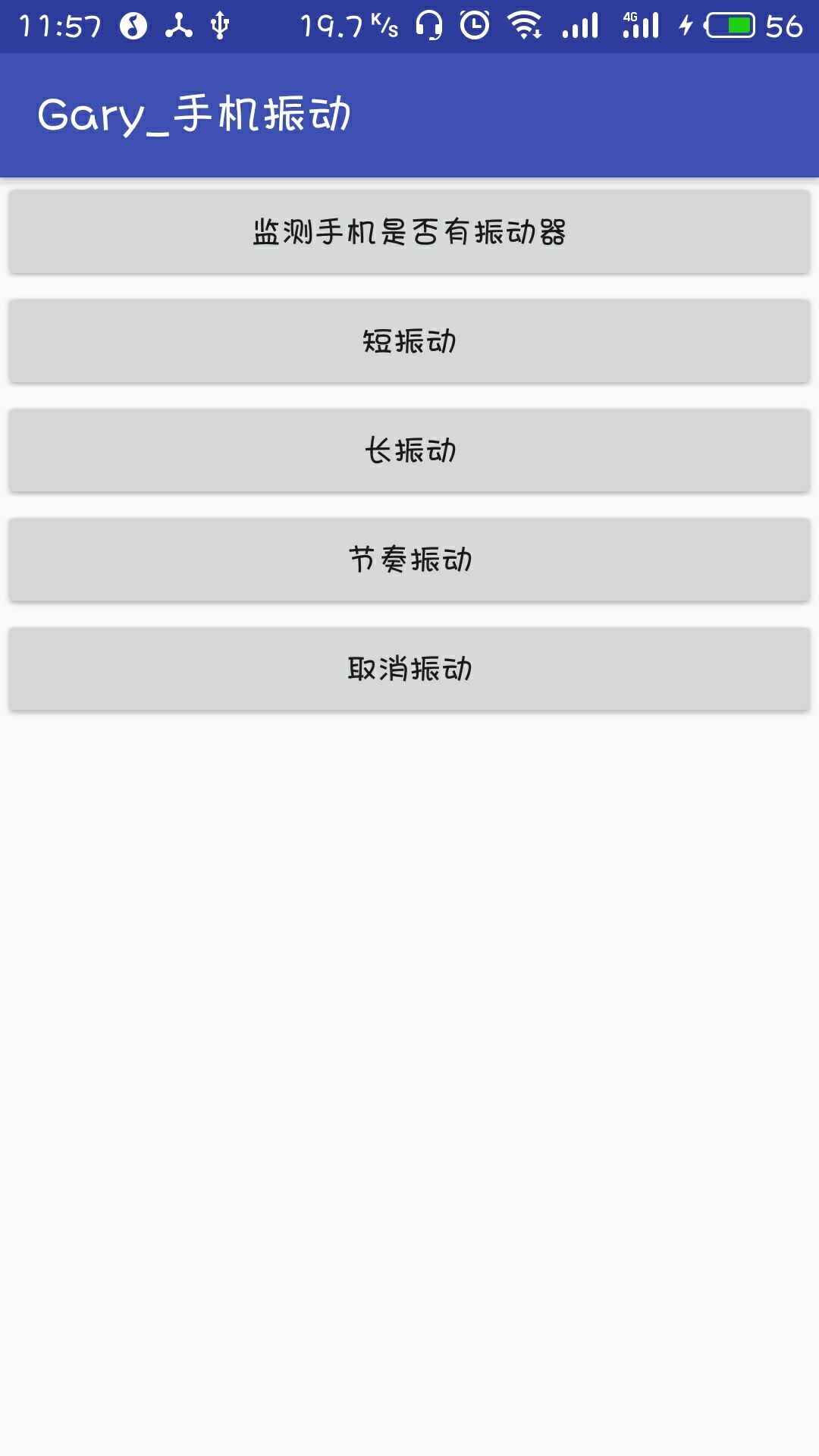
运行截图:
程序结构

<?xml version="1.0" encoding="utf-8"?>

<manifest xmlns:android="http://schemas.android.com/apk/res/android"

    package="com.example.administrator.myapplication">

    <application

        android:allowBackup="true"

        android:icon="@mipmap/ic_launcher"

        android:label="@string/app_name"

        android:roundIcon="@mipmap/ic_launcher_round"

        android:supportsRtl="true"

        android:theme="@style/AppTheme">

        <activity android:name=".MainActivity">

            <intent-filter>

                <action android:name="android.intent.action.MAIN" />

                <category android:name="android.intent.category.LAUNCHER" />

            </intent-filter>

        </activity>

    </application>

    <uses-permission android:name="android.permission.VIBRATE"/>

</manifest>
AndroidManifest.xml
package com.example.administrator.myapplication;

import android.app.Service;

import android.content.Context;

import android.os.Vibrator;

import android.support.v7.app.AppCompatActivity;

import android.os.Bundle;

import android.view.View;

import android.widget.Button;

import android.widget.Toast;

public class MainActivity extends AppCompatActivity implements View.OnClickListener{

    private Button btn_hasVibrator;

    private Button btn_short;

    private Button btn_long;

    private Button btn_rhythm;

    private Button btn_cancle;

    private Vibrator myVibrator;

    private Context mContext;

    @Override

    protected void onCreate(Bundle savedInstanceState) {

        super.onCreate(savedInstanceState);

        setContentView(R.layout.activity_main);

        //获得系统的Vibrator实例:

        myVibrator = (Vibrator) getSystemService(Service.VIBRATOR_SERVICE);

        mContext = MainActivity.this;

        bindViews();

    }

    private void bindViews() {

        btn_hasVibrator = (Button) findViewById(R.id.btn_hasVibrator);

        btn_short = (Button) findViewById(R.id.btn_short);

        btn_long = (Button) findViewById(R.id.btn_long);

        btn_rhythm = (Button) findViewById(R.id.btn_rhythm);

        btn_cancle = (Button) findViewById(R.id.btn_cancle);

        btn_hasVibrator.setOnClickListener(this);

        btn_short.setOnClickListener(this);

        btn_long.setOnClickListener(this);

        btn_rhythm.setOnClickListener(this);

        btn_cancle.setOnClickListener(this);

    }

    @Override

    public void onClick(View v) {

        switch (v.getId()) {

            case R.id.btn_hasVibrator:

                Toast.makeText(mContext, myVibrator.hasVibrator() ? "当前设备有振动器" : "当前设备无振动器",

                        Toast.LENGTH_SHORT).show();

                break;

            case R.id.btn_short:

                myVibrator.cancel();

                myVibrator.vibrate(new long[]{100, 200, 100, 200}, 0);

                Toast.makeText(mContext, "短振动", Toast.LENGTH_SHORT).show();

                break;

            case R.id.btn_long:

                myVibrator.cancel();

                myVibrator.vibrate(new long[]{100, 100, 100, 1000}, 0);

                Toast.makeText(mContext, "长振动", Toast.LENGTH_SHORT).show();

                break;

            case R.id.btn_rhythm:

                myVibrator.cancel();

                myVibrator.vibrate(new long[]{500, 100, 500, 100, 500, 100}, 0);

                Toast.makeText(mContext, "节奏振动", Toast.LENGTH_SHORT).show();

                break;

            case R.id.btn_cancle:

                myVibrator.cancel();

                Toast.makeText(mContext, "取消振动", Toast.LENGTH_SHORT).show();

        }

    }

}
MainActivity
<?xml version="1.0" encoding="utf-8"?>

<LinearLayout xmlns:android="http://schemas.android.com/apk/res/android"

    xmlns:app="http://schemas.android.com/apk/res-auto"

    xmlns:tools="http://schemas.android.com/tools"

    android:layout_width="match_parent"

    android:layout_height="match_parent"

    android:orientation="vertical"

    tools:context="com.example.administrator.myapplication.MainActivity"

    android:weightSum="1">

    <Button

        android:id="@+id/btn_hasVibrator"

        android:layout_width="match_parent"

        android:layout_height="wrap_content"

        android:text="监测手机是否有振动器" />

    <Button

        android:id="@+id/btn_short"

        android:layout_width="match_parent"

        android:layout_height="wrap_content"

        android:text="短振动" />

    <Button

        android:id="@+id/btn_long"

        android:layout_width="match_parent"

        android:layout_height="wrap_content"

        android:text="长振动" />

    <Button

        android:id="@+id/btn_rhythm"

        android:layout_width="match_parent"

        android:layout_height="wrap_content"

        android:text="节奏振动" />

    <Button

        android:id="@+id/btn_cancle"

        android:layout_width="match_parent"

        android:layout_height="wrap_content"

        android:text="取消振动" />

</LinearLayout>
activity_main.xml
一、获得系统的Vibrator
        myVibrator = (Vibrator) getSystemService(Service.VIBRATOR_SERVICE);

        mContext = MainActivity.this;
二、判断并设置频率不同的震动器
abstract void cancel():关闭或者停止振动器

abstract boolean hasVibrator():判断硬件是否有振动器

void vibrate(long milliseconds):控制手机振动为milliseconds毫秒
void vibrate(long[] pattern,int repeat):指定手机以pattern指定的模式振动

第一个参数:new int[200,400,600,800],在200,400,600,800这个时间交替启动与关闭振动器
第二个参数:重复次数,如果是-1的只振动一次,如果是0的话则一直振动
 public void onClick(View v) {

        switch (v.getId()) {

            case R.id.btn_hasVibrator:

                Toast.makeText(mContext, myVibrator.hasVibrator() ? "当前设备有振动器" : "当前设备无振动器",

                        Toast.LENGTH_SHORT).show();

                break;

            case R.id.btn_short:

                myVibrator.cancel();

                myVibrator.vibrate(new long[]{100, 200, 100, 200}, 0);

                Toast.makeText(mContext, "短振动", Toast.LENGTH_SHORT).show();

                break;

            case R.id.btn_long:

                myVibrator.cancel();

                myVibrator.vibrate(new long[]{100, 100, 100, 1000}, 0);

                Toast.makeText(mContext, "长振动", Toast.LENGTH_SHORT).show();

                break;

            case R.id.btn_rhythm:

                myVibrator.cancel();

                myVibrator.vibrate(new long[]{500, 100, 500, 100, 500, 100}, 0);

                Toast.makeText(mContext, "节奏振动", Toast.LENGTH_SHORT).show();

                break;

            case R.id.btn_cancle:

                myVibrator.cancel();

                Toast.makeText(mContext, "取消振动", Toast.LENGTH_SHORT).show();

        }

    }
三、开启系统权限
<uses-permission android:name="android.permission.VIBRATE"/>
Android_(服务)Vibrator振动器的更多相关文章
- Android该系统提供的服务--Vibrator(振子)
Android该系统提供的服务--Vibrator(振子) --转载请注明出处:coder-pig Vibrator简单介绍与相关方法: watermark/2/text/aHR0cDovL2Jsb2 ...
- Android中振动器(Vibrator)的使用
系统获取Vibrator也是调用Context的getSystemService方法,接下来就可以调用Vibrator的方法控制手机振动了.Vibrator只有三个方法控制手机振动: 1.vibrat ...
- 振动器(Vibrator)
package com.wwj.serviceandboardcast; import android.app.Activity; import android.app.Service; impo ...
- Android 振动器
今天介绍一下Android的振动器Vibrator,有三个方法来控制手机振动: 1.void vibrate(long milliseconds):控制手机振动milliseconds毫秒. 2.vo ...
- Android菜鸟的成长笔记(24)——Android中的振动器
在某些时候,程序需要启动系统振动器,比如手机静音时使用振动提示用户:再比如玩游戏时,当系统碰撞.爆炸时使用振动带给用户更逼真的体验等.总之,振动是除视频.声音之外的另一种"多媒体" ...
- Android的几种Manager
电话管理器TelephoneManager 第一个实例是获取网络和SIM卡信息:界面是一个列表,这里省略,Java代码如下: public class MainActivity extends Act ...
- Micro:Bit手柄试用之一MagicPad (解决蓝牙与gamePad包共存)
前言 原创文章,转载引用务必注明链接.由于本人初次接触Micro:Bit,水平有限,如有疏漏,欢迎指正. Micro:Bit真好玩! DFRobot的论坛相关资料算是国内比较丰富的了,个人感觉MB比A ...
- 利用传感器(sensor)实现微信摇一摇动画
所需要的权限: <uses-permission android:name="android.permission.VIBRATE"></uses-permiss ...
- 玩转Android之加速度传感器的使用,模仿微信摇一摇
Android系统带的传感器有很多种,最常见的莫过于微信的摇一摇了,那么今天我们就来看看Anroid中传感器的使用,做一个类似于微信摇一摇的效果. OK ,废话不多说,我们就先来看看效果图吧: 当我摇 ...
随机推荐
- uniapp配置scss支持
在开发 uniapp 的时候发现默认 style 是不支持 scss 模式开发样式,这样的话使用 --status-bar-height 就没有办法变成想要的数值了,这时候就需要开启 scss 支持. ...
- Magento2入门之修改logo
本文用于学习记录用 1.主题创建是在路径 /app/design/frontend/公司名/主题名称/ 我自己创建的路径为 app/design/frontend/Bman/castle,以下操作都在 ...
- redis在php中实际应用-list
1.LPUSH Redis Lpush 命令将一个或多个值插入到列表头部. 如果 key 不存在,一个空列表会被创建并执行 LPUSH 操作. 当 key 存在但不是列表类型时,返回一个错误.(在Re ...
- 使用TableSnapshotInputFormat读取Hbase快照数据
根据快照名称读取hbase快照中的数据,在网上查了好多资料,很少有资料能够给出清晰的方案,根据自己的摸索终于实现,现将代码贴出,希望能给大家有所帮助: public void read(org.apa ...
- java实现spark常用算子之groupbykey
import org.apache.spark.SparkConf;import org.apache.spark.api.java.JavaPairRDD;import org.apache.spa ...
- calc,support,media各自的含义及用法
@support:用于检测浏览器是否支持CSS某个属性,即条件判断,如果支持某个属性,可以写一套样式,如果不支持某属性,提供另一套样式作为替补. calc():用于计算动态函数值,支持“+”,“-”, ...
- 企业QQ在线咨询接入
普通QQ在线咨询接入 http://wpa.qq.com/msgrd?v=3&uin=4009603616&site=qq&menu=yes; 企业QQ在线咨询接入 ...
- 基于Zabbix 3.2.6版本的low-level-discover(lld)
个人使用理解: 1.使用一个返回值是JSON的KEY,在Templates或者Hosts中创建一个Discovery规则.该key的返回值类似于: 索引key -- value 类型 ...
- PowerDesigner连接 MySQL 生成 ER图
powerdesigner 16.5 http://www.pcsoft.com.cn/soft/27495.html jdk 1.8 32位 https://mirrors.huaweicloud. ...
- PyCharm上unittest 测试用例两种执行方式
每次讲到unittest测试框架的时候,经常有同学在群里反映,为啥我的运行不是按照我往suite里添加的用例顺序执行的,为什么别人的能跑出来报告,我的就不行... 当然,首先确认代码是OK的,如果代码 ...