
EasyHook Creating a remote file monitor
In this tutorial we will create a remote file monitor using EasyHook. We will cover how to:
使用EasyHook创建一个全局文件监控程序,包括
- Inject a managed assembly into an existing target process based on the process Id
- 将托管程序集(dll)注入到已存在的进程ID
- Inject a managed assembly into a newly created (and suspended) process using path to executable
- 将托管程序集(dll)注入到新创建(并且挂起)的进程(通过该进程运行的路径注入)
- Create local hooks within the remote process to monitor 3 file operations (CreateFile, ReadFile and WriteFile)
- 通过远程程序创建本地hook,完成CreateFile, ReadFile 和WriteFile3种操作
- Report file accesses back to the main console application using .NET inter-process communication (IPC)
For this tutorial we will be creating a solution with two projects:
这个教程里,我们要创建两个解决方案
- FileMonitor: a C# console application; and
- FileMonitorHook: a C# class library that contains the hook logic and the IPC interface. This assembly is our injection payload.
Step 1: Create the injection payload: FileMonitorHook class library
第1步:创建注入器:FileMonitorHook类库
Create a new C# class library project called FileMonitorHook.
解决方案下新建建一个叫FileMonitorHook的类库
Add the EasyHook NuGet package (right-click on the FileMonitorHook project, Manage NuGet Packages…), search for EasyHook and install.
添加EasyHook.dll的引用(EasyHook32.dll和EasyHook64.dll要跟被引用的EasyHook.dll放在同一目录)
ServerInterface class
Next we will add the interface class that will be used to communicate from the payload within the target process back to the FileMonitor console app we will add shortly. It is important that this class, and any objects it needs to pass back and forth descend from MarshalByRefObject.
然后添加接口类
/// <summary>

/// Provides an interface for communicating from the client (target) to the server (injector)

/// </summary>

public class ServerInterface : MarshalByRefObject

{

    public void IsInstalled(int clientPID)

    {

        Console.WriteLine("FileMonitor has injected FileMonitorHook into process {0}.\r\n", clientPID);

    }

    /// <summary>

    /// Output messages to the console.

    /// </summary>

    /// <param name="clientPID"></param>

    /// <param name="fileNames"></param>

    public void ReportMessages(int clientPID, string[] messages)

    {

        for (int i = ; i < messages.Length; i++)

        {

            Console.WriteLine(messages[i]);

        }

    }

    public void ReportMessage(int clientPID, string message)

    {

        Console.WriteLine(message);

    }

    /// <summary>

    /// Report exception

    /// </summary>

    /// <param name="e"></param>

    public void ReportException(Exception e)

    {

        Console.WriteLine("The target process has reported an error:\r\n" + e.ToString());

    }

    /// <summary>

    /// Called to confirm that the IPC channel is still open / host application has not closed

    /// </summary>

    public void Ping()

    {

    }

}
InjectionEntryPoint class
Lastly we need to create a public class that implements EasyHook.IEntryPoint so that the EasyHook injection process can call our custom logic once the payload has been injected.
然后,需要创建一个公共类来实现EasyHook.IEntryPoint接口,当内容被注入后,EasyHook就能调用我们自己写的程序
This class will include a constructor that sets up the IPC connection, and a method called Run with the same parameters as the constructor.
这个类必须有一个IPC连接的构造函数,并且签名相同的Run函数
The constructor and Run method must include at least one parameter of type EasyHook.RemoteHooking.IContext, and then any number of additional parameters providing they are serializable.
这两个函数必须有一个EasyHook.RemoteHooking.IContext类型的参数,其它参数都是序列化的
For example, a minimal IEntryPoint that does nothing would need look like this:
例如,一个最小的IEntryPoint如下
public class MySimpleEntryPoint: EasyHook.IEntryPoint

{

    public MySimpleEntryPoint(EasyHook.RemoteHooking.IContext context)

    {

    }

    public void Run(EasyHook.RemoteHooking.IContext context)

    {

    }

}
In the above example, once the payload has been injected, the instance of MySimpleEntryPoint will be created, the Run method called, and then immediately afterwards the payload will be unloaded.
一旦内容被注入,会创建一个MySimpleEntryPoint实例,Run函数会被调用,内容立刻被卸载
Our file monitor example is going to accomplish the following:
我们的例子实现如下:
- Constructor: 构造函数
- Connect to the server IPC channel for
ServerInterface - 为
ServerInterface连接IPC - Attempt to call the
ServerInterface.Pingmethod we created earlier to confirm the channel is accessible - 尝试用
ServerInterfacePing我们能创建的方法来判断能否访问
- Connect to the server IPC channel for
- Run:
- Install our hooks for CreateFile, ReadFile and WriteFile. Our hooks will not modify the original behaviour in any way, they will simply add a message to the queue of messages to be returned to the console app.
- 为CreateFile, ReadFile and WriteFile增加hook,我们的hook部改变原始表现,只是增加了一个打印信息
- Enter an endless loop to communicate the results back to the console app.
- 用一个无限循环来打印返回信息
Important: if using a loop, be sure to add aThread.Sleep
so that you do not cause performance problems in the target
application. If a loop is not used then consider using a signal event
such as anEventWaitHandleto prevent theRunmethod exiting prematurely. - 注意:用循环的时候,一定要Sleep,否则影响目标程序性能。如果不再用循环,使用
EventWaitHandle来提前结束它
/// <summary>

/// EasyHook will look for a class implementing <see cref="EasyHook.IEntryPoint"/> during injection. This

/// becomes the entry point within the target process after injection is complete.

/// </summary>

public class InjectionEntryPoint: EasyHook.IEntryPoint

{

    /// <summary>

    /// Reference to the server interface within FileMonitor

    /// </summary>

    ServerInterface _server = null;

    /// <summary>

    /// Message queue of all files accessed

    /// </summary>

    Queue<string> _messageQueue = new Queue<string>();

    /// <summary>

    /// EasyHook requires a constructor that matches <paramref name="context"/> and any additional parameters as provided

    /// in the original call to <see cref="EasyHook.RemoteHooking.Inject(int, EasyHook.InjectionOptions, string, string, object[])"/>.

    ///

    /// Multiple constructors can exist on the same <see cref="EasyHook.IEntryPoint"/>, providing that each one has a corresponding Run method (e.g. <see cref="Run(EasyHook.RemoteHooking.IContext, string)"/>).

    /// </summary>

    /// <param name="context">The RemoteHooking context</param>

    /// <param name="channelName">The name of the IPC channel</param>

    public InjectionEntryPoint(

        EasyHook.RemoteHooking.IContext context,

        string channelName)

    {

        // Connect to server object using provided channel name

        _server = EasyHook.RemoteHooking.IpcConnectClient<ServerInterface>(channelName);

        // If Ping fails then the Run method will be not be called

        _server.Ping();

    }

    /// <summary>

    /// The main entry point for our logic once injected within the target process.

    /// This is where the hooks will be created, and a loop will be entered until host process exits.

    /// EasyHook requires a matching Run method for the constructor

    /// </summary>

    /// <param name="context">The RemoteHooking context</param>

    /// <param name="channelName">The name of the IPC channel</param>

    public void Run(

        EasyHook.RemoteHooking.IContext context,

        string channelName)

    {

        // Injection is now complete and the server interface is connected

        _server.IsInstalled(EasyHook.RemoteHooking.GetCurrentProcessId());

        // Install hooks

        // CreateFile https://msdn.microsoft.com/en-us/library/windows/desktop/aa363858(v=vs.85).aspx

        var createFileHook = EasyHook.LocalHook.Create(

            EasyHook.LocalHook.GetProcAddress("kernel32.dll", "CreateFileW"),

            new CreateFile_Delegate(CreateFile_Hook),

            this);

        // ReadFile https://msdn.microsoft.com/en-us/library/windows/desktop/aa365467(v=vs.85).aspx

        var readFileHook = EasyHook.LocalHook.Create(

            EasyHook.LocalHook.GetProcAddress("kernel32.dll", "ReadFile"),

            new ReadFile_Delegate(ReadFile_Hook),

            this);

        // WriteFile https://msdn.microsoft.com/en-us/library/windows/desktop/aa365747(v=vs.85).aspx

        var writeFileHook = EasyHook.LocalHook.Create(

            EasyHook.LocalHook.GetProcAddress("kernel32.dll", "WriteFile"),

            new WriteFile_Delegate(WriteFile_Hook),

            this);

        // Activate hooks on all threads except the current thread

        createFileHook.ThreadACL.SetExclusiveACL(new Int32[] {  });

        readFileHook.ThreadACL.SetExclusiveACL(new Int32[] {  });

        writeFileHook.ThreadACL.SetExclusiveACL(new Int32[] {  });

        _server.ReportMessage("CreateFile, ReadFile and WriteFile hooks installed");

        // Wake up the process (required if using RemoteHooking.CreateAndInject)

        EasyHook.RemoteHooking.WakeUpProcess();

        try

        {

            // Loop until FileMonitor closes (i.e. IPC fails)

            while (true)

            {

                System.Threading.Thread.Sleep();

                string[] queued = null;

                lock (_messageQueue)

                {

                    queued = _messageQueue.ToArray();

                    _messageQueue.Clear();

                }

                // Send newly monitored file accesses to FileMonitor

                if (queued != null && queued.Length > )

                {

                    _server.ReportMessages(queued);

                }

                else

                {

                    _server.Ping();

                }

            }

        }

        catch

        {

            // Ping() or ReportMessages() will raise an exception if host is unreachable

        }

        // Remove hooks

        createFileHook.Dispose();

        readFileHook.Dispose();

        writeFileHook.Dispose();

        // Finalise cleanup of hooks

        EasyHook.LocalHook.Release();

    }

    /// <summary>

    /// P/Invoke to determine the filename from a file handle

    /// https://msdn.microsoft.com/en-us/library/windows/desktop/aa364962(v=vs.85).aspx

    /// </summary>

    /// <param name="hFile"></param>

    /// <param name="lpszFilePath"></param>

    /// <param name="cchFilePath"></param>

    /// <param name="dwFlags"></param>

    /// <returns></returns>

    [DllImport("Kernel32.dll", SetLastError = true, CharSet = CharSet.Auto)]

    static extern uint GetFinalPathNameByHandle(IntPtr hFile, [MarshalAs(UnmanagedType.LPTStr)] StringBuilder lpszFilePath, uint cchFilePath, uint dwFlags);

    #region CreateFileW Hook

    /// <summary>

    /// The CreateFile delegate, this is needed to create a delegate of our hook function <see cref="CreateFile_Hook(string, uint, uint, IntPtr, uint, uint, IntPtr)"/>.

    /// </summary>

    /// <param name="filename"></param>

    /// <param name="desiredAccess"></param>

    /// <param name="shareMode"></param>

    /// <param name="securityAttributes"></param>

    /// <param name="creationDisposition"></param>

    /// <param name="flagsAndAttributes"></param>

    /// <param name="templateFile"></param>

    /// <returns></returns>

    [UnmanagedFunctionPointer(CallingConvention.StdCall,

                CharSet = CharSet.Unicode,

                SetLastError = true)]

    delegate IntPtr CreateFile_Delegate(

                String filename,

                UInt32 desiredAccess,

                UInt32 shareMode,

                IntPtr securityAttributes,

                UInt32 creationDisposition,

                UInt32 flagsAndAttributes,

                IntPtr templateFile);

    /// <summary>

    /// Using P/Invoke to call original method.

    /// https://msdn.microsoft.com/en-us/library/windows/desktop/aa363858(v=vs.85).aspx

    /// </summary>

    /// <param name="filename"></param>

    /// <param name="desiredAccess"></param>

    /// <param name="shareMode"></param>

    /// <param name="securityAttributes"></param>

    /// <param name="creationDisposition"></param>

    /// <param name="flagsAndAttributes"></param>

    /// <param name="templateFile"></param>

    /// <returns></returns>

    [DllImport("kernel32.dll",

        CharSet = CharSet.Unicode,

        SetLastError = true, CallingConvention = CallingConvention.StdCall)]

    static extern IntPtr CreateFileW(

        String filename,

        UInt32 desiredAccess,

        UInt32 shareMode,

        IntPtr securityAttributes,

        UInt32 creationDisposition,

        UInt32 flagsAndAttributes,

        IntPtr templateFile);

    /// <summary>

    /// The CreateFile hook function. This will be called instead of the original CreateFile once hooked.

    /// </summary>

    /// <param name="filename"></param>

    /// <param name="desiredAccess"></param>

    /// <param name="shareMode"></param>

    /// <param name="securityAttributes"></param>

    /// <param name="creationDisposition"></param>

    /// <param name="flagsAndAttributes"></param>

    /// <param name="templateFile"></param>

    /// <returns></returns>

    IntPtr CreateFile_Hook(

        String filename,

        UInt32 desiredAccess,

        UInt32 shareMode,

        IntPtr securityAttributes,

        UInt32 creationDisposition,

        UInt32 flagsAndAttributes,

        IntPtr templateFile)

    {

        try

        {

            lock (this._messageQueue)

            {

                if (this._messageQueue.Count < )

                {

                    string mode = string.Empty;

                    switch (creationDisposition)

                    {

                        case :

                            mode = "CREATE_NEW";

                            break;

                        case :

                            mode = "CREATE_ALWAYS";

                            break;

                        case :

                            mode = "OPEN_ALWAYS";

                            break;

                        case :

                            mode = "OPEN_EXISTING";

                            break;

                        case :

                            mode = "TRUNCATE_EXISTING";

                            break;

                    }

                    // Add message to send to FileMonitor

                    this._messageQueue.Enqueue(

                        string.Format("[{0}:{1}]: CREATE ({2}) \"{3}\"",

                        EasyHook.RemoteHooking.GetCurrentProcessId(), EasyHook.RemoteHooking.GetCurrentThreadId()

                        , mode, filename));

                }

            }

        }

        catch

        {

            // swallow exceptions so that any issues caused by this code do not crash target process

        }

        // now call the original API...

        return CreateFileW(

            filename,

            desiredAccess,

            shareMode,

            securityAttributes,

            creationDisposition,

            flagsAndAttributes,

            templateFile);

    }

    #endregion

    #region ReadFile Hook

    /// <summary>

    /// The ReadFile delegate, this is needed to create a delegate of our hook function <see cref="ReadFile_Hook(IntPtr, IntPtr, uint, out uint, IntPtr)"/>.

    /// </summary>

    /// <param name="hFile"></param>

    /// <param name="lpBuffer"></param>

    /// <param name="nNumberOfBytesToRead"></param>

    /// <param name="lpNumberOfBytesRead"></param>

    /// <param name="lpOverlapped"></param>

    /// <returns></returns>

    [UnmanagedFunctionPointer(CallingConvention.StdCall, SetLastError = true)]

    delegate bool ReadFile_Delegate(

        IntPtr hFile,

        IntPtr lpBuffer,

        uint nNumberOfBytesToRead,

        out uint lpNumberOfBytesRead,

        IntPtr lpOverlapped);

    /// <summary>

    /// Using P/Invoke to call the orginal function

    /// </summary>

    /// <param name="hFile"></param>

    /// <param name="lpBuffer"></param>

    /// <param name="nNumberOfBytesToRead"></param>

    /// <param name="lpNumberOfBytesRead"></param>

    /// <param name="lpOverlapped"></param>

    /// <returns></returns>

    [DllImport("kernel32.dll", SetLastError = true, CallingConvention = CallingConvention.StdCall)]

    static extern bool ReadFile(

        IntPtr hFile,

        IntPtr lpBuffer,

        uint nNumberOfBytesToRead,

        out uint lpNumberOfBytesRead,

        IntPtr lpOverlapped);

    /// <summary>

    /// The ReadFile hook function. This will be called instead of the original ReadFile once hooked.

    /// </summary>

    /// <param name="hFile"></param>

    /// <param name="lpBuffer"></param>

    /// <param name="nNumberOfBytesToRead"></param>

    /// <param name="lpNumberOfBytesRead"></param>

    /// <param name="lpOverlapped"></param>

    /// <returns></returns>

    bool ReadFile_Hook(

        IntPtr hFile,

        IntPtr lpBuffer,

        uint nNumberOfBytesToRead,

        out uint lpNumberOfBytesRead,

        IntPtr lpOverlapped)

    {

        bool result = false;

        lpNumberOfBytesRead = ;

        // Call original first so we have a value for lpNumberOfBytesRead

        result = ReadFile(hFile, lpBuffer, nNumberOfBytesToRead, out lpNumberOfBytesRead, lpOverlapped);

        try

        {

            lock (this._messageQueue)

            {

                if (this._messageQueue.Count < )

                {

                    // Retrieve filename from the file handle

                    StringBuilder filename = new StringBuilder();

                    GetFinalPathNameByHandle(hFile, filename, , );

                    // Add message to send to FileMonitor

                    this._messageQueue.Enqueue(

                        string.Format("[{0}:{1}]: READ ({2} bytes) \"{3}\"",

                        EasyHook.RemoteHooking.GetCurrentProcessId(), EasyHook.RemoteHooking.GetCurrentThreadId()

                        , lpNumberOfBytesRead, filename));

                }

            }

        }

        catch

        {

            // swallow exceptions so that any issues caused by this code do not crash target process

        }

        return result;

    }

    #endregion

    #region WriteFile Hook

    /// <summary>

    /// The WriteFile delegate, this is needed to create a delegate of our hook function <see cref="WriteFile_Hook(IntPtr, IntPtr, uint, out uint, IntPtr)"/>.

    /// </summary>

    /// <param name="hFile"></param>

    /// <param name="lpBuffer"></param>

    /// <param name="nNumberOfBytesToWrite"></param>

    /// <param name="lpNumberOfBytesWritten"></param>

    /// <param name="lpOverlapped"></param>

    /// <returns></returns>

    [UnmanagedFunctionPointer(CallingConvention.StdCall, CharSet = CharSet.Unicode, SetLastError = true)]

    [return: MarshalAs(UnmanagedType.Bool)]

    delegate bool WriteFile_Delegate(

        IntPtr hFile,

        IntPtr lpBuffer,

        uint nNumberOfBytesToWrite,

        out uint lpNumberOfBytesWritten,

        IntPtr lpOverlapped);

    /// <summary>

    /// Using P/Invoke to call original WriteFile method

    /// </summary>

    /// <param name="hFile"></param>

    /// <param name="lpBuffer"></param>

    /// <param name="nNumberOfBytesToWrite"></param>

    /// <param name="lpNumberOfBytesWritten"></param>

    /// <param name="lpOverlapped"></param>

    /// <returns></returns>

    [DllImport("kernel32.dll", CharSet = CharSet.Unicode, SetLastError = true, CallingConvention = CallingConvention.StdCall)]

    [return: MarshalAs(UnmanagedType.Bool)]

    static extern bool WriteFile(

        IntPtr hFile,

        IntPtr lpBuffer,

        uint nNumberOfBytesToWrite,

        out uint lpNumberOfBytesWritten,

        IntPtr lpOverlapped);

    /// <summary>

    /// The WriteFile hook function. This will be called instead of the original WriteFile once hooked.

    /// </summary>

    /// <param name="hFile"></param>

    /// <param name="lpBuffer"></param>

    /// <param name="nNumberOfBytesToWrite"></param>

    /// <param name="lpNumberOfBytesWritten"></param>

    /// <param name="lpOverlapped"></param>

    /// <returns></returns>

    bool WriteFile_Hook(

        IntPtr hFile,

        IntPtr lpBuffer,

        uint nNumberOfBytesToWrite,

        out uint lpNumberOfBytesWritten,

        IntPtr lpOverlapped)

    {

        bool result = false;

        // Call original first so we get lpNumberOfBytesWritten

        result = WriteFile(hFile, lpBuffer, nNumberOfBytesToWrite, out lpNumberOfBytesWritten, lpOverlapped);

        try

        {

            lock (this._messageQueue)

            {

                if (this._messageQueue.Count < )

                {

                    // Retrieve filename from the file handle

                    StringBuilder filename = new StringBuilder();

                    GetFinalPathNameByHandle(hFile, filename, , );

                    // Add message to send to FileMonitor

                    this._messageQueue.Enqueue(

                        string.Format("[{0}:{1}]: WRITE ({2} bytes) \"{3}\"",

                        EasyHook.RemoteHooking.GetCurrentProcessId(), EasyHook.RemoteHooking.GetCurrentThreadId()

                        , lpNumberOfBytesWritten, filename));

                }

            }

        }

        catch

        {

            // swallow exceptions so that any issues caused by this code do not crash target process

        }

        return result;

    }

    #endregion

}
Step 2: Create the FileMonitor console app
第2步:创建一个FileMonitor控制台程序
Add a new C# console app project to the solution called FileMonitor.
Add the EasyHook NuGet package (right-click on the FileMonitor project, Manage NuGet Packages…), search for EasyHook and install.
添加EasyHook引用
Add a reference to FileMonitorHook that we added previously so that we can make use of the ServerInterface class we created.
添加FileMonitorHook引用,这样就能使用ServerInterface类
Within Program.cs we will create the following two static methods:
在Program.cs 中创建两个静态方法
- Main: the program entry point where we will perform the injection and then wait for the user to exit; and
- Main程序进入,执行注入,等待退出
- ProcessArgs: (to process the command line arguments).
- ProcessArgs 来处理命令行参数
FileMonitor console app code
Within the console app we will be doing the following:
在控制台程序,我们做如下事情:
- Check command line arguments (either a process ID or path to executable - see ProcessArgs method in the source code listed below)
- 检查命令行参数(进程id或者exe路径)
- Create the IPC server channel using the
EasyHook.RemoteHooking.IpcCreateServer<T>helper. The channel name will be generated for us for added security and we will be passing that into the target process during injection. - 创建IPC服务(
EasyHook.RemoteHooking.IpcCreateServer<T>),它能安全的注入目标进程 - Determine the full path to the payload “FileMonitorHook.dll”
- 确定注入内容FileMonitorHook.dll的完成路径
- If a target process Id has been provided
- 如果提供了进程id
- Inject the payload into the target process, passing the IPC channel name as the one and only parameter to send through to the payload as part of the injection process.
- 注入内容到目标进程,通过IPC通道名发送注入内容到进程
- If a target executable path has been specified
- 如果提供了 exe路径
- CreateAndInject the payload into the target process. Again the IPC channel name will be passed as the only parameter.
- 创建并且注入内容到目标经常,并且IPC通道名会作为唯一参数
class Program

{

    static void Main(string[] args)

    {

        Int32 targetPID = ;

        string targetExe = null;

        // Will contain the name of the IPC server channel

        string channelName = null;

        // Process command line arguments or print instructions and retrieve argument value

        ProcessArgs(args, out targetPID, out targetExe);

        if (targetPID <=  && string.IsNullOrEmpty(targetExe))

            return;

        // Create the IPC server using the FileMonitorIPC.ServiceInterface class as a singleton

        EasyHook.RemoteHooking.IpcCreateServer<FileMonitorHook.ServerInterface>(ref channelName, System.Runtime.Remoting.WellKnownObjectMode.Singleton);

        // Get the full path to the assembly we want to inject into the target process

        string injectionLibrary = Path.Combine(Path.GetDirectoryName(System.Reflection.Assembly.GetExecutingAssembly().Location), "FileMonitorHook.dll");

        try

        {

            // Injecting into existing process by Id

            if (targetPID > )

            {

                Console.WriteLine("Attempting to inject into process {0}", targetPID);

                // inject into existing process

                EasyHook.RemoteHooking.Inject(

                    targetPID,          // ID of process to inject into

                    injectionLibrary,   // 32-bit library to inject (if target is 32-bit)

                    injectionLibrary,   // 64-bit library to inject (if target is 64-bit)

                    channelName         // the parameters to pass into injected library

                                        // ...

                );

            }

            // Create a new process and then inject into it

            else if (!string.IsNullOrEmpty(targetExe))

            {

                Console.WriteLine("Attempting to create and inject into {0}", targetExe);

                // start and inject into a new process

                EasyHook.RemoteHooking.CreateAndInject(

                    targetExe,          // executable to run

                    "",                 // command line arguments for target

                    ,                  // additional process creation flags to pass to CreateProcess

                    EasyHook.InjectionOptions.DoNotRequireStrongName, // allow injectionLibrary to be unsigned

                    injectionLibrary,   // 32-bit library to inject (if target is 32-bit)

                    injectionLibrary,   // 64-bit library to inject (if target is 64-bit)

                    out targetPID,      // retrieve the newly created process ID

                    channelName         // the parameters to pass into injected library

                                        // ...

                );

            }

        }

        catch (Exception e)

        {

            Console.ForegroundColor = ConsoleColor.Red;

            Console.WriteLine("There was an error while injecting into target:");

            Console.ResetColor();

            Console.WriteLine(e.ToString());

        }

        Console.ForegroundColor = ConsoleColor.DarkGreen;

        Console.WriteLine("<Press any key to exit>");

        Console.ResetColor();

        Console.ReadKey();

    }

    static void ProcessArgs(string[] args, out int targetPID, out string targetExe)

    {

        targetPID = ;

        targetExe = null;

        // Load any parameters

        while ((args.Length != ) || !Int32.TryParse(args[], out targetPID) || !File.Exists(args[]))

        {

            if (targetPID > )

            {

                break;

            }

            if (args.Length !=  || !File.Exists(args[]))

            {

                Console.WriteLine("Usage: FileMonitor ProcessID");

                Console.WriteLine("   or: FileMonitor PathToExecutable");

                Console.WriteLine("");

                Console.WriteLine("e.g. : FileMonitor 1234");

                Console.WriteLine("          to monitor an existing process with PID 1234");

                Console.WriteLine(@"  or : FileMonitor ""C:\Windows\Notepad.exe""");

                Console.WriteLine("          create new notepad.exe process using RemoteHooking.CreateAndInject");

                Console.WriteLine();

                Console.WriteLine("Enter a process Id or path to executable");

                Console.Write("> ");

                args = new string[] { Console.ReadLine() };

                if (String.IsNullOrEmpty(args[])) return;

            }

            else

            {

                targetExe = args[];

                break;

            }

        }

    }

}
Example output
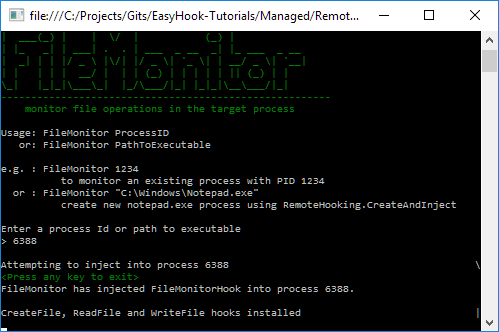
Here are some screenshots of the example output from the full solution found in the EasyHook-Tutorials GitHub repository.
下面是运行截图
CreateAndInject into a new notepad.exe process
创建并且新建一个notepad.exe的进程

Inject into an existing notepad.exe process using the process Id
注入刚才创建的notepad程序的进程id
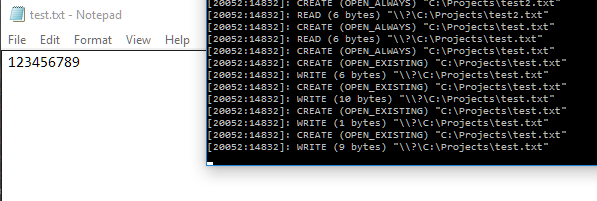
Messages being returned to the console app from the injected payload.
打印注入的内容
问题记录

FileMonitor要添加System.Runtime.Remoting引用
EasyHook Creating a remote file monitor的更多相关文章
- TFS Build Error: CSC : fatal error CS0042: Unexpected error creating debug information file 'xxxx.PDB'
CSC : fatal error CS0042: Unexpected error creating debug information file 'xxxx.PDB' -- 'c:\Builds\ ...
- oracle rman catalog--ORA-01580: error creating control backup file
在测试rman catalog时,错误的设置了snapshot路径,报错 RMAN> show snapshot controlfile name; RMAN configuration par ...
- Observer - IO (File Monitor)
1. 概述 有时被称作发布/订阅模式,观察者模式定义了一种一对多的依赖关系,让多个观察者对象同时监听某一个主题对象.这个主题对象在状态发生变化时,会通知所有观察者对象,使它们能够自动更新自己. 2. ...
- Creating a Unique File Name
If you are working with files or file attachments in PeopleCode, you will typically want to create a ...
- 远程文件同步详解(Remote File Sync)
1. 远程文件同步的常见方式: 1.cron + rsync 优点: 简单 缺点:定时执行,实时性比较差:另外,rsync同步数据时,需要扫描所有文件后进行比对,进行差量传输.如果文件数量达到了百万甚 ...
- 实战远程文件同步(Remote File Sync)
1. 远程文件同步的常见方式: 1.cron + rsync 优点: 简单 缺点:定时执行,实时性比较差:另外,rsync同步数据时,需要扫描所有文件后进行比对,进行差量传输.如果文件数量达到了百万甚 ...
- judge remote file exist
# -*- coding:utf-8 -*- import paramiko,os,sys,time print ''' *****判断远端服务器上的某个文件是否存在***** ''' ip = ra ...
- [PHP学习教程 - 文件]002.判断远程文件是否存在(Remote File Exists)
引言:项目过程当中碰到了类似流程这样的需求,对服务器上的文件进行依次操作,如:检查文件格式->检查文件是否有更新->处理更新->同步其他服务器等等 如果需求的操作是依赖于远程文件是否 ...
- Unmanaged Exports not creating a .lib file
别用VS2017!别用VS2017!别用VS2017!去吧.
随机推荐
- HBASE学习笔记(二)
一.HBASE内部原理 1.hbase系统架构 上图组件介绍; 1):Client 包含访问 hbase 的接口, client 维护着一些 cache 来加快对 hbase 的访问,比如 regio ...
- ftp建立虚拟用户实现文件上传和下载
环境 centos7 1.开启vsftpd服务 2.检查vsftpd服务是否开启 3.添加虚拟用户口令文件 vi etc/vsftpd/vuser.txt 4.生成虚拟用户口令认证文件 如果没有db_ ...
- Python操作Redis,你要的都在这了!
Redis是一个基于内存的高效的键值型非关系型数据库,存取效率极高,而且支持多种存储数据结构,使用也非常简单.本节中,我们就来介绍一下Python的Redis操作,主要介绍RedisPy这个库的用法. ...
- Windows PyCharm QtDesigner/pyuic5配置
QtDesigner 配置成功截图如下: C:\ProgramData\Anaconda3\Library\bin\designer.exe $FileDir$ pyuic5 配置成功截图如下: C: ...
- tf.get_variable函数的使用
tf.get_variable(name, shape, initializer): name就是变量的名称,shape是变量的维度,initializer是变量初始化的方式,初始化的方式有以下几种 ...
- linux shell鼠标键盘快捷键
- 拯救诺基亚X6
现象:充电不稳,冲不进去电,后来直接黑屏了. 维修方式:更换手机尾插.或者更换整个尾插小板. 手机主板应该没有问题,这是本人某友的手机,据了解磕碰进水等问题.先前先后因为此问题找手机店,维修过两次,费 ...
- mongodb数据库的改操作
原来字段: { "_id" : ObjectId("5df0a28e406405edeac5001f"), "username" : &qu ...
- python3中OpenCV imwrite保存中文路径文件
原先一段将特征值保存为图片的代码,这部分学生的电脑上运行没有生成图片 代码的基本样子是: import os import cv2 import numpy as np def text_to_pic ...
- 【leetcode】1201. Ugly Number III
题目如下: Write a program to find the n-th ugly number. Ugly numbers are positive integers which are div ...