
Linux系统重要文件(三)
一系统运行级别文件
文件路径:/etc/inittab
文件作用说明:定义系统启动后,自动开启哪些软件程序系统
runlevel 查看当前运行级别
centos6系统运行级别: 7个级别
0 -- 系统关机级别 init 0
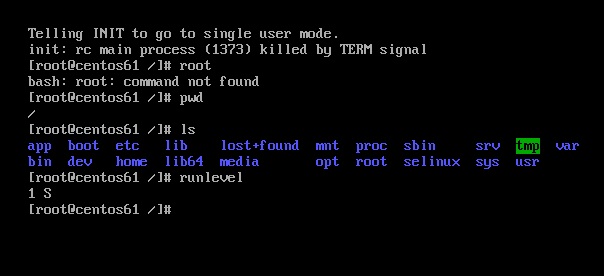
1 -- 系统单用户级别
用于破解系统密码root,救援恢复系统数据,没有网络服务
2 -- 系统多用户级别 没有网络多用户级别
3 -- 系统多用户级别 拥有网络多用户级别,生产中使用最多
4 -- 未使用级别
5 -- 系统图形化级别
6 -- 系统重启级别 init 6
(一)查看当前运行级别
[root@centos61 ~]# cat  /etc/redhat-release

CentOS release 6.8 (Final)

[root@centos61 ~]# runlevel

N
[root@centos71 ~]# cat  /etc/redhat-release

CentOS Linux release 7.6. (Core)

[root@centos71 ~]# runlevel

N
(二)centos6设置系统级别
临时设置:init 级别数字
[root@centos61 ~]# cat  /etc/inittab

# inittab is only used by upstart for the default runlevel.

#

# ADDING OTHER CONFIGURATION HERE WILL HAVE NO EFFECT ON YOUR SYSTEM.

#

# System initialization is started by /etc/init/rcS.conf

#

# Individual runlevels are started by /etc/init/rc.conf

#

# Ctrl-Alt-Delete is handled by /etc/init/control-alt-delete.conf

#

# Terminal gettys are handled by /etc/init/tty.conf and /etc/init/serial.conf,

# with configuration in /etc/sysconfig/init.

#

# For information on how to write upstart event handlers, or how

# upstart works, see init(), init(), and initctl().

#

# Default runlevel. The runlevels used are:

#    - halt (Do NOT set initdefault to this)

#    - Single user mode

#    - Multiuser, without NFS (The same as , if you do not have networking)

#    - Full multiuser mode

#    - unused

#    - X11

#    - reboot (Do NOT set initdefault to this)

#

id::initdefault:
此时断开远程连接
[root@centos61 ~]# init

[root@centos61 ~]#

Connection closed by foreign host.

Disconnected from remote host(centos61) at ::.

Type `help' to learn how to use Xshell prompt.

[c:\~]$
永久设置
对配置文件/etc/inittab修改
可以使用小工具进行修改,比如sed,awk,强化练习
[root@centos61 ~]# sed  -i   s/::/::/g  /etc/inittab

[root@centos61 ~]# tail  -   /etc/inittab

id::initdefault:
[root@centos61 ~]# runlevel

S

[root@centos61 ~]# reboot

Broadcast message from root@centos61.huawei.com

    (/dev/pts/) at : ...

The system is going down for reboot NOW!

[root@centos61 ~]#

Connection closed by foreign host.

Disconnected from remote host(centos6-) at ::.

Type `help' to learn how to use Xshell prompt.

注意还要执行init 3才可以的
[root@centos61 ~]# runlevel

S
(三)centos7设置系统级别
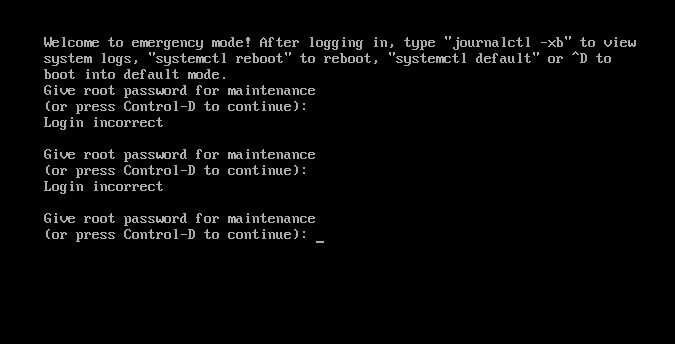
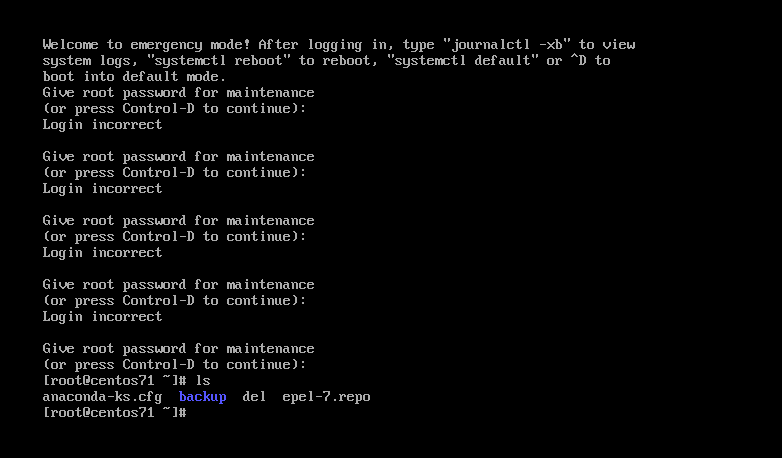
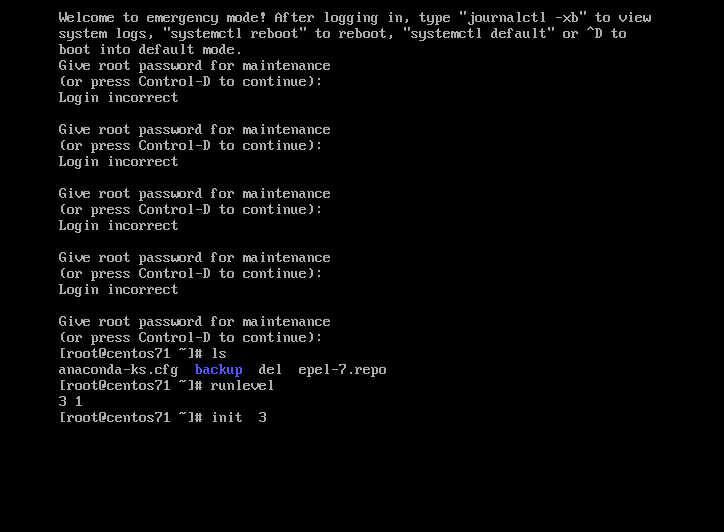
和centos6有区别,使用target模式
[root@centos7 ~]# ll  /usr/lib/systemd/system/runlevel*target

lrwxrwxrwx. 1 root root 15 Nov 26 17:33 /usr/lib/systemd/system/runlevel0.target -> poweroff.target

lrwxrwxrwx. 1 root root 13 Nov 26 17:33 /usr/lib/systemd/system/runlevel1.target -> rescue.target

lrwxrwxrwx. 1 root root 17 Nov 26 17:33 /usr/lib/systemd/system/runlevel2.target -> multi-user.target

lrwxrwxrwx. 1 root root 17 Nov 26 17:33 /usr/lib/systemd/system/runlevel3.target -> multi-user.target

lrwxrwxrwx. 1 root root 17 Nov 26 17:33 /usr/lib/systemd/system/runlevel4.target -> multi-user.target

lrwxrwxrwx. 1 root root 16 Nov 26 17:33 /usr/lib/systemd/system/runlevel5.target -> graphical.target

lrwxrwxrwx. 1 root root 13 Nov 26 17:33 /usr/lib/systemd/system/runlevel6.target -> reboot.target

[root@centos7 ~]# runlevel

N
[root@centos71 ~]# ll   /usr/lib/systemd/system/multi-user.target

-rw-r--r--.  root root  Oct    /usr/lib/systemd/system/multi-user.target

[root@centos71 ~]# ll   /usr/lib/systemd/system/rescue.target

-rw-r--r--.  root root  Oct    /usr/lib/systemd/system/rescue.target

[root@centos71 ~]# cat  /usr/lib/systemd/system/multi-user.target

#  This file is part of systemd.

#

#  systemd is free software; you can redistribute it and/or modify it

#  under the terms of the GNU Lesser General Public License as published by

#  the Free Software Foundation; either version 2.1 of the License, or

#  (at your option) any later version.

[Unit]

Description=Multi-User System

Documentation=man:systemd.special()

Requires=basic.target

Conflicts=rescue.service rescue.target

After=basic.target rescue.service rescue.target

AllowIsolate=yes


[root@centos71 ~]# cat  /usr/lib/systemd/system/rescue.target

#  This file is part of systemd.

#

#  systemd is free software; you can redistribute it and/or modify it

#  under the terms of the GNU Lesser General Public License as published by

#  the Free Software Foundation; either version 2.1 of the License, or

#  (at your option) any later version.

[Unit]

Description=Rescue Mode

Documentation=man:systemd.special()

Requires=sysinit.target rescue.service

After=sysinit.target rescue.service

AllowIsolate=yes

[Install]

Alias=kbrequest.target
临时设置: init 级别数字
永久设置
[root@centos71 ~]# cat  /etc/inittab

# inittab is no longer used when using systemd.

#

# ADDING CONFIGURATION HERE WILL HAVE NO EFFECT ON YOUR SYSTEM.

#

# Ctrl-Alt-Delete is handled by /usr/lib/systemd/system/ctrl-alt-del.target

#

# systemd uses 'targets' instead of runlevels. By default, there are two main targets:

#

# multi-user.target: analogous to runlevel

# graphical.target: analogous to runlevel

#

# To view current default target, run:

# systemctl get-default

#

# To set a default target, run:

# systemctl set-default TARGET.target
二系统登录前后提示文件
(一)登录系统前显示提示信息
[root@centos71 ~]# ll  /etc/issue*

-rw-r--r--.  root root  Nov    /etc/issue

-rw-r--r--.  root root  Nov    /etc/issue.net

[root@centos71 ~]# cat  /etc/issue*

\S

Kernel \r on an \m

\S

Kernel \r on an \m

[root@centos71 ~]# cat  /etc/issue

\S

Kernel \r on an \m

[root@centos71 ~]# cat  /etc/issue.net

\S

Kernel \r on an \m

[root@centos71 ~]#
[root@centos71 ~]# diff   /etc/issue*

3d2

<

[root@centos71 ~]# wc   /etc/issue.net

     /etc/issue.net

[root@centos71 ~]# wc   /etc/issue

     /etc/issue
(二)登录系统后显示提示信息
[root@centos61 ~]# ll  /etc/motd

-rw-r--r--.  root root  Jan    /etc/motd
[root@centos71 ~]# cat  /etc/motd

                              (@@) (  ) (@)  ( )  @@    ()    @     O     @     O      @

                                 (   )

                             (@@@@)

                          (    )

                        (@@@)

                    ====        ________                ___________

                _D _|  |_______/        \__I_I_____===__|_________|

                 |(_)---  |   H\________/ |   |        =|___ ___|      _________________

                 /     |  |   H  |  |     |   |         ||_| |_||     _|                \_____A

                |      |  |   H  |__--------------------| [___] |   =|                        |

                | ________|___H__/__|_____/[][]~\_______|       |   -|                        |

                |/ |   |-----------I_____I [][] []  D   |=======|____|________________________|_

              __/ =| o |=-~~\  /~~\  /~~\  /~~\ ____Y___________|__|__________________________|_

               |/-=|___|=O=====O=====O=====O   |_____/~\___/          |_D__D__D_|  |_D__D__D_|

                \_/      \__/  \__/  \__/  \__/      \_/               \_/   \_/    \_/   \_/
[root@centos71 ~]# ll  /etc/motd

-rw-r--r--.  root root  Dec   : /etc/motd
三系统主机名配置文件
文件作用说明:修改主机名称
主机名称: 区域-机房-机柜号码-机器编号 BJ - pbs-010203 - 01
(一)centos6/7系统主机名称临时修改
hostname
[root@centos61 ~]# hostname

centos61.huawei.com

[root@centos61 ~]# hostname  centos6.com

[root@centos61 ~]# exit

logout

Connection closed by foreign host.

Disconnected from remote host(centos6-) at ::.

Type `help' to learn how to use Xshell prompt.

[c:\~]$

Connecting to 10.0.0.61:...

Connection established.

To escape to local shell, press Ctrl+Alt+].

Last login: Thu Dec   ::  from 10.0.0.1

[root@centos6 ~]# hostname

centos6.com
文件内容没有变化
[root@centos6 ~]# cat /etc/sysconfig/network

NETWORKING=yes

HOSTNAME=centos61.huawei.com
[root@centos7 ~]# hostname   centos7.jd.com

[root@centos7 ~]# exit

logout

Connection closed by foreign host.

Disconnected from remote host(centos7-1) at 09:58:58.

Type `help' to learn how to use Xshell prompt.

[c:\~]$ ssh  10.0.0.72

Connecting to 10.0.0.200:22...

Connection established.

To escape to local shell, press Ctrl+Alt+].

WARNING! The remote SSH server rejected X11 forwarding request.

Last login: Wed Dec  4 08:27:57 2019 from 10.0.0.1

[root@centos7 ~]# hostname

centos7.jd.com

[root@centos7 ~]# cat  /etc/hostname

centos7.com
(二)centos6系统主机名称永久修改
注意修改之后要重启,注销没用
[root@centos6 ~]# hostname

centos6.com

[root@centos6 ~]# cat /etc/sysconfig/network

NETWORKING=yes

HOSTNAME=centos61.com

[root@centos6 ~]# exit

logout

Connection closed by foreign host.

Disconnected from remote host(centos6-) at ::.

Type `help' to learn how to use Xshell prompt.

[c:\~]$

Connecting to 10.0.0.61:...

Connection established.

To escape to local shell, press Ctrl+Alt+].

Last login: Thu Dec   ::  from 10.0.0.1

[root@centos6 ~]# hostname

centos6.com
重启之后变成了centos61
[root@centos6 ~]# hostname

centos6.com

[root@centos6 ~]# reboot

Broadcast message from root@centos6.com

    (/dev/pts/) at : ...

The system is going down for reboot NOW!

[root@centos6 ~]#

Connection closed by foreign host.

Disconnected from remote host(centos6-) at ::.

Type `help' to learn how to use Xshell prompt.

[c:\~]$

Connecting to 10.0.0.61:...

Connection established.

To escape to local shell, press Ctrl+Alt+].

Last login: Thu Dec   ::  from 10.0.0.1

[root@centos61 ~]# hostname

centos61.com

[root@centos61 ~]# cat /etc/sysconfig/network

NETWORKING=yes

HOSTNAME=centos61.com
(三)centos7系统主机名称永久修改
要修改两处
[root@centos71 ~]# cat     /etc/hostname

centos71.com

[root@centos71 ~]# sed -i  s@@@g   /etc/hostname

[root@centos71 ~]# cat     /etc/hostname

centos7.com

[root@centos71 ~]# hostnamectl    set-hostname  centos7.com
[c:\~]$

Connecting to 10.0.0.200:...

Connection established.

To escape to local shell, press Ctrl+Alt+].

WARNING! The remote SSH server rejected X11 forwarding request.

Last login: Thu Dec   ::  from 10.0.0.1

[root@centos7 ~]# host

-bash: host: command not found

[root@centos7 ~]# hostname

centos7.com
Linux系统重要文件(三)的更多相关文章
- Linux系统中文件定位与查找
Linux系统中文件查找 关键词 文件查找 | find | locate 本文主要介绍有关文件查找的两个命令——find和locate,以及压缩打包的命令——compress, gzip,bzip2 ...
- Linux系统初学-第三课 Linux网络配置1
Linux系统初学-第三课 Linux网络配置 1.动态IP配置 配置文件路径 /etc/sysconfig/network-scripts/ ls查看网卡eth0,其中HWADDR值得获取:ifco ...
- Linux系统重要文件(二)
Linux系统重要文件概述 一系统自动挂载文件 文件路径信息:/etc/fstab文件作用说明:实现存储设备自动挂载 [root@centos7 ~]# cat /etc/fstab # # /etc ...
- Linux系统重要文件
Linux系统重要文件介绍与配置 一网卡配置文件 (一)网卡配置文件参数介绍 文件路径信息:/ec/sysconfig/network-scripts/ifcfg-eth0 文件作用说明:配置网卡地址 ...
- 实验二:Linux系统简单文件操作命令
項目 内容 这个作业属于哪个课程() 课程链接 这个作业的要求在哪里 实验要求 学号-姓名 17043133-木腾飞 作业学习目标 学习在Linux系统终端下进行命令行操作: 学习掌握常用命令行操作并 ...
- Linux系统下文件压缩与打包命令
Linux系统下文件压缩与打包命令 常用的压缩文件拓展名 * .Z * .zip * .gz * .bz2 * .xz * .tar * .tar.gz * .tar.bz2 * .tar.xz 压缩 ...
- Linux系统编程--文件IO操作
Linux思想即,Linux系统下一切皆文件. 一.对文件操作的几个函数 1.打开文件open函数 int open(const char *path, int oflags); int open(c ...
- 树莓派与Linux系统之间文件传输
最近因为要学习Python,于是把放在家里接了一年灰的树莓派又给搜出来了,刚买那会也捣鼓了好一阵子, 基本操作都学会了,但现在又忘光了,只能又从头开始搞了,首先第一个要解决的是怎么把文件从电脑传输到树 ...
- Linux学习笔记之二————Linux系统的文件和目录
一.Windows和Linux文件系统区别 1.在 windows 平台下,打开“计算机”,我们看到的是一个个的驱动器盘符: 每个驱动器都有自己的根目录结构,这样形成了多个树并列的情形,如图所示: ...
- linux系统——hosts文件修改
1. 关于/etc/host,主机名和IP配置文件 Hosts - The static table lookup for host name(主机名查询静态表) Linux 的/etc/hosts是 ...
随机推荐
- LintCode之最长单词
题目描述: 分析:先建一个数组s用来存储每个字符串的长度,然后遍历数组s得到最大的数max,这个数就是词典中的最长单词的长度,由于可能有多个长度相等的单词,所以要循环整个词典,当一个单词的长度等于ma ...
- CodeForces - 587E[线段树+线性基+差分] ->(线段树维护区间合并线性基)
题意:给你一个数组,有两种操作,一种区间xor一个值,一个是查询区间xor的结果的种类数 做法一:对于一个给定的区间,我们可以通过求解线性基的方式求出结果的种类数,而现在只不过将其放在线树上维护区间线 ...
- ZOJ 3822 ( 2014牡丹江区域赛D题) (概率dp)
http://acm.zju.edu.cn/onlinejudge/showProblem.do?problemId=5376 题意:每天往n*m的棋盘上放一颗棋子,求多少天能将棋盘的每行每列都至少有 ...
- MYSQL之union和order by分析([Err] 1221 - Incorrect usage of UNION and ORDER BY)
我在一个业务中采用了按月的分表策略,当查询的条件跨月的时候,使用了union all汇总2个表的数据,并按插入时间倒序排列.查询并不复杂,但是当执行的时候却报错了. SELECT * FROM `ta ...
- Spring Boot学习第一部分(Spring 4.x)第一章(Spring 基础)
1.spring概述 1.1.spring的简史 第一阶段:XML配置spring 1.x时代, 第二阶段:注解配置spring 2.x时代, @Controller @Service @Compon ...
- 20150803--JS学习笔记(1)
JS中对象的 prototype 的含义: javascript中的每个对象都有prototype属性,Javascript中对象的prototype属性的解释是:返回对象类型原型的引用. A.pro ...
- org.dom4j 解析XML
org.dom4j 解析xml java 代码 1 import java.io.File; import java.io.FileOutputStream; import java.io.FileW ...
- Altium Designer chapter2总结
原理图开发环境这节中需要注意的如下: (1)电路图首先项设定中需注意的地方: 1.General:中经常用到的自动生成交叉节点.放置元件时自动增加选项.复合封装元件的字母数字后缀选项.默认电源对象名称 ...
- Gradient Vanishing Problem in Deep Learning
在所有依靠Gradient Descent和Backpropagation算法来学习的Neural Network中,普遍都会存在Gradient Vanishing Problem.Backprop ...
- 排序算法一:插入排序(Insertion sort)
最近从网易公开课在看麻省理工学院的公开课<算法导论>,感觉还不错,接下来几篇文章所示学习日记了,不准备对算法细节做过多描述,感兴趣的可以自己去看. 文章分几篇讲经典排序算法,直接上代码,根 ...