
Linux系统重要文件(三)
一系统运行级别文件
文件路径:/etc/inittab
文件作用说明:定义系统启动后,自动开启哪些软件程序系统
runlevel 查看当前运行级别
centos6系统运行级别: 7个级别
0 -- 系统关机级别 init 0
1 -- 系统单用户级别
用于破解系统密码root,救援恢复系统数据,没有网络服务
2 -- 系统多用户级别 没有网络多用户级别
3 -- 系统多用户级别 拥有网络多用户级别,生产中使用最多
4 -- 未使用级别
5 -- 系统图形化级别
6 -- 系统重启级别 init 6
(一)查看当前运行级别
[root@centos61 ~]# cat  /etc/redhat-release

CentOS release 6.8 (Final)

[root@centos61 ~]# runlevel

N
[root@centos71 ~]# cat  /etc/redhat-release

CentOS Linux release 7.6. (Core)

[root@centos71 ~]# runlevel

N
(二)centos6设置系统级别
临时设置:init 级别数字
[root@centos61 ~]# cat  /etc/inittab

# inittab is only used by upstart for the default runlevel.

#

# ADDING OTHER CONFIGURATION HERE WILL HAVE NO EFFECT ON YOUR SYSTEM.

#

# System initialization is started by /etc/init/rcS.conf

#

# Individual runlevels are started by /etc/init/rc.conf

#

# Ctrl-Alt-Delete is handled by /etc/init/control-alt-delete.conf

#

# Terminal gettys are handled by /etc/init/tty.conf and /etc/init/serial.conf,

# with configuration in /etc/sysconfig/init.

#

# For information on how to write upstart event handlers, or how

# upstart works, see init(), init(), and initctl().

#

# Default runlevel. The runlevels used are:

#    - halt (Do NOT set initdefault to this)

#    - Single user mode

#    - Multiuser, without NFS (The same as , if you do not have networking)

#    - Full multiuser mode

#    - unused

#    - X11

#    - reboot (Do NOT set initdefault to this)

#

id::initdefault:
此时断开远程连接
[root@centos61 ~]# init

[root@centos61 ~]#

Connection closed by foreign host.

Disconnected from remote host(centos61) at ::.

Type `help' to learn how to use Xshell prompt.

[c:\~]$
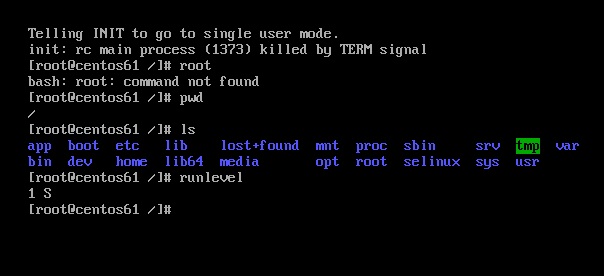
永久设置
对配置文件/etc/inittab修改
可以使用小工具进行修改,比如sed,awk,强化练习
[root@centos61 ~]# sed  -i   s/::/::/g  /etc/inittab

[root@centos61 ~]# tail  -   /etc/inittab

id::initdefault:
[root@centos61 ~]# runlevel

S

[root@centos61 ~]# reboot

Broadcast message from root@centos61.huawei.com

    (/dev/pts/) at : ...

The system is going down for reboot NOW!

[root@centos61 ~]#

Connection closed by foreign host.

Disconnected from remote host(centos6-) at ::.

Type `help' to learn how to use Xshell prompt.

注意还要执行init 3才可以的
[root@centos61 ~]# runlevel

S
(三)centos7设置系统级别
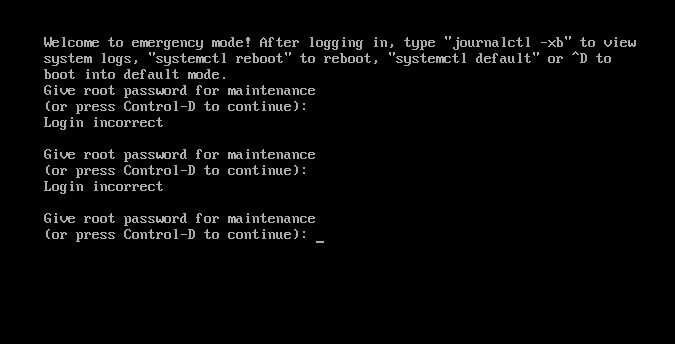
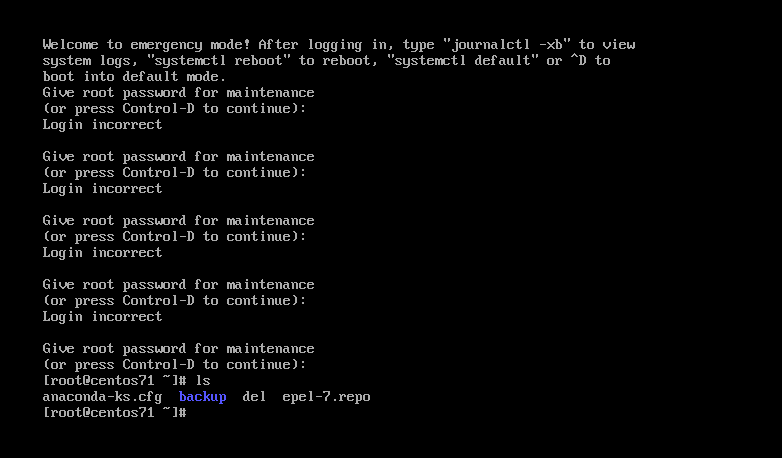
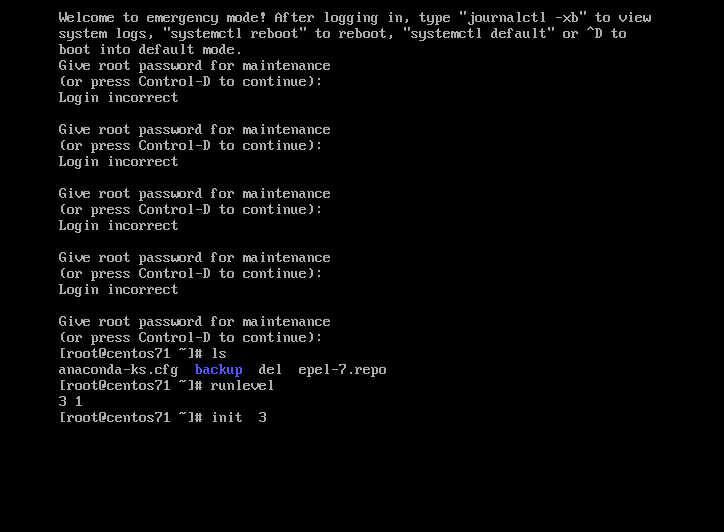
和centos6有区别,使用target模式
[root@centos7 ~]# ll  /usr/lib/systemd/system/runlevel*target

lrwxrwxrwx. 1 root root 15 Nov 26 17:33 /usr/lib/systemd/system/runlevel0.target -> poweroff.target

lrwxrwxrwx. 1 root root 13 Nov 26 17:33 /usr/lib/systemd/system/runlevel1.target -> rescue.target

lrwxrwxrwx. 1 root root 17 Nov 26 17:33 /usr/lib/systemd/system/runlevel2.target -> multi-user.target

lrwxrwxrwx. 1 root root 17 Nov 26 17:33 /usr/lib/systemd/system/runlevel3.target -> multi-user.target

lrwxrwxrwx. 1 root root 17 Nov 26 17:33 /usr/lib/systemd/system/runlevel4.target -> multi-user.target

lrwxrwxrwx. 1 root root 16 Nov 26 17:33 /usr/lib/systemd/system/runlevel5.target -> graphical.target

lrwxrwxrwx. 1 root root 13 Nov 26 17:33 /usr/lib/systemd/system/runlevel6.target -> reboot.target

[root@centos7 ~]# runlevel

N
[root@centos71 ~]# ll   /usr/lib/systemd/system/multi-user.target

-rw-r--r--.  root root  Oct    /usr/lib/systemd/system/multi-user.target

[root@centos71 ~]# ll   /usr/lib/systemd/system/rescue.target

-rw-r--r--.  root root  Oct    /usr/lib/systemd/system/rescue.target

[root@centos71 ~]# cat  /usr/lib/systemd/system/multi-user.target

#  This file is part of systemd.

#

#  systemd is free software; you can redistribute it and/or modify it

#  under the terms of the GNU Lesser General Public License as published by

#  the Free Software Foundation; either version 2.1 of the License, or

#  (at your option) any later version.

[Unit]

Description=Multi-User System

Documentation=man:systemd.special()

Requires=basic.target

Conflicts=rescue.service rescue.target

After=basic.target rescue.service rescue.target

AllowIsolate=yes


[root@centos71 ~]# cat  /usr/lib/systemd/system/rescue.target

#  This file is part of systemd.

#

#  systemd is free software; you can redistribute it and/or modify it

#  under the terms of the GNU Lesser General Public License as published by

#  the Free Software Foundation; either version 2.1 of the License, or

#  (at your option) any later version.

[Unit]

Description=Rescue Mode

Documentation=man:systemd.special()

Requires=sysinit.target rescue.service

After=sysinit.target rescue.service

AllowIsolate=yes

[Install]

Alias=kbrequest.target
临时设置: init 级别数字
永久设置
[root@centos71 ~]# cat  /etc/inittab

# inittab is no longer used when using systemd.

#

# ADDING CONFIGURATION HERE WILL HAVE NO EFFECT ON YOUR SYSTEM.

#

# Ctrl-Alt-Delete is handled by /usr/lib/systemd/system/ctrl-alt-del.target

#

# systemd uses 'targets' instead of runlevels. By default, there are two main targets:

#

# multi-user.target: analogous to runlevel

# graphical.target: analogous to runlevel

#

# To view current default target, run:

# systemctl get-default

#

# To set a default target, run:

# systemctl set-default TARGET.target
二系统登录前后提示文件
(一)登录系统前显示提示信息
[root@centos71 ~]# ll  /etc/issue*

-rw-r--r--.  root root  Nov    /etc/issue

-rw-r--r--.  root root  Nov    /etc/issue.net

[root@centos71 ~]# cat  /etc/issue*

\S

Kernel \r on an \m

\S

Kernel \r on an \m

[root@centos71 ~]# cat  /etc/issue

\S

Kernel \r on an \m

[root@centos71 ~]# cat  /etc/issue.net

\S

Kernel \r on an \m

[root@centos71 ~]#
[root@centos71 ~]# diff   /etc/issue*

3d2

<

[root@centos71 ~]# wc   /etc/issue.net

     /etc/issue.net

[root@centos71 ~]# wc   /etc/issue

     /etc/issue
(二)登录系统后显示提示信息
[root@centos61 ~]# ll  /etc/motd

-rw-r--r--.  root root  Jan    /etc/motd
[root@centos71 ~]# cat  /etc/motd

                              (@@) (  ) (@)  ( )  @@    ()    @     O     @     O      @

                                 (   )

                             (@@@@)

                          (    )

                        (@@@)

                    ====        ________                ___________

                _D _|  |_______/        \__I_I_____===__|_________|

                 |(_)---  |   H\________/ |   |        =|___ ___|      _________________

                 /     |  |   H  |  |     |   |         ||_| |_||     _|                \_____A

                |      |  |   H  |__--------------------| [___] |   =|                        |

                | ________|___H__/__|_____/[][]~\_______|       |   -|                        |

                |/ |   |-----------I_____I [][] []  D   |=======|____|________________________|_

              __/ =| o |=-~~\  /~~\  /~~\  /~~\ ____Y___________|__|__________________________|_

               |/-=|___|=O=====O=====O=====O   |_____/~\___/          |_D__D__D_|  |_D__D__D_|

                \_/      \__/  \__/  \__/  \__/      \_/               \_/   \_/    \_/   \_/
[root@centos71 ~]# ll  /etc/motd

-rw-r--r--.  root root  Dec   : /etc/motd
三系统主机名配置文件
文件作用说明:修改主机名称
主机名称: 区域-机房-机柜号码-机器编号 BJ - pbs-010203 - 01
(一)centos6/7系统主机名称临时修改
hostname
[root@centos61 ~]# hostname

centos61.huawei.com

[root@centos61 ~]# hostname  centos6.com

[root@centos61 ~]# exit

logout

Connection closed by foreign host.

Disconnected from remote host(centos6-) at ::.

Type `help' to learn how to use Xshell prompt.

[c:\~]$

Connecting to 10.0.0.61:...

Connection established.

To escape to local shell, press Ctrl+Alt+].

Last login: Thu Dec   ::  from 10.0.0.1

[root@centos6 ~]# hostname

centos6.com
文件内容没有变化
[root@centos6 ~]# cat /etc/sysconfig/network

NETWORKING=yes

HOSTNAME=centos61.huawei.com
[root@centos7 ~]# hostname   centos7.jd.com

[root@centos7 ~]# exit

logout

Connection closed by foreign host.

Disconnected from remote host(centos7-1) at 09:58:58.

Type `help' to learn how to use Xshell prompt.

[c:\~]$ ssh  10.0.0.72

Connecting to 10.0.0.200:22...

Connection established.

To escape to local shell, press Ctrl+Alt+].

WARNING! The remote SSH server rejected X11 forwarding request.

Last login: Wed Dec  4 08:27:57 2019 from 10.0.0.1

[root@centos7 ~]# hostname

centos7.jd.com

[root@centos7 ~]# cat  /etc/hostname

centos7.com
(二)centos6系统主机名称永久修改
注意修改之后要重启,注销没用
[root@centos6 ~]# hostname

centos6.com

[root@centos6 ~]# cat /etc/sysconfig/network

NETWORKING=yes

HOSTNAME=centos61.com

[root@centos6 ~]# exit

logout

Connection closed by foreign host.

Disconnected from remote host(centos6-) at ::.

Type `help' to learn how to use Xshell prompt.

[c:\~]$

Connecting to 10.0.0.61:...

Connection established.

To escape to local shell, press Ctrl+Alt+].

Last login: Thu Dec   ::  from 10.0.0.1

[root@centos6 ~]# hostname

centos6.com
重启之后变成了centos61
[root@centos6 ~]# hostname

centos6.com

[root@centos6 ~]# reboot

Broadcast message from root@centos6.com

    (/dev/pts/) at : ...

The system is going down for reboot NOW!

[root@centos6 ~]#

Connection closed by foreign host.

Disconnected from remote host(centos6-) at ::.

Type `help' to learn how to use Xshell prompt.

[c:\~]$

Connecting to 10.0.0.61:...

Connection established.

To escape to local shell, press Ctrl+Alt+].

Last login: Thu Dec   ::  from 10.0.0.1

[root@centos61 ~]# hostname

centos61.com

[root@centos61 ~]# cat /etc/sysconfig/network

NETWORKING=yes

HOSTNAME=centos61.com
(三)centos7系统主机名称永久修改
要修改两处
[root@centos71 ~]# cat     /etc/hostname

centos71.com

[root@centos71 ~]# sed -i  s@@@g   /etc/hostname

[root@centos71 ~]# cat     /etc/hostname

centos7.com

[root@centos71 ~]# hostnamectl    set-hostname  centos7.com
[c:\~]$

Connecting to 10.0.0.200:...

Connection established.

To escape to local shell, press Ctrl+Alt+].

WARNING! The remote SSH server rejected X11 forwarding request.

Last login: Thu Dec   ::  from 10.0.0.1

[root@centos7 ~]# host

-bash: host: command not found

[root@centos7 ~]# hostname

centos7.com
Linux系统重要文件(三)的更多相关文章
- Linux系统中文件定位与查找
Linux系统中文件查找 关键词 文件查找 | find | locate 本文主要介绍有关文件查找的两个命令——find和locate,以及压缩打包的命令——compress, gzip,bzip2 ...
- Linux系统初学-第三课 Linux网络配置1
Linux系统初学-第三课 Linux网络配置 1.动态IP配置 配置文件路径 /etc/sysconfig/network-scripts/ ls查看网卡eth0,其中HWADDR值得获取:ifco ...
- Linux系统重要文件(二)
Linux系统重要文件概述 一系统自动挂载文件 文件路径信息:/etc/fstab文件作用说明:实现存储设备自动挂载 [root@centos7 ~]# cat /etc/fstab # # /etc ...
- Linux系统重要文件
Linux系统重要文件介绍与配置 一网卡配置文件 (一)网卡配置文件参数介绍 文件路径信息:/ec/sysconfig/network-scripts/ifcfg-eth0 文件作用说明:配置网卡地址 ...
- 实验二:Linux系统简单文件操作命令
項目 内容 这个作业属于哪个课程() 课程链接 这个作业的要求在哪里 实验要求 学号-姓名 17043133-木腾飞 作业学习目标 学习在Linux系统终端下进行命令行操作: 学习掌握常用命令行操作并 ...
- Linux系统下文件压缩与打包命令
Linux系统下文件压缩与打包命令 常用的压缩文件拓展名 * .Z * .zip * .gz * .bz2 * .xz * .tar * .tar.gz * .tar.bz2 * .tar.xz 压缩 ...
- Linux系统编程--文件IO操作
Linux思想即,Linux系统下一切皆文件. 一.对文件操作的几个函数 1.打开文件open函数 int open(const char *path, int oflags); int open(c ...
- 树莓派与Linux系统之间文件传输
最近因为要学习Python,于是把放在家里接了一年灰的树莓派又给搜出来了,刚买那会也捣鼓了好一阵子, 基本操作都学会了,但现在又忘光了,只能又从头开始搞了,首先第一个要解决的是怎么把文件从电脑传输到树 ...
- Linux学习笔记之二————Linux系统的文件和目录
一.Windows和Linux文件系统区别 1.在 windows 平台下,打开“计算机”,我们看到的是一个个的驱动器盘符: 每个驱动器都有自己的根目录结构,这样形成了多个树并列的情形,如图所示: ...
- linux系统——hosts文件修改
1. 关于/etc/host,主机名和IP配置文件 Hosts - The static table lookup for host name(主机名查询静态表) Linux 的/etc/hosts是 ...
随机推荐
- How to pass values across the pages in ASP.net without using Session
https://stackoverflow.com/questions/14956027/how-to-pass-values-across-the-pages-in-asp-net-without- ...
- Only variables should be passed by reference
报错位置代码: $status->type = array_pop(explode('\\',$status->type)) (此处$status->type值原本是 APP\ ...
- loj#2333 「JOI 2017 Final」准高速电车
分析 我们发现到达一个点一定是先快车再准快车再慢车 于是快车将1-n分为多个区间 每次取出每个区间当前能到达的点的数量 选剩余时间贡献最大的的一个取得贡献并且再能到达的最远点建立准快车 代码 #inc ...
- spring-cloud zuul网关
API Gateway 是随着微服务(Microservice)这个概念一起兴起的一种架构模式,它用于解决微服务过于分散,没有一个统一的出入口进行流量管理的问题. 使用 Zuul 实现 API Gat ...
- Java Xms Xmx
堆设置 -Xms 是指程序启动时初始内存大小(此值可以设置成与-Xmx相同,以避免每次GC完成后 JVM 内存重新分配). -Xmx 指程序运行时最大可用内存大小,程序运行中内存大于这个值会 OutO ...
- Python基础学习:operator模块
operator——函数的标准操作 转自:https://blog.csdn.net/zhtysw/article/details/80510113 代码资源:Lib/operator.py oper ...
- Python web自动化测试框架搭建(功能&接口)——unittest介绍
Python UnitTest测试框架介绍 1) TestCase:所有测试用例类继承的基本类, TestCase的实例就是测试用例 2) TestSuite:测试套件 ...
- POJ - 3176 Cow Bowling 动态规划
动态规划:多阶段决策问题,每步求解的问题是后面阶段问题求解的子问题,每步决策将依赖于以前步骤的决策结果.(可以用于组合优化问题) 优化原则:一个最优决策序列的任何子序列本身一定是相当于子序列初始和结束 ...
- 校内模拟赛 : Rima —— 字典树+树形DP
首先说一下,对一个刚学Trie树的蒟蒻来说(就是我),这道题是一道好题.Trie树比较简单,所以就不详细写了. Rima 内存限制:256 MiB 时间限制:1000 ms 标准输入输出 题目类型:传 ...
- python函数与方法的区别
一.函数和方法的区别 1.函数要手动传self,方法不用传 2.如果是一个函数,用类名去调用,如果是一个额方法,用对象去调用 举例说明: class Foo(object): def __init__ ...