
framwork maven的配置及使用
maven的配置及使用
一.什么是maven:
参考百度百科:
http://baike.baidu.com/link?url=Kdew1Be1-rDr08gp2ulNCae2aTB1L1HGP5GLJ4vGR6s4POL3YvAtI4Wz870Wc_l79tkxZc5kcwXG9kPQyq3-__
二.创建maven项目:
1.创建Maven Project:
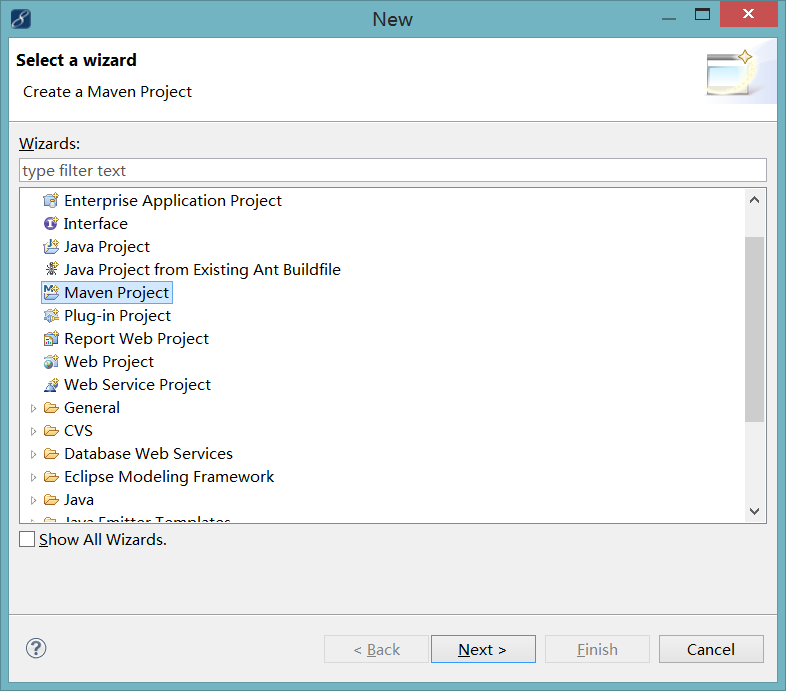
2.勾选Create a simple project:

3.maven setting:
groupId: 相当于这个project的所有者或者机构的一个标识,一般是com.company.xxx这种格式
artifactId: 这个project最后所生成的文档(jar、war)的名字,比如对于junit这个开源的project,它的artifactId就是junit
packaging: 这个project的打包的类型,一般是war、jar等值
version: project的版本
name: project的名字,生成文档等内容的时候会用的这个名字

4.创建后maven项目的目录结构:

三.配置maven:
创建完项目后自动会创建pom.xml文件
<project xmlns="http://maven.apache.org/POM/4.0.0" xmlns:xsi="http://www.w3.org/2001/XMLSchema-instance" xsi:schemaLocation="http://maven.apache.org/POM/4.0.0 http://maven.apache.org/xsd/maven-4.0.0.xsd">

  <modelVersion>4.0.0</modelVersion>

  <groupId>com.zlp</groupId>

  <artifactId>mavenTest</artifactId>

  <version>0.0.1-SNAPSHOT</version>

  <packaging>war</packaging>

  <name>mavenTest</name>

  <description>test</description>

  <build>

    <plugins>

      <plugin>

        <artifactId>maven-compiler-plugin</artifactId>

        <configuration>

          <source>1.6</source>

          <target>1.6</target>

        </configuration>

      </plugin>

    </plugins>

  </build>

</project>
maven配置就是修改pom.xml文件,在<dependencies>放如下代码</dependencies>增加如下配置:
<dependency>
<groupId>org.springframework</groupId>
<artifactId>spring-test</artifactId>
<version>3.0.0.RELEASE</version>
<type>jar</type>
<scope>compile</scope>
</dependency>
注意:如果不存在<dependencies>自己写个,位置在</project>上面就行!
这只是一个,可以放多个。spring、spring mvc 、junit等等。会自动下载所需要的包及相关文件,在本机的这个位置:user下面的用户下面的.m2文件夹下的repository。不知道user在哪里,你也可以直接搜这个文件夹。下载有时会失败,那么只能用笨方法,从别人哪里拷贝,放到下载所在的文件夹中。
配置完后如下:
pom.xml
 <?xml version="1.0"?>

 <project xsi:schemaLocation="http://maven.apache.org/POM/4.0.0 http://maven.apache.org/xsd/maven-4.0.0.xsd" xmlns="http://maven.apache.org/POM/4.0.0"

     xmlns:xsi="http://www.w3.org/2001/XMLSchema-instance">

   <modelVersion>4.0.0</modelVersion>

   <groupId>com.zlp</groupId>

   <artifactId>mavenTest</artifactId>

   <version>0.0.1-SNAPSHOT</version>

   <packaging>war</packaging>

   <name>mavenTest</name>

   <dependencies>

     <dependency>

       <groupId>org.springframework</groupId>

       <artifactId>spring-test</artifactId>

       <version>3.0.0.RELEASE</version>

       <scope>compile</scope>

     </dependency>

   </dependencies>

   <repositories>

     <repository>

       <snapshots>

         <enabled>false</enabled>

       </snapshots>

       <id>central</id>

       <name>Maven Repository Switchboard</name>

       <url>http://repo1.maven.org/maven2</url>

     </repository>

   </repositories>

   <pluginRepositories>

     <pluginRepository>

       <releases>

         <updatePolicy>never</updatePolicy>

       </releases>

       <snapshots>

         <enabled>false</enabled>

       </snapshots>

       <id>central</id>

       <name>Maven Plugin Repository</name>

       <url>http://repo1.maven.org/maven2</url>

     </pluginRepository>

   </pluginRepositories>

   <build>

     <sourceDirectory>C:\work\mavenTest\src\main\java</sourceDirectory>

     <scriptSourceDirectory>C:\work\mavenTest\src\main\scripts</scriptSourceDirectory>

     <testSourceDirectory>C:\work\mavenTest\src\test\java</testSourceDirectory>

     <outputDirectory>C:\work\mavenTest\target\classes</outputDirectory>

     <testOutputDirectory>C:\work\mavenTest\target\test-classes</testOutputDirectory>

     <resources>

       <resource>

         <directory>C:\work\mavenTest\src\main\resources</directory>

       </resource>

     </resources>

     <testResources>

       <testResource>

         <directory>C:\work\mavenTest\src\test\resources</directory>

       </testResource>

     </testResources>

     <directory>C:\work\mavenTest\target</directory>

     <finalName>mavenTest-0.0.1-SNAPSHOT</finalName>

     <pluginManagement>

       <plugins>

         <plugin>

           <artifactId>maven-antrun-plugin</artifactId>

           <version>1.3</version>

         </plugin>

         <plugin>

           <artifactId>maven-assembly-plugin</artifactId>

           <version>2.2-beta-5</version>

         </plugin>

         <plugin>

           <artifactId>maven-dependency-plugin</artifactId>

           <version>2.1</version>

         </plugin>

         <plugin>

           <artifactId>maven-release-plugin</artifactId>

           <version>2.0</version>

         </plugin>

       </plugins>

     </pluginManagement>

     <plugins>

       <plugin>

         <artifactId>maven-compiler-plugin</artifactId>

         <version>2.3.2</version>

         <executions>

           <execution>

             <id>default-testCompile</id>

             <phase>test-compile</phase>

             <goals>

               <goal>testCompile</goal>

             </goals>

             <configuration>

               <source>1.6</source>

               <target>1.6</target>

             </configuration>

           </execution>

           <execution>

             <id>default-compile</id>

             <phase>compile</phase>

             <goals>

               <goal>compile</goal>

             </goals>

             <configuration>

               <source>1.6</source>

               <target>1.6</target>

             </configuration>

           </execution>

         </executions>

         <configuration>

           <source>1.6</source>

           <target>1.6</target>

         </configuration>

       </plugin>

       <plugin>

         <artifactId>maven-clean-plugin</artifactId>

         <version>2.4.1</version>

         <executions>

           <execution>

             <id>default-clean</id>

             <phase>clean</phase>

             <goals>

               <goal>clean</goal>

             </goals>

           </execution>

         </executions>

       </plugin>

       <plugin>

         <artifactId>maven-install-plugin</artifactId>

         <version>2.3.1</version>

         <executions>

           <execution>

             <id>default-install</id>

             <phase>install</phase>

             <goals>

               <goal>install</goal>

             </goals>

           </execution>

         </executions>

       </plugin>

       <plugin>

         <artifactId>maven-resources-plugin</artifactId>

         <version>2.4.3</version>

         <executions>

           <execution>

             <id>default-resources</id>

             <phase>process-resources</phase>

             <goals>

               <goal>resources</goal>

             </goals>

           </execution>

           <execution>

             <id>default-testResources</id>

             <phase>process-test-resources</phase>

             <goals>

               <goal>testResources</goal>

             </goals>

           </execution>

         </executions>

       </plugin>

       <plugin>

         <artifactId>maven-surefire-plugin</artifactId>

         <version>2.7.1</version>

         <executions>

           <execution>

             <id>default-test</id>

             <phase>test</phase>

             <goals>

               <goal>test</goal>

             </goals>

           </execution>

         </executions>

       </plugin>

       <plugin>

         <artifactId>maven-war-plugin</artifactId>

         <version>2.1.1</version>

         <executions>

           <execution>

             <id>default-war</id>

             <phase>package</phase>

             <goals>

               <goal>war</goal>

             </goals>

           </execution>

         </executions>

       </plugin>

       <plugin>

         <artifactId>maven-deploy-plugin</artifactId>

         <version>2.5</version>

         <executions>

           <execution>

             <id>default-deploy</id>

             <phase>deploy</phase>

             <goals>

               <goal>deploy</goal>

             </goals>

           </execution>

         </executions>

       </plugin>

       <plugin>

         <artifactId>maven-site-plugin</artifactId>

         <version>2.0.1</version>

         <executions>

           <execution>

             <id>default-site</id>

             <phase>site</phase>

             <goals>

               <goal>site</goal>

             </goals>

             <configuration>

               <outputDirectory>C:\work\mavenTest\target\site</outputDirectory>

               <reportPlugins>

                 <reportPlugin>

                   <groupId>org.apache.maven.plugins</groupId>

                   <artifactId>maven-project-info-reports-plugin</artifactId>

                 </reportPlugin>

               </reportPlugins>

             </configuration>

           </execution>

           <execution>

             <id>default-deploy</id>

             <phase>site-deploy</phase>

             <goals>

               <goal>deploy</goal>

             </goals>

             <configuration>

               <outputDirectory>C:\work\mavenTest\target\site</outputDirectory>

               <reportPlugins>

                 <reportPlugin>

                   <groupId>org.apache.maven.plugins</groupId>

                   <artifactId>maven-project-info-reports-plugin</artifactId>

                 </reportPlugin>

               </reportPlugins>

             </configuration>

           </execution>

         </executions>

         <configuration>

           <outputDirectory>C:\work\mavenTest\target\site</outputDirectory>

           <reportPlugins>

             <reportPlugin>

               <groupId>org.apache.maven.plugins</groupId>

               <artifactId>maven-project-info-reports-plugin</artifactId>

             </reportPlugin>

           </reportPlugins>

         </configuration>

       </plugin>

     </plugins>

   </build>

   <reporting>

     <outputDirectory>C:\work\mavenTest\target\site</outputDirectory>

   </reporting>

 </project>
四.maven创库及查找方式:
1.仓库地址:http://mvnrepository.com
2.查找方式:
下面以servlet为例:
打开创库地址:
搜素需要的包:

如下图,会搜素到多个版本,自己选择把,然后点击 servlet-api

拷贝maven下的内容:

成功找方法,失败找借口。
---------心态
framwork maven的配置及使用的更多相关文章
- 国内可用maven repository 配置
国内可用maven repository 配置 发表于2016/1/4 23:08:04 10235人阅读 分类: maven 鉴于一些原因,从maven中央仓库download依赖包时,被各种折磨 ...
- MyEclipse中Maven的配置
之前在MyEclipse这个IDE中配置Maven,完成配置后启动Maven时出现-Dmaven.multiModuleProjectDirectory system propery is not s ...
- maven的安装,maven库配置和Eclipse插件的安装
maven的安装,maven库配置和Eclipse插件的安装 1.下载并解压maven 2.配置环境变量 3.配置maven配置文件 1.下载链接 Downloading Apache Maven 2 ...
- Eclipse下Maven插件配置
要做一个基于C/S架构的汽车租赁系统,由于在实习期间接触过一些Java和SpringMVC,Spring,Hibernate的东西,所以决定使用这个框架组合来完成这个项目. 首先是Maven的配置,为 ...
- maven打包配置
maven打包配置,到底要打包哪些文件,如何配置?? <build> <finalName>weatherAdminSys</finalName> <plug ...
- 开发流程和Maven的配置
按照何种开发模型? V模型:项目需求--->概要设计(功能模块) --->详细设计(页面的设计,数据库的设计) --->编码(框架的搭建,功能的实现)---->测试(单元测试, ...
- Eclipse中Maven的配置
Maven 的配置 1. 安装配置Maven: 1.1 从Apache网站 http://maven.apache.org/ 下载并且解压缩安装Apache Maven 1.2 配置 Maven 的c ...
- 【maven教程】(1)---maven环境配置
maven环境配置 刚开始学习maven,现在项目需要用到maven,而且他确实很好用,也比较容易上手,我也是主要通过视频学习,在写博客的时候也会总结其它人所写 博客,从简到难,如果你也是初学者那接下 ...
- Eclipse上Maven环境配置使用 (全)
Eclipse上Maven环境配置使用 (全) 1. 安装配置Maven: 1.1 从Apache网站 http://maven.apache.org/ 下载并且解压缩安装Apache Maven. ...
随机推荐
- bzoj 1009 [HNOI2008]GT考试——kmp+矩阵优化dp
题目:https://www.lydsy.com/JudgeOnline/problem.php?id=1009 首先想到 确保模式串不出现 就是 确保每个位置的后缀不是该模式串. 为了dp,需要记录 ...
- laravel 配置文件的使用
在开发的时候有许多数据是固定的 或者是多处使用的, 那么我们可以把它保存到配置文件中, 这样将来我们可以直接从配置文件中读取这个数据,如果有特殊的数据需要改变的时候,我们也可以在单独特定的环境中,不使 ...
- [python] 关于错误 ImportError: cannot import name compile_command
我的pydev某一天开始就无法debug 了,执行debug 就会报 ImportError: cannot import name compile_command 原因居然是:我自己写了一个code ...
- python第十一天-----补:缓存操作
memcached,首先下载python-memcached模块,在cmd中执行pip install python-memcached即可 memcached比较简单,默认情况仅支持简单的kv存储, ...
- cpu上下文切换(下)
--怎么查看系统的上下文切换情况 过多的上下文切换,会把cpu时间消耗在寄存器.内核栈以及虚拟内存等数据的保存和恢复上,缩短进程真正运行的时间,成了系统性能大幅下降的一个元凶. 查看,使用vmstat ...
- python正则以及collections模块
正则 一.认识模块 什么是模块:一个模块就是一个包含了python定义和声明的文件,文件名就是加上.py的后缀,但其实import加载的模块分为四个通用类别 : 1.使用python编写的代码(.p ...
- Repmat:Replicate and tile an array
Repmat:Replicate and tile an array Syntax B = repmat(A,m,n) B = repmat(A,[m n]) B = repmat(A,[m n p. ...
- gridcontrol 添加行号
private void gridView1_CustomDrawRowIndicator(object sender, DevExpress.XtraGrid.Views.Grid.RowIndic ...
- 浅谈Android四大组建之一Service---Service的创建
Service是安卓四大组件之一,个人觉得Service的使用还是比较简单的额,可以理解为看不见的Activity,因为Service的使用和Activity十分接近.启动啊,生命周期等,都十分简单. ...
- JS中,日期对象(获取当前现在的年份,星期,时间)
<!DOCTYPE html> <html> <head> <meta charset="UTF-8"> <title> ...