
初识Notification
- 首先需要一个 NotificationManager 来对通知进行管理,可以调用 Context 的getSystemService()方法获取到。getSystemService()方法接收一个字符串参数用于确定获取系统的哪个服务,这里我们传入 Context.NOTIFICATION_SERVICE 即可。因此,获取NotificationManager 的实例就可以写成:
- 接下来需要创建一个 Notification 对象,这个对象用于存储通知所需的各种信息,我们可以使用它的有参构造函数来进行创建。Notification 的有参构造函数接收三个参数,第一个参数用于指定通知的图标,比如项目的 res/drawable 目录下有一张 icon.png 图片,那么这里就可以传入 R.drawable.icon。第二个参数用于指定通知的 ticker 内容,当通知刚被创建的时候,它会在系统的状态栏一闪而过,属于一种瞬时的提示信息。第三个参数用于指定通知被创建的时间,以毫秒为单位,当下拉系统状态栏时,这里指定的时间会显示在相应的通知上。因此,创建一个 Notification 对象就可以写成:
Notification notification = new Notification(R.drawable.icon, "This is ticker text",System.currentTimeMillis());
- 创建好了 Notification 对象后,我们还需要对通知的布局进行设定,这里只需要调用Notification 的 setLatestEventInfo()方法就可以给通知设置一个标准的布局。这个方法接收四个参数,第一个参数是 Context,这个没什么好解释的。第二个参数用于指定通知的标题内容,下拉系统状态栏就可以看到这部分内容。第三个参数用于指定通知的正文内容,同样下拉系统状态栏就可以看到这部分内容。第四个参数我们暂时还用不到,可以先传入 null。因此,对通知的布局进行设定就可以写成:
notification.setLatestEventInfo(context, "This is content title", "This iscontent text", null);
- 以上工作都完成之后,只需要调用 NotificationManager 的 notify()方法就可以让通知显示出来了。notify()方法接收两个参数,第一个参数是 id,要保证为每个通知所指定的 id 都是不同的。第二个参数则是 Notification 对象,这里直接将我们刚刚创建好的 Notification 对象传入即可。因此,显示一个通知就可以写成:
import android.app.Activity;import android.app.Notification;import android.app.NotificationManager;import android.app.PendingIntent;import android.content.Intent;import android.os.Bundle;import android.view.View;import android.view.View.OnClickListener;import android.widget.Button;import android.widget.RemoteViews;publicclassMyNotificationActivityextendsActivity{privateButton btn_notify1;privateNotificationManager nManager;privateNotification notification ;@Overrideprotectedvoid onCreate(Bundle savedInstanceState){// TODO Auto-generated method stubsuper.onCreate(savedInstanceState);setContentView(R.layout.layout_notification);//得到notification管理器nManager =(NotificationManager) getSystemService(NOTIFICATION_SERVICE);btn_notify1 =(Button)findViewById(R.id.btn_notify1);btn_notify1.setOnClickListener(newOnClickListener(){@Overridepublicvoid onClick(View v){// TODO Auto-generated method stubPendingIntent piIntent =PendingIntent.getActivity(MyNotificationActivity.this,1,newIntent(MyNotificationActivity.this,FormActivity.class),1);/*Notification notification = new Notification(R.drawable.p2409, "You have a message", System.currentTimeMillis());notification.setLatestEventInfo(MyNotificationActivity.this, "Racoon", "Love U", piIntent);*///创建notification实例notification =newNotification.Builder(MyNotificationActivity.this).setContentText("Love U").setContentTitle("little Racoon").setTicker("You have a new message").setSmallIcon(R.drawable.peasy)//状态栏的图标.setContentIntent(piIntent).getNotification();notification.contentView =newRemoteViews(getPackageName(), R.layout.layout_customnotification);//把notification发布到状态栏nManager.notify(1, notification);}});}@Overrideprotectedvoid onStop(){// TODO Auto-generated method stubnManager.cancelAll();super.onStop();}}
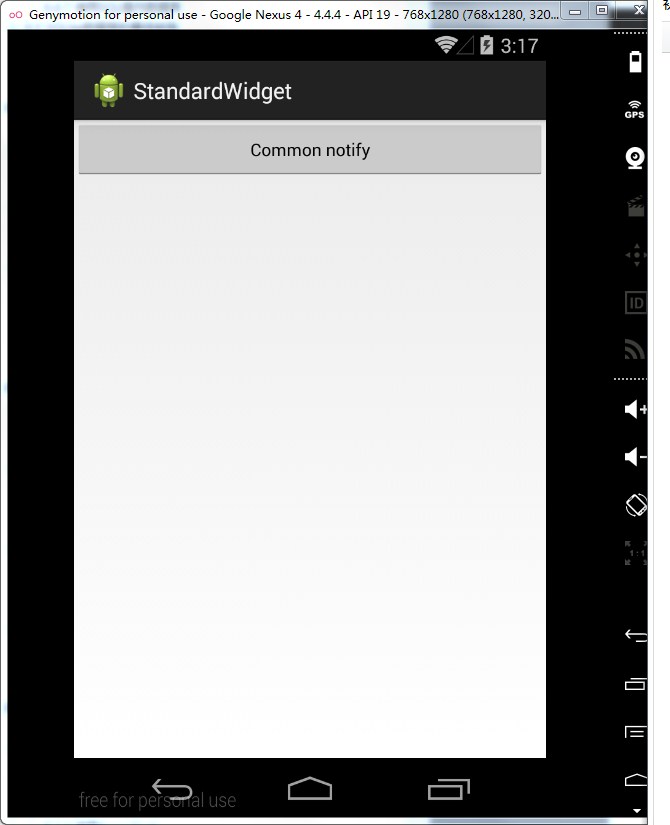
<?xml version="1.0" encoding="utf-8"?><LinearLayoutxmlns:android="http://schemas.android.com/apk/res/android"android:layout_width="match_parent"android:layout_height="match_parent"android:orientation="vertical"><Buttonandroid:id="@+id/btn_notify1"style="?android:attr/buttonStyleSmall"android:layout_width="match_parent"android:layout_height="wrap_content"android:text="Common notify"/>- </LinearLayout>


初识Notification的更多相关文章
- 初识zookeeper(1)之zookeeper的安装及配置
初识zookeeper(一)之zookeeper的安装及配置 1.简要介绍 zookeeper是一个分布式的应用程序协调服务,是Hadoop和Hbase的重要组件,是一个树型的目录服务,支持变更推送. ...
- Android Notification 详解(一)——基本操作
Android Notification 详解(一)--基本操作 版权声明:本文为博主原创文章,未经博主允许不得转载. 微博:厉圣杰 源码:AndroidDemo/Notification 文中如有纰 ...
- Android Notification 详解——基本操作
Android Notification 详解 版权声明:本文为博主原创文章,未经博主允许不得转载. 前几天项目中有用到 Android 通知相关的内容,索性把 Android Notificatio ...
- android Notification介绍
如果要添加一个Notification,可以按照以下几个步骤 1:获取NotificationManager: NotificationManager m_NotificationManager=(N ...
- Android种使用Notification实现通知管理以及自定义通知栏(Notification示例四)
示例一:实现通知栏管理 当针对相同类型的事件多次发出通知,作为开发者,应该避免使用全新的通知,这时就应该考虑更新之前通知栏的一些值来达到提醒用户的目的.例如我们手机的短信系统,当不断有新消息传来时,我 ...
- Missing Push Notification Entitlement 问题
最近打包上传是遇到一个问题: 描述: Missing Push Notification Entitlement - Your app includes an API for Apple's Push ...
- 笔记:Memory Notification: Library Cache Object loaded into SGA
笔记:Memory Notification: Library Cache Object loaded into SGA在警告日志中发现一些这样的警告信息:Mon Nov 21 14:24:22 20 ...
- ABP源码分析二十四:Notification
NotificationDefinition: 用于封装Notification Definnition 的信息.注意和Notification 的区别,如果把Notification看成是具体的消息 ...
- Android动画效果之初识Property Animation(属性动画)
前言: 前面两篇介绍了Android的Tween Animation(补间动画) Android动画效果之Tween Animation(补间动画).Frame Animation(逐帧动画)Andr ...
随机推荐
- 【Hadoop】hiveserver2 不能启动端口 10000 开启服务的相关经验总结
转载来自http://blog.csdn.net/lsttoy/article/details/53490144. 这个问题困扰了我三天,各种查资料踩坑填坑的尝试,终于搞定了这个问题. 首先来品尝下喜 ...
- Storm在zookeeper上的目录结构
storm操作zookeeper的主要函数都定义在命名空间backtype.storm.cluster中(即cluster.clj文件中). backtype.storm.cluster定义了两个重要 ...
- Java数组转置
数组转置,就是将打印的数组的列和行进行位置对换. 我们就可以用两个for循环遍历数组,然后交换arr[i][j]与arr[j][i] public class Demo{ public static ...
- redis系列:通过文章点赞排名案例学习sortedset命令
前言 这一篇文章将讲述Redis中的sortedset类型命令,同样也是通过demo来讲述,其他部分这里就不在赘述了. 项目Github地址:https://github.com/rainbowda/ ...
- Protocol Buffers官方文档(proto3语言指南)
本文是对官方文档的翻译,大部分内容都是引用其他一些作者的优质翻译使文章内容更加通俗易懂(自己是直译,读起来有点绕口难理解,本人英文水平有限),参考的文章链接在文章末尾 这篇指南描述如何使用protoc ...
- Cogs 1995. Yukari
1995. Yukari ★★☆ 输入文件:camera.in 输出文件:camera.out 简单对比时间限制:1 s 内存限制:128 MB 题目背景: 幻想乡的创始人之一,八云紫 ...
- Java基础--常用API--集合类相关API
一.泛型 1.泛型的本质是将类型参数化,即将数据类型作为参数. 2.泛型可以在编译期进行检查,其所有的强制转换是隐式且自动的,提高了代码的安全性. 3.泛型可以用在类(泛型类).接口(泛型接口).方法 ...
- 避免picture图片无法删除,提示正在被其他进程使用
pictureBox1.Image = Image.FromStream(ByteToStream(SetImageToByteArray(cutImgPath))); #region 将文件转换成流 ...
- spring使用redisTemplate
连接工厂:spring data redis 2.0中提供了两种redis客户端实现 LettuceConnectionFactory JedisConnectionFactory 区别: Lettu ...
- elasticsearch常用工具及使用
1. 数据库工具:https://github.com/jprante/elasticsearch-jdbc 2.数据展示:https://github.com/mobz/elasticsearch- ...