
JSP+Servlet 无数据库模拟登录过程
程序目录结构:
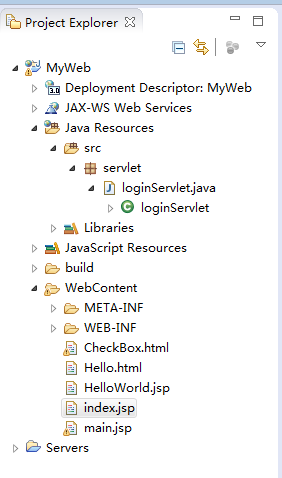
index.jsp:
 <%@ page language="java" contentType="text/html; charset=utf-8"

     pageEncoding="utf-8"%>

 <%@ page import="java.io.*,java.util.*" %>

 <!DOCTYPE html PUBLIC "-//W3C//DTD HTML 4.01 Transitional//EN" "http://www.w3.org/TR/html4/loose.dtd">

 <html>

 <head>

 <meta http-equiv="Content-Type" content="text/html; charset=ISO-8859-1">

 <title>Insert title here</title>

 </head>

 <style>

 </style>

 <body>

     <form action="index" method="post">

         <input type="text" name="txtName" value="用户名" maxlength="12">

         <input type="password" name="passwd" value="请输入密码" maxlength="12">

         <input type="submit" name="btnSubmit" value="提交">

     </form>

 </body>

 </html>
servlet 代码:
 package servlet;

 import java.io.IOException;

 import javax.servlet.Servlet;

 import javax.servlet.ServletConfig;

 import javax.servlet.ServletException;

 import javax.servlet.ServletRequest;

 import javax.servlet.ServletResponse;

 import javax.servlet.http.HttpServletRequest;

 import javax.servlet.http.HttpServletResponse;

 public class loginServlet implements Servlet {

     @Override

     public void destroy() {

         // TODO Auto-generated method stub

     }

     @Override

     public ServletConfig getServletConfig() {

         // TODO Auto-generated method stub

         return null;

     }

     @Override

     public String getServletInfo() {

         // TODO Auto-generated method stub

         return null;

     }

     @Override

     public void init(ServletConfig arg0) throws ServletException {

         // TODO Auto-generated method stub

     }

     @Override

     public void service(ServletRequest request, ServletResponse response) throws ServletException, IOException {

         HttpServletRequest httpServletRequest = (HttpServletRequest) request;

         HttpServletResponse httpServletResponse = (HttpServletResponse) response;

         String userName = httpServletRequest.getParameter("txtName");

         String userPwd = httpServletRequest.getParameter("passwd");

         if (userName.equals("g.qu") && userPwd.equals("g.qu")) {

             httpServletResponse.sendRedirect("Hello.html");

         } else {

             httpServletResponse.sendRedirect("main.jsp");

         }

     }

 }
web.xml 基础代码:
 <?xml version="1.0" encoding="UTF-8"?>

 <web-app xmlns:xsi="http://www.w3.org/2001/XMLSchema-instance"

     xmlns="http://java.sun.com/xml/ns/javaee"

     xsi:schemaLocation="http://java.sun.com/xml/ns/javaee http://java.sun.com/xml/ns/javaee/web-app_3_0.xsd"

     id="WebApp_ID" version="3.0">

     <!-- Web程序名称 -->

     <display-name>MyWeb</display-name>

     <!-- 应用程序的描述信息 -->

     <description></description>

     <!-- 在向servlet或JSP页面制定初始化参数或定制URL时,必须首先命名servlet或JSP页面 -->

     <servlet>

         <!-- Servlet名字,可以随便取,有多个Servlet时不允许重名 -->

         <servlet-name>loginServlet</servlet-name>

         <!-- 指定实现这个Servlet的类。完整的包名+类名 -->

         <servlet-class>servlet.loginServlet</servlet-class>

     </servlet>

     <!-- 服务器一般为servlet提供一个缺省的URL;但是,常常会更改这个URL,以便servlet可以访问初始化参数或更容易地处理相对URL。

         在更改缺省URL时,使用servlet-mapping元素。 -->

     <servlet-mapping>

         <!-- 必须和<servlet>里的<servlet-name>内容一样 -->

         <servlet-name>loginServlet</servlet-name>

         <!-- 指定访问这个Servlet的URL,这里给出的是对于整个Web应用的相对URL路径 -->

         <url-pattern>/index</url-pattern>

     </servlet-mapping>

     <!-- 在 用户访问Web应用时,如果仅给出Web应用的根访问URL,没有指定具体的文件名,容器会调用<weblcome-file- list>

         元素里指定的文件清单。<welcome-file-list>里允许有多个<welcome-file>元 素,每个元素代表一个文件。 容器会先找第一文文件件是否存在,如果存在这把这个文件返回个客户,不再进行其他文件的查找。如果不存在则找第二个文件,依次

         类推。 如果所有文件都不存在,则跑出404错误 -->

     <welcome-file-list>

         <welcome-file>index.jsp</welcome-file>

     </welcome-file-list>

     <!-- 在返回特定HTTP状态代码时,或者特定类型的异常被抛出时,能够制定将要显示的页面。 -->

     <error-page>

         <error-code>404</error-code>

         <location>/error.html</location>

     </error-page>

     <!-- 设 定HttpSession的生命周期。这里以分钟计算。下面的设定指明Session在最长不活动时间为10分钟。 过了这个时间,Servlet容器将它

         作为无效处理。注意这里和程序里指定的计数单位不同,程序里是以秒为单位。 -->

     <session-config>

         <session-timeout>10</session-timeout>

     </session-config>

     <filter>

         <!-- 过滤器名,可以随便取,当web应用中有多个过滤器时不允许重名. -->

         <filter-name>SampleFilter</filter-name>

         <!-- 具体的过滤器的类的完整的包名+类名。注意:不能写错了。否则容器不能正确的实例化过滤器 -->

         <filter-class></filter-class>

     </filter>

 <!-- 如果要想进行认证,必须有login-config节点  -->

         <login-config>

 <!--认证方式。有4种:BASIC:基本。 DIGEST:摘要。CLIENT-CERT:客户证书(能提供最高强度的认证)。FORM:表单  -->

             <auth-method>FORM</auth-method>

             <realm-name>

                 Tomcat Servet Configuraton Form-Based Authentication Area

             </realm-name>

             <form-login-config>

                 <form-login-page>/login.jsp</form-login-page>

                 <form-error-page>/error.jsp</form-error-page>

             </form-login-config>

         </login-config>

 </web-app>
启动Tomcat 服务器;在浏览器中输入地址 http://localhost:8080/MyWeb/index.jsp 访问
JSP+Servlet 无数据库模拟登录过程的更多相关文章
- 基于JQuery+JSP的无数据库无刷新多人在线聊天室
JQuery是一款非常强大的javascript插件,本文就针对Ajax前台和JSP后台来实现一个无刷新的多人在线聊天室,该实现的数据全部存储在服务端内存里,没有用到数据库,本文会提供所有源程序,需要 ...
- jsp&servlet初体验——用户登录功能实现
数据库准备-创建db_login数据库 t_user表 1.创建web工程 2.创建用户model user.java package com.gxy.model; public class U ...
- IDEA+JSP+Servlet+Tomcat简单的登录示例
1.用IDEA新建Java WEB项目并配置Tomcat 这一部分可以参考之前的一篇随笔 https://www.cnblogs.com/lbhym/p/11496610.html 2.导入Servl ...
- 【网络爬虫】【python】网络爬虫(三):模拟登录——伪装浏览器登录爬取过程
一.关于抓包分析和debug Log信息 模拟登录访问需要设置request header信息,对于这个没有概念的朋友可以参见本系列前面的java版爬虫中提到的模拟登录过程,主要就是添加请求头requ ...
- 基于JSP+SERVLET的新闻发布系统(一)
本系统使用的是基于JSP+SERVLET+TOMCAT6 数据库使用的是MYSQL IDE是MYECLIPSE8.5,页面编辑使用的是百度的ueditor,比较适合咱国人 采用MVC模式,使用的关键技 ...
- Python爬虫之模拟登录微信wechat
不知何时,微信已经成为我们不可缺少的一部分了,我们的社交圈.关注的新闻或是公众号.还有个人信息或是隐私都被绑定在了一起.既然它这么重要,如果我们可以利用爬虫模拟登录,是不是就意味着我们可以获取这些信息 ...
- Python 爬虫之模拟登录
最近应朋友要求,帮忙爬取了小红书创作平台的数据,感觉整个过程很有意思,因此记录一下.在这之前自己没怎么爬过需要账户登录的网站数据,所以刚开始去看小红书的登录认证时一头雾水,等到一步步走下来,最终成功, ...
- servlet数据库验证登录
servlet数据库验证登录 一.将数据库连接和验证封装为一个单独的类 import java.sql.*; public class SQLtest { // JDBC 驱动名及数据库 URL st ...
- jsp+servlet+mysql 实现简单的银行登录转账功能
jsp+servlet+mysql 实现简单的银行登录转账功能 [前期的准备] html(登录界面),servlet(处理业务逻辑),jsp(主要实现界面),mysql(实现与数据库的简单的交互)先从 ...
随机推荐
- java连接SQL数据库(JDBC)相关设置
2016-06-14 一.SQL server中的相关设置(以sql server 2012 版本为例) 建立一个SQL server 身份认证的服务器登录名 首先启动SQL客户端,以windows身 ...
- BZOJ3241/UOJ125 [Noi2013]书法家
本文版权归ljh2000和博客园共有,欢迎转载,但须保留此声明,并给出原文链接,谢谢合作. 本文作者:ljh2000 作者博客:http://www.cnblogs.com/ljh2000-jump/ ...
- pandas读取Excel
time31 = pd.read_excel('F:/save_file/3问出车表.xlsx', sheetname='Sheet1') # 读取‘3问出车表.xlsx’中的Sheet1表单, ti ...
- 机器学习三剑客之Matplotlib
matplotlib Matplotlib 是Python 2D绘图领域的基础套件,它让使用者将数据图形化,并提供多样化的输出格式.这里将会以四个小案例探索Matplotlib的常见用法 绘制折线 ...
- Merge 2
在SQL2008中,新增了一个关键字:Merge,这个和Oracle的Merge的用法差不多,只是新增了一个delete方法而已.下面就是具体的使用说明: 首先是对merge的使用说明: merge ...
- Windows 10 Certified with Oracle E-Business Suite
Microsoft Windows 10 (32-bit and 64-bit) is certified as a desktop client operating system for end-u ...
- handsontable 给单元格自定义属性
setHotAttr(hotObj,rowHeader,colHeader){// 给handsongtable绑定行列属性 console.log(hotObj); console.log(colH ...
- git常用别名设置,保存一份
git配置别名设置,保存一份 若git config --global xxxx 设置,则文件一般在 C:\Users\Administrator\.gitconfig [alias] lg = ...
- @angular/cli项目构建--路由2
app.module.ts update const routes: Routes = [ {path: '', redirectTo: '/home', pathMatch: 'full'}, {p ...
- OpenCV - win7+vs2013(2012)+opencv3.0.0 环境配置 (以及配置技巧)
1. opencv 3.0.0 库下载地址, 这里的版本是3.0.0,其他的版本配置可能不一样,请大家注意. http://sourceforge.net/projects/opencvlibrary ...