
用cocos2d-html5做的消除类游戏《英雄爱消除》(3)——游戏主界面
游戏主界面,同时也是主程序,包括sprite的生成加入以及游戏状态的控制。
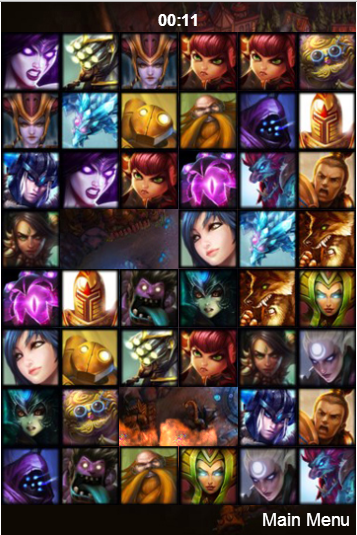
下面同样贴下源码再讲解;
/**

 * Power by  html5中文网(html5china.com)

 * author: jackyWHJ

 */

var STATE_PLAYING = 0;

var STATE_GAMEOVER = 1;

var g_sharedGameLayer;

var GameLayer = cc.Layer.extend({

    _time:0,

    _timeLabel:null,

    _timeString:"",

    screenRect:null,

    _state:STATE_PLAYING,

    _explosions:null,

    _texOpaqueBatch:null,

    _blocks:[],

    _heroFrameCache:null,

    init:function () {

        var bRet = false;

        if (this._super()) {

            cc.SpriteFrameCache.getInstance().addSpriteFrames(s_textureOpaquePack_plist);

            this._heroFrameCache = cc.SpriteFrameCache.getInstance();

            this._heroFrameCache.addSpriteFrames(s_textureNormalImage_plist);

            cc.SpriteFrameCache.getInstance().addSpriteFrames(s_textureLoveImage_plist);

            // reset global values

            LLK.map = [];//元素表,Block数组

            this._state = STATE_PLAYING;

            // OpaqueBatch

            var texOpaque = cc.TextureCache.getInstance().addImage(s_textureOpaquePack);

            this._texOpaqueBatch = cc.SpriteBatchNode.createWithTexture(texOpaque);

            this._texOpaqueBatch.setBlendFunc(gl.SRC_ALPHA, gl.ONE);

            this.addChild(this._texOpaqueBatch);

            var winSize = cc.Director.getInstance().getWinSize();

//            this._wayManager = new WayManager(this);

            this.screenRect = cc.rect(0, 0, winSize.width, winSize.height + 10);

            // explosion batch node

            cc.SpriteFrameCache.getInstance().addSpriteFrames(s_explosion_plist);

            var explosionTexture = cc.TextureCache.getInstance().addImage(s_explosion);

            this._explosions = cc.SpriteBatchNode.createWithTexture(explosionTexture);

            this._explosions.setBlendFunc(gl.SRC_ALPHA, gl.ONE);

            this.addChild(this._explosions);

            Explosion.sharedExplosion();

            this.initBackground();

            this.initBlock();

            // accept touch now!

            this._timeLabel = cc.LabelTTF.create("00:00","Arial Bold",16);

            this._timeLabel.setPosition(180,520);

            this._timeLabel.setColor(cc.c3b(255,255,255));

            this.addChild(this._timeLabel,10);

            if( 'keyboard' in sys.capabilities )

                this.setKeyboardEnabled(true);

            if( 'mouse' in sys.capabilities )

                this.setMouseEnabled(true);

            if( 'touches' in sys.capabilities )

                this.setTouchEnabled(true);

            if (LLK.SOUND) {

//                cc.log(cc.AudioEngine.getInstance().isMusicPlaying());

                cc.AudioEngine.getInstance().playMusic(s_bgMusic_mp3,true);

            }

            // schedule

            this.scheduleUpdate();

            this.schedule(this.scoreCounter, 1);

            bRet = true;

            g_sharedGameLayer = this;

        }

        return bRet;

    },

    initBlock:function(){

        var mapIndex = 0,i = 0,j = 0;

        var imgLen =  LLK.CONTAINER.NORMALIMAGES.length;

        if(LLK.MODE){

            imgLen =  LLK.CONTAINER.NORMALIMAGES.length;

            for ( i = 0; i < LLK.LEVEL.x*LLK.LEVEL.y; i+=2) {

                this._blocks[i] = this._blocks[i + 1] = LLK.CONTAINER.NORMALIMAGES[Math.floor(Math.random() * imgLen)];

            }

        }

        else{

            imgLen =  LLK.CONTAINER.MENGIMAGES.length;

            for ( i = 0; i < LLK.LEVEL.x*LLK.LEVEL.y; i+=2) {

                this._blocks[i] = this._blocks[i + 1] = LLK.CONTAINER.MENGIMAGES[Math.floor(Math.random() * imgLen)];

            }

        }

        var imgName = "";

        for ( j=0; j < LLK.LEVEL.y; j++) {

            for ( i=0; i < LLK.LEVEL.x; i++) {

                imgName = this.randomArray(this._blocks);

                var temp = new Block(imgName);

                temp.pointX = i;

                temp.pointY = j;

                temp.name = imgName;

                temp.id = mapIndex;

                LLK.map[temp.id] = temp;

                temp.setAnchorPoint(cc.p(0, 0));

                temp.setPosition(i*60, j*60+30);

                this.addChild(temp);

                mapIndex ++;

            }

        }

        LLK.COUNT = mapIndex;

    },

    randomArray:function (arr){

        var index = Math.floor(Math.random()*arr.length);

        return arr.splice(index,1)[0];

    },

    scoreCounter:function () {

        if( this._state == STATE_PLAYING ) {

            this._time++;

            var minute = 0 | (this._time / 60);

            var second = this._time % 60;

            minute = minute > 9 ? minute : "0" + minute;

            second = second > 9 ? second : "0" + second;

            this._timeString = minute + ":" + second;

            this._timeLabel.setString(this._timeString);

//            this._levelManager.loadLevelResource(this._time);

        }

    },

    initBackground:function () {

        // bg

        var bgImage = s_b03;

        if(Math.random() > 0.5){

            bgImage = s_b04;

        }

        this._backSky = cc.Sprite.create(bgImage);

        this._backSky.setAnchorPoint(cc.p(0, 0));

        this._backSkyHeight = this._backSky.getContentSize().height;

        this.addChild(this._backSky, -10);

    },

    onGameOver:function () {

        this._state = STATE_GAMEOVER;

        var scene = cc.Scene.create();

        scene.addChild(GameOver.create());

        cc.Director.getInstance().replaceScene(cc.TransitionFade.create(1.2, scene));

    }

});

GameLayer.create = function () {

    var sg = new GameLayer();

    if (sg && sg.init()) {

        return sg;

    }

    return null;

};

GameLayer.scene = function () {

    var scene = cc.Scene.create();

    var layer = GameLayer.create();

    scene.addChild(layer, 1);

    return scene;

};

GameLayer.prototype.addExplosions = function (explosion) {

    this._explosions.addChild(explosion);

};

GameLayer.prototype.addSpark = function (spark) {

    this._texOpaqueBatch.addChild(spark);

};
cc.SpriteFrameCache.getInstance().addSpriteFrames(s_textureOpaquePack_plist);

this._heroFrameCache = cc.SpriteFrameCache.getInstance();

this._heroFrameCache.addSpriteFrames(s_textureNormalImage_plist);

cc.SpriteFrameCache.getInstance().addSpriteFrames(s_textureLoveImage_plist);
这里因为我们这个游戏存在这2个模式,所以有2个纹理集,之后的程序中会根据当前选择的模式对应使用纹理集。
       // explosion batch node

            cc.SpriteFrameCache.getInstance().addSpriteFrames(s_explosion_plist);

            var explosionTexture = cc.TextureCache.getInstance().addImage(s_explosion);

            this._explosions = cc.SpriteBatchNode.createWithTexture(explosionTexture);

            this._explosions.setBlendFunc(gl.SRC_ALPHA, gl.ONE);

            this.addChild(this._explosions);

            Explosion.sharedExplosion();
  initBlock:function(){

        var mapIndex = 0,i = 0,j = 0;

        var imgLen =  LLK.CONTAINER.NORMALIMAGES.length;

        if(LLK.MODE){

            imgLen =  LLK.CONTAINER.NORMALIMAGES.length;

            for ( i = 0; i < LLK.LEVEL.x*LLK.LEVEL.y; i+=2) {

                this._blocks[i] = this._blocks[i + 1] = LLK.CONTAINER.NORMALIMAGES[Math.floor(Math.random() * imgLen)];

            }

        }

        else{

            imgLen =  LLK.CONTAINER.MENGIMAGES.length;

            for ( i = 0; i < LLK.LEVEL.x*LLK.LEVEL.y; i+=2) {

                this._blocks[i] = this._blocks[i + 1] = LLK.CONTAINER.MENGIMAGES[Math.floor(Math.random() * imgLen)];

            }

        }

        var imgName = "";

        for ( j=0; j < LLK.LEVEL.y; j++) {

            for ( i=0; i < LLK.LEVEL.x; i++) {

                imgName = this.randomArray(this._blocks);

                var temp = new Block(imgName);

                temp.pointX = i;

                temp.pointY = j;

                temp.id = mapIndex;

                LLK.map[temp.id] = temp;

                temp.setAnchorPoint(cc.p(0, 0));

                temp.setPosition(i*60, j*60+30);

                this.addChild(temp);

                mapIndex ++;

            }

        }

        LLK.COUNT = mapIndex;

    },
在该方法中,我们根据当前选择的模式随机生成this._blocks数组,记住这里的block是成对出现的。之后我们根据我们的界面的XY层数从我们的this._blocks数组中随机取出元素,取出的元素作为参数初始化Block然后把它添加到Layer中,在生成Block的时候我们要注意给Block的坐标pointX 、pointY赋值,并且使用我们的map数组缓存Block数组,供之后的Block移动查找移动位置的Block使用,最后,我们不要忘记给我们的Block计数附上值。
this._timeLabel = cc.LabelTTF.create("00:00","Arial Bold",16);

this._timeLabel.setPosition(180,520);

this._timeLabel.setColor(cc.c3b(255,255,255));

this.addChild(this._timeLabel,10);
  scoreCounter:function () {

        if( this._state == STATE_PLAYING ) {

            this._time++;

            var minute = 0 | (this._time / 60);

            var second = this._time % 60;

            minute = minute > 9 ? minute : "0" + minute;

            second = second > 9 ? second : "0" + second;

            this._timeString = minute + ":" + second;

            this._timeLabel.setString(this._timeString);

//            this._levelManager.loadLevelResource(this._time);

        }

    },
当游戏还在运行状态,时间计数每次加1然后转化成相应的时间显示形式之后修改时间显示label的内容。
  onGameOver:function () {

        this._state = STATE_GAMEOVER;

        var scene = cc.Scene.create();

        scene.addChild(GameOver.create());

        cc.Director.getInstance().replaceScene(cc.TransitionFade.create(1.2, scene));

    }
它做的是修改游戏的状态并且切换游戏场景。
下面是几个主要功能的教程
用cocos2d-html5做的消除类游戏《英雄爱消除》——概述
用cocos2d-html5做的消除类游戏《英雄爱消除》(1)——系统主菜单
用cocos2d-html5做的消除类游戏《英雄爱消除》(2)——Block设计实现
用cocos2d-html5做的消除类游戏《英雄爱消除》(3)——游戏主界面
用cocos2d-html5做的消除类游戏《英雄爱消除》(4)——游戏结束
ps:概述中有完整的源码链接
用cocos2d-html5做的消除类游戏《英雄爱消除》(3)——游戏主界面的更多相关文章
- 用cocos2d-html5做的消除类游戏《英雄爱消除》(1)——系统主菜单
系统主菜单如下图所示: 首先,介绍下这个主菜单,它包含了一个动画logo以及一个按钮选项,动画logo每隔1秒钟切换一张图片,点击相应的按钮选项会切换不同的游戏场景. 下面看下这个界面的源码: /** ...
- 用cocos2d-html5做的消除类游戏《英雄爱消除》(2)——Block设计实现
Block可以说是这个游戏的核心类,它除了包含自身的一些属性和方法外还添加了对触摸事件的响应. 我们先来看下源码吧 /** * Power by html5中文网(html5china.com) * ...
- 用cocos2d-html5做的消除类游戏《英雄爱消除》——概述
在bbs.html5china.com论坛学习了MV和老马的小熊蘑菇后我也自己模仿他们做了这样子一个游戏,权当技术交流学习,现在附上游戏截图和源码. 游戏截图: 1.系统菜单界面: 2.游戏界面 3. ...
- 用cocos2d-html5做的消除类游戏《英雄爱消除》(4)——游戏结束
游戏结束界面: 在前面几个教程中,这个界面的创作所需要的知识点基本我们都讲过了,这里就说下用户数据的缓存吧,也是先来看下源码 /** * Power by html5中文网(html5china.co ...
- 消除类游戏(js版)
最近一直在玩一款消灭星星的消除类游戏,周末无聊就用js也写了一遍,感觉玩比写还困难一直玩不到10000分.废话不多说直接上源码. 效果图(ps 页面有点难看木有美工) 代码总共456行,未经过严格测试 ...
- ccf题库中2015年12月2号消除类游戏
题目如下: 问题描述 消除类游戏是深受大众欢迎的一种游戏,游戏在一个包含有n行m列的游戏棋盘上进行,棋盘的每一行每一列的方格上放着一个有颜色的棋子,当一行或一列上有连续三个或更多的相同颜色的棋子时,这 ...
- CCF2015122消除类游戏(C语言版)
问题描述 消除类游戏是深受大众欢迎的一种游戏,游戏在一个包含有n行m列的游戏棋盘上进行,棋盘的每一行每一列的方格上放着一个有颜色的棋子,当一行或一列上有连续三个或更多的相同颜色的棋子时,这些棋子都被消 ...
- ccf消除类游戏
问题描述 消除类游戏是深受大众欢迎的一种游戏,游戏在一个包含有n行m列的游戏棋盘上进行,棋盘的每一行每一列的方格上放着一个有颜色的棋子,当一行或一列上有连续三个或更多的相同颜色的棋子时,这些棋子都被消 ...
- CCF CSP 201512-2 消除类游戏
CCF计算机职业资格认证考试题解系列文章为meelo原创,请务必以链接形式注明本文地址 CCF CSP 201512-2 消除类游戏 问题描述 消除类游戏是深受大众欢迎的一种游戏,游戏在一个包含有n行 ...
随机推荐
- Maven 小技巧之 自动更新你的jar包
在做selenium 自动化测试的时候,我们经常遇到这样的情况:浏览器悄悄升级了.紧接着所有测试用例都Fail. 检查过日志之后发现,原来是升级过的浏览器,我们用原来的selenium已经无法操作. ...
- JAVA学习第四十八课 — IO流(二):文件的复制 & 缓冲区1
一.复制文本文件 将G盘的文本文件拷贝到D盘上 也就是 读取G盘中文本文件的数据.写入D盘中->连读带写 而剪切呢.就是连读带写后,删除原盘的文件 <span style="fo ...
- 我的_vimrc文件
""""""""""""""""&quo ...
- 简易web服务器(java版)
//直接使用 ServerSocket 监听服务器端口,就能实现web服务器package ThreadPoolTest; import java.io.InputStream; import jav ...
- busybox下inittab中runlevel解析
Order of scripts run in /etc/rc?.d ================================== 0. Overview. All scripts execu ...
- web 开发之js---js 实现自动添加input text 编辑框
<html><head><script type="text/javascript">function addNewLine(){var for ...
- git 入门二 (基础)
1.创建新仓库 git init touch test.txt git add --a git commit -m "fist commit" 初始化 ...
- 从外置U盘中拷文件到Linux(挂载)
第一步: 将U盘插入电脑,在Linux系统中会有反应,类似sda.sdb……,然后去/dev目录查看是否有这个文件 第二步: 新建一个目录:/mnt/mine 第三步: 将u盘挂载到/mnt/mine ...
- 线性同余方程组模板( x=r0(mod m0) )
#include <iostream> #include <stdio.h> #include <string.h> #include <algorithm& ...
- 【CodeM初赛B轮】A 贪心
[CodeM初赛B轮]A 题目大意:给你一棵树,起初所有点都是白色的,你每次都能选择一个白点i,将这个点i到根路径上的所有到i的距离<k[i]的点都染成黑色(根和i也算,已经被染成黑色的点还是黑 ...