
xenserver 更新源
在xenserver上安装vnc软件时,报错
[root@cloud yum-3.4.3]# ./yummain.py install yum
There are no enabled repos.
Run "yum repolist all" to see the repos you have.
You can enable repos with yum-config-manager --enable <repo>
没有启用的repo源,用命令yum repolist all查看yum镜像源status如下
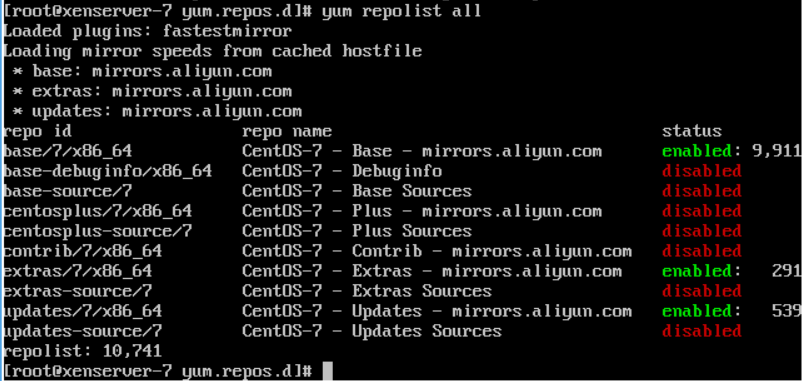
查看了很多解决方案
参考文章https://blog.csdn.net/juiyy/article/details/52123518修复
主要用了这四步,
wget -O /etc/yum.repos.d/CentOS-Base.repo http://mirrors.aliyun.com/repo/Centos-7.repo
wget http://mirrors.163.com/.help/CentOS7-Base-163.repo
yum clean all
yum makecache
还参考这文章http://www.cnblogs.com/J0der/p/5566610.html继续修复yum源,具体哪一步解决问题了我也不清楚,反正之后就可以成功联网安装package了。
cd /etc/yum.repos.d
mkdir yum.repos.d
wget http://docs.linuxtone.org/soft/lemp/CentOS-Base.repo
估计可能是上面的部分修复了问题。
下面贴上两篇文章https://blog.csdn.net/juiyy/article/details/52123518
xenserver 更新源
https://www.centos.org/download/mirrors/
https://wiki.centos.org/HowTos/CreatePublicMirrors
wget -O /etc/yum.repos.d/CentOS-Base.repo http://mirrors.aliyun.com/repo/Centos-7.repo
wget http://mirrors.163.com/.help/CentOS7-Base-163.repo
yum clean all
yum makecache
# CentOS-Base.repo
#
# The mirror system uses the connecting IP address of the client and the
# update status of each mirror to pick mirrors that are updated to and
# geographically close to the client. You should use this for CentOS updates
# unless you are manually picking other mirrors.
#
# If the mirrorlist= does not work for you, as a fall back you can try the
# remarked out baseurl= line instead.
#
#
[base]
name=CentOS-7.2.1511 - Base - mirrors.aliyun.com
failovermethod=priority
baseurl=http://mirrors.aliyun.com/centos/7.2.1511/os/$basearch/
http://mirrors.aliyuncs.com/centos/7.2.1511/os/$basearch/
#mirrorlist=http://mirrorlist.centos.org/7.2.1511=$releasever&arch=$basearch&repo=os
gpgcheck=1
gpgkey=http://mirrors.aliyun.com/centos/RPM-GPG-KEY-CentOS-7
#released updates
[updates]
name=CentOS-7.2.1511 - Updates - mirrors.aliyun.com
failovermethod=priority
baseurl=http://mirrors.aliyun.com/centos/7.2.1511/updates/$basearch/
http://mirrors.aliyuncs.com/centos/7.2.1511/updates/$basearch/
#mirrorlist=http://mirrorlist.centos.org/7.2.1511=$releasever&arch=$basearch&repo=updates
gpgcheck=1
gpgkey=http://mirrors.aliyun.com/centos/RPM-GPG-KEY-CentOS-7
#additional packages that may be useful
[extras]
name=CentOS-7.2.1511 - Extras - mirrors.aliyun.com
failovermethod=priority
baseurl=http://mirrors.aliyun.com/centos/7.2.1511/extras/$basearch/
http://mirrors.aliyuncs.com/centos/7.2.1511/extras/$basearch/
#mirrorlist=http://mirrorlist.centos.org/7.2.1511e=$releasever&arch=$basearch&repo=extras
gpgcheck=1
gpgkey=http://mirrors.aliyun.com/centos/RPM-GPG-KEY-CentOS-7
#additional packages that extend functionality of existing packages
[centosplus]
name=CentOS-7.2.1511 - Plus - mirrors.aliyun.com
failovermethod=priority
baseurl=http://mirrors.aliyun.com/centos/7.2.1511/centosplus/$basearch/
http://mirrors.aliyuncs.com/centos/7.2.1511/centosplus/$basearch/
#mirrorlist=http://mirrorlist.centos.org/7.2.1511=$releasever&arch=$basearch&repo=centosplus
gpgcheck=1
enabled=0
gpgkey=http://mirrors.aliyun.com/centos/RPM-GPG-KEY-CentOS-7
#contrib - packages by Centos Users
[contrib]
name=CentOS-$releasever - Contrib - mirrors.aliyun.com
failovermethod=priority
baseurl=http://mirrors.aliyun.com/centos/$releasever/contrib/$basearch/
http://mirrors.aliyuncs.com/centos/$releasever/contrib/$basearch/
#mirrorlist=http://mirrorlist.centos.org/?release=$releasever&arch=$basearch&repo=contrib
gpgcheck=1
enabled=0
gpgkey=http://mirrors.aliyun.com/centos/RPM-GPG-KEY-CentOS-7
http://www.cnblogs.com/J0der/p/5566610.html
yum指令之修复
折腾着搞openvpn 网站服务器yum指令出了点问题
------------------------------------------------------------
[root@cloud ~]# yum
There was a problem importing one of the Python modules
required to run yum. The error leading to this problem was:
No module named yum
Please install a package which provides this module, or
verify that the module is installed correctly.
It's possible that the above module doesn't match the
current version of Python, which is:
2.6.6 (r266:84292, Feb 22 2013, 00:00:18)
[GCC 4.4.7 20120313 (Red Hat 4.4.7-3)]
If you cannot solve this problem yourself, please go to
the yum faq at:
http://yum.baseurl.org/wiki/Faq
-----------------------------------------------------------
原因是python版本与yum不兼容.
解决过程:1.准备
[root@cloud ~]# lsb_release -a
LSB Version: :base-4.0-amd64:base-4.0-noarch:core-4.0-amd64:core-4.0-noarch:graphics-4.0-amd64:graphics-4.0-noarch:printing-4.0-amd64:printing-4.0-noarch
Distributor ID: CentOS
Description: CentOS release 6.4 (Final)
Release: 6.4
Codename: Final
那么系统是CentOS release 6.4 (Final).
[root@cloud ~]# uname -a
Linux cloud 2.6.32-358.el6.x86_64 #1 SMP Fri Feb 22 00:31:26 UTC 2013 x86_64 x86_64 x86_64 GNU/Linux
那么安装的系统是64位.
2.安装yum程序
先下载所需要的rpm包;
2)下载并安装python-urlgrabber,python-pycurl,yum-metadata-parser(yum需要这三个东西)
centos5 下载地址:http://tel.mirrors.163.com/centos/5/os/x86_64/CentOS/
centos6 下载地址:http://mirrors.163.com/centos/6/os/x86_64/Packages/
使用 wget 下载,然后 rpm -ivh xxx.rpm 安装
3)安装yum
到官网或其他地址下载yum源码包(例如:yum-3.4.3)
wget http://yum.baseurl.org/download/3.4/yum-3.4.3.tar.gz
tar xvf yum-3.4.3.tar.gz
cd yum-3.4.3
./yummain.py install yum
错误又出来了
CRITICAL:yum.cli:Config Error: Error accessing file for config file:///etc/yum.conf
其实是因为/etc/yum.conf之前被我删了
那么touch保险下吧 touch /etc/yum.conf
再执行./yummain.py install yum
[root@cloud yum-3.4.3]# ./yummain.py install yum
There are no enabled repos.
Run "yum repolist all" to see the repos you have.
You can enable repos with yum-config-manager --enable <repo>
又是问题。。。坑
没有repo源 又是被我删了的。。。有的话请略过
cd /etc/yum.repos.d
mkdir yum.repos.d
wget http://docs.linuxtone.org/soft/lemp/CentOS-Base.repo
./yummain.py install yum
出现
There was a problem importing one of the Python modules
required to run yum. The error leading to this problem was:
No module named yum
Please install a package which provides this module, or
verify that the module is installed correctly.
It's possible that the above module doesn't match the
current version of Python, which is:
2.6.6 (r266:84292, Feb 22 2013, 00:00:18)
[GCC 4.4.7 20120313 (Red Hat 4.4.7-3)]
If you cannot solve this problem yourself, please go to
the yum faq at:
http://yum.baseurl.org/wiki/Faq
-----------------------------------
未完待续,问题还没解决....
xenserver 更新源的更多相关文章
- 4.修改更新源sources.list,提高软件下载安装速度(提供Kali 2.0 更新源)
1.切换到root用户(如果已经是root用户就直接看第二步) dnt@HackerKali:~$ su 密码: 2.用文本编辑器打开sources.list,手动添加下面的更新源 root@Hack ...
- 修改pip更新源
修改pip更新源 pip安装时默认访问pypi的,但是pypi的速度对于国内来说有点慢,还在国内也有一些pip的镜像源,造福广大程序员 pipy国内镜像目前有: http://pypi.douban. ...
- Ubuntu14.04更新源、安装chrome/搜狗输入法
目录: 1.更新源 2.安装chrome 3.安装搜狗输入法 1.更新源 三步: cp /etc/apt/sources.list /etc/apt/sources.list_backup ...
- ubuntu 12.04 LTS 如何使用更快的更新源
装好ubuntu系统后的第一见事就是替换自带的更新源,原因是系统自带的源有些在中国访问不了,可以访问的速度又特别慢.幸好国内的一些公司和大学提供了速度不错的更新源.下面介绍如何使用更快的更新源 方法/ ...
- Ubuntu如何选择更新源
刚装上Ubuntu, 决定先更新一下源. 虽然网上搜索提供了很多更新源,结果替换上实际使用的时候,却发现总是有404无法连接的情况. 后来查查资料,发现Ubuntu自己就提供了很多的源管理. 具体更新 ...
- Ubuntu 14.04.4官方默认更新源sources.list
Ubuntu 14.04.4官方默认更新源sources.list # deb cdrom:[Ubuntu LTS _Trusty Tahr_ - Release amd64 (20160217.1) ...
- kali更新源
原文链接:http://www.cnblogs.com/dunitian/p/4712852.html kali2.0官方下载地址: https://www.kali.org/downloads/ 可 ...
- Ubuntu如何更新源
Ubuntu的源其实就是更新各种软件包需要用到镜像网站, 当大家在虚拟机上安装Linux镜像的时候肯定会遇到各种Linux软件没有安装,当你用apt-get安装的时候它会提示无效的网址,这个时候你就需 ...
- ubuntu 12.10 sourcelist软件更新源列表(zz)
ubuntu 12.10正式版已经发布了,国内各大开源软件源也陆续更新了资源.今天分享一下ubuntu 12.10 软件更新源列表. 首先,备份一下ubuntu 12.04 原来的源地址列表文 ...
随机推荐
- day03 hadoop的解压与配置文件的配置,还需要看视频
拷贝hadoop1.2.1.tar.gz安装包到其他的节点上 scp -r ~/hadoop-1.2.1.tar.gz root@node2:~/ tar -zxvf hadoop-1.2.1.t ...
- rlwrap:让控制台程序使用input.rc里的设置
习惯了vi模式,在bash里配置input.rc可以使平时命令行操作都使用vi习惯,翻页和跳动光标都很方便 但是当运行一些交互式程序时,比如redis-cli,lua等,它们却不按input.rc的配 ...
- GC算法与种类
- Entity Framework Code-First(16):Move Configurations
Move Configurations to Separate Class in Code-First: By now, we have configured all the domain class ...
- Vue 学习文档
Vue 学习文档 vue 起步 引包 启动 new Vue(options) options: el 目的地(可以用类名.标签名等,也可以直接用mod元素) #elementId .elementCl ...
- 《Linux内核设计与实现》读书笔记(二)- 内核开发的准备
在尝试内核开发之前,需要对内核有个整体的了解. 主要内容: 获取内核源码 内核源码的结构 编译内核的方法 内核开发的特点 1. 获取内核源码 内核是开源的,所有获取源码特别方便,参照以下的网址,可以通 ...
- 【mybatis 如何写union和union查询】
select d.* from (select a.CheckType,b.UserName,a.CheckNumber, a.PayName ,a.PayBank,a.PayBankNumber,a ...
- 在GridView中实现换页确认功能
首先看效果: 废话不多说,直接贴代码: <asp:GridView ID="GridView1" runat="server" AllowPaging=& ...
- JsonParse类
using System.Data; using Newtonsoft.Json; using Newtonsoft.Json.Converters; using System; using Syst ...
- Codeforces - 102222A - Maximum Element In A Stack - 模拟
https://codeforc.es/gym/102222/problem/F 注意到其实用unsigned long long不会溢出. #include<bits/stdc++.h> ...