
Java NIO基本使用介绍
NIO主要包括Channel,Buffer,Selector三个核心元素组成。
Channel即通道,l和Buffer有好几种类型。下面是JAVA NIO中的一些主要Channel的实现:
- FileChannel
- DatagramChannel
- SocketChannel
- ServerSocketChannel
正如你所看到的,这些通道涵盖了UDP 和 TCP 网络IO,以及文件IO。
Buffer有IntBuffer,CharBuffer,FloatBuffer。。。。。
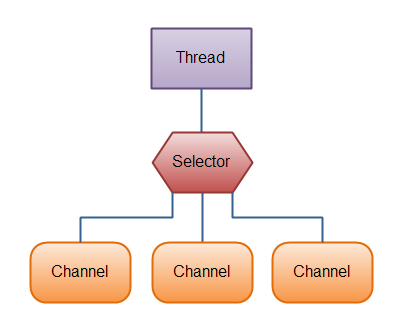
可以在Selector上注册通道。
Selector所在线程负责处理监听,待所关注的事件到达时,将事件分发给在Selector上注册的channel作异步处理,如下图所示。
Buffer的基本用法
使用Buffer读写数据一般遵循以下四个步骤:
- 调用channel的read()方法,将channel中的数据写入到Buffer中。
- 调用
flip()方法flip方法将Buffer从写模式切换到读模式。调用flip()方法会将position设回0,并将limit设置成之前position的值。
换句话说,position现在用于标记读的位置,limit表示之前写进了多少个byte、char等 —— 现在能读取多少个byte、char等。
public final Buffer flip() {

    limit = position;

    position = 0;

    mark = -1;

    return this;

} - 调用channel的write()方法,将Buffer中的数据写入channel中。
- 调用
clear()方法或者compact()方法
为了理解Buffer的工作原理,需要熟悉它的三个属性:
- capacity
- position
- limit
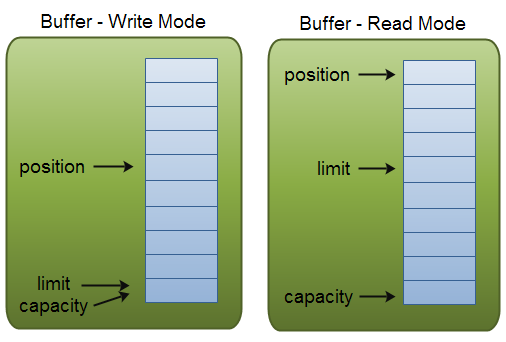
position和limit的含义取决于Buffer处在读模式还是写模式。不管Buffer处在什么模式,capacity的含义总是一样的。
这里有一个关于capacity,position和limit在读写模式中的说明,详细的解释在插图后面。
capacity
作为一个内存块,Buffer有一个固定的大小值,也叫“capacity”.你只能往里写capacity个byte、long,char等类型。一旦Buffer满了,需要将其清空(通过读数据或者清除数据)才能继续写数据往里写数据。
position
当你写数据到Buffer中时,position表示当前的位置。初始的position值为0.当一个byte、long等数据写到Buffer后, position会向前移动到下一个可插入数据的Buffer单元。position最大可为capacity – 1.
当读取数据时,也是从某个特定位置读。当将Buffer从写模式切换到读模式,position会被重置为0. 当从Buffer的position处读取数据时,position向前移动到下一个可读的位置。
limit
在写模式下,Buffer的limit表示你最多能往Buffer里写多少数据。 写模式下,limit等于Buffer的capacity。
当切换Buffer到读模式时, limit表示你最多能读到多少数据。因此,当切换Buffer到读模式时,limit会被设置成写模式下的position值。换句话说,你能读到之前写入的所有数据(limit被设置成已写数据的数量,这个值在写模式下就是position)
使用JAVA NIO编写一个客户端与服务端通信的例子。
Server
 package com.nio;

 import java.io.IOException;

 import java.net.InetSocketAddress;

 import java.nio.ByteBuffer;

 import java.nio.channels.SelectionKey;

 import java.nio.channels.Selector;

 import java.nio.channels.ServerSocketChannel;

 import java.nio.channels.SocketChannel;

 import java.util.Iterator;

 import java.util.Set;

 public class Server {

     private Selector selector;

     private ByteBuffer readBuffer = ByteBuffer.allocate(100);

     public void start() throws IOException {

         ServerSocketChannel ssc = ServerSocketChannel.open();

         ssc.configureBlocking(false);

         ssc.socket().bind(new InetSocketAddress("localhost", 8002));

         selector = Selector.open();

         ssc.register(selector, SelectionKey.OP_ACCEPT);

         while (!Thread.currentThread().isInterrupted()) {

             selector.select();

             Set selectedKeys = selector.selectedKeys();

             Iterator iterator = selectedKeys.iterator();

             while (iterator.hasNext()) {

                 SelectionKey key = (SelectionKey) iterator.next();

                 if (!key.isValid()) {

                     continue;

                 }

                 if (key.isAcceptable()) {

                     accept(key);

                 } else if (key.isReadable()) {

                     read(key);

                 }

             }

             iterator.remove();

         }

     }

     private void read(SelectionKey key) throws IOException {

         SocketChannel socketChannel = (SocketChannel) key.channel();

         this.readBuffer.clear();

         int readNum = 0;

         try {

             readNum = socketChannel.read(this.readBuffer);

         } catch (IOException e) {

             key.cancel();

             socketChannel.close();

             return;

         }

         if (readNum > 0) {

             byte[] newBytes = new byte[readNum];

             System.arraycopy(readBuffer.array(), 0, newBytes, 0, readNum);

             String message = new String(newBytes);

             System.out.println(message);

             message = "你好,已收到你发的消息:" + message;

             readBuffer.flip();

             readBuffer = ByteBuffer.wrap(message.getBytes());

             socketChannel.write(readBuffer);

         }

     }

     private void accept(SelectionKey key) throws IOException {

         ServerSocketChannel ssc = (ServerSocketChannel) key.channel();

         SocketChannel clientChanel = ssc.accept();

         clientChanel.configureBlocking(false);

         clientChanel.register(selector, SelectionKey.OP_READ);

         System.out.println("a new client connected...");

     }

     public static void main(String[] args) throws IOException {

         new Server().start();

     }

 }
Client
 package com.nio;

 import java.io.IOException;

 import java.net.InetSocketAddress;

 import java.nio.ByteBuffer;

 import java.nio.channels.SelectionKey;

 import java.nio.channels.Selector;

 import java.nio.channels.SocketChannel;

 import java.util.Iterator;

 import java.util.Scanner;

 import java.util.Set;

 public class Client {

     private void start() throws IOException {

         SocketChannel sc = SocketChannel.open();

         sc.configureBlocking(false);

         sc.connect(new InetSocketAddress("localhost", 8002));

         Selector selector = Selector.open();

         sc.register(selector, SelectionKey.OP_CONNECT );

         Scanner scanner = new Scanner(System.in);

         while (true) {

             selector.select();

             Set selectedKeys = selector.selectedKeys();

             Iterator iterator = selectedKeys.iterator();

             while (iterator.hasNext()) {

                 SelectionKey key = (SelectionKey) iterator.next();

                 if (key.isConnectable()) {

                     sc.finishConnect();

                     sc.register(selector, SelectionKey.OP_WRITE);

                     System.out.println("server connected");

                     break;

                 } else if (key.isWritable()) {

                     System.out.println("please input message");

                     String message = scanner.nextLine();

                     ByteBuffer writebufBuffer = ByteBuffer.wrap(message.getBytes());

                     sc.write(writebufBuffer);

                     sc.register(selector, SelectionKey.OP_READ);

                 }else if(key.isReadable()){

                     ByteBuffer readBuffer = ByteBuffer.allocate(1024);

                     int readNum = sc.read(readBuffer);

                     byte[] newBytes = new byte[readNum];

                     System.arraycopy(readBuffer.array(), 0, newBytes, 0, readNum);

                     String message = new String(newBytes);

                     System.out.println(message);

                     sc.register(selector, SelectionKey.OP_WRITE);

                 }

             }

             iterator.remove();

         }

     }

     public static void main(String[] args) throws IOException {

         new Client().start();

     }

 }
Client端输入abc后,Server端会将收到的信息返回到Client端,打印"你好,已收到......"

Server端也会打印出Client端发送的消息。

Java NIO基本使用介绍的更多相关文章
- 快学Java NIO 续篇
可以先看Java NIO的整体介绍,这篇接着说以下内容,<快学Java NIO>续篇 FileChannel SocketChannel ServerSocketChannel Java ...
- Java NIO简单介绍(二)
上一篇<NIO简单介绍(一)>中讲解了NIO中本地IO相关的内容,这篇重点介绍的NIO的非阻塞式网络通信 一.阻塞与非阻塞 传统的 IO 流都是阻塞式的.也就是说,当一个线程调用 read ...
- Java NIO简单介绍(一)
Java NIO( New IO) 是从Java 1.4版本开始引入的 一个新的IO API,可以替代标准的Java IO API. NIO与原来的IO有同样的作用和目的,但是使用的方式完全不同,NI ...
- java学习-NIO(五)NIO学习总结以及NIO新特性介绍
我们知道是NIO是在2002年引入到J2SE 1.4里的,很多Java开发者比如我还是不知道怎么充分利用NIO,更少的人知道在Java SE 7里引入了更新的输入/输出 API(NIO.2).但是对于 ...
- java NIO介绍
前言 我们在写java程序的时候,为了进行优化,把全部的精力用在了处理效率上,但是对IO的关注却很少.这也可能是由以前java早期时JVM在解释字节码时速度慢,运行速率大大低于本地编译代码,因此以前往 ...
- Java中NIO的简单介绍
NIO基本介绍 Java NIO(New IO) 也有人称之为Java non-blocking IO 是从Java1.4版本开始引入的一个新的IO API,可以代替标准的IO API.NIO与原来的 ...
- Java NIO框架Mina、Netty、Grizzly介绍与对比(zz)
Mina:Mina(Multipurpose Infrastructure for Network Applications) 是 Apache 组织一个较新的项目,它为开发高性能和高可用性的网络应用 ...
- [翻译] java NIO 教程---介绍
原文地址:http://tutorials.jenkov.com/java-nio/index.html Java NIO(new IO)是从java1.4之后的对IO API的另一种选择,即对标准j ...
- Java NIO框架Mina、Netty、Grizzly介绍与对比
Mina:Mina(Multipurpose Infrastructure for Network Applications) 是 Apache 组织一个较新的项目,它为开发高性能和高可用性的网络应用 ...
随机推荐
- 机器学习:Jupyter Notebook中numpy的使用
一.Jupyter Notebook的魔法命令 # 模块/方法 + ?或者help(模块/方法):查看模块/方法的解释文档: 1)%run # 机械学习中主要应用两个魔法命令:%run.%timeit ...
- Java应用中使用ShutdownHook友好地清理现场、退出JVM的2种方法
Runtime.getRuntime().addShutdownHook(shutdownHook); 这个方法的含义说明: 这个方法的意思就是在jvm中增加一个关闭的钩子,当jv ...
- net start sql server (instance)
如何启动 SQL Server 实例(net 命令) 其他版本 可以使用 Microsoft Windows net 命令启动 Microsoft SQL Server 服务. 启动 SQL Se ...
- chef语法和案例
1. 添加用户 $ vim create_user.rb -----------------------------------> user 'charlie' do //创建一个uid为88的 ...
- React组件详细介绍及其生命周期函数
组件的详细说明 通过Reac.createClass({...})创建组件的时候,应该有一个render()方法,也可以在其中添加生命周期函数. render方法 当调用该方法的时候,会检测this. ...
- 一些奇怪的Javascript用法
阅读AngularJS时,看到一些奇怪的Javascript用法.1.(function(){ a.work=function(){} })(a) 声明一个匿名函数并执行 2. ...
- Ubuntu使用crontab 使用举例
除了这些固定值外,还可以配合星号(*),逗号(,),和斜线(/)来表示一些其他的含义: 星号 表示任意值,比如在小时部分填写 * 代表任意小时(每小时) 逗号 ...
- IOS 获取系统通讯录
进入正题 获取系统通讯录,不想多讲,留下链接http://my.oschina.net/joanfen/blog/140146 通常做法: 首先创建一个ABAddressBookRef类的对象add ...
- php文件上传(视频图片或者其他)
html页面 <html> <head> <meta charset="utf-8"> <title></title> ...
- ios各个型号设备屏幕分辨率总结
https://blog.csdn.net/amyloverice/article/details/79389357 iPhone: iPhone 1G 320x480 iPhone 3G 3 ...