
All you should know about NUMA in VMware!
http://www.elasticvision.info/
All you should know about NUMA in VMware!
Lets try answering some typical questions before we understand NUMA on VMware.
1. What is NUMA?
Ans: NON-UNIFORM-MEMORY-ACCESS, means that it will take longer to access some regions of memory than others. This is due to the fact that some regions of memory are on physically different busses from other regions.
or
It provides a dedicated memory (local memory) bank for each processor, The key issue in NUMA is the decision of, where to place each page to maximize performance.
2. Is there something called UMA as well?
Ans: Yes, Uniform Memory Access. The difference between UMA and NUMA machines lies in the fact that on a NUMA machine, access to a remote memory is much slower than access to a local memory.
3. Is ESXi is NUMA aware?
Ans: YES, ESXi is NUMA aware!
4. Does NUMA architecture is limited to a vendor like Intel or AMD?
Ans: NO, both Intel and AMD procs uses NUMA architecture.
5. Besides NUMA on physical layers, is there a NUMA for virtual layer (soft NUMA)?
Ans: YES, it is called as vNUMA in VMware terms. And soft NUMA in generic terms.
Can be illustrated as:
In a NUMA (Non-Uniform Memory Access) system, there are multiple NUMA nodes that consist of a set of processors and the memory. The access to memory in the same node is local; the access to the other node is remote. The remote access takes more cycles because it involves a multi-hop operation. Due to this asymmetric memory access latency, keeping the memory access local or maximizing the memory locality improves performance. On the other hand, CPU load balancing across NUMA nodes is also crucial to performance. The CPU
scheduler achieves both of these aspects of performance.
When a virtual machine powers on in a NUMA system, it is assigned a home node where memory is preferentially allocated. Since vCPUs only can be scheduled on the home node, memory access will likely be satisfied from the home node with local access latency. Note that if the home node cannot satisfy the memory request, remote nodes are looked up for available memory. This is especially true when the amount of memory allocated for a virtual machine is greater than the amount of memory per NUMA node. Because this will increase the average
memory access latency by having to access a remote node, it is best to configure the memory size of a virtual machine to fit into a NUMA node.
NUMA:
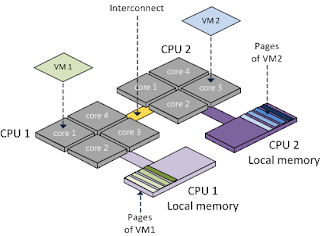
Diagram1 courtesy of Frank Denneman
UMA:

Diagram2 courtesy of Frank Denneman
Important tweaks pertaining to NUMA and vNUMA on VMware environments:
1. To configure virtual machines to use hyper-threading with NUMA in VMware
Perform either of the following tasks:
Configure one virtual machine to use hyper-threading with NUMA, addnuma.vcpu.preferHT=TRUE for per-virtual machine advanced configuration file.
To edit with vSphere Client:
Right-click on VM
Select Edit Settings
Click the Options tab.
Highlight General under Advanced options and click Configuration Parameters.
Configure all virtual machines to use hyper-threading with NUMA, addnuma.PreferHT=1 for per-host advanced configuration file.
To edit from vCenter Server:
Highlight Host.
Click the Configuration tab.
Under Software, click Advanced Settings.
Highlight Numa and browse to Numa.PreferHT.
2. In order to keep the VMs on a single NUMA node the customer set the following parameter “sched.cpu.vsmpConsolidate=true” . Benefits of this tweak:
- Optional parameter in VM Config file
- Good for cache sharing workloads
- Helps reduce the potential for remote memory access''
3. The VMkernel.Boot.sharePerNode option controls whether memory pages can be shared (de-duplicated) only within a single NUMA node or across multiple NUMA nodes.
VMkernel.Boot.sharePerNode is turned on by default, and identical pages are shared only within the same NUMA node. This improves memory locality, because all accesses to shared pages use local memory.
When you turn off the VMkernel.Boot.sharePerNode option, identical pages can be shared across different NUMA nodes. This increases the amount of sharing and de-duplication, which reduces overall memory consumption at the expense of memory locality. In memory-constrained environments, such as VMware View deployments, many similar virtual machines present an opportunity for de-duplication, and page sharing across NUMA nodes could be very beneficial.
To edit from vCenter Server:
Highlight Host.
Click the Configuration tab.
Under Software, click Advanced Settings.
Under Advanced Settings, click vmkernel.
Under boot, find for VMkernel.Boot.sharePerNode
4. vNUMA is actually enabled only for a virtual machine with 9 or more vCPUs. This is to avoid changing the behavior of an existing virtual machine by suddenly exposing NUMA topology after the virtual machine is upgraded to a newer hardware version and running on vSphere 5.x or later. Since only 9 vCPUs or wider virtual machines are supported from vSphere 5.x, it is safe to assume that such virtual machines do not have a legacy issue. This policy can be overridden with the following advanced virtual machine attribute.
To edit with vSphere Client:
Right-click on VM
Select Edit Settings
Click the Options tab.
Highlight General under Advanced options and click Configuration Parameters.
Add: numa.vcpu.min 8 (value)
Hope this helps.
I have taken some inputs from below links, you can refer:
http://frankdenneman.nl/tag/numa/
http://kb.vmware.com/kb/2003582
All you should know about NUMA in VMware!的更多相关文章
- VMware vSphere 5.x 与 vSphere 6.0各版本功能特性对比
各版本中的新特性及功能对比: VMware vSphere 5.0 VMware vSphere 5.1 VMware vSphere 5.5 VMware vSphere 6.0 ESXi 5. ...
- [qemu][kvm] 在一个vmware虚拟机里安装qemu-kvm虚拟机
说起来这个需求,简直是傻傻的.但却实实在在的摆在我的面前.... VM无外乎就是为了模拟场景:我现在要的场景就是一台很多个core的linux主机.但是我只有一个装了windows的笔记本.上边有一个 ...
- SMP、NUMA、MPP体系结构介绍
从系统架构来看,目前的商用服务器大体可以分为三类,即对称多处理器结构 (SMP : Symmetric Multi-Processor) ,非一致存储访问结构 (NUMA : Non-Uniform ...
- Summarizing NUMA Scheduling两篇文章,解释得不错
http://vxpertise.net/2012/06/summarizing-numa-scheduling/ Sitting on my sofa this morning watching S ...
- NUMA总结。
vsphere 5.1性能最佳实践http://www.vmware.com/pdf/Perf_Best_Practices_vSphere5.1.pdf vNUMA 要求:硬件版本8以上. 1.整个 ...
- esxtop 指标%RDY,NUMA,Wide-VMs
参考文章:http://www.boche.net/blog/index.php/2010/10/21/cpu-ready-to-rdy-conversion/ http://kb.vmware.co ...
- VMware上配置DPDK环境并运行实例程序
1. 在虚拟机VMware上配置环境 VMware安装:http://www.zdfans.com/html/5928.html Ubuntu:https://www.ubuntu.com/downl ...
- openstack对接VMware浅析
前言 本文是对openstack对接vmware的浅析,所以本文重点是以下两点: 先了解它的整体架构,搞清楚为什么要用这样的架构: 然后再了解架构中的各个组件,组件提供的主要功能与各个组件之间的交互 ...
- libvirt/qemu特性之numa
博客地址:http://blog.csdn.net/halcyonbaby 内容系本人学习.研究和总结,如有雷同,实属荣幸! Numa 查看主机node情况 使用virsh命令查看 virsh # c ...
随机推荐
- Javascript 中的arguments
arguments是当前正在执行的function的一个参数,它保存了函数当前调用的参数. 使用方法:function.arguments[i]. 其中function.是可选项,是当前正在执行的 ...
- CentOS MongoDB 高可用实战
原文:https://www.sunjianhua.cn/archives/centos-mongodb.html 一.MongoDB 单节点 1.1.Windows 版安装 1.1.1 获取社区版本 ...
- iOS内存管理 -讲的不错,角度独特
ios的内存管理,包括对象的所有权与引用计数.自动释放.访问器方法与属性.一些会改变引用计数的特殊情况 ----- 对象所有权(ownership) 与引用计数 (retain co ...
- NSString 拼接字符串
NSString* string; // 结果字符串 NSString* string1, string2; //已存在的字符串,需要将string1和string2连接起来 //方法1. strin ...
- 11i and R12 Table Count in Different Module
Advertisement Module 11i Tables R12 Tables New Tables AR 551 616 118 BOM 264 337 73 GL 186 309 140 A ...
- Android倒计时功能的实现
Android中的倒计时的功能(也能够直接使用CountDownTimer这个类直接实现,相关此Demo可查看我的博客).參考了网上写的非常好的一个倒计时Demo: watermark/2/text/ ...
- poj 3041(最大匹配问题)
http://poj.org/problem?id=3041 Asteroids Time Limit: 1000MS Memory Limit: 65536K Total Submissions ...
- Linux学习13-CentOS安装ab做压力测试
前言 网站性能压力测试是服务器网站性能调优过程中必不可缺少的一,测试环境准备好了后,如何对网站做压力测试? 压力测试的工具很多,如:ab.http_load.webbench.siege.jmeter ...
- Android性能检测工具——traceview
之前的几篇文章中介绍了android中常用的一些工具,今天介绍的工具也是比较实用和方便的,它可以用量化的指标告诉我们哪个方法执行的时间最长,被调用的次数最多,有没有重复调用.下面我们就来看看它是怎么为 ...
- caffe中的学习率的衰减机制
版权声明:本文为博主原创文章,未经博主允许不得转载. https://blog.csdn.net/Julialove102123/article/details/79200158 根据 caffe/ ...