
Using Fetch to rewrite JSON
截图如下:
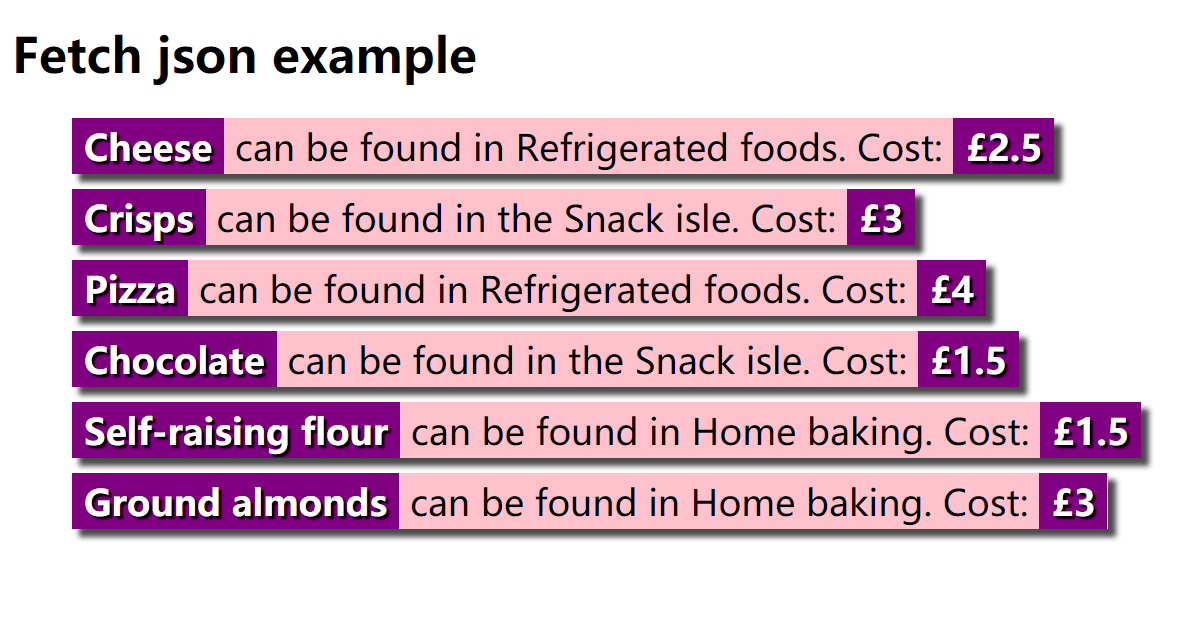
html代码如下:
 <!DOCTYPE html>

 <html>

   <head>

     <meta charset="utf-8">

     <meta http-equiv="X-UA-Compatible" content="IE=edge,chrome=1">

     <meta name="viewport" content="width=device-width">

     <title>Fetch json example</title>

 <style type="text/css">

 html {

   font-family: sans-serif;

 }

 ul {

   list-style-type: none;

   display: flex;

   flex-flow: column;

   align-items: flex-start;

 }

 li {

   margin-bottom: 10px;

   background-color: pink;

   font-size: 150%;

   border-top: 3px solid pink;

   border-bottom: 3px solid pink;

   box-shadow: 5px 5px 5px rgba(0,0,0,0.7);

 }

 strong {

   background-color: purple;

   color: white;

   padding: 0 8px;

   border-top: 3px solid purple;

   border-bottom: 3px solid purple;

   text-shadow: 2px 2px 1px black;

 }

 </style>

     <!--[if lt IE 9]>

       <script src="//html5shiv.googlecode.com/svn/trunk/html5.js"></script>

     <![endif]-->

   </head>

   <body>

     <h1>Fetch json example</h1>

     <ul>

     </ul>

   </body>

   <script>

     var myList = document.querySelector('ul');

     fetch('https://raw.githubusercontent.com/KylinBio-healthTechnology/lw/master/x.json')

     .then(function(response) {

       if (!response.ok) {

         throw new Error("HTTP error, status = " + response.status);

       }

       return response.json();

     })

     .then(function(json) {

       for(var i = 0; i < json.products.length; i++) {

         var listItem = document.createElement('li');

         listItem.innerHTML = '<strong>' + json.products[i].Name + '</strong>';

         listItem.innerHTML +=' can be found in ' + json.products[i].Location + '.';

         listItem.innerHTML +=' Cost: <strong>£' + json.products[i].Price + '</strong>';

         myList.appendChild(listItem);

       }

     })

     .catch(function(error) {

       var p = document.createElement('p');

       p.appendChild(

         document.createTextNode('Error: ' + error.message)

       );

       document.body.insertBefore(p, myList);

     });

   </script>

 </html>
json文件如下:https://raw.githubusercontent.com/KylinBio-healthTechnology/lw/master/x.json
 { "products" : [

   { "Name": "Cheese", "Price" : 2.50, "Location": "Refrigerated foods"},

   { "Name": "Crisps", "Price" : 3, "Location": "the Snack isle"},

   { "Name": "Pizza", "Price" : 4, "Location": "Refrigerated foods"},

   { "Name": "Chocolate", "Price" : 1.50, "Location": "the Snack isle"},

   { "Name": "Self-raising flour", "Price" : 1.50, "Location": "Home baking"},

   { "Name": "Ground almonds", "Price" : 3, "Location": "Home baking"}

 ]}
Using Fetch to rewrite JSON的更多相关文章
- Rewrite JSON with Fetch
1.重写json请求部分:HTML文件代码如下:<html>......<script> var myList = document.querySelector(‘ul‘); ...
- Rewrite JSON project with Fetch
上传 JSON 数据 使用fetch()来发布json编码的数据. var url = 'https://example.com/profile'; var data = {username: 'ex ...
- Rewrite json
<!DOCTYPE html> <html> <head> <meta charset="utf-8"> <meta http ...
- express后端和fetch前端的json数据传递
在使用express做后端,前端使用fetch API来请求后端时,一般都是用 JSON 数据进行通信的. 下面是一个简单的例子: 前端: if (up) { var passwordAgain = ...
- react之fetch请求json数据
Fetch下载 npm install whatwg-fetch -S Fetch请求json数据 json文件要放在public内部才能被检索到
- react 项目实战(二)创建 用户添加 页面 及 fetch请求 json-server db.json -w -p 8000
1.安装 路由 npm install -S react-router@3.x 2.新增页面 我们现在的应用只有一个Hello React的页面,现在需要添加一个用于添加用户的页面. 首先在/src目 ...
- [Angular-Scaled Web] 8. Using $http to load JSON data
Using the $http service to make requests to remote servers. categories-model.js: angular.module('egg ...
- 你不需要jQuery(三):新AJAX方法fetch()
XMLHttpRequest来完成ajax有些老而过时了. fetch()能让我们完成类似 XMLHttpRequest (XHR) 提供的ajax功能.它们之间的主要区别是,Fetch API 使用 ...
- 腾讯IVWEB团队:前端 fetch 通信
欢迎大家关注腾讯云技术社区-博客园官方主页,我们将持续在博客园为大家推荐技术精品文章哦~ 作者:villainthr 文章摘自: 前端小吉米 随着前端异步的发展, XHR 这种耦合方式的书写不利于前端 ...
随机推荐
- 安装Qt5.9
目前,作为一个重量级编程开发工具,Qt 已经正式发布了 5.9.0 版本.相比之前的 5.7,5.8 版本,新版本在性能和功能上有了大幅改善和提高,并由此获得了官方的明确表态:这将是继 5.6 之后的 ...
- JavaScript:值类型 引用类型
JavaScript类型 (1)值类型:数值.布尔值.null.undefined. (2)引用类型:对象.数组.函数. 1.string var str="hongda"; v ...
- 打印图形|2014年蓝桥杯B组题解析第五题-fishers
打印图形 小明在X星球的城堡中发现了如下图形和文字: rank=3 rank=5 rank = 6 小明开动脑筋,编写了如下的程序,实现该图形的打印. 答案:f(a, rank-1, row, col ...
- datagridview控件的使用
http://home.cnblogs.com/group/topic/40730.html datagridview定位到最后一行的方法 this.dataGridView2.CurrentCell ...
- 【第三十五章】 metrics(3)- codahale-metrics基本使用
<!-- metrics --> <dependency> <groupId>io.dropwizard.metrics</groupId> <a ...
- hdu 6444 Neko's loop 单调队列优化DP
Neko's loop Time Limit: 2000/1000 MS (Java/Others) Memory Limit: 65536/65536 K (Java/Others)Total ...
- java代码实现highchart与数据库数据结合完整案例分析(一)---饼状图
作者原创:转载请注明出处 在做项目的过程中,经常会用到统计数据,同时会用到highchart或echart进行数据展示,highchart是外国开发的数据统计图插件, echart是我们国家开发的数据 ...
- nohup 日志切割
最近遇到日志切割的问题,即程序是通过命令: nohup python *.py & 放到后台执行的,这样程序的日志输出到了nohup自动生成的nohup.out文件. 问题就来了,nohup. ...
- UVa 1660 电视网络(点连通度+最小割最大流+Dinic)
https://vjudge.net/problem/UVA-1660 题意:给出一个无向图,求出点连通度.即最少删除多少个点,使得图不连通. 思路: 如果求线连通度的话,直接求个最大流就可以了.但这 ...
- BZOJ 1189 【HNOI2007】 紧急疏散evacuate
题目链接:紧急疏散 这薄脊题我代码不知不觉就写长了…… 这道题二分答案显然,然后用最大流\(check\)即可.设当前二分的答案为\(x\),那么把每扇门拆成\(x\)个点,第\(i\)个代表在第\( ...