
diffutils's diff
比较文件的差异
diff,用来查看两个文件的差异之处,或者两个目录之中的对应文件。倘若比较的不是文本文件,而是二进制文件,只会报告两者不同。输出文本文件的异同时,可以按照多个格式输出,根据使用的选项决定。
cmd,可以比较两个文件在字节、行数上的差异。
diff3,可以比较三个文件的差异。当两个副本来自同一个原始文件时,能同时获取这两份较之原始文件的差异,而且能保留两者的修改生成一个新的文件、并提出有冲突的警告。
sdiff,交互式合并两个文件。
可以使用diff来发布源码补丁,可以考虑使用patch命令来打上这个补丁。diff命令可以理解为“减法结果”的生成,patch是把“减法结果”加到文件生成新文件。
忽略掉“制表符”与“空格”的差异,使用选项“--ignore-tailing-apace”(-E)
1.比较方法
对于文件的差异有多种情况,出于不同的目得有选择地忽略某些情况。比如由于空白符数量造成差异,或者存在一个仅仅包含空白符的空白行。又或者某些文件不会因为字母大小写而存在差异,但是比较时却认为存在差异。
默认使用“diff file1 file2”时,显示差异的行信息。可以使用选项“-q”,仅仅显示异同结果,不同时“Files file1 and file2 differ”。
1.1.差异组
俩文件的内容在忽略行顺序时,是一样的时候,比较时会因为参考的行不一样得到不同的输出结果。
# file1

i

love

you

# file2

you

love

i
1.2.空白符(忽略)
1.2.1.-E
--ignore-tab-expansion(-E)
忽略tab与空格,认为tab是“多个”空格。(“多个”-与数量无关、与长度有关系,这里成功测试是7个)
[view@file diffutils]$ diff -q blank blank2

Files blank and blank2 differ

[view@file diffutils]$ diff -q -E blank blank2

[view@file diffutils]$
1.2.2.-Z
--ignore-trailing-space(-Z)
忽略行尾的空格(认为行尾多个空格与没有空格等效)
[view@file diffutils]$ diff -q blank blank2

Files blank and blank2 differ

[view@file diffutils]$ diff -q -Z blank blank2

[view@file diffutils]$
1.2.3.-b
--ignore-space-change(-b)
效果就像上边两项的集合,忽略行尾、行中的“空格与多个空格”的差异。这里就就直接认为tab与空格是一回事,而且不限制“等长”。
[view@file diffutils]$ diff -q blank blank2

Files blank and blank2 differ

[view@file diffutils]$ diff -q -E blank blank2

Files blank and blank2 differ

[view@file diffutils]$ diff -q -Z blank blank2

Files blank and blank2 differ

[view@file diffutils]$ diff -q -b blank blank2

[view@file diffutils]$
1.2.4.-w
--ignore-all-space(-w)
忽略行首存在空白符时的差异(一个有、另一个没有)。空白符包括:水平制表符\t、垂直制表符\v、换页\f、回车\r、空格、以及其他定义的空白符。
[view@file diffutils]$ diff -q -b blank blank2

Files blank and blank2 differ

[view@file diffutils]$ diff -q -w blank blank2

[view@file diffutils]$
1.3.空白行(忽略)
--ignore-blank-lines(-B)
空白行,就是“^?”。当这个空白行位于文件的不同“行位置”时,希望忽略这个情况,需要使用该选项。
[view@file diffutils]$ diff -q blank blank2

Files blank and blank2 differ

[view@file diffutils]$ diff -q -B blank blank2

[view@file diffutils]$
当空白行是个“^[:blank:]?”,该选项就无法忽略差异了。
[view@file diffutils]$ diff -q -B blank blank2

Files blank and blank2 differ
1.4.匹配行(忽略)
--ignore-matching-lines=regexp(-Iregexp)
比如,写了一个脚本,在不同的环境下分别以“#/bin/sh”、“#/bin/bash”为首行。
[view@file diffutils]$ diff -q blank blank2

Files blank and blank2 differ

[view@file diffutils]$ diff -q blank blank2 -I "^#"

[view@file diffutils]$
1.5.字母大小写
-i or --ignore-case
忽略英文字母大小写。
2.输出格式
例子文件
# file t:

The Nameless is the origin of Heaven and Earth;

The named is the mother of all things.

Therefore let there always be non-being,

  so we may see their subtlety,

And let there always be being,

  so we may see their outcome.

The two are the same,

But after they are produced,

  they have different names.

They both may be called deep and profound.

Deeper and more profound,

The door of all subtleties!

# file l

The Way that can be told of is not the eternal Way;

The name that can be named is not the eternal name.

The Nameless is the origin of Heaven and Earth;

The Named is the mother of all things.

Therefore let there always be non-being,

  so we may see their subtlety,

And let there always be being,

  so we may see their outcome.

The two are the same,

But after they are produced,

  they have different names.
2.1.上下文显示
上下文格式显示
把上下文显示的格式保存为c,并在vim中同时打开来对比效果。
选项:--context[=lines] (-Clines) or -c
默认:3行
输出上下文显示格式到文件
[view@file diffutils]$ diff -c l t > c
在vim左侧打开上下部分分别打开l、t;右侧打开c
[view@file diffutils]$ vi -o l t

:vsplit c

Ctrl+W L

Ctrl+w w

 Ctrl+w Ctrl+_

Ctrl+w w

Ctrl+w w

 Ctrl+w Ctrl+_
下边以纯本本格式显示打开后的效果(单击图片可放大):
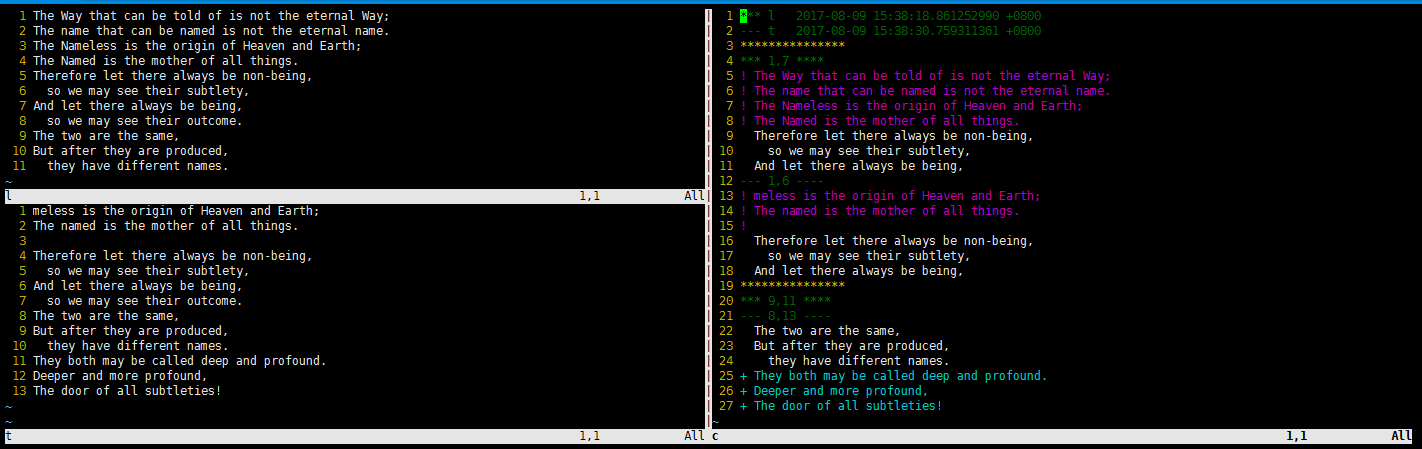
第一行,前三列定义文件名称表示符号,以深绿色显示,分割代表文件名对应的文件内容。深黄色星号分割对比的区域。区域内,白色文字属于“上下文”。叹号开头的紫红色,表示差异部分。加号开头浅蓝色表示多出的差异部分。(代表文件名的星号第8行、与短横杠的第7行相同,不在c文件中显示。)
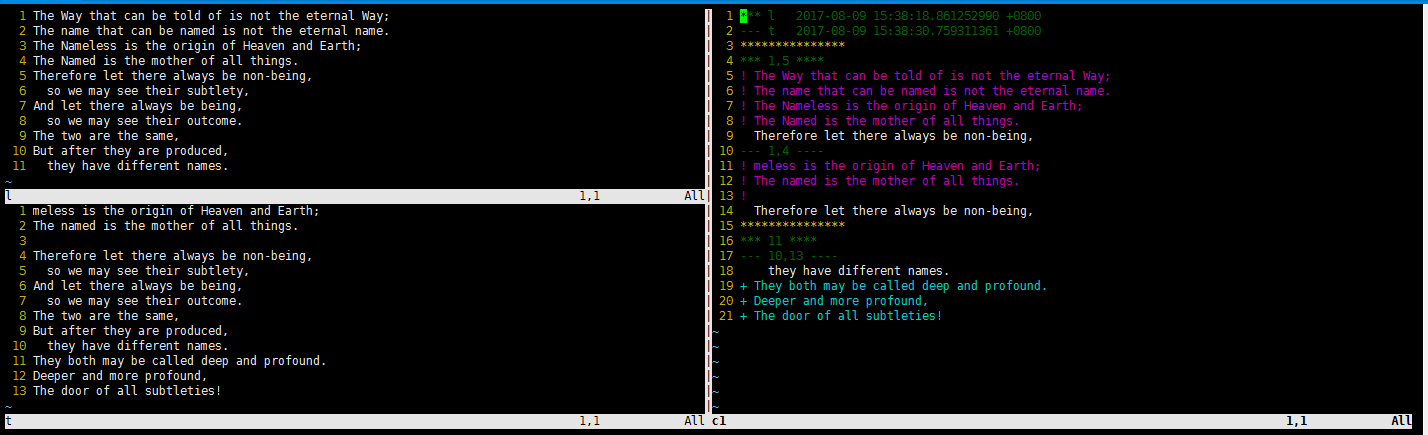
百尺杆头,更近一步,把上下文设定为1行:
[view@file diffutils]$ diff -C  l t > c1

[view@file diffutils]$ vi -o l t
2.2.统一显示格式
使用选项: --unified[=lines](-Ulines), or-u;默认3行
[view@file diffutils]$ diff -u l t

--- l    -- ::18.861252990 +

+++ t    -- ::30.759311361 +

@@ -, +, @@

-The Way that can be told of is not the eternal Way;

-The name that can be named is not the eternal name.

-The Nameless is the origin of Heaven and Earth;

-The Named is the mother of all things.

+meless is the origin of Heaven and Earth;

+The named is the mother of all things.

+

 Therefore let there always be non-being,

   so we may see their subtlety,

 And let there always be being,

@@ -, +, @@

 The two are the same,

 But after they are produced,

   they have different names.

+They both may be called deep and profound.

+Deeper and more profound,

+The door of all subtleties!
前两行定义了怎么理解加、键号。-:l文件。+:t文件。缩进:相同内容。@开头,内容汇总信息,加减号于前边两行对应;9,3表示第9行往后3行。
2.3.并排显示
两个文件的内容并排显示出来,使用选项:--side-by-side(-y)。可是使用 --width=columns(-Wcolumns) 指定显示宽度。
[view@file diffutils]$ diff -y l t

The Way that can be told of is n   <

The name that can be named is no   <

The Nameless is the origin of He        The Nameless is the origin of He

The Named is the mother of all t   |    The named is the mother of all t

                                   >

Therefore let there always be no        Therefore let there always be no

  so we may see their subtlety,           so we may see their subtlety,

And let there always be being,          And let there always be being,

  so we may see their outcome.            so we may see their outcome.

The two are the same,                   The two are the same,

But after they are produced,            But after they are produced,

  they have different names.              they have different names.

                                   >    They both may be called deep and

                                   >    Deeper and more profound,

                                   >    The door of all subtleties!
2.4.默认输出
默认输出,也称为一般输出,选项“--normal”为默认选项。
[view@file diffutils]$ diff l t

,4c1,

< The Way that can be told of is not the eternal Way;

< The name that can be named is not the eternal name.

< The Nameless is the origin of Heaven and Earth;

< The Named is the mother of all things.

---

> meless is the origin of Heaven and Earth;

> The named is the mother of all things.

>

11a11,

> They both may be called deep and profound.

> Deeper and more profound,

> The door of all subtleties!
3.比较目录
[view@file diffutils]$ ll

total

drwxrwxr-x  work work  Aug  : dir1

drwxrwxr-x  work work  Aug  : dir2

[view@file diffutils]$ tree

.

├── dir1

│   ├── l

│   └── t

└── dir2

    ├── l

    └── t

 directories,  files

文件是一致的时候,没有任何显示

[view@file diffutils]$ diff dir1 dir2

[view@file diffutils]$ rm -f dir1/l

[view@file diffutils]$ diff dir1 dir2

Only in dir2: l

[view@file diffutils]$ touch dir1/l

当不同的文件是文本文件时,就比较俩文件内容

[view@file diffutils]$ diff dir1 dir2

diff dir1/l dir2/l

0a1,

> The Way that can be told of is not the eternal Way;

> The name that can be named is not the eternal name.

> The Nameless is the origin of Heaven and Earth;

> The Named is the mother of all things.

> Therefore let there always be non-being,

>   so we may see their subtlety,

> And let there always be being,

>   so we may see their outcome.

> The two are the same,

> But after they are produced,

>   they have different names.

把输出简化

[view@file diffutils]$ diff -q dir1 dir2

Files dir1/l and dir2/l differ

有差异时,不输出

[work@file diffutils]$ diff -q dir1 dir2 >/dev/null

[work@file diffutils]$ echo $?
再看看二进制文件比较
[view@file diffutils]$ diff bin1 bin2

[view@file diffutils]$ mv bin1/ls bin1/lls

[view@file diffutils]$ diff bin1 bin2

Only in bin1: lls

Only in bin2: ls
从结果看,比较二进制文件时,仅仅比较了文件名
[view@file diffutils]$ echo $?
比较两个目录时,如果包含子目录,会显示关于子目录的信息(目录亦即文件)。默认不递归比较,可以使用选项显式指定“-ror--recursive”。比较目录时,同样会关注其中文本文件的内容(不同时会显示出来)、二进制文件的名称(文件一致名称不同会显示不同文件)。
diffutils's diff的更多相关文章
- linux包之diff
[root@84-monitor ~]# rpm -qf /usr/bin/diffdiffutils-2.8.1-28.el6.x86_64[root@84-monitor ~]# rpm -ql ...
- [Linux] diff命令:逐行进行文件比较
1. 比较文件 $ diff file1 file2 2. 比较文件夹 $ diff -urNa dir1 dir2 -u, -U NUM, --unified[=NUM] output NUM (d ...
- 一个diff工具,用于判断两个目录下所有的改动(比较新旧版本文件夹)
需求: 编写一个diff工具,用于判断两个目录下所有的改动 详细介绍: 有A和B两个目录,目录所在位置及层级均不确定 需要以B为基准找出两个目录中所有有改动的文件(文件或内容增加.修改.删除),将有改 ...
- git diff与linux diff的输出格式之unified format
前言 前面有一篇文章<一个有些意思的项目--文件夹对比工具(一)>,里面简单讲了下diff算法之--Myers算法. 既然是算法,就会有实现,比如git diff中有Myers的实现,gi ...
- 虚拟dom与diff算法 分析
好文集合: 深入浅出React(四):虚拟DOM Diff算法解析 全面理解虚拟DOM,实现虚拟DOM
- svn diff 详解
UI版: 如果多人编辑同一段代码,常常容易出现冲突的情况: 如果出现冲突,我们如何解决他呢? 1 可以选择使用自己的文件mime file,也可以使用 他们的文件 their file 2 解决冲突, ...
- React Diff算法
Web界面由DOM树来构成,当其中某一部分发生变化时,其实就是对应的某个DOM节点发生了变化.在React中,构建UI界面的思路是由当前状态决定界面.前后两个状态就对应两套界面,然后由React来比较 ...
- diff生成补丁与patch打补丁
1.使用diff生成补丁: diff是Linux下的文件比较命令,参数这里就不说了,直接man一下就行了,不仅可以比较文件,也可以比较两个目录,并且可以将不同之处生成补丁文件,其实就是一种打补丁的命令 ...
- git diff 生成patch, git apply patch 打补丁方法说明,以及分支管理的简单操作。
git diff 简易操作说明 先git log 查看commit ID, 记录你想要打的补丁的ID 比如说: git log commit 4ff35d800fa62123a28b7bda2a04e ...
随机推荐
- C/S架构和B/S架构
本文内容整理自http://blog.csdn.net/tennysonsky/article/details/45062079 C/S架构和B/S架构是两种颇具影响力的软件体系结构.C/S是一种历史 ...
- Appium笔记(二) 丶Appium的安装
一.前言 Appium 中有个很重要的组件Appium-Server,它主要用来监听我们的移动设备(真机或模拟器),然将不同编程语言编写的 appium 测试脚本进行解析,然后,驱动移动设备来运行测试 ...
- Prime Ring Problem dfs
A ring is compose of n circles as shown in diagram. Put natural number 1, 2, ..., n into each circle ...
- hdu2087 剪花布条 暴力/KMP
在字符串中不可重叠地寻找子串数量,暴力/KMP #include<stdio.h> #include<string.h> int main(){ ],b[]; ]!='#'){ ...
- 最短路--spfa+队列优化模板
spfa普通版就不写了,优化还是要的昂,spfa是可以判负环,接受负权边和重边的,判断负环只需要另开一个数组记录每个结点的入队次数,当有任意一个结点入队大于点数就表明有负环存在 #include< ...
- 移动端 元素外面使用伪类after加边框 导致其内部元素无法选中
解决方法:给内部元素增加属性 position: relative; z-index: 3; 这样就能选中其内部元素了.
- FastAdmin 浏览器 JS CSS 缓存如何更新?
由于代码修改,但文件名没有修改,因为浏览器对 JS 和 CSS 是缓存的,而且由于服务器无法控制客户端的缓存. 但是可以对 JS 和 CSS 的请求加上版本号,达到更新缓存的效果.
- Spring MVC 向页面传值-Map、Model、ModelMap、ModelAndView
Spring MVC 向页面传值,有4种方式: ModelAndView Map Model ModelMap 使用后面3种方式,都是在方法参数中,指定一个该类型的参数. Model Model 是一 ...
- python值传递和指针传递
a= 1def change_integer(a): a=a+1 return a print change_integer(a)print a b= [1, 2, 3] ...
- 切图js
首先引用一段关于拖动,缩放,剪切的基础代码 /* * 作者:http://cloudgamer.cnblogs.com/ * * 改进与增强 * 作者:http://yoker.sc0826.com/ ...