
Python(六)之文件对象
Python文件对象
明确文件系统:

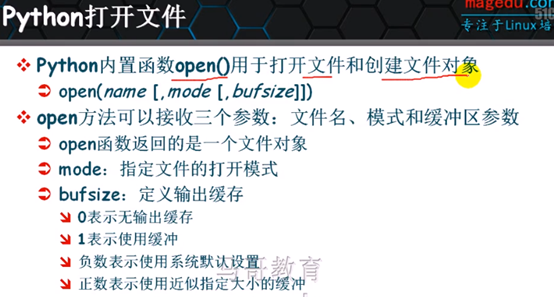
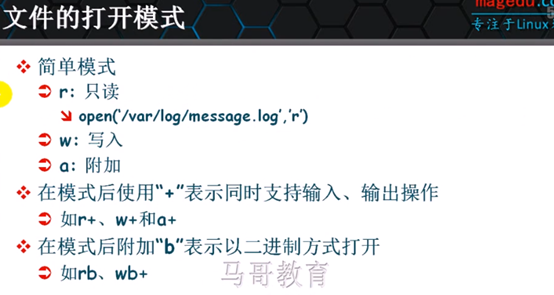
- 获取文件对象:
var_name = open(file_name[mode,[bufsize]])
缓冲:
0:禁用
1:使用缓冲,只缓冲一行数据
2+:指定缓存空间大小
负数:使用系统默认缓冲区
- 文件对象的内置方法、函数、属相
next:
In [10]: f1 = open('/etc/passwd','r')

In [11]: type(f1)

Out[11]: file

In [12]: f1.next()

Out[12]: 'root:x:0:0:root:/root:/bin/bash\n'

In [13]: f1.next()

Out[13]: 'bin:x:1:1:bin:/bin:/sbin/nologin\n'

In [14]: f1.next()

Out[14]: 'daemon:x:2:2:daemon:/sbin:/sbin/nologin\n'
close:
In [35]: f1.close()
fileno 返回文件描述符
In [38]: f1 = open('/etc/passwd','r')

In [39]: f1.fileno()

Out[39]: 8
readline,readlines
返回字符串对象
In [40]: f1.readline()

Out[40]: 'root:x:0:0:root:/root:/bin/bash\n'

返回文件所有行为列表对象:

In [41]: f1.readlines()

Out[41]:

['bin:x:1:1:bin:/bin:/sbin/nologin\n',

 'daemon:x:2:2:daemon:/sbin:/sbin/nologin\n',

 'mail:x:8:12:mail:/var/spool/mail:/sbin/nologin\n',

 'nobody:x:99:99:Nobody:/:/sbin/nologin\n']
tell:游标在文件中的位置,字节
In [47]: f1.tell()

Out[47]: 951
file.seek(offset[whence])
whence:起点
0:从文件头偏移,默认
1:从当前位置偏移
2:从文件尾部偏移
In [48]: f1.tell()

Out[48]: 951

In [49]: f1.seek(0)

In [50]: f1.tell()

Out[50]: 0

file.read([size])
file.read([size]) 读取多少个字节
In [51]: f1.read(10)

Out[51]: 'root:x:0:0'

此时在readline,或next读取的是位置到行尾

In [52]: f1.readline()

Out[52]: ':root:/root:/bin/bash\n'
file.write打开文件保存数据
In [61]: cp /etc/passwd .

In [62]: ls

passwd

In [64]: f1 = open('passwd','r+')

In [65]: f1.next()

Out[65]: 'root:x:0:0:root:/root:/bin/bash\n'

I [66]: f1.seek(0,2)

In [67]: f1.tell()

Out[67]: 951

In [68]: f1.write('new line.\n')

In [69]: f1.tell()

Out[69]: 961

In [70]: cat passwd

root:x:0:0:root:/root:/bin/bash

mysql:x:306:306::/home/mysql:/bin/bash

new line.

In [71]: f1.close()

In [72]: f2 = open('new_file','w+')

In [73]: f2.write('Python')

In [74]: f2.close()

In [75]: cat new_file

Python

读模式打开不存在文件,报IOError

In [76]: f3 = open('new_file2','r+')

---------------------------------------------------------------------------

IOError                                   Traceback (most recent call last)

<ipython-input-76-1d0d8a99b4f2> in <module>()

----> 1 f3 = open('new_file2','r+')

IOError: [Errno 2] No such file or directory: 'new_file2'

In [77]: f3 = open('new_file2','a')

In [78]: ls

new_file  new_file2  passwd
writelines(...)
writelines(sequence_of_strings) -> None. Write the strings to the file.
Note that newlines are not added. The sequence can be any iterable object
producing strings. This is equivalent to calling write() for each string
In [13]: f4 = open('new_file4','w+')

In [14]: import os

In [15]: l4 = os.listdir(‘/etc’)
返回列表对象:

In [19]: f4.writelines(l4)
In [20]: f4.flush()
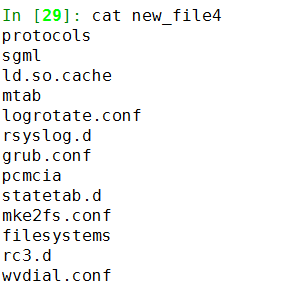
可以看到,writelines把列表中多有对象当成一个字符串写入文件,没有换行
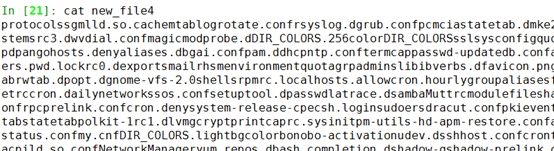
下面进行手动换行:
重新生成列表,添加换行符:
In [23]: l4 = [i+'\n' for i in os.listdir('/etc')]
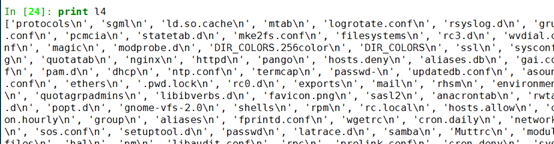
In [25]: f4 = open('new_file4','w+')

In [26]: f4.writelines(l4)

In [27]: f4.flush()

In [28]: f4.close()
isatty()判断是不是终端
In [52]: f3 = open('new_file3','r+')

In [53]: f3.isatty()

Out[53]: False
truncate(N)截取保留N个字节:
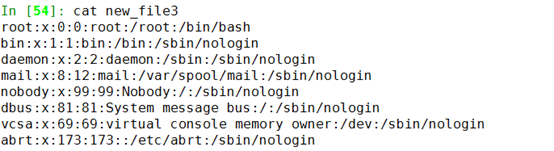
In [55]: f3.readline()

Out[55]: 'root:x:0:0:root:/root:/bin/bash\n'

In [56]: f3.readline()

Out[56]: 'bin:x:1:1:bin:/bin:/sbin/nologin\n'

In [57]: f3.readline()

Out[57]: 'daemon:x:2:2:daemon:/sbin:/sbin/nologin\n'

截取保留当前游标位置及之前字节数

In [58]: f3.truncate(f3.tell())

In [59]: f3.flush()

In [60]: f3.seek(0)

In [61]: f3.readlines()

Out[61]:

['root:x:0:0:root:/root:/bin/bash\n',

 'bin:x:1:1:bin:/bin:/sbin/nologin\n',

 'daemon:x:2:2:daemon:/sbin:/sbin/nologin\n']
closed 属性,判断文件打开状态
In [62]: f4.closed

Out[62]: False
file.name属性
In [53]: f1.name

Out[53]: '/etc/passwd'
mode文件打开模式,另外还有encoding、softspace等。
           file.close      file.flush      file.next       file.seek       file.writelines

           file.closed     file.isatty     file.read       file.softspace  file.xreadlines

           file.encoding   file.mode       file.readinto   file.tell

           file.errors     file.name       file.readline   file.truncate

           file.fileno     file.newlines   file.readlines  file.write
- 练习
1、1-10的平方写进文件new_file3,一次写一个对象
2、上面writelines方法,写入/etc下所有文件名到文件。
In [7]: f3 = open('new_file3','w+')

In [8]: for line in (i**2 for i in range(1,11)):

   ...:     f3.write(str(line)+'\n')

   ...:

In [9]: f3.flush()

In [10]: f3.close()

In [11]: cat new_file3

1

4

9

16

25

36

49

64

81

100
Python(六)之文件对象的更多相关文章
- 【Python】写入文件
1.1写入空文件 若将文本写入文件,在调用open()时候需要提供另外一个实参,告诉Python你要写入打开的文件 file_path = 'txt\MyFavoriteFruit.txt' with ...
- 十:python 对象类型详解六:文件
一:文件 1.简介:内置open 函数会创建一个python 文件对象,可以作为计算机上的一个文件链接.在调用open 之后,可以通过调用返回文件对象的方法来读写相关外部文件.文件对象只是常见文件处理 ...
- python学习笔记(六)文件夹遍历,异常处理
python学习笔记(六) 文件夹遍历 1.递归遍历 import os allfile = [] def dirList(path): filelist = os.listdir(path) for ...
- Python自动化运维之4、格式化输出、文件对象
Python格式化输出: Python的字符串格式化有两种方式: 百分号方式.format方式 百分号的方式相对来说比较老,而format方式则是比较先进的方式,企图替换古老的方式,目前两者并存.[P ...
- Python 文件对象
Python 文件对象 1) 内置函数 open() 用于打开和创建文件对象 open(name,[,mode[,bufsize]]) 文件名.模式.缓冲区参数 mode: r 只读 w 写入 a 附 ...
- Python StringIO与BytesIO、类文件对象
StringIO与BytesIO StringIO与BytesIO.类文件对象的用途,应用场景,优.缺点. StringIO StringIO 是io 模块中的类,在内存中开辟的一个文本模式的buff ...
- Python Cookbook(第3版)中文版:15.19 从C语言中读取类文件对象
15.19 从C语言中读取类文件对象¶ 问题¶ 你要写C扩展来读取来自任何Python类文件对象中的数据(比如普通文件.StringIO对象等). 解决方案¶ 要读取一个类文件对象的数据,你需要重复调 ...
- Python学习笔记 -- 第六章 文件操作
I/O编程 在磁盘上读写文件的功能都是由操作系统提供的,现代操作系统不允许普通的程序直接操作磁盘,所以,读写文件就是请求操作系统打开一个文件对象(通常称为文件描述符),然后,通过操作系统提供的接口从这 ...
- python 将文件描述符包装成文件对象
有一个对应于操作系统上一个已打开的I/O 通道(比如文件.管道.套接字等)的整型文件描述符,你想将它包装成一个更高层的Python 文件对象. 一个文件描述符和一个打开的普通文件是不一样的.文件描述符 ...
随机推荐
- webpack window下配置的hello world
峰回路转 一区九折 先看效果:(此效果是webpack执行完之后会生成build文件夹已经它下面的index.html,点击index.html就是下图的效果)
- 【Android】详解Android的menu菜单
在软件应用过程中,菜单的存在是必不可少的,我这次讲一下,我对android菜单的一个基础做法吧 Android的菜单分为三种类型:选项菜单(Option Menu).上下文菜单(Context Men ...
- 基于matplotlib的数据可视化 - 等高线 contour 与 contourf
contour 与contourf 是绘制等高线的利器. contour - 绘制等高线 contourf - 填充等高线 两个的返回值值是一样的(return values are the sam ...
- AaronYang的留言板
^_^很开心能在这里遇到你,我是ay,英文名叫aaronyang,真名叫杨洋,安徽六安的,有老乡吗?这里的文章几乎都是我原创的,要不然就是收集别人的好的文章,自己再整理下与大家分享.绝对希望原创,本站 ...
- C++模板”>>”编译问题与词法消歧设计
在编译理论中,通常将编译过程抽象为5个主要阶段:词法分析(Lexical Analysis),语法分析(Parsing),语义分析(Semantic Analysis),优化(Optimization ...
- matlab中的Traing、Validation、Testing
<matlab神经网络30个案例分析> ROC曲线是反映敏感性和特异性连续变量的综合指标,roc曲线真阳性率为纵坐标,假阳性率为横坐标,在坐标上由无数个临界值求出的无数对真阳性率和假阳性率 ...
- CUDA 中的计时方法
问题描述:一般利用CUDA进行加速处理时,都需要测试CUDA程序的运行时间,来对比得到的加速效果. 解决方法: 1).GPU端计时,即设备端计时. 2).CPU端计时,即主机端计时. 设备端计时有两种 ...
- win10 标注工具LabelImg 安装使用
安装步骤(默认已经安装了Python3.X ): pip 安装PyQt5 进入cmd(Win键 + R键,输入cmd,enter键入),输入: >>pip install PyQt5 如果 ...
- git忽略除指定文件/指定后缀名文件外的文件
不需要从头写.gitignore文件,GitHub已经为我们准备了各种配置文件,只需要组合一下就可以使用了.所有配置文件可以直接在线浏览:https://github.com/github/gitig ...
- Android Logcat信息级别解读
Android Logcat信息级别解读 Logcat信息分为好几个级别,分别是:Assert(断言).Debug(调试).Error(错误).Info(信息).Verbose(详细).Warning ...