
Introduction to the visual formatting model
原文:https://www.w3.org/TR/CSS2/visuren.html#block-formatting
---------------------------------------
This chapter and the next describe the visual formatting model: how user agents process the document tree for visual media.
In the visual formatting model, each element in the document tree generates zero or more boxes according to the box model. The layout of these boxes is governed by:
- box dimensions and type.
- positioning scheme (normal flow, float, and absolute positioning).
- relationships between elements in the document tree.
- external information (e.g., viewport size, intrinsic dimensions of images, etc.).
The properties defined in this chapter and the next apply to both continuous media and paged media. However, the meanings of the margin properties vary when applied to paged media (see the page model for details).
The visual formatting model does not specify all aspects of formatting (e.g., it does not specify a letter-spacing algorithm). Conforming user agents may behave differently for those formatting issues not covered by this specification.
9.1.1 The viewport
User agents for continuous media generally offer users a viewport (a window or other viewing area on the screen) through which users consult a document. User agents may change the document's layout when the viewport is resized (see the initial containing block).
When the viewport is smaller than the area of the canvas on which the document is rendered, the user agent should offer a scrolling mechanism. There is at most one viewport per canvas, but user agents may render to more than one canvas (i.e., provide different views of the same document).
9.1.2 Containing blocks
In CSS 2.1, many box positions and sizes are calculated with respect to the edges of a rectangular box called a containing block. In general, generated boxes act as containing blocks for descendant boxes; we say that a box "establishes" the containing block for its descendants. The phrase "a box's containing block" means "the containing block in which the box lives," not the one it generates.
Each box is given a position with respect to its containing block, but it is not confined by this containing block; it may overflow.
The details of how a containing block's dimensions are calculated are described in the next chapter.
9.2 Controlling box generation
The following sections describe the types of boxes that may be generated in CSS 2.1. A box's type affects, in part, its behavior in the visual formatting model. The 'display' property, described below, specifies a box's type.
9.2.1 Block-level elements and block boxes
Block-level elements are those elements of the source document that are formatted visually as blocks (e.g., paragraphs). The following values of the 'display' property make an element block-level: 'block', 'list-item', and 'table'.
Block-level boxes are boxes that participate in a block formatting context. Each block-level element generates a principal block-level box that contains descendant boxes and generated content and is also the box involved in any positioning scheme. Some block-level elements may generate additional boxes in addition to the principal box: 'list-item' elements. These additional boxes are placed with respect to the principal box.
Except for table boxes, which are described in a later chapter, and replaced elements, a block-level box is also a block container box. A block container box either contains only block-level boxes or establishes an inline formatting context and thus contains only inline-level boxes. Not all block container boxes are block-level boxes: non-replaced inline blocks and non-replaced table cells are block containers but not block-level boxes. Block-level boxes that are also block containers are called block boxes.
The three terms "block-level box," "block container box," and "block box" are sometimes abbreviated as "block" where unambiguous.
9.2.1.1 Anonymous block boxes
In a document like this:
<DIV>

  Some text

  <P>More text

</DIV>
(and assuming the DIV and the P both have 'display: block'), the DIV appears to have both inline content and block content. To make it easier to define the formatting, we assume that there is an anonymous block box around "Some text".
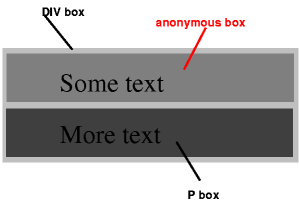
Diagram showing the three boxes, of which one is anonymous, for the example above.
In other words: if a block container box (such as that generated for the DIV above) has a block-level box inside it (such as the P above), then we force it to have only block-level boxes inside it.
When an inline box contains an in-flow block-level box, the inline box (and its inline ancestors within the same line box) are broken around the block-level box (and any block-level siblings that are consecutive or separated only by collapsible whitespace and/or out-of-flow elements), splitting the inline box into two boxes (even if either side is empty), one on each side of the block-level box(es). The line boxes before the break and after the break are enclosed in anonymous block boxes, and the block-level box becomes a sibling of those anonymous boxes. When such an inline box is affected by relative positioning, any resulting translation also affects the block-level box contained in the inline box.
This model would apply in the following example if the following rules:
p    { display: inline }

span { display: block }
were used with this HTML document:
<!DOCTYPE HTML PUBLIC "-//W3C//DTD HTML 4.01//EN">

<HEAD>

<TITLE>Anonymous text interrupted by a block</TITLE>

</HEAD>

<BODY>

<P>

This is anonymous text before the SPAN.

<SPAN>This is the content of SPAN.</SPAN>

This is anonymous text after the SPAN.

</P>

</BODY>
The P element contains a chunk (C1) of anonymous text followed by a block-level element followed by another chunk (C2) of anonymous text. The resulting boxes would be a block box representing the BODY, containing an anonymous block box around C1, the SPAN block box, and another anonymous block box around C2.
The properties of anonymous boxes are inherited from the enclosing non-anonymous box (e.g., in the example just below the subsection heading "Anonymous block boxes", the one for DIV). Non-inherited properties have their initial value. For example, the font of the anonymous box is inherited from the DIV, but the margins will be 0.
Properties set on elements that cause anonymous block boxes to be generated still apply to the boxes and content of that element. For example, if a border had been set on the P element in the above example, the border would be drawn around C1 (open at the end of the line) and C2 (open at the start of the line).
Some user agents have implemented borders on inlines containing blocks in other ways, e.g., by wrapping such nested blocks inside "anonymous line boxes" and thus drawing inline borders around such boxes. As CSS1 and CSS2 did not define this behavior, CSS1-only and CSS2-only user agents may implement this alternative model and still claim conformance to this part of CSS 2.1. This does not apply to UAs developed after this specification was released.
Anonymous block boxes are ignored when resolving percentage values that would refer to it: the closest non-anonymous ancestor box is used instead. For example, if the child of the anonymous block box inside the DIV above needs to know the height of its containing block to resolve a percentage height, then it will use the height of the containing block formed by the DIV, not of the anonymous block box.
9.2.2 Inline-level elements and inline boxes
Introduction to the visual formatting model的更多相关文章
- CSS学习笔记——视觉格式化模型 visual formatting model
CSS 视觉格式化模型(visual formatting model)是用来处理文档并将它显示在视觉媒体上的机制.他有一套既定的规则(也就是W3C规范),规定了浏览器该怎么处理每一个盒子.以下内容翻 ...
- visual formatting model (可视化格式模型)【持续修正】
概念: visual formatting model,可视化格式模型 The CSS visual formatting model is an algorithm that processes a ...
- 可视化格式模型(visual formatting model)
原文 简书原文:https://www.jianshu.com/p/7632f16ff555 大纲 1.认识可视化模型 2.可视化模型的内容 3.可视化模型的影响因素 1.认识可视化模型 盒子模型是C ...
- Visual formatting model 可视化格式模型
在可视化格式模型里,每个元素都是由一个或者多个盒子组成,这些盒子的布局由下面规则控制: box dimensions and type.(块元素和行内元素) positioning scheme (n ...
- CSS - 视觉格式化模型(Visual formatting model)
几个概念 块:block,一个抽象的概念,块与块之间在垂直方向上按照顺序依次堆叠. 行内:inline,一个抽象的概念,行内与行内之间在水平方向上按照顺序依次堆叠(会有换行). 元素:element, ...
- 详说 Block Formatting Contexts (块级格式化上下文)
在上文<详说清除浮动>中,Kayo 较为详细地介绍了 BFC ,也就是本文的主角 Block Formatting Contexts (块级格式化上下文),本文会基于上文关于 BFC 的部 ...
- Block Formatting Contexts (块级格式化上下文) 使用参考
转自:http://kayosite.com/block-formatting-contexts-in-detail.html 在上文<详说清除浮动>中,Kayo 较为详细地介绍了 BFC ...
- HTML5 Differences from HTML4
Abstract "HTML5 Differences from HTML4" describes the differences of the HTML5 specificati ...
- CSS 3 学习——transform 3D转换渲染
以下内容根据官方规范翻译,没有翻译关于SVG变换的内容和关于矩阵计算的内容. 一般情况下,元素在一个无景深无立体感的平面(flat plane)上渲染,这个平面就是其包含块所处的平面.同时,页面上的其 ...
随机推荐
- UVALive 6916 Punching Robot dp
Punching Robot 题目连接: https://icpcarchive.ecs.baylor.edu/index.php?option=com_onlinejudge&Itemid= ...
- linux soname
在linux下使用动态库时,经常会发现明明编译时指定的是libA.so,可是程序运行时或通过ldd查看依赖却是libA.so.XXX, 原因跟linux下so库的soname有关,查看so库的sona ...
- SAE J1850 VPW Implement
---恢复内容开始--- OBDII Interface Project When I can ever find enough time away from schoolwork, I try to ...
- STM32 通用定时器的几种配置方式
STM32 通用定时器的几种配置方式 //------------------------------------------------------------------------------ ...
- Revit MEP API连接器类别
连接器的类别,风管不仅有两端,可能在曲线上也有. ; ; ; ; Connector conn = csi.Current ; ...
- [.NET] [.net 脱壳工具]Sixxpack 最新脱壳机 通杀Sixxpack全版本by -=Msdn5 君临=
[.net 脱壳工具]Sixxpack 最新脱壳机 通杀Sixxpack全版本by -=Msdn5 君临=- 识别方法: 如果无法调戏,请上传附件艾特我.............发帖不易啊..身处大西 ...
- 让DELPHI自带的richedit控件显示图片
让DELPHI自带的richedit控件显示图片 unit RichEx; { 2005-03-04 LiChengbin Added: Insert bitmap or gif into RichE ...
- 【k8s】centos上安装kubernetes,报错Error:docker-ce-cli conflicts with 2:docker-1.13.1-94.gitb2f74b2.el7.centos.x86_64
使用命令: yum install kubernetes 报错: Error: docker-ce-cli conflicts with :docker--.git07f3374.el7.centos ...
- 【python】python读写文件,都不乱码
读是按照文本的编码方式读取,写是按照文本的编码方式追加 import chardet fileName = 'E:/2/采集数据_pswf12_180大0小35750_20181206.txt' # ...
- 浅析c++中virtual关键字
http://blog.csdn.net/djh512/article/details/8973606 1.virtual关键字主要是什么作用? c++中的函数调用默认不适用动态绑定.要触发动态绑定, ...