
sql的行转列(PIVOT)与列转行(UNPIVOT) webapi 跨域问题 Dapper 链式查询 扩展 T4 代码生成 Demo (抽奖程序)
sql的行转列(PIVOT)与列转行(UNPIVOT)
在做数据统计的时候,行转列,列转行是经常碰到的问题。case when方式太麻烦了,而且可扩展性不强,可以使用 PIVOT,UNPIVOT比较快速实现行转列,列转行,而且可扩展性强
一、行转列
1、测试数据准备

CREATE  TABLE [StudentScores]
(
   [UserName]         NVARCHAR(20),        --学生姓名
   [Subject]          NVARCHAR(30),        --科目
   [Score]            FLOAT,               --成绩
)

INSERT INTO [StudentScores] SELECT '张三', '语文', 80
INSERT INTO [StudentScores] SELECT '张三', '数学', 90
INSERT INTO [StudentScores] SELECT '张三', '英语', 70
INSERT INTO [StudentScores] SELECT '张三', '生物', 85
INSERT INTO [StudentScores] SELECT '李四', '语文', 80
INSERT INTO [StudentScores] SELECT '李四', '数学', 92
INSERT INTO [StudentScores] SELECT '李四', '英语', 76
INSERT INTO [StudentScores] SELECT '李四', '生物', 88
INSERT INTO [StudentScores] SELECT '码农', '语文', 60
INSERT INTO [StudentScores] SELECT '码农', '数学', 82
INSERT INTO [StudentScores] SELECT '码农', '英语', 96
INSERT INTO [StudentScores] SELECT '码农', '生物', 78

2、行转列sql
SELECT * FROM [StudentScores] /*数据源*/
AS P
PIVOT
(
    SUM(Score/*行转列后 列的值*/) FOR
    p.Subject/*需要行转列的列*/ IN ([语文],[数学],[英语],[生物]/*列的值*/)
) AS T
执行结果:

二、列转行
1、测试数据准备
CREATE TABLE ProgrectDetail
(
    ProgrectName         NVARCHAR(20), --工程名称
    OverseaSupply        INT,          --海外供应商供给数量
    NativeSupply         INT,          --国内供应商供给数量
    SouthSupply          INT,          --南方供应商供给数量
    NorthSupply          INT           --北方供应商供给数量
)

INSERT INTO ProgrectDetail
SELECT 'A', 100, 200, 50, 50
UNION ALL
SELECT 'B', 200, 300, 150, 150
UNION ALL
SELECT 'C', 159, 400, 20, 320
UNION ALL

2、列转行的sql
SELECT P.ProgrectName,P.Supplier,P.SupplyNum
FROM
(
    SELECT ProgrectName, OverseaSupply, NativeSupply,
           SouthSupply, NorthSupply
     FROM ProgrectDetail
)T
UNPIVOT
(
    SupplyNum FOR Supplier IN
    (OverseaSupply, NativeSupply, SouthSupply, NorthSupply )
) P
执行结果:

webapi 跨域问题
参考:http://www.cnblogs.com/chenxizhang/p/3821703.html
给自己做个笔记
 HttpContext.Current.Response.AddHeader("Access-Control-Allow-Credentials", "true");
 HttpContext.Current.Response.AddHeader("Access-Control-Allow-Headers", "origin,x-requested-with,content-type");
 HttpContext.Current.Response.AddHeader("Access-Control-Allow-Methods", "POST,GET,OPTIONS");
 HttpContext.Current.Response.AddHeader("Access-Control-Allow-Origin", "*");
在web.config中添加这段代码
<system.webServer>
<httpProtocol>
<customHeaders>
<add name="Access-Control-Allow-Origin" value="*" />
<add name="Access-Control-Allow-Headers" value="Content-Type" />
<add name="Access-Control-Allow-Methods" value="GET, POST, PUT, DELETE, OPTIONS" />
</customHeaders>
</httpProtocol>
<handlers>
<remove name="ExtensionlessUrlHandler-Integrated-4.0" />
<remove name="OPTIONSVerbHandler" />
<remove name="TRACEVerbHandler" />
<add name="ExtensionlessUrlHandler-Integrated-4.0" path="*." verb="*" type="System.Web.Handlers.TransferRequestHandler" preCondition="integratedMode,runtimeVersionv4.0" />
</handlers>
</system.webServer>
Dapper 链式查询 扩展
Dapper 链式查询扩展 DapperSqlMaker
Github地址:https://github.com/mumumutou/DapperSqlMaker 欢迎大佬加入
Demo:
- 查询 TestsDapperSqlMaker\DapperSqlMaker.Test\ SelectDapperSqlMakerTest.cs
- 添加 TestsDapperSqlMaker\DapperSqlMaker.Test\ InsertDapperSqlMakerTest.cs
- 更新 TestsDapperSqlMaker\DapperSqlMaker.Test\ UpdateDapperSqlMakerTest.cs
- 删除 TestsDapperSqlMaker\DapperSqlMaker.Test\ DeleteDapperSqlMakerTest.cs
- 上下文类 TestsDapperSqlMaker\DbDapperSqlMaker\ LockDapperUtilsqlite.cs
简单栗子:
1.查询-联表查询,分页
 1 public void 三表联表分页测试()
 2 {
 3     var arruser = new int[2] { 1,2 };  //
 4     string uall = "b.*", pn1 = "%蛋蛋%", pn2 = "%m%";
 5     LockPers lpmodel = new LockPers() { IsDel = false};
 6     Users umodel = new Users() { UserName = "jiaojiao" };
 7     SynNote snmodel = new SynNote() { Name = "木头" };
 8     Expression<Func<LockPers, Users, SynNote, bool>> where = PredicateBuilder.WhereStart<LockPers, Users, SynNote>();
 9     where = where.And((l, u, s) => ( l.Name.Contains(pn1) || l.Name.Contains(pn2) ));
10     where = where.And((lpw, uw, sn) => lpw.IsDel == lpmodel.IsDel);
11     where = where.And((l, u, s) => u.UserName == umodel.UserName);
12     where = where.And((l, u, s) => s.Name == snmodel.Name );
13     where = where.And((l, u, s) => SM.In(u.Id, arruser));
14
15     DapperSqlMaker<LockPers, Users, SynNote> query = LockDapperUtilsqlite<LockPers, Users, SynNote>
16         .Selec()
17         .Column((lp, u, s) => //null)  //查询所有字段
18             new { lp.Name, lpid = lp.Id, x = "LENGTH(a.Prompt) as len", b = SM.Sql(uall)                              , scontent = s.Content, sname = s.Name })
19         .FromJoin(JoinType.Left, (lpp, uu, snn) => uu.Id == lpp.UserId
20                 , JoinType.Inner, (lpp, uu, snn) => uu.Id == snn.UserId)
21         .Where(where)
22         .Order((lp, w, sn) => new { lp.EditCount, x = SM.OrderDesc(lp.Name), sn.Content });
23
24     var result = query.ExcuteSelect();
25     WriteJson(result); //  查询结果
26
27     Tuple<StringBuilder, DynamicParameters> resultsqlparams = query.RawSqlParams();
28     WriteSqlParams(resultsqlparams); // 打印sql和参数
29
30     int page = 2, rows = 3, records;
31     var result2 = query.LoadPagelt(page, rows, out records);
32     WriteJson(result2); //  查询结果
33 }
生成的sql :
select  a.Name as Name, a.Id as lpid
    , LENGTH(a.Prompt) as len, b.*
    , c.Content as scontent, c.Name as sname
from LockPers a
    left join  Users b on  b.Id = a.UserId
    inner join  SynNote c on  b.Id = c.UserId
where  (  a.Name like @Name0  or  a.Name like @Name1  )
    and  a.IsDel = @IsDel2  and  b.UserName = @UserName3
    and  c.Name = @Name4  and  b.Id in @Id
order by  a.EditCount, a.Name desc , c.Content
2.更新-更新部分字段
 1 [Test]
 2 public void 更新部分字段测试lt()
 3 {
 4     var issucs = LockDapperUtilsqlite<LockPers>.Cud.Update(
 5         s =>
 6         {
 7             s.Name = "测试bool修改1";
 8             s.Content = "update方法内赋值修改字段";
 9             s.IsDel = true;
10         },
11         w => w.Name == "测试bool修改1" && w.IsDel == true
12         );
13     Console.WriteLine(issucs);
14 }
3.七联表以上待扩展 copy六联表修改3个文件
- DapperSqlMaker
- Template_DapperSqlMaker 上下文类
- PredicateBuilder 条件拼接类
4.实体生成T4模板使用方法 https://www.cnblogs.com/cl-blogs/p/7205954.html
T4 代码生成 Demo (抽奖程序)
参考自这位大狮的: https://github.com/Pencroff/Dapper-DAL/blob/master/Dapper-DAL/Models/ModelGenerator.tt
项目Demo下载 http://download.csdn.net/detail/qq_21533697/9904071
- 支持Oracle,MSSQL,SQLite
- Demo项目是个抽奖小程序,抽奖只用到了LuckDraw表
- Demo用的SQLite包含库方便直接运行
- 里面用到Dapper就只写了Model层的模板,
文件目录
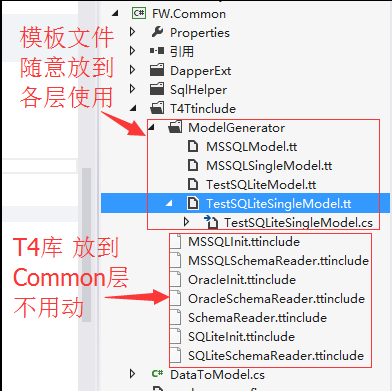
T4库
表结构读取抽象类 SchemaReader.ttinclude
  1 <#+
  2 /*
  3 The contents of this file are subject to the New BSD
  4  License (the "License"); you may not use this file
  5  except in compliance with the License. You may obtain a copy of
  6  the License at http://www.opensource.org/licenses/bsd-license.php
  7
  8  Software distributed under the License is distributed on an
  9  "AS IS" basis, WITHOUT WARRANTY OF ANY KIND, either express or
 10  implied. See the License for the specific language governing
 11  rights and limitations under the License.
 12 */
 13
 14 string ConnectionString = "";
 15 string TableFilter = "";
 16 string TopNamespace = "";
 17 string Namespace = "";
 18 string ClassPrefix = "";
 19 string ClassSuffix = "";
 20 string SchemaName = null;
 21 bool IncludeViews;
 22 string[] ExcludeTablePrefixes = new string[]{};
 23 string _connectionString="";
 24 string _providerName="";
 25
 26 static Regex rxCleanUp = new Regex(@"[^\w\d_]", RegexOptions.Compiled);
 27
 28 static Func<string, string> CleanUp = (str) =>
 29 {
 30     str = rxCleanUp.Replace(str, "_");
 31     if (char.IsDigit(str[0])) str = "_" + str;
 32
 33     return str;
 34 };
 35
 36 string CheckNullable(Column col)
 37 {
 38     string result="";
 39     if(col.IsNullable &&
 40         col.PropertyType !="byte[]" &&
 41         col.PropertyType !="string" &&
 42         col.PropertyType !="Microsoft.SqlServer.Types.SqlGeography" &&
 43         col.PropertyType !="Microsoft.SqlServer.Types.SqlGeometry"
 44         )
 45         result="?";
 46     return result;
 47 }
 48
 49 static bool IsExcluded(string tablename, string[] ExcludeTablePrefixes)
 50 {
 51     for (int i = 0; i < ExcludeTablePrefixes.Length; i++)
 52     {
 53         string s = ExcludeTablePrefixes[i];
 54         if(tablename.StartsWith(s)) return true;
 55     }
 56     return false;
 57 }
 58
 59
 60 abstract class SchemaReader
 61 {
 62     public abstract Tables ReadSchema(string connstr, string tableFilter);
 63     public GeneratedTextTransformation outer;
 64     public void WriteLine(string o)
 65     {
 66         outer.WriteLine(o);
 67     }
 68
 69     public string GetPropertyType(string sqlType)
 70     {
 71         string sysType = "string";
 72         switch (sqlType)
 73         {
 74             case "bigint":
 75                 sysType = "long";
 76                 break;
 77             case "smallint":
 78                 sysType = "short";
 79                 break;
 80             case "int":
 81             case "number":
 82             case "integer":
 83                 sysType = "int";
 84                 break;
 85             case "uniqueidentifier":
 86                 sysType = "Guid";
 87                 break;
 88             case "smalldatetime":
 89             case "datetime":
 90             case "date":
 91             case "time":
 92                 sysType = "DateTime";
 93                 break;
 94             case "float":
 95                 sysType = "double";
 96                 break;
 97             case "real":
 98                 sysType = "float";
 99                 break;
100             case "numeric":
101             case "smallmoney":
102             case "decimal":
103             case "money":
104                 sysType = "decimal";
105                 break;
106             case "tinyint":
107                 sysType = "byte";
108                 break;
109             case "bit":
110                 sysType = "bool";
111                 break;
112             case "image":
113             case "binary":
114             case "varbinary":
115             case "timestamp":
116                 sysType = "byte[]";
117                 break;
118             case "geography":
119                 sysType = "Microsoft.SqlServer.Types.SqlGeography";
120                 break;
121             case "geometry":
122                 sysType = "Microsoft.SqlServer.Types.SqlGeometry";
123                 break;
124         }
125         return sysType;
126     }
127 }
128
129 public class Table
130 {
131     public List<Column> Columns;
132     public string Name;
133     public string Schema;
134     public bool IsView;
135     public string CleanName;
136     public string ClassName;
137     public string SequenceName;
138     public bool Ignore;
139
140     public Column PK
141     {
142         get
143         {
144             return this.Columns.SingleOrDefault(x=>x.IsPK);
145         }
146     }
147
148     public Column GetColumn(string columnName)
149     {
150         return Columns.Single(x=>string.Compare(x.Name, columnName, true)==0);
151     }
152
153     public Column this[string columnName]
154     {
155         get
156         {
157             return GetColumn(columnName);
158         }
159     }
160
161 }
162
163 public class Column
164 {
165     public string Name;
166     public string PropertyName;
167     public string PropertyType;
168     public string DbType;
169     public bool IsPK;
170     public bool IsNullable;
171     public bool IsAutoIncrement;
172     public bool Ignore;
173 }
174
175 public class Tables : List<Table>
176 {
177     public Tables()
178     {
179     }
180
181     public Table GetTable(string tableName)
182     {
183         return this.Single(x=>string.Compare(x.Name, tableName, true)==0);
184     }
185
186     public Table this[string tableName]
187     {
188         get
189         {
190             return GetTable(tableName);
191         }
192     }
193
194 }
195
196 #>
SQLite表结构读取实现 SQLiteSchemaReader.ttinclude
  1 <#@ include file=".\SchemaReader.ttinclude" #>
  2 <#+
  3 Tables LoadTables()
  4 {
  5
  6     WriteLine("// This file was automatically generated by the Dapper.SimpleCRUD T4 Template");
  7     WriteLine("// Do not make changes directly to this file - edit the template instead");
  8     WriteLine("// ");
  9     WriteLine("// The following connection settings were used to generate this file");
 10     WriteLine("// ");
 11     WriteLine("//     Connection String : `{0}`", ConnectionString);
 12     WriteLine("");
 13
 14     //DbProviderFactory _factory ;
 15     try
 16     {
 17         // _factory = DbProviderFactories.GetFactory(ProviderName);
 18     }
 19     catch (Exception x)
 20     {
 21         var error=x.Message.Replace("\r\n", "\n").Replace("\n", " ");
 22         WriteLine("");
 23         WriteLine("// -----------------------------------------------------------------------------------------");
 24         WriteLine("// -----------------------------------------------------------------------------------------");
 25         WriteLine("");
 26         return new Tables();
 27     }
 28
 29     try
 30     {
 31         Tables result;
 32
 33         SchemaReader reader= new SqliteSchemaReader();
 34         result=reader.ReadSchema(ConnectionString, TableFilter);
 35
 36         for (int i=result.Count-1; i>=0; i--)
 37         {
 38             if (SchemaName!=null && string.Compare(result[i].Schema, SchemaName, true)!=0)
 39             {
 40                 result.RemoveAt(i);
 41                 continue;
 42             }
 43             if (!IncludeViews && result[i].IsView)
 44             {
 45                 result.RemoveAt(i);
 46                 continue;
 47             }
 48         }
 49
 50
 51
 52         var rxClean = new Regex("^(Equals|GetHashCode|GetType|ToString|repo|Save|IsNew|Insert|Update|Delete|Exists|SingleOrDefault|Single|First|FirstOrDefault|Fetch|Page|Query)$");
 53         foreach (var t in result)
 54         {
 55             t.ClassName = ClassPrefix + t.ClassName + ClassSuffix;
 56             foreach (var c in t.Columns)
 57             {
 58                 c.PropertyName = rxClean.Replace(c.PropertyName, "_$1");
 59
 60                 // Make sure property name doesn't clash with class name
 61                 if (c.PropertyName == t.ClassName)
 62                     c.PropertyName = "_" + c.PropertyName;
 63             }
 64         }
 65
 66             return result;
 67     }
 68     catch (Exception x)
 69     {
 70         var error=x.Message.Replace("\r\n", "\n").Replace("\n", " ");
 71         Warning(string.Format("Failed to read database schema - {0}", error));
 72         WriteLine("");
 73         WriteLine("// -----------------------------------------------------------------------------------------");
 74         WriteLine("// Failed to read database schema - {0}", error);
 75         WriteLine("// -----------------------------------------------------------------------------------------");
 76         WriteLine("");
 77         return new Tables();
 78     }
 79
 80
 81 }
 82
 83 class SqliteSchemaReader : SchemaReader
 84     {
 85
 86         private    string _connstr {get;set;}
 87
 88         public override Tables ReadSchema(string connstr, string tableFilter)
 89         {
 90             _connstr = connstr;
 91             var result = new Tables();
 92             //pull the tables in a reader
 93             using (IDataReader rdr = ExecuteReader(TABLE_SQL + tableFilter)) // SQLitehelper.
 94             {
 95                 while (rdr.Read())
 96                 {
 97                     Table tbl = new Table();
 98                     tbl.Name = rdr["name"].ToString();
 99                     //tbl.Schema = rdr["TABLE_SCHEMA"].ToString();
100                     //tbl.IsView = string.Compare(rdr["TABLE_TYPE"].ToString(), "View", true) == 0;
101                     tbl.CleanName = CleanUp(tbl.Name);
102                     // tbl.CleanName = T4Generator.CleanUp(tbl.Name);
103                     if (tbl.CleanName.StartsWith("tbl_")) tbl.CleanName = tbl.CleanName.Replace("tbl_", "");
104                     if (tbl.CleanName.StartsWith("tbl")) tbl.CleanName = tbl.CleanName.Replace("tbl", "");
105                     tbl.CleanName = tbl.CleanName.Replace("_", "");
106                     tbl.ClassName = tbl.CleanName;
107
108                     result.Add(tbl);
109                 }
110            }
111
112             foreach (var tbl in result)
113             {
114                 tbl.Columns = LoadColumns(tbl);
115
116                 //Mark the primary key
117                 //string PrimaryKey = GetPK(tbl.Schema, tbl.Name);
118                 //var pkColumn = tbl.Columns.SingleOrDefault(x => x.Name.ToLower().Trim() == PrimaryKey.ToLower().Trim());
119                 //if (pkColumn != null)
120                 //{
121                 //    pkColumn.IsPK = true;
122                 //}
123             }
124
125
126             return result;
127         }
128
129         List<Column> LoadColumns(Table tbl)
130         {
131             var result = new List<Column>();
132             using (IDataReader rdr = ExecuteReader(COLUMN_SQL.Replace("@tableName", tbl.Name))) // SQLitehelper.
133             {
134                 while (rdr.Read())
135                 {
136                     Column col = new Column();
137                     col.Name = rdr["name"].ToString();
138                     col.PropertyName = CleanUp(col.Name);
139                     //col.PropertyName = T4Generator.CleanUp(col.Name);
140                     col.PropertyType = base.GetPropertyType(rdr["type"].ToString().ToLower());
141                     col.IsNullable = rdr["notnull"].ToString() != "1";
142                     //col.IsAutoIncrement = false; //((int)rdr["IsIdentity"]) == 1;
143                     col.IsPK = rdr["pk"].ToString() == "1";
144                     result.Add(col);
145                 }
146             }
147
148             return result;
149         }
150
151         string Table_Filter =  " ";
152
153         const string TABLE_SQL = " select name from sqlite_master where type = 'table' ";
154
155         const string COLUMN_SQL = " PRAGMA table_info(@tableName) ";
156
157         /// <summary>
158         /// 查询
159         /// </summary>
160         /// <param name="sql">sql语句</param>
161         /// <param name="slPars">参数</param>
162         /// <returns>发挥SQLiteDataReader</returns>
163         public SQLiteDataReader ExecuteReader(string sql, params SQLiteParameter[] slPars)
164         {
165             SQLiteConnection conn = new SQLiteConnection(_connstr);
166             using (SQLiteCommand cmd = new SQLiteCommand(sql,conn))
167             {
168                 if (slPars != null)
169                 {
170                     cmd.Parameters.AddRange(slPars);
171                 }
172                 try
173                 {
174                     conn.Open();
175                     return cmd.ExecuteReader(CommandBehavior.CloseConnection);
176                 }
177                 catch(Exception ex)
178                 {
179                     conn.Close();
180                     conn.Dispose();
181                     throw ex;
182                 }
183
184             }
185
186         }
187
188     }
189 #>
SQLite配置文件 SQLiteInit.ttinclude
1.配置连接串 注意修改连接串为自己对应的 ConnectionString = @"Data Source=E:/cc/test/LotterySite/Lib/db/cater.db;";
2.需要生成的表 3.顶级命名空间 4.一个库对应一个配置文件 (开始是把这些配置直接写在各层模板文件的,后来涉及多库的切换,每个文件改链接麻烦)
 1 <#@ include file="./SQLiteSchemaReader.ttinclude" #>
 2 <#  // 初始化文件 一个库对应一个ttinclude文件
 3     // Settings  初始化配置
 4     ConnectionString = @"Data Source=E:/cc/test/LotterySite/Lib/db/cater.db;";  // 连接串
 5     TableFilter = " and name in ('LuckDraw') ";  // 过滤表
 6     TopNamespace = "FW";  // 顶级命名空间
 7     ClassPrefix = "";
 8     ClassSuffix = "";
 9     IncludeViews = true;
10     ExcludeTablePrefixes = new string[]{"aspnet_","webpages_"};
11
12     // Read schema
13     var tables = LoadTables();   //读取的所有表结构
14 #>
SQLite 模板使用
 1 <#@ template hostspecific="True" #>
 2 <#@ include file="EF.Utility.CS.ttinclude"#>
 3 <#@ include file="$(SolutionDir)\FW.Common\T4Ttinclude\SQLiteInit.ttinclude" #>
 4 <#@ assembly name="EnvDTE" #>
 5 <#@ assembly name="System.Data" #>
 6 <#@ assembly name="System.Data.Entity.Design" #>
 7 <#@ assembly name="System.Xml" #>
 8 <#@ assembly name="System.Configuration" #>
 9 <#@ assembly name="$(SolutionDir)\Lib\sqlite\System.Data.SQLite.dll" #>
10
11 <#@ import namespace="System.Collections.Generic" #>
12 <#@ import namespace="System.Data" #>
13 <#@ import namespace="System.Data.Common" #>
14 <#@ import namespace="System.Diagnostics" #>
15 <#@ import namespace="System.Globalization" #>
16 <#@ import namespace="System.IO" #>
17 <#@ import namespace="System.Linq" #>
18 <#@ import namespace="System.Text" #>
19 <#@ import namespace="System.Text.RegularExpressions" #>
20 <#@ import namespace="System.Configuration" #>
21 <#@ import namespace="System.Data.SQLite" #>
22 <#@ output extension=".cst"#>
23
24
25 <#
26     Namespace = TopNamespace + ".TestModel";
27     // Read schema
28
29     EntityFrameworkTemplateFileManager fileManager = EntityFrameworkTemplateFileManager.Create(this); // 多文件生成
30 /*
31     // Tweak Schema
32     tables["tablename"].Ignore = true;                            // To ignore a table
33     tables["tablename"].ClassName = "newname";                    // To change the class name of a table
34     tables["tablename"]["columnname"].Ignore = true;            // To ignore a column
35     tables["tablename"]["columnname"].PropertyName="newname";    // To change the property name of a column
36     tables["tablename"]["columnname"].PropertyType="bool";        // To change the property type of a column
37 */
38 #>
39
40 <# fileManager.StartHeader(); #>
41
42 using System;
43 using Dapper;
44 using Dapper.Contrib.Extensions;
45
46 namespace <#=Namespace #>
47 {
48
49 <# fileManager.EndBlock(); #>
50
51
52 <#
53 foreach(Table tbl in from t in tables where !t.Ignore select t){
54         if(IsExcluded(tbl.Name, ExcludeTablePrefixes)) continue;
55
56         fileManager.StartNewFile(tbl.Name+".cs"); // 新建文件
57 #>
58     /// <summary>
59     /// A class which represents the <#=tbl.Name#> <#=(tbl.IsView)?"view":"table"#>.
60     /// </summary>
61     [Table("[<#=tbl.Name#>]")]
62     public partial class <#=tbl.ClassName#>
63     {
64        /* <#foreach(Column col in from c in tbl.Columns where !c.Ignore select c) {#> <#=col.PropertyName #> <#}#> */
65
66 <#foreach(Column col in from c in tbl.Columns where !c.Ignore select c)
67 {#>
68     <# if (tbl.PK!=null && tbl.PK.Name==col.PropertyName) { #>
69     [Key]
70     <#}#>
71     public virtual <#=col.PropertyType #><#=CheckNullable(col)#> <#=col.PropertyName #> { get; set; }
72 <#}#>
73     }
74
75 <#}#>
76
77 <# fileManager.StartFooter(); #>
78 } // namespace
79 <# fileManager.EndBlock(); #>
80 <# fileManager.Process(true); #>
81
模板属性:
Namespace 命名空间
tables 表结构集合
表属性
Name 数据库中的表名
ClassName 实体类名称
IsView 是否是视图(没怎么用)
PK.Name 主键列名
列属性
PropertyName 属性名称
PropertyType 属性类型
CheckNullable(col) 可空类型判断
注意引入对应的SQLite的T4配置库
<#@ include file="$(SolutionDir)\FW.Common\T4Ttinclude\SQLiteInit.ttinclude" #>
$(SolutionDir) 解决方案目录
sql的行转列(PIVOT)与列转行(UNPIVOT) webapi 跨域问题 Dapper 链式查询 扩展 T4 代码生成 Demo (抽奖程序)的更多相关文章
- Oracle 行转列pivot 、列转行unpivot 的Sql语句总结
这个比较简单,用||或concat函数可以实现 select concat(id,username) str from app_user select id||username str from ap ...
- SQL行装列PIVOT和列转行UNPIVOT
数据 CREATE TABLE student( no int, ca ), name ), subject ), scorce int ); /* 数据 */ , ); , ); , ); , ); ...
- sql的行转列(PIVOT)与列转行(UNPIVOT)
在做数据统计的时候,行转列,列转行是经常碰到的问题.case when方式太麻烦了,而且可扩展性不强,可以使用 PIVOT,UNPIVOT比较快速实现行转列,列转行,而且可扩展性强 一.行转列 1.测 ...
- SQL行转列(PIVOT)与列转行(UNPIVOT)简明方法
原文地址:https://www.cnblogs.com/linJie1930906722/p/6036714.html 在做数据统计的时候,行转列,列转行是经常碰到的问题.case when方式太麻 ...
- SQL中行转列(PIVOT)与列转行(UNPIVOT)
一.行转列 1.测试数据准备 CREATE TABLE [StudentScores] ( ), --学生姓名 ), --科目 [Score] FLOAT, --成绩 ) 执行结果: 2.行转列sql ...
- sql 行转列 PIVOT 列转行 UNPIVOT
原文:sql 行转列 PIVOT 列转行 UNPIVOT 一: 现有表一(t_table1),想转为表二(t_table2)的格式. 表一: 年 公司 收入 2013 公司1 12 2013 公司2 ...
- sql server 行转列 Pivot UnPivot
SQL Server中行列转换 Pivot UnPivot 本文转自:张志涛 原文地址: http://www.cnblogs.com/zhangzt/archive/2010/07/29/17878 ...
- sql server 行转列 要注意的问题 pivot
select * from ( select mvqr.VoteQuestionId,mvqr.AnswerSolution from JY_MemberVoteQuestionRef as ...
- Sql Server 行转列
--摘自百度 PIVOT用于将列值旋转为列名(即行转列),在SQL Server 2000可以用聚合函数配合CASE语句实现 PIVOT的一般语法是:PIVOT(聚合函数(列) FOR 列 in (… ...
随机推荐
- 给ajax表单提交数据前面加上实体名称
有时候我们后台做了一个引用类型例如: 下面的实体以C#为例 public class Order{ public string orderId{get;set;} public OrderItem o ...
- MATLAB中的集合运算
matlab里关于集合运算和二进制数的运算的函数 intersect:集合交集ismember :是否集合中元素setdiff :集合差集setxor :集合异或(不在交集中的元素)union :两个 ...
- 公共Maven库
<repository><id>codelds</id><url>https://code.lds.org/nexus/content/groups/m ...
- @SuppressLint("NewApi")和@TargetApi()的区别
在Android代码中,我们有时会使用比我们在AndroidManifest中设置的android:minSdkVersion版本更高的方法,此时编译器会提示警告, 解决方法是在方法上加上@Suppr ...
- SQL还原后:目录名称无效
使用Sql Server备份文件,还原数据库出现如下错误:目录名称无效 解决方法:在系统临时文件夹内,如C:\Users\Administrator\AppData\Local\Temp\ 下新建名称 ...
- Swift语言精要 - 浅谈代理模式(Delegate)
在iOS编程中,我们经常谈到代理代理,也就是delegate,那么什么是代理呢? 我们来看一下cocoa对它的描述: Delegation is Cocoa’s term for passing of ...
- Python3中使用Mysql的用法。
一.Python2中一般使用MySqldb来调用Mysql,但是在Python3中不支持该包,使用pymysql来代替了,用法一模一样. 二.安装: pip install pymysql 三.例子: ...
- Shiro整合springboot,freemaker,redis(含权限系统完整源码)
区块链技术联盟 2018-02-08 17:06:40 目录 一.导语 二.shiro功能介绍 三.shiro详解 四.shiro实战案例分享 五.系统配置 六.其他 一.导语 今天推荐给大家一个非常 ...
- Customize Web Sessions List
To customize Fiddler's Web Sessions List, add rules using FiddlerScript to the OnBeforeRequest funct ...
- sqlserver 日志查看
sqlserve的ErrorLog文件有时候会碰到文件很大的情况,可能通过命令xp_readerrorlog 或 sp_readerrorlog 执行,可以加搜索文本或起止时间 -- 日志查看 --e ...