
Flutter -------- Http库 网络请求封装(HttpController)
http库 再次封装的网络请求类 HttpController
1.添加依赖
dependencies:

  http: ^0.12.0 #latest version
2.导入库
import 'package:http/http.dart' as http; //导入前需要配置
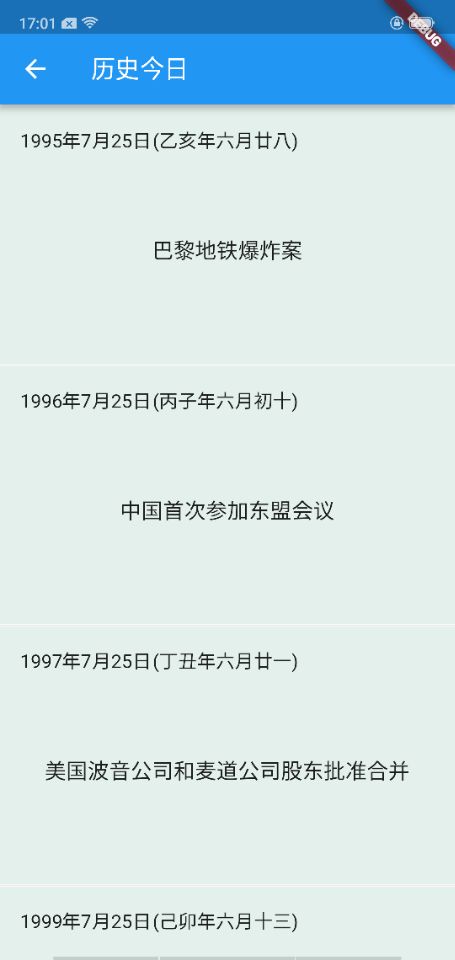
效果图:
封装类
import 'package:http/http.dart' as http;

class HttpController {

  static void get(String url, Function callback,

      {Map<String, String> params, Function errorCallback}) async {

    if (params != null && params.isNotEmpty) {

      StringBuffer sb = new StringBuffer("?");

      params.forEach((key, value) {

        sb.write("$key" + "=" + "$value" + "&");

      });

      String paramStr = sb.toString();

      paramStr = paramStr.substring(0, paramStr.length - 1);

      url += paramStr;

    }

    try {

      http.Response res = await http.get(url);

      if (callback != null) {

        callback(res.body);

      }

    } catch (exception) {

      if (errorCallback != null) {

        errorCallback(exception);

      }

    }

  }

  static void post(String url, Function callback,

      {Map<String, String> params, Function errorCallback}) async {

    try {

      http.Response res = await http.post(url, body: params);

      if (callback != null) {

        callback(res.body);

      }

    } catch (e) {

      if (errorCallback != null) {

        errorCallback(e);

      }

    }

  }

}
调用:
import 'dart:convert';

import 'package:flutter/material.dart';

import 'package:flutter_test1/http/HttpController.dart';

class HomePage extends StatefulWidget {

  @override

  State<StatefulWidget> createState() {

    // TODO: implement createState

    return new Page();

  }

}

class Page extends State<HomePage> {

  String dataStr = "";

  var _items = [];

  @override

  Widget build(BuildContext context) {

    return layout(context);

  }

  @override

  void initState() {

    super.initState();

    getData();

  }

  void getData() {

    Map<String, String> map = new Map();

    map["v"] = "1.0";

    map["month"] = "7";

    map["day"] = "25";

    map["key"] = "bd6e35a2691ae5bb8425c8631e475c2a";

    HttpController.post("http://api.juheapi.com/japi/toh", (data) {

      if (data != null) {

        final body = json.decode(data.toString());

        final feeds = body["result"];

        var items = [];

        feeds.forEach((item) {

          items.add(Model(item["_id"], item["title"], item["pic"], item["year"],

              item["month"], item["day"], item["des"], item["lunar"]));

        });

        setState(() {

          dataStr = data.toString();

          _items = items;

        });

      }

    }, params: map);

  }

  Widget layout(BuildContext context) {

    return new Scaffold(

      appBar: buildAppBar(context),

      body:

      new ListView.builder(itemCount: _items.length, itemBuilder: itemView),

    );

  }

  Widget itemView(BuildContext context, int index) {

    Model model = this._items[index];

    //设置分割线

    if (index.isOdd) return new Divider(height: 2.0);

    return new Container(

        color: Color.fromARGB(0x22, 0x49, 0xa9, 0x8d),

        child: new Padding(

            padding: const EdgeInsets.all(8.0),

            child: new Padding(

                padding: const EdgeInsets.all(8.0),

                child: new Column(

                  children: <Widget>[

                    new Row(

                      children: <Widget>[

                        new Text('${model.year}年${model.month}月${model.day}日',

                            style: new TextStyle(fontSize: 15.0)),

                        new Text('(${model.lunar})',

                            style: new TextStyle(fontSize: 15.0)),

                      ],

                    ),

                    new Center(

                      heightFactor: 6.0,

                      child: new Text("${model.title}",

                          style: new TextStyle(fontSize: 17.0)),

                    )

                  ],

                ))));

  }

  Widget buildAppBar(BuildContext context) {

    return new AppBar(title: const Text('历史今日'));

  }

}

class Model {

  String _id;

  String title;

  String pic;

  int year;

  int month;

  int day;

  String des;

  String lunar;

  Model(this._id, this.title, this.pic, this.year, this.month, this.day,

      this.des, this.lunar);

}
Flutter -------- Http库 网络请求封装(HttpController)的更多相关文章
- flutter dio网络请求封装实现
flutter dio网络请求封装实现 文章友情链接: https://juejin.im/post/6844904098643312648 在Flutter项目中使用网络请求的方式大致可分为两种 ...
- Flutter学习(7)——网络请求框架Dio简单使用
原文地址: Flutter学习(7)--网络请求框架Dio简单使用 | Stars-One的杂货小窝 Flutter系列学习之前都是在个人博客发布,感兴趣可以过去看看 网络请求一般APP都是需要的,在 ...
- React-Native 之 GD (八)GET 网络请求封装
1.到这里,相信各位对 React-Native 有所熟悉了吧,从现在开始我们要慢慢往实际的方向走,这边就先从网络请求这部分开始,在正式开发中,网络请求一般都单独作为一部分,我们在需要使用的地方只需要 ...
- 十. Axios网络请求封装
1. 网络模块的选择 Vue中发送网络请求有非常多的方式,那么在开发中如何选择呢? 选择一:传统的Ajax是基于XMLHttpRequest(XHR) 为什么不用它呢?非常好解释配置和调用方式等非常混 ...
- Spring Boot + Vue 前后端分离开发,前端网络请求封装与配置
前端网络访问,主流方案就是 Ajax,Vue 也不例外,在 Vue2.0 之前,网络访问较多的采用 vue-resources,Vue2.0 之后,官方不再建议使用 vue-resources ,这个 ...
- 移动开发在路上-- IOS移动开发 五 网络请求封装
接着上次的讲,这次我们讲 网络请求的封装 打开创建的项目,让我们一起来继续完成他, 上次我们说到GET请求地址的拼接: 我们接着上次的继续完善: 下边我们要定义的是 block //定义block ...
- iOS开发——post异步网络请求封装
IOS中有许多网络请求的函数,同步的,异步的,通过delegate异步回调的. 在做一个项目的时候,上网看了很多别人的例子,发现都没有一个简单的,方便的异步请求的封装例子.我这里要给出的封装代码,是异 ...
- Android项目开发全程(三)-- 项目的前期搭建、网络请求封装是怎样实现的
在前两篇博文中已经做了铺垫,下面咱们就可以用前面介绍过的内容开始做一个小项目了(项目中会用到Afinal框架,不会用Afinal的童鞋可以先看一下上一篇博文),正所谓麻雀虽小,五脏俱全,这在里我会尽量 ...
- React Native 网络请求封装:使用Promise封装fetch请求
最近公司使用React作为前端框架,使用了异步请求访问,这里做下总结: React Native中虽然也内置了XMLHttpRequest 网络请求API(也就是俗称的ajax),但XMLHttpRe ...
随机推荐
- mybatis中对数据表操作的四种语法
查询数据(select) select...from...where... 如:查询学生表中学号为某数的学生的全部信息 select * from stu where id=#{id} 增加数据(in ...
- 调试freeradius 3.0 与microsoft AD通过LDAP认证的笔记
首先来参考文章: a.https://blog.51cto.com/liqingbiao/2146832?utm_source=oschina-app 这个主要参考了基本安装.配置.测试 b.http ...
- 最小哈希 minhash
最小哈希 维基百科,自由的百科全书 跳到导航跳到搜索 在计算机科学领域,最小哈希(或最小哈希式独立排列局部性敏感哈希)方法是一种快速判断两个集合是否相似的技术.这种方法是由Andrei Bro ...
- toapi模块简单使用
toapi是一个api与爬虫结合的一个库,使用简单,可以自定义api展示,简单的mockserver,但只限制于get请求 toapi会在同级目录下建立缓存机制,再次访问就会读缓存了 安装: pip ...
- 创建型模式(过渡模式) 简单工厂模式(Simple Factory)
简单工厂模式(Simple Factory Pattern)属于类的创建型模式,又叫静态工厂方法模式(Static FactoryMethod Pattern) 是通过专门定义一个类来负责创建其他类的 ...
- 判断 List map set 是否为空
//如果object为null,则设置为defaultValue ObjectUtils.defaultIfNull(object, defaultValue); //判断集合是否为null List ...
- python中的一切皆对象
python中一切皆对象是这个语言灵活的根本.函数和类也是对象,属于python的一等公民.包括代码包和模块也都是对象.python的面向对象更加彻底. 可以赋值给一个变量可以添加到集合对象中可以作为 ...
- Java8新特性(拉姆达表达式lambda)
一.函数式接口 函数式接口(functional interface 也叫功能性接口,其实是同一个东西).简单来说,函数式接口是只包含一个方法的接口.比如Java标准库中的java.lang.Runn ...
- React navtive
http://www.linuxidc.com/Linux/2015-09/123239.htm
- loj #6485. LJJ 学二项式定理 单位根反演
新学的黑科技,感觉好nb ~ #include <bits/stdc++.h> #define ll long long #define setIO(s) freopen(s". ...