
Hystrix【入门】
公共依赖配置:
<parent>

        <groupId>org.springframework.boot</groupId>

        <artifactId>spring-boot-starter-parent</artifactId>

        <version>2.0.3.RELEASE</version>

        <relativePath/>

</parent>

<properties>

        <project.build.sourceEncoding>UTF-8</project.build.sourceEncoding>

        <project.reporting.outputEncoding>UTF-8</project.reporting.outputEncoding>

        <java.version>1.8</java.version>

        <spring-cloud.version>Finchley.RELEASE</spring-cloud.version>

</properties>

<dependencyManagement>

        <dependencies>

            <dependency>

                <groupId>org.springframework.cloud</groupId>

                <artifactId>spring-cloud-dependencies</artifactId>

                <version>${spring-cloud.version}</version>

                <type>pom</type>

                <scope>import</scope>

            </dependency>

        </dependencies>

</dependencyManagement>
1、创建client-server工程
1.1、client-server工程pom依赖:
<!--加上上面的公共依赖-->

<dependencies>

        <dependency>

            <groupId>org.springframework.cloud</groupId>

            <artifactId>spring-cloud-starter-netflix-eureka-client</artifactId>

        </dependency>

        <dependency>

            <groupId>org.springframework.cloud</groupId>

            <artifactId>spring-cloud-starter-netflix-hystrix</artifactId>

        </dependency>
</dependencies>

<build>

        <plugins>

            <plugin>

                <groupId>org.springframework.boot</groupId>

                <artifactId>spring-boot-maven-plugin</artifactId>

            </plugin>

        </plugins>

</build>
1.2、client-server工程启动类:
import org.springframework.boot.SpringApplication;

import org.springframework.boot.autoconfigure.SpringBootApplication;

import org.springframework.cloud.client.discovery.EnableDiscoveryClient;

import org.springframework.cloud.netflix.hystrix.EnableHystrix;

@SpringBootApplication

@EnableHystrix//开启断路器注解

@EnableDiscoveryClient

public class ClientApplication {

    public static void main(String[] args) {

        SpringApplication.run(ClientApplication.class, args);

    }

}
1.3、client-server工程配置文件:client-server\src\main\resources\bootstrap.yml
server:

  port: 8888

spring:

  application:

    name: sc-client-service

eureka:

  client:

    serviceUrl:

      defaultZone: http://${eureka.host:127.0.0.1}:${eureka.port:8761}/eureka/

  instance:

    prefer-ip-address: true
1.4、编写模拟使用hystrix场景代码:
/**

 * 用户接口

 */

public interface IUserService {

    String getUser(String username) throws Exception;

}
import org.springframework.stereotype.Component;

import com.netflix.hystrix.contrib.javanica.annotation.HystrixCommand;

import cn.springcloud.book.service.IUserService;

/**

 * 具体用户接口实现类

 */

@Component

public class UserServiceImpl implements IUserService {

    @Override

    @HystrixCommand(fallbackMethod = "defaultUser")//降级

    public String getUser(String username) throws Exception {

        if ("spring".equals(username)) {

            return "This is real user";

        } else {

            throw new Exception();

        }

    }

    /**

     * 出错则调用该方法返回友好错误

     *

     * @param username

     * @return

     */

    public String defaultUser(String username) {

        return "The user does not exist in this system";

    }

}
import org.springframework.beans.factory.annotation.Autowired;

import org.springframework.web.bind.annotation.GetMapping;

import org.springframework.web.bind.annotation.RequestParam;

import org.springframework.web.bind.annotation.RestController;

import cn.springcloud.book.service.IUserService;

/**

 * 测试API

 */

@RestController

public class TestController {

    @Autowired

    private IUserService userService;

    @GetMapping("/getUser")

    public String getUser(@RequestParam String username) throws Exception{

        return userService.getUser(username);

    }

}
2、创建eureka-server工程
2.1、eureka-server工程pom文件:
<!--加上上面的公共依赖-->

<dependencies>

        <dependency>

            <groupId>org.springframework.cloud</groupId>

            <artifactId>spring-cloud-starter-netflix-eureka-server</artifactId>

        </dependency>

</dependencies>

<build>

        <plugins>

            <plugin>

                <groupId>org.springframework.boot</groupId>

                <artifactId>spring-boot-maven-plugin</artifactId>

            </plugin>

        </plugins>

</build>
2.2、eureka-server工程启动类:
import org.springframework.boot.SpringApplication;

import org.springframework.boot.autoconfigure.SpringBootApplication;

import org.springframework.cloud.netflix.eureka.server.EnableEurekaServer;

@SpringBootApplication

@EnableEurekaServer

public class EurekaServerApplication {

    public static void main(String[] args) {

        SpringApplication.run(EurekaServerApplication.class, args);

    }

}
2.3、eureka-server工程配置文件:eureka-server\src\main\resources\bootstrap.yml
server:

  port: 8761

eureka:

  instance:

    hostname: localhost

  client:

    registerWithEureka: false

    fetchRegistry: false

    serviceUrl:

      defaultZone: http://localhost:8761/eureka/
3、启动2个工程
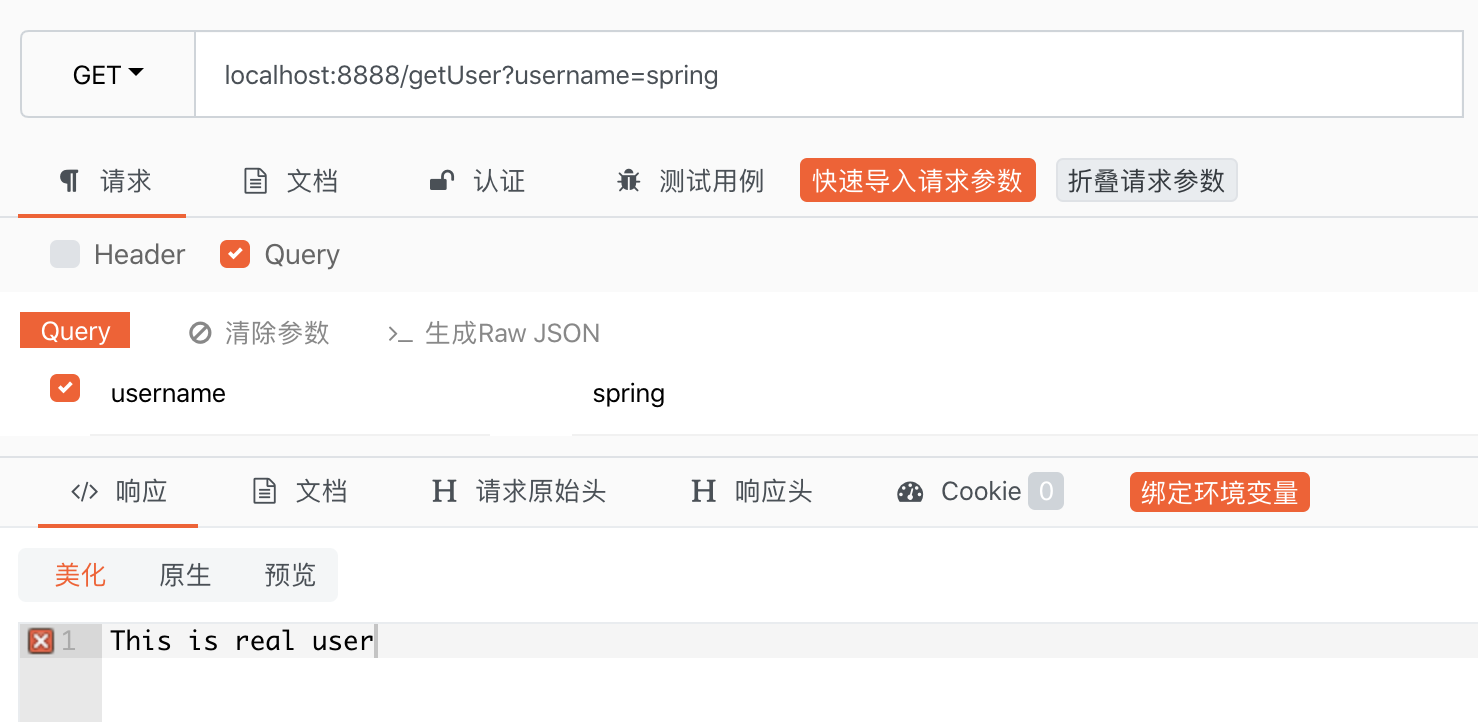
访问接口:
第一次传入spring
第二次传入:springcloud
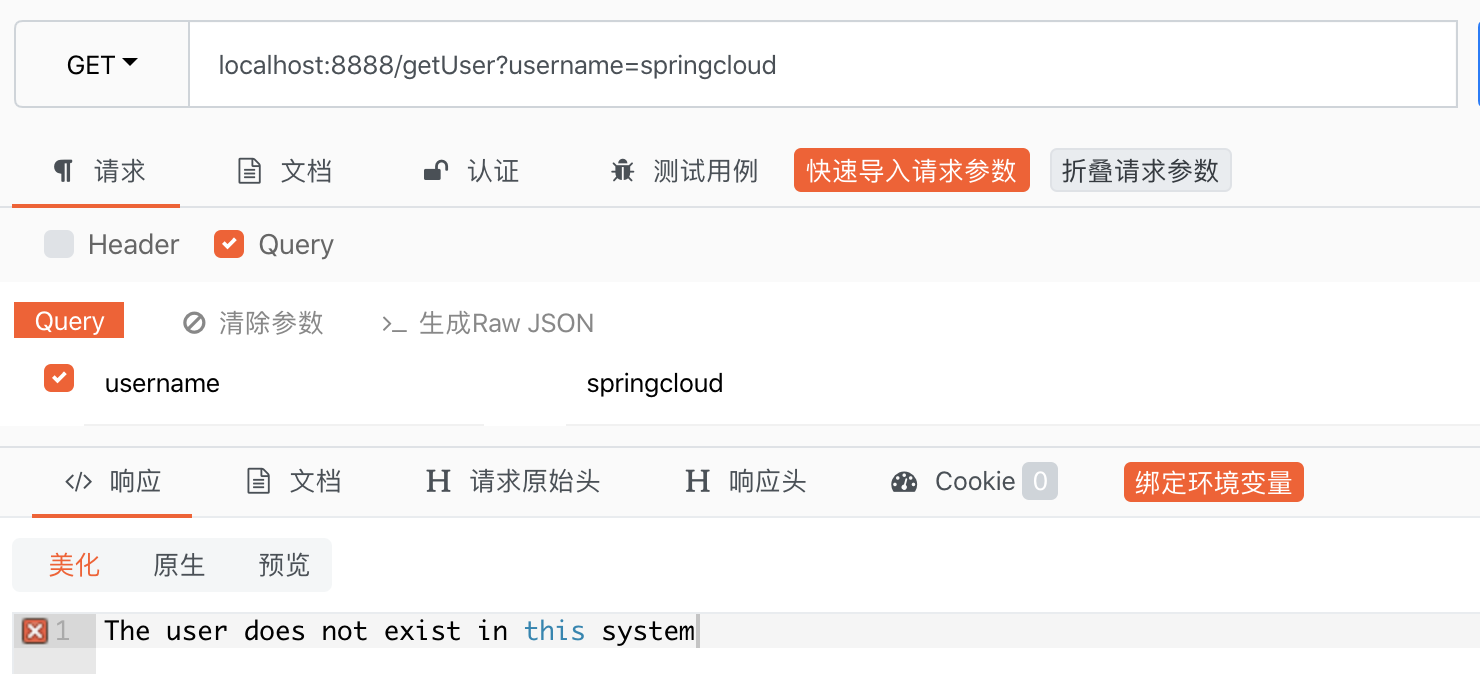
说明执行了 fallbackMethod 定义的指定方法!
Hystrix【入门】的更多相关文章
- Hystrix入门教程
Hystrix入门教程 一·什么是Hystrix?Hystrix有什么作用?使用Hystrix有哪些适用场景 Hystrix是springCloud的组件之一,Hystrix 可以让我们在分布式系统中 ...
- Spring-cloud(六) Hystrix入门
前提 一个可用的Eureka注册中心(文中以之前博客中双节点注册中心,不重要) 一个连接到这个注册中心的服务提供者 快速入门 项目搭建 搭建一个新maven项目,artifactid为Ribbon-c ...
- SpringCloud(六) Hystrix入门
前提 一个可用的Eureka注册中心(文中以之前博客中双节点注册中心,不重要) 一个连接到这个注册中心的服务提供者 快速入门 项目搭建 搭建一个新maven项目,artifactid为Ribbon-c ...
- 微服务容错限流Hystrix入门
为什么需要容错限流 复杂分布式系统通常有很多依赖,如果一个应用不能对来自依赖 故障进行隔离,那么应用本身就处在被拖垮的风险中.在一个高流量的网站中,某个单一后端一旦发生延迟,将会在数秒内导致 所有应用 ...
- Hystrix入门与分析(二):依赖隔离之线程池隔离
1.依赖隔离概述 依赖隔离是Hystrix的核心目的.依赖隔离其实就是资源隔离,把对依赖使用的资源隔离起来,统一控制和调度.那为什么需要把资源隔离起来呢?主要有以下几点: 1.合理分配资源,把给资源分 ...
- Hystrix入门与分析(一):初识Hystrix
在以前的文章中,我们介绍过使用Gauva实现限流的功能,现在我们来了解一下如何在服务框架中实现熔断和降级的方法. 简介Hystrix 大型系统架构的演进基本上都是这样一个方向:从单体应用到分布式架构. ...
- Hystrix入门执行过程
netflix-hystrix团队开发了hystrix-javanica,使用流行的java注解以及函数式编程,来替代hystrix枯燥的编程方法. 其主要是HystrixCommand注解的使用. ...
- Hystrix入门指南
Introduction 1.Where does the name come from? hystrix对应的中文名字是“豪猪”,豪猪周身长满了刺,能保护自己不受天敌的伤害,代表了一种防御机制,这与 ...
- Hystrix入门
hystrix对应的中文名字是“豪猪”,豪猪周身长满了刺,能保护自己不受天敌的伤害,代表了一种防御机制,这与hystrix本身的功能不谋而合,因此Netflix团队将该框架命名为Hystrix,并使用 ...
- 转 Hystrix入门指南 Introduction
https://www.cnblogs.com/gaoyanqing/p/7470085.html
随机推荐
- "中国东信杯"广西大学第二届程序设计竞赛 - H - Antinomy与伊尔美格
题意:给一个有向图,n个点m条边,每个点有点权xi.规定从u点出发,到指定的k个点之一结束,可以多次经过同一个点和同一条边,求路径上点权和的最大值. 题解:直接缩点变成DAG,然后dp的时候并不是直接 ...
- python 的小技巧之统计list里面元素的个数
一般写法 def count_list(std:list,tongji): i=0 for item in std: if item==tongji: i+=1 print(i) if __name_ ...
- cmd命令 taskkill
netstat -ano|findstr " tasklist|findstr " taskkill /pid taskkill 命令: // 描述: 结束一个或多个任务或流程. ...
- nmcli 配置ip
配置ip: nmcli connection modify 'Wired connection 1' connection.autoconnect yes ipv4.method manual ipv ...
- m.baidu.com/?tn=simple 开始有广告了。。。
m.baidu.com/?tn=simple 开始有广告了.... 极简的百度也被安排上了广告,..... 文章来源:外星人来地球 欢迎关注,有问题一起学习欢迎留言.评论
- H.264与H.265视频压缩编码参考码率
- ratingBar 星级评分条
<?xml version="1.0" encoding="utf-8"?> <LinearLayout xmlns:android=&quo ...
- flutter Dismissible 可以在拖动时隐藏的widget
import 'package:flutter/material.dart'; class DismissedAppPage extends StatefulWidget { @override St ...
- pytorch nn.Sequential()动态添加方法
之前我们使用nn.Sequential()都是直接写死的,就如下所示: # Example of using Sequential model = nn.Sequential( nn.Conv2d(, ...
- 【物联网】esp8266+LCD
https://blog.csdn.net/qq_40531588/article/details/89515149