
hive基础知识二
1. Hive的分区表
1.1 hive的分区表的概念

在文件系统上建立文件夹,把表的数据放在不同文件夹下面,加快查询速度。

1.2 hive分区表的构建
创建一个分区字段的分区表
hive> create table student_partition1(

    id int,

    name string,

    age int)

    partitioned by (dt string)

    row format delimited fields terminated by '\t';
创建二级分区表
hive> create table student_partition2(

    id int,

    name string,

    age int)

    partitioned by (month string, day string)

    row format delimited fields terminated by '\t';
2、Hive修改表结构
2.1 修改表的名称
hive> alter table student_partition1 rename to student_partition3;
2.2 表的结构信息
hive> desc student_partition3;

hive> desc formatted  student_partition3;

2.3 增加/修改/替换列信息
增加列
hive> alter table student_partition3 add columns(address string);
修改列
hive> alter table student_partition3 change column address address_id int;
替换列
hive> alter table student_partition3 replace columns(deptno string, dname string, loc string);

 #表示替换表中所有的字段
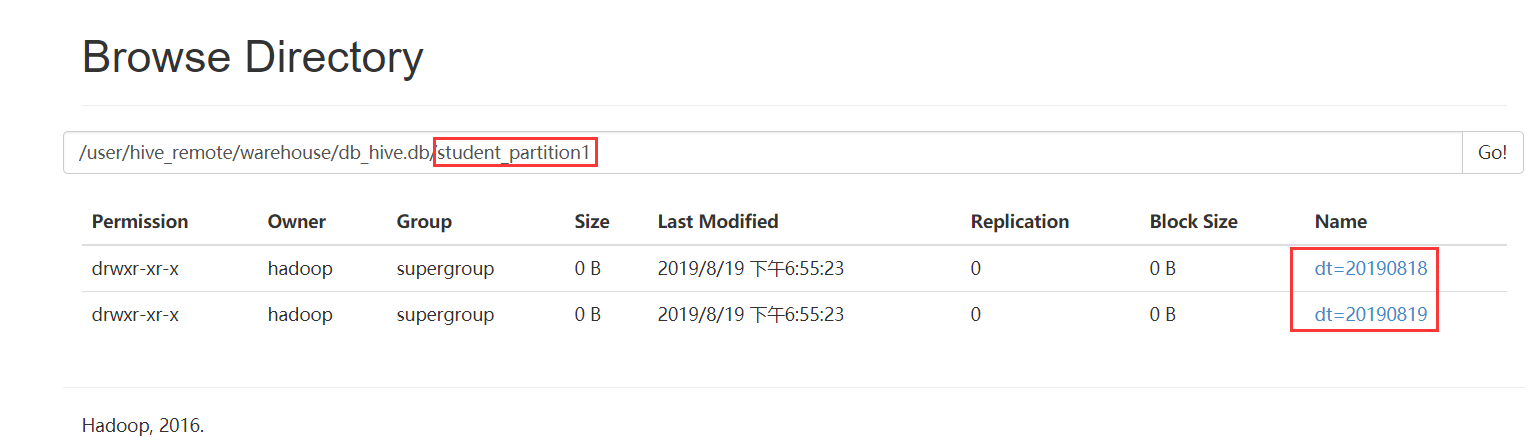
2.4 增加/删除/查看分区
添加分区
//添加单个分区

hive> alter table student_partition1 add partition(dt='') ;

//添加多个分区

hive> alter table student_partition1 add partition(dt='') partition(dt='');

删除分区
hive> alter table student_partition1 drop partition (dt='');

hive> alter table student_partition1 drop partition (dt=''),partition (dt='');
查看分区
hive> show partitions student_partition1;

3. Hive数据导入
3.1 向表中加载数据(load)
语法
hive> load data [local] inpath 'dataPath' overwrite | into table student [partition (partcol1=val1,…)];
load data: 表示加载数据
==local==: 表示从本地加载数据到hive表;否则从HDFS加载数据到hive表
inpath: 表示加载数据的路径
overwrite: 表示覆盖表中已有数据,否则表示追加
into table: 表示加载到哪张表
student: 表示具体的表
partition: 表示上传到指定分区
说明:load data ...本质,就是将dataPath文件上传到hdfs的 ‘/user/hive/warehouse/tablename’ 下。
实质:hdfs dfs -put /opt/student1.txt /user/hive/warehouse/student1
例如:

--普通表:

load data local inpath '/opt/bigdata/data/person.txt' into table person

--分区表:

load data local inpath '/opt/bigdata/data/person.txt' into table student_partition1 partition(dt="20190505")

--查询表:

select * from student_partition1 where dt='';

--实操案例:

实现创建一张表,然后把本地的数据文件上传到hdfs上,最后把数据文件加载到hive表中
3.2 通过查询语句向表中插入数据(insert)
从指定的表中查询数据结果数据然后插入到目标表中
语法
insert into/overwrite table  tableName  select xxxx from tableName

insert into table student_partition1 partition(dt="2019-07-08") select * from student1;
3.3 查询语句中创建表并加载数据(as select)
在查询语句时先创建表,然后进行数据加载
语法
create table if not exists tableName as select id, name from tableName;
3.4 创建表时通过location指定加载数据路径
创建表,并指定在hdfs上的位置
create table if not exists student1(

id int,

name string)

row format delimited fields terminated by '\t'

location '/user/hive/warehouse/student1';
上传数据文件到hdfs上对应的目录中
hdfs dfs -put /opt/student1.txt /user/hive/warehouse/student1
3.5 Import数据到指定Hive表中
注意:先用export导出后,再将数据导入。
create table student2 like student1;

export table student1  to   '/export/student1';

import table student2  from '/export/student1';
4、Hive数据导出(15分钟)
4.1 insert 导出
1、将查询的结果导出到本地
insert overwrite local directory '/opt/bigdata/export/student' select * from student;

默认分隔符'\001'
2、将查询的结果格式化导出到本地
insert overwrite local directory '/opt/bigdata/export/student'

           row format delimited fields terminated by  ','

           select * from student;
3、将查询的结果导出到HDFS上(没有local)
insert overwrite  directory '/export/student'

           row format delimited fields terminated by  ','

           select * from student;
4.2 Hadoop命令导出到本地
hdfs dfs -get /user/hive/warehouse/student/student.txt /opt/bigdata/data
4.3 Hive Shell 命令导出
基本语法:
hive -e "sql语句" > file
hive -f sql文件 > file
bin/hive -e 'select * from default.student;' > /opt/bigdata/data/student1.txt
4.4 export导出到HDFS上
export table default.student to '/user/hive/warehouse/export/student1';
5、hive的静态分区和动态分区
5.1 静态分区
表的分区字段的值需要开发人员手动给定
1、创建分区表
create table order_partition(

order_number string,

order_price  double,

order_time string

)

partitioned BY(month string)

row format delimited fields terminated by '\t';
2、准备数据 order_created.txt内容如下
  10001 100 2019-03-02

  10002 200 2019-03-02

  10003 300 2019-03-02

  10004 400 2019-03-03

  10005 500 2019-03-03

  10006 600 2019-03-03

  10007 700 2019-03-04

  10008 800 2019-03-04

  10009 900 2019-03-04
3、加载数据到分区表
load data local inpath '/opt/bigdata/data/order_created.txt' overwrite into table order_partition partition(month='2019-03');
4、查询结果数据
  select * from order_partition where month='2019-03';

  结果为:

  10001   100.0   2019-03-02      2019-03

  10002   200.0   2019-03-02      2019-03

  10003   300.0   2019-03-02      2019-03

  10004   400.0   2019-03-03      2019-03

  10005   500.0   2019-03-03      2019-03

  10006   600.0   2019-03-03      2019-03

  10007   700.0   2019-03-04      2019-03

  10008   800.0   2019-03-04      2019-03

  10009   900.0   2019-03-04      2019-03
5.2 动态分区
按照需求实现把数据自动导入到表的不同分区中,不需要手动指定
需求:按照不同部门作为分区导数据到目标表
1、创建表
--创建普通表
create table t_order(
order_number string,
order_price double,
order_time string
)row format delimited fields terminated by '\t';
--创建目标分区表
create table order_dynamic_partition(
order_number string,
order_price double
)partitioned BY(order_time string)
row format delimited fields terminated by '\t';2、准备数据 order_created.txt内容如下
10001   100 2019-03-02

10002   200 2019-03-02

10003   300 2019-03-02

10004   400 2019-03-03

10005   500 2019-03-03

10006   600 2019-03-03

10007   700 2019-03-04

10008   800 2019-03-04

10009   900 2019-03-04
3、向普通表t_order加载数据
load data local inpath '/opt/bigdata/data/order_created.txt' overwrite into table t_order;
4、动态加载数据到分区表中
---要想进行动态分区,需要设置参数

hive> set hive.exec.dynamic.partition=true; //使用动态分区

hive> set hive.exec.dynamic.partition.mode=nonstrict; //非严格模式

    insert into table order_dynamic_partition partition(order_time) select order_number,order_price,order_time from t_order;

--注意字段查询的顺序,分区字段放在最后面。否则数据会有问题。
5、查看分区
show partitions order_dynamic_partition;

6、分桶
hive的分桶表
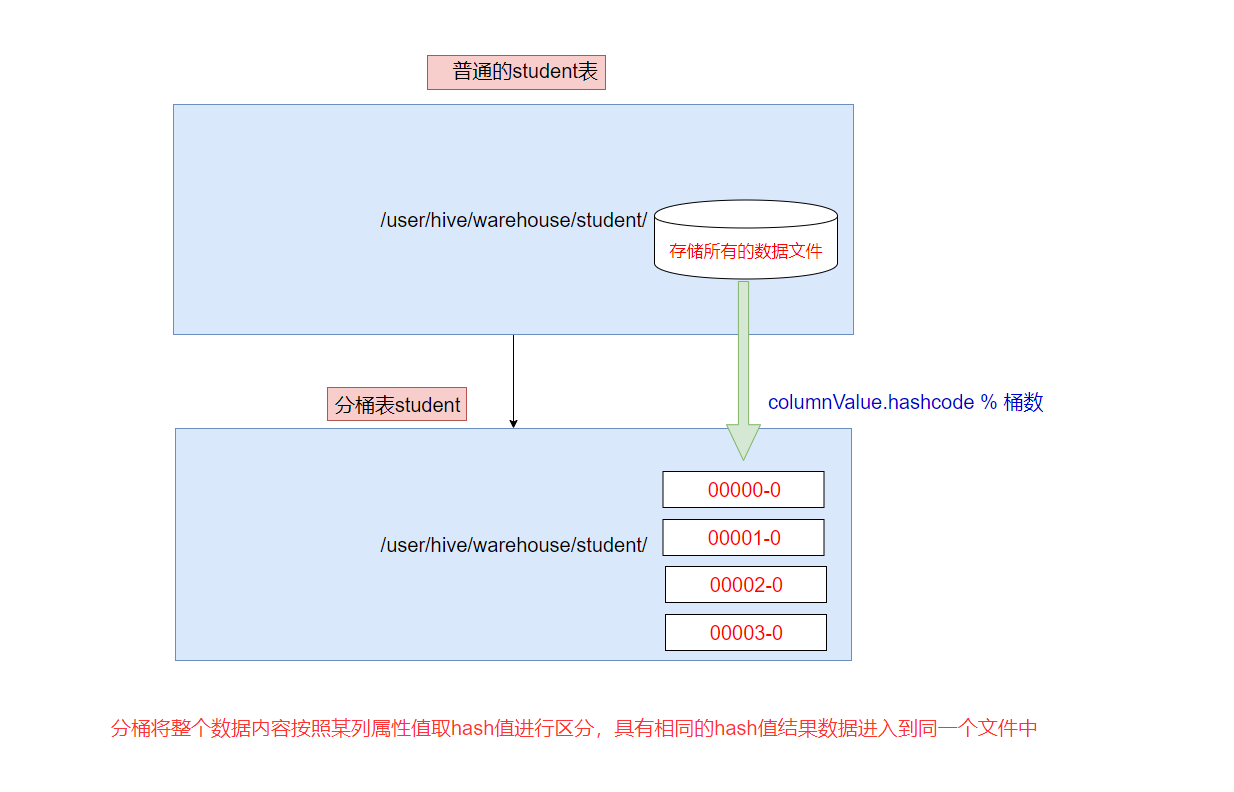

分桶是相对分区进行更细粒度的划分。
分桶将整个数据内容安装某列属性值取hash值进行区分,具有相同hash值的数据进入到同一个文件中
比如按照name属性分为4个桶,就是对name属性值的hash值对4取摸,按照取模结果对数据分桶。
取模结果为0的数据记录存放到一个文件
取模结果为1的数据记录存放到一个文件
取模结果为2的数据记录存放到一个文件
取模结果为3的数据记录存放到一个文件
作用
1、取样sampling更高效。没有分区的话需要扫描整个数据集。
2、提升某些查询操作效率,例如map side join
案例演示
1、创建分桶表
在创建分桶表之前要执行命名
set hive.enforce.bucketing=true;开启对分桶表的支持
set mapreduce.job.reduces=4; 设置与桶相同的reduce个数(默认只有一个reduce)
--分桶表
create table user_buckets_demo(id int, name string)
clustered by(id)
into 4 buckets
row format delimited fields terminated by '\t';
--普通表
create table user_demo(id int, name string)
row format delimited fields terminated by '\t';2、准备数据文件 buckets.txt
1    laowang1

2    laowang2

3    laowang3

4    laowang4

5    laowang5

6    laowang6

7    laowang7

8    laowang8

9    laowang9

10    laowang10
3、加载数据到普通表 user_demo 中
load data local inpath '/opt/bigdata/data/buckets.txt' into table user_demo;
4、加载数据到桶表user_buckets_demo中
insert into table user_buckets_demo select * from user_demo;
5、hdfs上查看表的数据目录

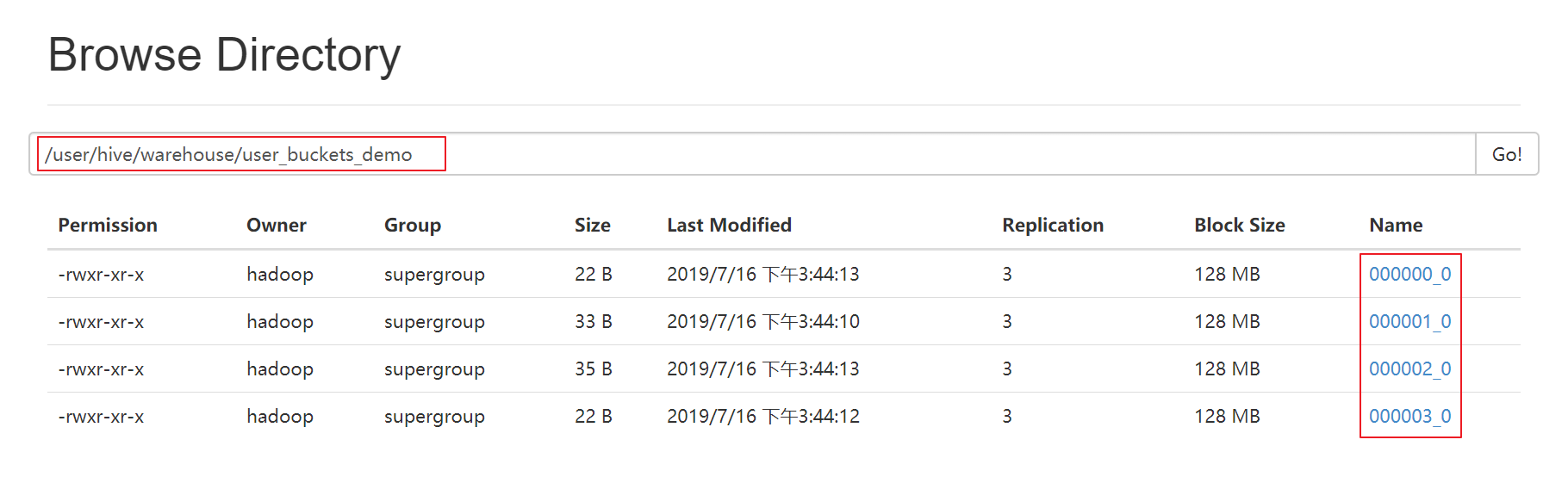
6、抽样查询桶表的数据
tablesample抽样语句,语法:tablesample(bucket x out of y)
x表示从第几个桶开始取数据
y表示桶数的倍数,一共需要从 桶数/y 个桶中取数据
select * from user_buckets_demo tablesample(bucket 1 out of 2)
-- 需要的总桶数=4/2=2个
-- 先从第1个桶中取出数据
-- 再从第1+2=3个桶中取出数据
hive基础知识二的更多相关文章
- 《Programming Hive》读书笔记(两)Hive基础知识
<Programming Hive>读书笔记(两)Hive基础知识 :第一遍读是浏览.建立知识索引,由于有些知识不一定能用到,知道就好.感兴趣的部分能够多研究. 以后用的时候再具体看.并结 ...
- java 基础知识二 基本类型与运算符
java 基础知识二 基本类型与运算符 1.标识符 定义:为类.方法.变量起的名称 由大小写字母.数字.下划线(_)和美元符号($)组成,同时不能以数字开头 2.关键字 java语言保留特殊含义或者 ...
- 菜鸟脱壳之脱壳的基础知识(二) ——DUMP的原理
菜鸟脱壳之脱壳的基础知识(二)——DUMP的原理当外壳的执行完毕后,会跳到原来的程序的入口点,即Entry Point,也可以称作OEP!当一般加密强度不是很大的壳,会在壳的末尾有一个大的跨段,跳向O ...
- Dapper基础知识二
在下刚毕业工作,之前实习有用到Dapper?这几天新项目想用上Dapper,在下比较菜鸟,这块只是个人对Dapper的一种总结. 2,如何使用Dapper? 首先Dapper是支持多种数据库的 ...
- python基础知识(二)
python基础知识(二) 字符串格式化 格式: % 类型 ---- > ' %类型 ' %(数据) %s 字符串 print(' %s is boy'%('tom')) ----> ...
- Java基础知识二次学习--第三章 面向对象
第三章 面向对象 时间:2017年4月24日17:51:37~2017年4月25日13:52:34 章节:03章_01节 03章_02节 视频长度:30:11 + 21:44 内容:面向对象设计思 ...
- Java基础知识二次学习-- 第一章 java基础
基础知识有时候感觉时间长似乎有点生疏,正好这几天有时间有机会,就决定重新做一轮二次学习,挑重避轻 回过头来重新整理基础知识,能收获到之前不少遗漏的,所以这一次就称作查漏补缺吧!废话不多说,开始! 第一 ...
- 快速掌握JavaScript面试基础知识(二)
译者按: 总结了大量JavaScript基本知识点,很有用! 原文: The Definitive JavaScript Handbook for your next developer interv ...
- Hive基础知识梳理
Hive简介 Hive是什么 Hive是构建在Hadoop之上的数据仓库平台. Hive是一个SQL解析引擎,将SQL转译成MapReduce程序并在Hadoop上运行. Hive是HDFS的一个文件 ...
随机推荐
- Entity Framework 学习系列(3) - MySql Code First 开发方式+数据迁移
目录 # 写在前面 一.开发环境 二.创建项目 三.安装程序包 四.创建模型 五.连接字符串 六.编辑程序 七.数据迁移 写在最后 # 写在前面 这几天,一直都在学习Entity Framework ...
- SUSE12Sp3-使用Docker导入镜像并安装redis,zookeeper,kafka
首先在另外一台联网电脑拉取最新的redis,zookeeper,kafka镜像 docker pull redis docker pull zookeeper docker pull wurstmei ...
- (原创)MODBUS-TCP协议分析
- Mycat分布式数据库架构解决方案--Mycat实现数据库分表
echo编辑整理,欢迎转载,转载请声明文章来源.欢迎添加echo微信(微信号:t2421499075)交流学习. 百战不败,依不自称常胜,百败不颓,依能奋力前行.--这才是真正的堪称强大!!! 准备工 ...
- 如何在Linux中复制文档
在办公室里复印文档过去需要专门的员工与机器.如今,复制是电脑用户无需多加思考的任务.在电脑里复制数据是如此微不足道的事,以致于你还没有意识到复制就发生了,例如当拖动文档到外部硬盘的时候. 数字实体复制 ...
- vs2017 添加 mysql EF实体数据模型闪退
1.查看vs2017安装路径找到Mysql.Data.dll版本号与MySQL Connector Net版本是否一致 历史版本下载地址 http://mysql.inspire.net.nz/Dow ...
- python高级编程之 web静态服务器
返回固定数据 import socket def request_handler(new_client_socket): """ 响应客户端请求的核心函数 "& ...
- byte[],File和InputStream的相互转换
File.FileInputStream 转换为byte[] File file = new File("test.txt"); InputStream input = new F ...
- 【Axure】原型设计工具的概览与初识
软件工程综合实践第三次个人作业 作业要求:通过搜索资料和自学,了解原型设计的工具 前言: Axure是一款强大的原型设计工具,具有比较大的用户基础,在此前提下沟通.传输.修改就显得十分方便,并且在细节 ...
- Django之ORM多对多表创建方式,AJAX异步提交,分页器组件等
MTV与MVC MTV模型: M:模型层(models.py),负责业务对象和数据库关系的映射(ORM) T:模板层(Template),负责如何把页面展示给用户(HTML) V:视图层( ...