
pytorch tutorial 1
这里用torch 做一个最简单的测试
目标就是我们用torch 建立一个一层的网络,然后拟合一组可以回归的数据
import torch

from torch.autograd import Variable

import torch.nn.functional as F

import matplotlib.pyplot as plt

x = torch.unsqueeze(torch.linspace(-1, 1, 100), dim=1)

y = x.pow(2) + 0.2*torch.rand(x.size())

x, y = Variable(x), Variable(y)
这里我们先早出来假数据,这里需要注意的是,最新版本的torch已经不需要variable了
接着我们来搭建我们的网络
class Net(torch.nn.Module):

    def __init__(self, n_feature, n_hidden, n_output):

        super(Net, self).__init__()

        self.hidden = torch.nn.Linear(n_feature, n_hidden)

        self.predict = torch.nn.Linear(n_hidden, n_output)

    # 前向传播

    def forward(self, x):

        x = F.relu(self.hidden(x))

        x = self.predict(x)

        return x
我们做了个 1-10-1这样的单隐藏层的网络
net = Net(n_feature=1, n_hidden=10, n_output=1)

print(net)

# define optimizer

optimizer = torch.optim.SGD(net.parameters(), lr=0.5)

loss_func = torch.nn.MSELoss()
接着我们选SGD来优化,选MSE做loss function
开始训练
plt.ion()

# begin training

for t in range(200):

    prediction = net(x)

    loss = loss_func(prediction, y)   # must be (1. nn output, 2. target)

    optimizer.zero_grad()  # clear gradients for next train

    loss.backward()   # backpropagation, compute gradients

    optimizer.step()    # apply gradients

    if t % 5 == 0:

        plt.cla()

        plt.scatter(x.data.numpy(), y.data.numpy())

        plt.plot(x.data.numpy(), prediction.data.numpy(), 'r-', lw=5)

        plt.text(0.5, 0, 'Loss=%.4f' % loss.data.numpy(), fontdict={'size': 20, 'color': 'red'})

        plt.pause(0.1)

plt.ioff()

plt.show()
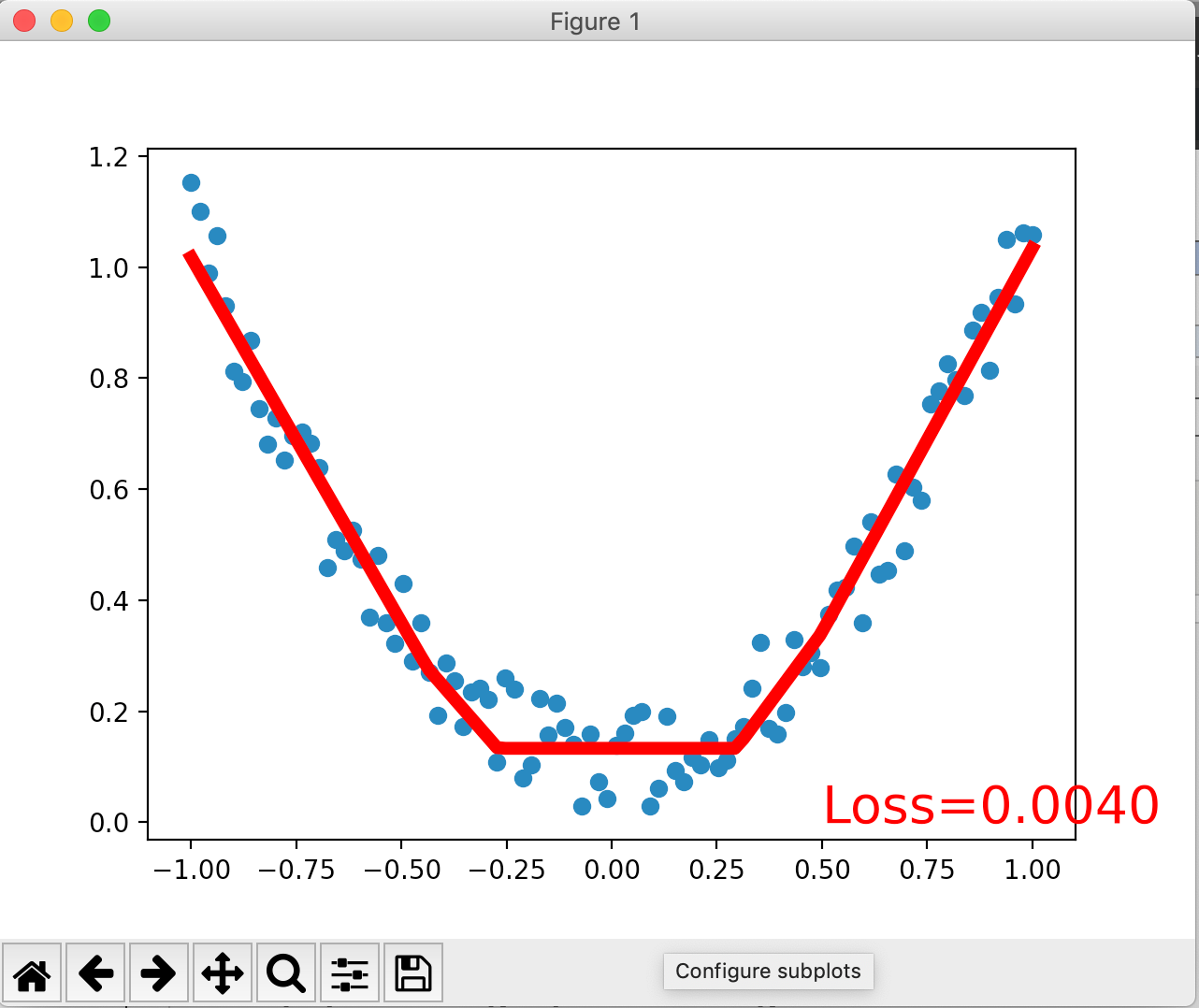
大概效果是这样
pytorch tutorial 1的更多相关文章
- Pytorch tutorial 之Datar Loading and Processing (1)
引自Pytorch tutorial: Data Loading and Processing Tutorial 这节主要介绍数据的读入与处理. 数据描述:人脸姿态数据集.共有69张人脸,每张人脸都有 ...
- 【转载】Pytorch tutorial 之Datar Loading and Processing
前言 上文介绍了数据读取.数据转换.批量处理等等.了解到在PyTorch中,数据加载主要有两种方式: 1.自定义的数据集对象.数据集对象被抽象为Dataset类,实现自定义的数据集需要继承Datase ...
- Pytorch tutorial 之Datar Loading and Processing (2)
上文介绍了数据读取.数据转换.批量处理等等.了解到在PyTorch中,数据加载主要有两种方式: 1. 自定义的数据集对象.数据集对象被抽象为Dataset类,实现自定义的数据集需要继承Dataset. ...
- Pytorch tutorial 之Transfer Learning
引自官方: Transfer Learning tutorial Ng在Deeplearning.ai中讲过迁移学习适用于任务A.B有相同输入.任务B比任务A有更少的数据.A任务的低级特征有助于任务 ...
- pytorch tutorial 2
这里使用pytorch进行一个简单的二分类模型 导入所有我们需要的库 import torch import matplotlib.pyplot as plt import torch.nn.func ...
- Pytorch入门之VAE
关于自编码器的原理见另一篇博客 : 编码器AE & VAE 这里谈谈对于变分自编码器(Variational auto-encoder)即VAE的实现. 1. 稀疏编码 首先介绍一下“稀疏编码 ...
- (转)Awesome PyTorch List
Awesome-Pytorch-list 2018-08-10 09:25:16 This blog is copied from: https://github.com/Epsilon-Lee/Aw ...
- 吐血整理:PyTorch项目代码与资源列表 | 资源下载
http://www.sohu.com/a/164171974_741733 本文收集了大量基于 PyTorch 实现的代码链接,其中有适用于深度学习新手的“入门指导系列”,也有适用于老司机的论文 ...
- Ubuntu 16.04上anaconda安装和使用教程,安装jupyter扩展等 | anaconda tutorial on ubuntu 16.04
本文首发于个人博客https://kezunlin.me/post/23014ca5/,欢迎阅读最新内容! anaconda tutorial on ubuntu 16.04 Guide versio ...
随机推荐
- WinRAR命令行版本 rar.exe使用详解(适用Linux)
RAR 命令行语法: RAR.exe <命令> [ -<开关> ] <压缩文件> [ <@列表文件...> ] [ <文件...> ] [ ...
- webpack4 plugins 篇
demo 代码点此,篇幅有限,仅介绍几个常用的. start 什么是 plugins ? While loaders are used to transform certain types of mo ...
- java--Proreties
Prorerties /* * Properties,内存与文件信息交互 * 表示了一个持久的属性集 * * 构造方法: * Properties() * * */ //简单使用 创建,添加,遍历, ...
- 【Web安全入门】三个技巧教你玩转XSS漏洞
XSS漏洞是Web应用程序中最常见的漏洞之一,想要入门Web安全的小伙伴,这个知识点是必学的. i春秋官网中有很多关于XSS漏洞的课程,新手小白可以去官网看课学习. 学习地址:https://www. ...
- ActiveMQ反序列化(CVE-2015-5254) && ActiveMQ任意文件写入 (CVE-2016-3088)
ActiveMQ 反序列化漏洞(CVE-2015-5254) 漏洞详情 ActiveMQ启动后,将监听61616和8161两个端口,其中消息在61616这个端口进行传递,使用ActiveMQ这个中间件 ...
- Android培训准备资料之UI一些相似控件和控件一些相似属性之间的区别
这一篇博客主要收集五大布局中的一些相似控件和控件一些相似属性之间的区别 ImageView ImageButton Button 三者有啥区别? (1)Button继承自TextView,ImageV ...
- 实用的生成二维码API
推荐一个生成二维码的API网站: 中文 http://www.topscan.com 英文 https://api.qrserver.com/v1/create-qr-code/?size=150x1 ...
- 微软官方的.net系列文档
闲下来的时候给自己补充补充基础,微软官方的相关技术文档地址,最新最全最官方:https://docs.microsoft.com/zh-cn/ 其中.NET专区:https://docs.micros ...
- firewalld规则写法
需要注意的是Firewalld中的区域与接口 一个网卡仅能绑定一个区域.比如: eth0-->A区域 但一个区域可以绑定多个网卡.比如: B区域-->eth0.eth1.eth2 可以根据 ...
- 吴丽丽-201871010123 《面向对象程序设计(java)》第六、七周学习总结
吴丽丽-201871010123 <面向对象程序设计(java)>第六.七周学习总结 项目 内容 这个作业属于哪个课程 https://www.cnblogs.com/nwnu-daizh ...