
MATLAB datenum日期转换为Python日期
摘要
MATLAB datenum时间格式参数众多,本文只简单关注 units 参数,即基准年份和计时度量(天、小时)。
命令行演示在 ipython 和 Octave 中进行。
示例1:小时制,基准年份1800-1-1
Time Attributes:

                     units              = 'hours since 1800-1-1 00:00:0.0'

                     long_name          = 'Time'

                     axis               = 'T'

                     standard_name      = 'time'

                     coordinate_defines = 'start'

                     delta_t            = '0000-00-01 00:00:00'

                     actual_range       = [1.74e+06 1.75e+06]

                     avg_period         = '0000-00-01 00:00:00'

time(1:5):

     1744392

     1744416

     1744440

     1744464

     1744488

#来源: 参考1

# python

import numpy as np

origin = np.datetime64('1800-01-01', 'D')

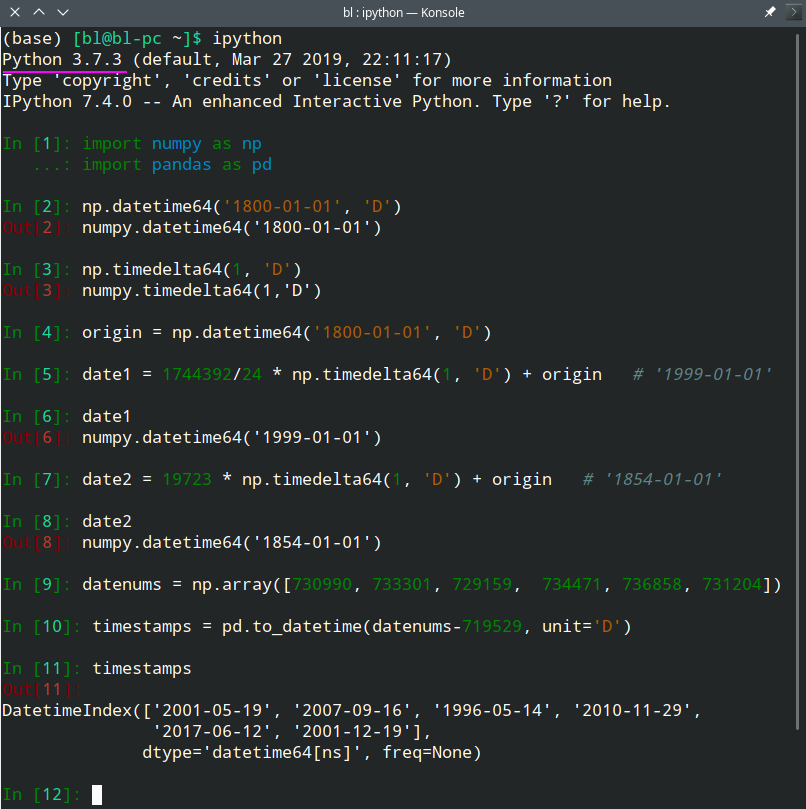
date1 = 1744392/24 * np.timedelta64(1, 'D') + origin   # '1999-01-01'
示例2:一天制,基准年份1800-1-1
time {

        String units "days since 1800-1-1 00:00:00";

        String long_name "Time";

        Float64 actual_range 19723.00000000000, 76214.00000000000;

        String delta_t "0000-01-00 00:00:00";

        String avg_period "0000-01-00 00:00:00";

        String prev_avg_period "0000-00-07 00:00:00";

        String standard_name "time";

        String axis "t";

}

#来源: 参考2

# python

import numpy as np

origin = np.datetime64('1800-01-01', 'D')

date2 = 19723 * np.timedelta64(1, 'D') + origin   # '1854-01-01'
示例3:时间列表转换
import numpy as np

import pandas as pd

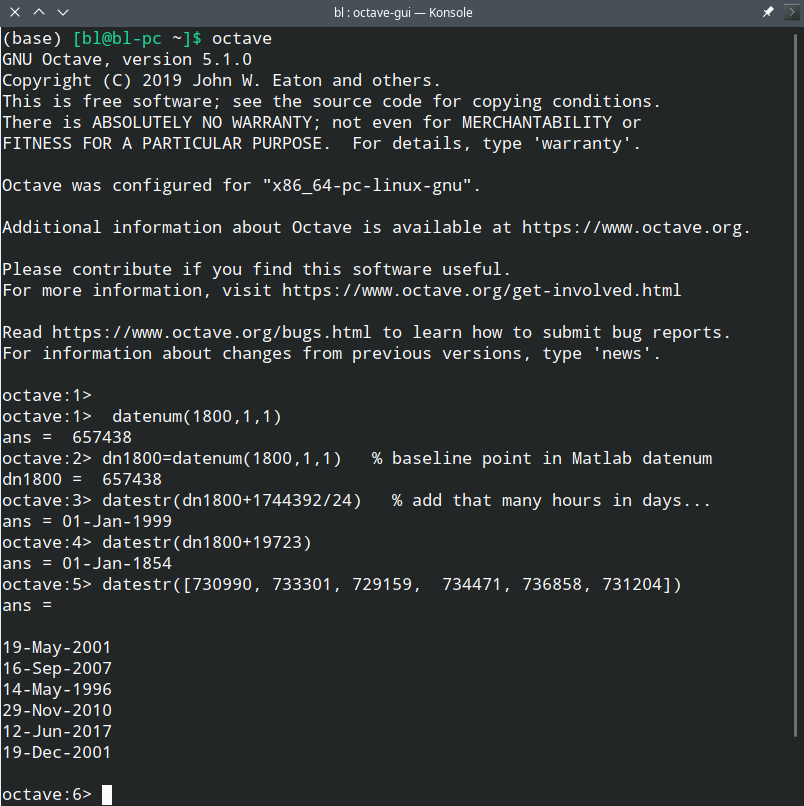
datenums = np.array([730990, 733301, 729159,  734471, 736858, 731204]) # 来源:参考7

timestamps = pd.to_datetime(datenums-719529, unit='D')

'''

DatetimeIndex(['2001-05-19', '2007-09-16', '1996-05-14',

               '2010-11-29', '2017-06-12', '2001-12-19'],

              dtype='datetime64[ns]', freq=None)

'''
截图(仅供参考)
验证:
参考
- convert narr model data time to datevec or datestr https://ww2.mathworks.cn/matlabcentral/answers/141304-convert-narr-model-data-time-to-datevec-or-datestr
- OPeNDAP-某数据集格式:http://test.opendap.org/dap/data/nc/sst.mnmean.nc.gz.das
- Python datetime to Matlab datenum https://stackoverflow.com/questions/8776414/python-datetime-to-matlab-datenum
- Converting Matlab's datenum format to Python https://stackoverflow.com/questions/13965740/converting-matlabs-datenum-format-to-python/36249553
- [Tutor] datenum https://mail.python.org/pipermail/tutor/2003-September/025454.html
- 在日期时间数组、数值和文本之间转换 https://ww2.mathworks.cn/help/matlab/matlab_prog/convert-between-datetime-arrays-numbers-and-strings.html
- datenum用法 https://ww2.mathworks.cn/help/matlab/ref/datenum.html
- 日期和时间 https://ww2.mathworks.cn/help/matlab/date-and-time-operations.html?s_tid=CRUX_lftnav
MATLAB datenum日期转换为Python日期的更多相关文章
- 简单的分页存储过程,Json格式日期转换为一般日期
简单的分页存储过程 CREATE PROC Paged @pageIndex INT, @pageCount INT OUTPUT, @pageSize INT AS DECLARE @count I ...
- Json格式日期转换为一般日期
Json日期转换为一般日期:json日期:/Date(1316756746000)/ 转换为2013-09-01格式的 1 //将json格式的时间转换成一般时间 2 function Chang ...
- 【310】◀▶ Python 日期和时间
参考: python 时间日期计算 Python 日期和时间(菜鸟教程) 8.1. datetime — Basic date and time types python中datetime模块中dat ...
- python 日期 & 时间
1. Python 提供了一个 time 和 calendar 模块可以用于格式化日期和时间. 2. 时间间隔是以秒为单位的浮点小数. 3. 每个时间戳都以自从1970年1月1日午夜(历元)经过了多长 ...
- (转)Python 日期和时间
转自http://www.runoob.com/python/python-date-time.html Python 日期和时间 Python 程序能用很多方式处理日期和时间,转换日期格式是一个常见 ...
- python日期格式化操作
1.将字符串的时间转换为时间戳 方法: a = "2013-10-10 23:40:00" #将其转换为时间数组 import time timeArray = time.strp ...
- 【转载】Python日期时间模块datetime详解与Python 日期时间的比较,计算实例代码
本文转载自脚本之家,源网址为:https://www.jb51.net/article/147429.htm 一.Python中日期时间模块datetime介绍 (一).datetime模块中包含如下 ...
- Python日期格式化知识
Python中日期格式化是非常常见的操作,Python 中能用很多方式处理日期和时间,转换日期格式是一个常见的功能.Python 提供了一个 time 和 calendar 模块可以用于格式化日期和时 ...
- Python 日期时间处理模块学习笔记
来自:标点符的<Python 日期时间处理模块学习笔记> Python的时间处理模块在日常的使用中用的不是非常的多,但是使用的时候基本上都是要查资料,还是有些麻烦的,梳理下,便于以后方便的 ...
随机推荐
- 为什么内核访问用户数据之前,要做access_ok?
本文系转载,著作权归作者所有.商业转载请联系作者获得授权,非商业转载请注明出处. 作者: 宋宝华 来源: 微信公众号linux阅码场(id: linuxdev) 原理 先看一段小视频,如果内核访问用户 ...
- window开机启动
C:\Users\sunyues\AppData\Roaming\Microsoft\Windows\Start Menu\Programs\Startup 再次文件夹下写脚本就可 @echo off ...
- 汉诺塔问题深度剖析(python实现)
当我们学习一门编程语言的时候,都会遇到递归函数这个问题.而学习递归的一个经典案例就是汉诺塔问题.通过这篇文章,观察移动三个盘子和四个盘子的详细过程,您不仅可以深刻的了解递归,也更加熟悉了汉诺塔的游戏的 ...
- springboot 整合 mybatis 入门
springboot整合mybatis 0.yml 配置文件 1.创建数据库表. 2.创建实体类. 3.创建 Mapper 接口 ,添加 @Mapper 注解. 4.创建 Mapper 映射文件. & ...
- mysql小结(了解)
Mysql总结 1.数据库的概念 """ 数据库:库(文件夹).表(表结构文件.表数据文件(索引结构)).字段(数据的描述).记录(数据的本体) 分类:效率问题(内存大于 ...
- NOIP 2008 立体图
洛谷 P1058 立体图 洛谷传送门 JDOJ 1541: [NOIP2008]立体图 T4 JDOJ传送门 题目描述 小渊是个聪明的孩子,他经常会给周围的小朋友们将写自己认为有趣的内容.最近,他准备 ...
- Java 内存分配(转)
Java程序运行在JVM(Java Virtual Machine,Java虚拟机)上,可以把JVM理解成Java程序和操作系统之间的桥梁,JVM实现了Java的平台无关性. 寄存器:JVM内部虚拟寄 ...
- CF308C-Sereja and Brackets-(线段树+括号匹配)
题意:给出一段括号,多次询问某个区间内能匹配多少括号. 题解:线段树,结构体三个属性,多余的左括号l,多余的右括号r,能够匹配的括号数val. 当前结点的val=左儿子的val+右儿子的val+min ...
- js面向对象的笼统介绍
**js进阶大纲**简单的表面组成:**对象的属性分两类,一类是数据属性,一类是访问器属性**1,数据属性用来保存数据.2,访问器属性不用来保存数据,而是定义了get,set两个函数,读取属性时,自动 ...
- sublime3插件BracketHighlighter的配置
BracketHighlighter插件能为Sublime Text提供括号,引号这类高亮功能,但安装此插件后,默认没有高亮,只有下划线表示,不是很醒目,需要配置:1.在Sublime Text中用p ...