
kubectl rollout回滚和autoscale自动扩容
kubernetes 滚动升级
Kubernetes 中采用ReplicaSet(简称RS)来管理Pod。如果当前集群中的Pod实例数少于目标值,RS 会拉起新的Pod,反之,则根据策略删除多余的Pod。Deployment正是利用了这样的特性,通过控制两个RS里面的Pod,从而实现升级。
滚动升级是一种平滑过渡式的升级,在升级过程中,服务仍然可用。
创建deployment
kubectl create deploy nginx-test --image=nginx:1.14

scale 副本数量
kubectl scale deployment nginx-test --replicas 10
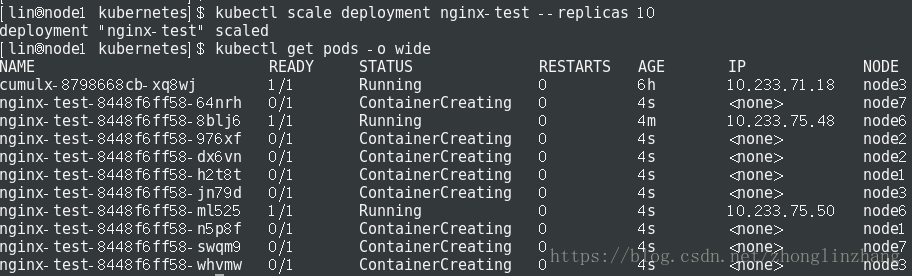
如果集群支持 horizontal pod autoscaling 的话,还可以为Deployment设置自动扩展:
kubectl autoscale deployment nginx-test --min=10 --max=15 --cpu-percent=80
需要注意的是,horizontal pod autoscaling(HPA)作用于Replication Controller 对象时,再对其使用rolling update会变成无效操作,因为RC在滚动更新时,是通过创建新的RC对象来替代旧的对象,但是HPA无法自动绑定到新创建的RC对象上
更新 deployment
更新镜像
kubectl set image deployment/nginx-test nginx=nginx:1.15
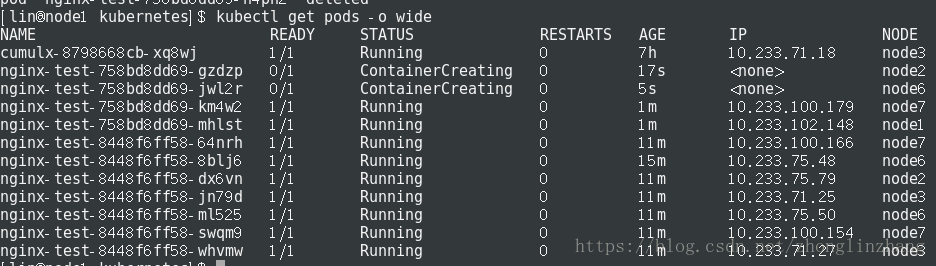
回滚到上一个版本:
kubectl rollout undo deployment/nginx-test
也可以使用 --revision参数指定某个历史版本:
kubectl rollout undo deployment/nginx-test --to-revision=2
历史记录
kubectl rollout history deployment/nginx-test
创建 Deployment 的时候使用了--record参数可以记录命令,我们可以很方便的查看每次 revision 的变化。查看单个revision 的详细信息:
kubectl rollout history deployment nginx-test --revision=1
验证发布
kubectl rollout status deploy/nginx-test
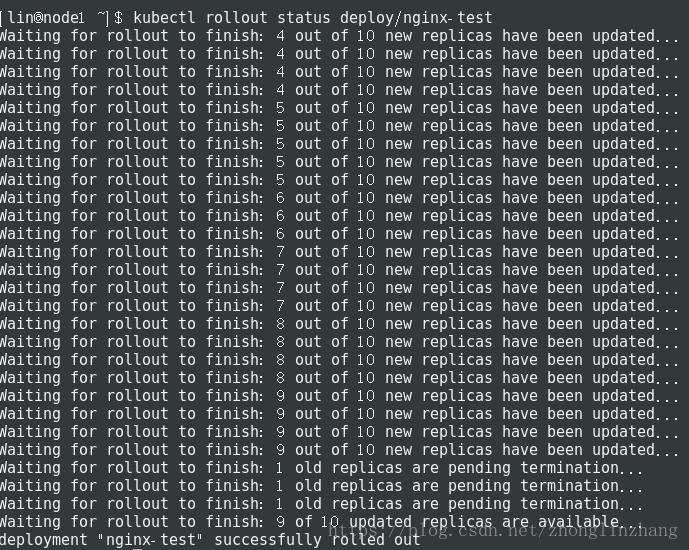
回滚发布
kubectl rollout undo deployments/nginx-test

想回滚到指定版本呢?答案是k8s完美支持,并且还可以通过资源文件进行配置保留的历史版次量
kubectl rollout undo deployment/nginx-test --to-revision=<版次>
原理
k8s分批次有序地进行着滚动更新,直到把所有旧的副本全部更新到新版本。实际上,k8s是通过两个参数来精确地控制着每次滚动的pod数量:
maxSurge 滚动更新过程中运行操作期望副本数的最大pod数,但不能为0;也可以为百分数(eg:10%)。默认为25%。
maxUnavailable 滚动更新过程中不可用的最大pod数,但不能为0;也可以为百分数(eg:10%)。默认为25%。
重要参数 maxSurge与maxUnavailable
maxSurge: 1 表示滚动升级时会先启动1个pod
maxUnavailable: 1 表示滚动升级时允许的最大Unavailable的pod个数
由于replicas为3,则整个升级,pod个数在2-4个之间
剖析部署概况
DESIRED 最终期望处于READY状态的副本数
CURRENT 当前的副本总数
UP-TO-DATE 当前完成更新的副本数
AVAILABLE 当前可用的副本数
滚动过程是通过控制两个副本集来完成的
kubernetes autoscale自动伸缩
使用 autoscaler 自动设置在kubernetes集群中运行的pod数量(水平自动伸缩)。
指定Deployment、ReplicaSet或ReplicationController,并创建已经定义好资源的自动伸缩器。使用自动伸缩器可以根据需要自动增加或减少系统中部署的pod数量。
$ autoscale (-f FILENAME | TYPE NAME | TYPE/NAME) [--min=MINPODS] --max=MAXPODS [--cpu-percent=CPU] [flags]
示例
使用默认的自动伸缩策略,指定目标CPU使用率,使其Pod数量在2到10之间。
kubectl autoscale deployment/nginx-test --min=2 --max=10
使其Pod的数量介于1和5之间,CPU使用率维持在80%。
kubectl autoscale deploy/nginx-test --max=5 --cpu-percent=80
autoscale 字段说明
| 名称 | Shorthand | 默认值 | 使用说明 |
|---|---|---|---|
| allow-missing-template-keys | true | 如果值为真,则忽略模板中的任何错误。仅仅能够应用到golang和jsonpath输出格式。 | |
| cpu-percent | -1 | The target average CPU utilization (represented as a percent of requested CPU) over all the pods. If it’s not specified or negative, a default autoscaling policy will be used. | |
| dry-run | false | If true, only print the object that would be sent, without sending it. | |
| filename | f | [] | Filename, directory, or URL to files identifying the resource to autoscale. |
| generator | horizontalpodautoscaler/v1 | The name of the API generator to use. Currently there is only 1 generator. | |
| max | -1 | The upper limit for the number of pods that can be set by the autoscaler. Required. | |
| min | -1 | The lower limit for the number of pods that can be set by the autoscaler. If it’s not specified or negative, the server will apply a default value. | |
| name | The name for the newly created object. If not specified, the name of the input resource will be used. | ||
| output | o | Output format. One of: json | |
| record | false | Record current kubectl command in the resource annotation. If set to false, do not record the command. If set to true, record the command. If not set, default to updating the existing annotation value only if one already exists. | |
| recursive | R | false | Process the directory used in -f, –filename recursively. Useful when you want to manage related manifests organized within the same directory. |
| save-config | false | If true, the configuration of current object will be saved in its annotation. Otherwise, the annotation will be unchanged. This flag is useful when you want to perform kubectl apply on this object in the future. | |
| template | Template string or path to template file to use when -o=go-template, -o=go-template-file. The template format is golang templates [http://golang.org/pkg/text/template/#pkg-overview]. |
kubectl rollout回滚和autoscale自动扩容的更多相关文章
- Kubectl Rollout 回滚及Autoscale自动扩容
Kubectl Rollout 回滚及Autoscale自动扩容 Kubernetes 中采用ReplicaSet(简称RS)来管理Pod.如果当前集群中的Pod实例数少于目标值,RS 会拉起新的Po ...
- Spring事务为什么不会自动回滚?Spring事务怎样才会自动回滚?事务自动回滚条件及手动回滚
原文:https://blog.csdn.net/qq_32331073/article/details/76508147 更多Spring事务问题请访问链接:Spring事务回滚问题疑难详解 在此, ...
- Oracle-11g-R2(11.2.0.3.x)RAC Oracle Grid & Database 零宕机方式回滚 PSU(自动模式)
回滚环境: 1.源库版本: Grid Infrastructure:11.2.0.3.15 Database:11.2.0.3.15 2.目标库版本: Grid Infrastructure:11.2 ...
- 【MySQL】MySQL回滚工具
1.mysqlbinlog把事务从binlog中导出 2.从导出的binlog中找到要回滚的事务,去掉第一个DML语句前和最后一个DML语句后与DML无关的binlog信息 3.在目录中新建一个tab ...
- ORA-01552 非系统表空间不能使用系统回滚段处理
今天新搭建了一个10g的测试数据库,运行都很正常,但是在打开autotrace功能后执行语句,报错 SQL> set autotrace on SQL> select username,s ...
- k8s学习笔记(3)- kubectl高可用部署,扩容,升级,回滚springboot应用
前言:上一篇通过rancher管理k8s,部署服务应用扩容,高可用,本篇介绍kubectl命令行部署高可用集群节点,测试升级.扩容等 1.测试环境:3节点k3s,使用其中2节点(ubuntunode1 ...
- k8s-控制器deployment弹性扩容,更新镜像,回滚,DaemonSet,StatufluSet
目录 1.控制器deployment,DaemonSet,StatufluSet 2.控制器-deployment 弹性扩容 方式1-修改配置清单 方式2-打标签 方式3-scale 更新镜像 方式1 ...
- kubernetes常用命令:缩容扩容回滚
查看版本 kubectl version 查看节点 kubectl get nodes 部署app 说明: 提供deployment名称和app镜像地址(docker镜像地址) kubectl run ...
- Docker & Kubenetes 系列四:集群,扩容,升级,回滚
本篇将会讲解应用部署到Kubenetes集群,集群副本集查看,集群自愈能力演示,集群扩容,滚动升级,以及回滚. 本篇是Docker&Kubenetes系列的第四篇,在前面的篇幅中,我们向Kub ...
随机推荐
- Kotlin开发springboot项目(二)
Kotlin开发springboot项目(二) 中文学习网站: https://www.kotlincn.net/ 研究一下kotlin的demo: https://github.com/JetBra ...
- JavaScript中数组去重汇总
1. 简单的去重方法,利用数组的indexOf下标属性来查询 /* * 新建一新数组,遍历传入数组,值不在新数组就push进该新数组中 * IE8以下不支持数组的indexOf方法 * */ func ...
- vue-router路由嵌套与二级路由重定向
(1)公共路由裁减 不是每个页面都存在导航,所以不要把导航组件在根组件APP.vue里引入,哪个页面需要,在哪里引入即可. 方案: 哪个页面需要,在哪个页面引入即可 (2)嵌套路由 注意:childr ...
- axios用法全解
[前言] 本文介绍下axios用法,希望对大家有所帮助 这里声明一句:请求数据一般放置到哪里?详见下篇文章 [主体] (1)下载 npm i axios --save (2)引入axios模块 方式1 ...
- discuz x3.2简化的搜索框代码
这是在做一个模板时改的,并不代表这是一个美化或者优化,只是特殊情况下的需要.只有一个搜索框,默认帖子搜索,无搜索按钮,输入内容直接回车搜索. <!--{if $_G['setting']['se ...
- ubuntu gitclone下载的文件放哪里了
在home主文件夹里面.
- java 构造实例
Person父类 package com.oracle.demo03; public class Person { private String name; private int age; //需要 ...
- 异常CLRDBG_NOTIFICATION_EXCEPTION_CODE( 0x04242420)
简介 CLRDBG_NOTIFICATION_EXCEPTION_CODE,值为0x0x04242420.此异常在.CLR 4.0的启动路径期间触发,是CLR4.0版本初始化调试服务时向调试器发送消息 ...
- 洛谷p2827蚯蚓题解
题目 算法标签里的算法什么的都不会啊 什么二叉堆?? qbxt出去学习的时候讲的,一段时间之前做的,现在才写到博客上的 维护3个队列,队列1表示最开始的蚯蚓,队列2表示每一次被切的蚯蚓被分开的较长的那 ...
- 【CSP-S膜你考】 A
A 题面 对于给定的一个正整数n, 判断n是否能分成若干个正整数之和 (可以重复) , 其中每个正整数都能表示成两个质数乘积. 输入格式 第一行一个正整数 q,表示询问组数. 接下来 q 行,每行一个 ...