
SHELL脚本编程-普通数组(列表)和关联数组(字典)
SHELL脚本编程-普通数组(列表)和关联数组(字典)
作者:尹正杰
版权声明:原创作品,谢绝转载!否则将追究法律责任。
一.数组相关概述
变量:
  存储单个元素的内存空间

数组:
  存储多个元素的连续的内存空间,相当于多个变量的集合

数组名和索引

  索引:编号从0开始,属于数值索引

  注意:索引可支持使用自定义的格式,而不仅是数值格式,即为关联索引,bash4.0版本之后开始支持(关联数据使用时必须提前声明类型)
  bash的数组支持稀疏格式(索引不连续)

声明数组:

  declare -a ARRAY_NAME

  declare -A ARRAY_NAME: 关联数组

  注意:普通数组不用事先声明就可以使用,但关联数组必须提前声明才能使用,且两者不可相互转换。
[root@node101.yinzhengjie.org.cn ~]# bash --version

GNU bash, version 4.2.()-release (x86_64-redhat-linux-gnu)

Copyright (C)  Free Software Foundation, Inc.

License GPLv3+: GNU GPL version  or later <http://gnu.org/licenses/gpl.html>

This is free software; you are free to change and redistribute it.

There is NO WARRANTY, to the extent permitted by law.

[root@node101.yinzhengjie.org.cn ~]#
[root@node101.yinzhengjie.org.cn ~]# bash --version
二.数组赋值
1>.一次只赋值一个元素及引用数组详解
[root@node101.yinzhengjie.org.cn ~]# declare -a title            #使用数组变量时建议提前声明

[root@node101.yinzhengjie.org.cn ~]#

[root@node101.yinzhengjie.org.cn ~]# title[]=CEO                #逐一对数组进行赋值

[root@node101.yinzhengjie.org.cn ~]# title[]=COO

[root@node101.yinzhengjie.org.cn ~]# title[]=CTO

[root@node101.yinzhengjie.org.cn ~]# title[]=CFO

[root@node101.yinzhengjie.org.cn ~]# title[]=devops

[root@node101.yinzhengjie.org.cn ~]#

[root@node101.yinzhengjie.org.cn ~]# echo $title                  #如果不加下标则默认打印数组的第一个元素。

CEO

[root@node101.yinzhengjie.org.cn ~]#

[root@node101.yinzhengjie.org.cn ~]# echo ${title[]}             #查看指定的元素下标

COO

[root@node101.yinzhengjie.org.cn ~]#

[root@node101.yinzhengjie.org.cn ~]# echo ${title[]}

CFO

[root@node101.yinzhengjie.org.cn ~]#

[root@node101.yinzhengjie.org.cn ~]# echo ${title[*]}          #查看数组中的所有元素

CEO COO CTO CFO devops

[root@node101.yinzhengjie.org.cn ~]#

[root@node101.yinzhengjie.org.cn ~]# echo ${title[@]}          #同上

CEO COO CTO CFO devops

[root@node101.yinzhengjie.org.cn ~]#

[root@node101.yinzhengjie.org.cn ~]# echo ${#title[@]}          #查看数组的长度

[root@node101.yinzhengjie.org.cn ~]#

[root@node101.yinzhengjie.org.cn ~]# echo ${#title[*]}          #同上

[root@node101.yinzhengjie.org.cn ~]#

[root@node101.yinzhengjie.org.cn ~]# echo ${title[*]}

CEO COO CTO CFO devops

[root@node101.yinzhengjie.org.cn ~]#

[root@node101.yinzhengjie.org.cn ~]# title[${#title[*]}]="bigdata"     #在数组的末尾添加一个元素

[root@node101.yinzhengjie.org.cn ~]#

[root@node101.yinzhengjie.org.cn ~]# echo ${title[@]}

CEO COO CTO CFO devops bigdata

[root@node101.yinzhengjie.org.cn ~]#

[root@node101.yinzhengjie.org.cn ~]# unset title[]                     #删除索引为1的元素

[root@node101.yinzhengjie.org.cn ~]#

[root@node101.yinzhengjie.org.cn ~]# echo ${title[@]}

CEO CTO CFO devops bigdata

[root@node101.yinzhengjie.org.cn ~]#

[root@node101.yinzhengjie.org.cn ~]# echo ${#title[@]}

[root@node101.yinzhengjie.org.cn ~]#

[root@node101.yinzhengjie.org.cn ~]# unset title                          #删除整个数组

[root@node101.yinzhengjie.org.cn ~]#

[root@node101.yinzhengjie.org.cn ~]# echo ${#title[@]}                    #由于数组依旧被删除了,长度自然也就为0啦~

[root@node101.yinzhengjie.org.cn ~]#

[root@node101.yinzhengjie.org.cn ~]# echo ${title[@]}             #内容也被随之清空了

[root@node101.yinzhengjie.org.cn ~]#
2>.一次赋值全部元素
[root@node101.yinzhengjie.org.cn ~]# echo ${title[@]}

[root@node101.yinzhengjie.org.cn ~]#

[root@node101.yinzhengjie.org.cn ~]# title=(CEO COO CTO CFO devops)        #一次性赋值多个元素

[root@node101.yinzhengjie.org.cn ~]#

[root@node101.yinzhengjie.org.cn ~]# echo ${title[@]}

CEO COO CTO CFO devops

[root@node101.yinzhengjie.org.cn ~]#

[root@node101.yinzhengjie.org.cn ~]# echo ${#title[@]}

[root@node101.yinzhengjie.org.cn ~]#

[root@node101.yinzhengjie.org.cn ~]# unset title

[root@node101.yinzhengjie.org.cn ~]# echo ${#title[@]}

[root@node101.yinzhengjie.org.cn ~]#
3>.只赋值特定元素(稀疏格式)
[root@node101.yinzhengjie.org.cn ~]# echo ${#title[@]}

[root@node101.yinzhengjie.org.cn ~]#

[root@node101.yinzhengjie.org.cn ~]# title=([]=CEO []=CTO []=devops)

[root@node101.yinzhengjie.org.cn ~]#

[root@node101.yinzhengjie.org.cn ~]# echo ${#title[@]}

[root@node101.yinzhengjie.org.cn ~]#

[root@node101.yinzhengjie.org.cn ~]# echo ${title[*]}

CEO CTO devops

[root@node101.yinzhengjie.org.cn ~]#

[root@node101.yinzhengjie.org.cn ~]# unset title

[root@node101.yinzhengjie.org.cn ~]#

[root@node101.yinzhengjie.org.cn ~]# echo ${title[*]}

[root@node101.yinzhengjie.org.cn ~]#
4>.交互式数组值对赋值
[root@node101.yinzhengjie.org.cn ~]# echo ${title[*]}

[root@node101.yinzhengjie.org.cn ~]#

[root@node101.yinzhengjie.org.cn ~]# read -a title        #通过交互式对数组title进行赋值,各个元素用空格分开即可。

CTO CEO COO CTO

[root@node101.yinzhengjie.org.cn ~]#

[root@node101.yinzhengjie.org.cn ~]# echo ${title[*]}

CTO CEO COO CTO

[root@node101.yinzhengjie.org.cn ~]#

[root@node101.yinzhengjie.org.cn ~]# echo ${#title[*]}

[root@node101.yinzhengjie.org.cn ~]#

[root@node101.yinzhengjie.org.cn ~]# unset title

[root@node101.yinzhengjie.org.cn ~]#

[root@node101.yinzhengjie.org.cn ~]# echo ${#title[*]}

[root@node101.yinzhengjie.org.cn ~]#

[root@node101.yinzhengjie.org.cn ~]#
5>.显示所有数组
[root@node101.yinzhengjie.org.cn ~]# student[]="jason"

[root@node101.yinzhengjie.org.cn ~]#

[root@node101.yinzhengjie.org.cn ~]# student[]="yinzhengjie"

[root@node101.yinzhengjie.org.cn ~]#

[root@node101.yinzhengjie.org.cn ~]# declare -a      #显示当前shell中识别的所有数组

declare -a BASH_ARGC='()'

declare -a BASH_ARGV='()'

declare -a BASH_LINENO='()'

declare -ar BASH_REMATCH='()'

declare -a BASH_SOURCE='()'

declare -ar BASH_VERSINFO='([0]="4" [1]="2" [2]="46" [3]="2" [4]="release" [5]="x86_64-redhat-linux-gnu")'

declare -a DIRSTACK='()'

declare -a FUNCNAME='()'

declare -a GROUPS='()'

declare -a PIPESTATUS='([0]="0")'

declare -a student='([0]="jason" [1]="yinzhengjie")'

[root@node101.yinzhengjie.org.cn ~]#

[root@node101.yinzhengjie.org.cn ~]#
三.遍历数组
[root@node101.yinzhengjie.org.cn ~]# cat shell/title_array.sh

#!/bin/bash

#

#********************************************************************

#Author:        yinzhengjie

#QQ:

#Date:             --

#FileName:        shell/title_array.sh

#URL:             http://www.cnblogs.com/yinzhengjie

#Description:        The test script

#Copyright notice:     original works, no reprint! Otherwise, legal liability will be investigated.

#********************************************************************

declare -a title

title[]=CEO

title[]=COO

title[]=CTO

title[]=CFO

title[]=devops

count=`seq  $[${#title[*]}-]`

for i in $count

    do

        echo Title is ${title[$i]}

done

[root@node101.yinzhengjie.org.cn ~]#

[root@node101.yinzhengjie.org.cn ~]# bash shell/title_array.sh

Title is CEO

Title is COO

Title is CTO

Title is CFO

Title is devops

[root@node101.yinzhengjie.org.cn ~]#
四.数组数据处理
1>.引用数组中的元素(数组切片)
[root@node101.yinzhengjie.org.cn ~]# title=(CEO COO CTO CFO devops)      #定义数组

[root@node101.yinzhengjie.org.cn ~]# echo ${title[*]}               #查看数组的内容

CEO COO CTO CFO devops

[root@node101.yinzhengjie.org.cn ~]#

[root@node101.yinzhengjie.org.cn ~]# echo ${title[*]::}             #跳过第一个元素并取出后续2个元素

COO CTO

[root@node101.yinzhengjie.org.cn ~]#

[root@node101.yinzhengjie.org.cn ~]# echo ${title[*]:}               #跳过前2个元素,后面的元素全都要

CTO CFO devops

[root@node101.yinzhengjie.org.cn ~]#

[root@node101.yinzhengjie.org.cn ~]#
2>.向数组中追加元素
[root@node101.yinzhengjie.org.cn ~]# echo ${title[*]}

CEO COO CTO CFO devops

[root@node101.yinzhengjie.org.cn ~]#

[root@node101.yinzhengjie.org.cn ~]# title[${#title[*]}]="bigdata"     #在数组的末尾添加一个元素

[root@node101.yinzhengjie.org.cn ~]#

[root@node101.yinzhengjie.org.cn ~]# echo ${title[@]}

CEO COO CTO CFO devops bigdata

[root@node101.yinzhengjie.org.cn ~]#
3>.关联数组(在其它编程语言称之为"字典"或者"map")
[root@node101.yinzhengjie.org.cn ~]# declare -a student_info        #声明为普通数组

[root@node101.yinzhengjie.org.cn ~]# student_info["name"]="尹正杰"

[root@node101.yinzhengjie.org.cn ~]# student_info["age"]=

[root@node101.yinzhengjie.org.cn ~]#

[root@node101.yinzhengjie.org.cn ~]# echo ${student_info["name"]}      #我们发现查询结果和咱们预期的不符哟!

[root@node101.yinzhengjie.org.cn ~]#

[root@node101.yinzhengjie.org.cn ~]# echo ${student_info["age"]}

[root@node101.yinzhengjie.org.cn ~]#

[root@node101.yinzhengjie.org.cn ~]# unset student_info           #将上面的普通数组删除掉,然后使用关联数组来保存数据。

[root@node101.yinzhengjie.org.cn ~]#

[root@node101.yinzhengjie.org.cn ~]# declare -A student_info        #声明为关联数组

[root@node101.yinzhengjie.org.cn ~]# student_info["name"]="尹正杰"

[root@node101.yinzhengjie.org.cn ~]# student_info["age"]=

[root@node101.yinzhengjie.org.cn ~]#

[root@node101.yinzhengjie.org.cn ~]# echo ${student_info["name"]}     #发现关联数组的确可以保存咱们的变量呢

尹正杰

[root@node101.yinzhengjie.org.cn ~]#

[root@node101.yinzhengjie.org.cn ~]# echo ${student_info["age"]}

[root@node101.yinzhengjie.org.cn ~]#
五.小试牛刀
1>.生成10个随机数保存于数组中,并找出其最大值和最小值
[root@node101.yinzhengjie.org.cn ~]# cat shell/max_min.sh

#!/bin/bash

#

#********************************************************************

#Author:        yinzhengjie

#QQ:

#Date:             --

#FileName:        shell/max_min.sh

#URL:             http://www.cnblogs.com/yinzhengjie

#Description:        The test script

#Copyright notice:     original works, no reprint! Otherwise, legal liability will be investigated.

#********************************************************************

declare -i min max

declare -a nums

for ((i=;i<;i++));do

    nums[$i]=$RANDOM

    [ $i -eq  ] && min=${nums[$i]} && max=${nums[$i]}&& continue

    [ ${nums[$i]} -gt $max ] && max=${nums[$i]}

    [ ${nums[$i]} -lt $min ] && min=${nums[$i]}

done

echo "All numbers are ${nums[*]}"

echo "Max is $max"

echo "Min is $min"

[root@node101.yinzhengjie.org.cn ~]#

[root@node101.yinzhengjie.org.cn ~]# bash shell/max_min.sh

All numbers are

Max is

Min is

[root@node101.yinzhengjie.org.cn ~]# bash shell/max_min.sh

All numbers are

Max is

Min is

[root@node101.yinzhengjie.org.cn ~]# bash shell/max_min.sh

All numbers are

Max is

Min is

[root@node101.yinzhengjie.org.cn ~]#
参考案例1
[root@node101.yinzhengjie.org.cn ~]# cat shell/max_min.sh

#!/bin/bash

#

#********************************************************************

#Author:        yinzhengjie

#QQ:

#Date:             --

#FileName:        shell/max_min.sh

#URL:             http://www.cnblogs.com/yinzhengjie

#Description:        The test script

#Copyright notice:     original works, no reprint! Otherwise, legal liability will be investigated.

#********************************************************************

declare -i min max

declare -a nums

for ((i=;i<;i++));do

    nums[$i]=$RANDOM

    if [ $i -eq  ];then

        max=${nums[$i]}

    min=${nums[$i]}

    else

        if [ "$max" -lt "${nums[$i]}" ];then

        max=${nums[$i]}

    elif [ "$min" -gt "${nums[$i]}" ];then

        min=${nums[$i]}

    else

        true

    fi

    fi

done

echo "All numbers are ${nums[*]}"

echo "Max is $max"

echo "Min is $min"

[root@node101.yinzhengjie.org.cn ~]#

[root@node101.yinzhengjie.org.cn ~]# bash shell/max_min.sh

All numbers are

Max is

Min is

[root@node101.yinzhengjie.org.cn ~]#

[root@node101.yinzhengjie.org.cn ~]# bash shell/max_min.sh

All numbers are

Max is

Min is

[root@node101.yinzhengjie.org.cn ~]#

[root@node101.yinzhengjie.org.cn ~]# bash shell/max_min.sh

All numbers are

Max is

Min is

[root@node101.yinzhengjie.org.cn ~]#
参考案例2
2>.编写脚本,定义一个数组,数组中的元素对应的值是/var/log目录下所有以.log结尾的文件;统计出其下标为奇数的文件中的行数之和
[root@node101.yinzhengjie.org.cn ~]# cat shell/log_wc.sh

#!/bin/bash

#

#********************************************************************

#Author:        yinzhengjie

#QQ:

#Date:             --

#FileName:        shell/log_wc.sh

#URL:             http://www.cnblogs.com/yinzhengjie

#Description:        The test script

#Copyright notice:     original works, no reprint! Otherwise, legal liability will be investigated.

#********************************************************************

declare -a files

files=(/var/log/*.log)

declare -i lines=0

for i in $(seq 0 $[${#files[*]}-1]); do

    if [ $[$i%2] -eq 1 ];then

        let lines+=$(wc -l ${files[$i]} | cut -d' ' -f1)

    fi

done

echo "Lines: $lines."

[root@node101.yinzhengjie.org.cn ~]#

[root@node101.yinzhengjie.org.cn ~]# ll /var/log/*.log

-rw-------. 2 root root     0 Nov 28 07:41 /var/log/boot.log

-rw-------. 1 root root 15539 Nov 23 07:04 /var/log/yum.log

[root@node101.yinzhengjie.org.cn ~]#

[root@node101.yinzhengjie.org.cn ~]# wc -l /var/log/boot.log

0 /var/log/boot.log

[root@node101.yinzhengjie.org.cn ~]#

[root@node101.yinzhengjie.org.cn ~]# wc -l /var/log/yum.log

256 /var/log/yum.log

[root@node101.yinzhengjie.org.cn ~]#

[root@node101.yinzhengjie.org.cn ~]# bash shell/log_wc.sh

Lines: 256.

[root@node101.yinzhengjie.org.cn ~]#

[root@node101.yinzhengjie.org.cn ~]#
参考案例
3>.输入若干个数值存入数组中,采用冒泡算法进行升序或降序排序
4>.打印杨辉三角形
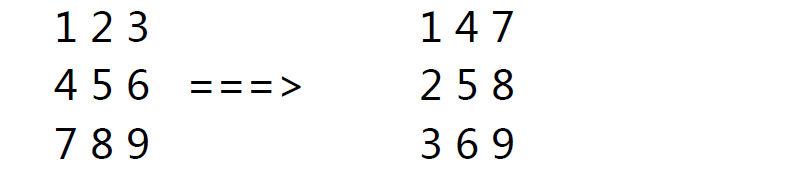
5>.将下图所示,实现转置矩阵matrix.sh
SHELL脚本编程-普通数组(列表)和关联数组(字典)的更多相关文章
- centos shell脚本编程1 正则 shell脚本结构 read命令 date命令的用法 shell中的逻辑判断 if 判断文件、目录属性 shell数组简单用法 $( ) 和${ } 和$(( )) 与 sh -n sh -x sh -v 第三十五节课
centos shell脚本编程1 正则 shell脚本结构 read命令 date命令的用法 shell中的逻辑判断 if 判断文件.目录属性 shell数组简单用法 $( ) 和$ ...
- Linux Shell脚本编程-数组和字符串处理
数组 1.数组的定义及声明 变量:存储单个元素的内存空间 数组:存储多个元素的连续的内存空间,相当于多个变量的集合 数组名:整个数组只有一个名字 索引:编号从0开始,属于数值索引:bash的数组支持 ...
- SHELL脚本编程的常识和VI常用技巧
来源:http://mprc.pku.edu.cn/mentors/training/TrainingCourses/material/ShellProgramming.HTM#_Toc3751808 ...
- 浅谈自底向上的Shell脚本编程及效率优化
作者:沐星晨 出处:http://blog.csdn.net/sosodream/article/details/6276758 浅谈自底向上的Shell脚本编程及效率优化 小论文,大家多批评指导:) ...
- Shell脚本编程30分钟入门
Shell脚本编程30分钟入门 转载地址: Shell脚本编程30分钟入门 什么是Shell脚本 示例 看个例子吧: #!/bin/sh cd ~ mkdir shell_tut cd shell_t ...
- Shell脚本编程具体解释
第12章 Shell脚本编程 l Shell命令行的执行 l 编写.改动权限和运行Shell程序的步骤 l 在Shell程序中使用參数和变量 l 表达式比較.循环结构语句和条件结构语句 l ...
- 30分钟快速学习Shell脚本编程
什么是Shell脚本 示例 看个例子吧: #!/bin/sh cd ~ mkdir shell_tut cd shell_tut for ((i=0; i<10; i++)); do touch ...
- 《Linux命令行与shell脚本编程大全》第二十二章 gawk进阶
gawk是一门功能丰富的编程语言,你可以通过它所提供的各种特性来编写好几程序处理数据. 22.1 使用变量 gawk编程语言支持两种不同类型的变量: 内建变量和自定义变量 22.1.1 内建变量 ga ...
- 《Linux命令行与shell脚本编程大全 第3版》
第一部分 Linux 命令行 第1章 初识Linux she1.1 什么是Linux 21.1.1 深入探究Linux 内核 31.1.2 GNU 工具 61.1.3 Linux 桌面环境 81 ...
随机推荐
- 在条件判断中使用 all() / any()
在条件判断中使用 all() / any() all() 和 any() 两个函数非常适合在条件判断中使用.这两个函数接受一个可迭代对象,返回一个布尔值,其中: all(seq):仅当 seq 中所有 ...
- Vue 组件封装发布到npm 报错 Uncaught TypeError: Cannot read property 'toLowerCase' of undefined
Uncaught TypeError: Cannot read property 'toLowerCase' of undefined 原因是 没有导出 export default { name:& ...
- laravel jwt实践
laravel版本为5.5 1.使用 composer 安装 composer require tymon/jwt-auth 1.*@rc 2.发布配置文件 # 这条命令会在 config 下增加一个 ...
- 研发的困境----DEVOPS
1.研发的困境 互联网的环境 互联网这个环境比较特别,包括现在不只是互联网,就算是被互联网赋能的这些“互联网+”的企业也在改变,用户在发生变化,用户构成的群体在发生变化,群体造成场景的变化,场景营造新 ...
- Spring boot + mybatis + mysql代码生成器
引入依赖: 在pom文件最下边: <build> <plugins> <!--逆向工程--> <plugin> <groupId>org.m ...
- repost: Deep Reinforcement Learning
From: http://wanghaitao8118.blog.163.com/blog/static/13986977220153811210319/ accessed 2016-03-10 深度 ...
- AtCoder-abc147 (题解)
A - Blackjack (水题) 题目链接 大致思路: 水题 B - Palindrome-philia (水题) 题目链接 大致思路: 由于整个串是回文串,只要判断前一半和后一半有多少个不同即可 ...
- 【LEETCODE】73、根据身高重建队列 第406题
说实话,这道题我没想出来,但是看解题报告题解比较让人觉得眼前一亮,这里记录下来 package y2019.Algorithm.greedy.medium; import java.util.Arra ...
- docker redis4.0集群搭建
一.前言 redis集群对于很多人来说非常熟悉,在前些日子,我也有一位大兄弟也发布过一篇关于在阿里云(centOS7)上搭建redis 集群的文章,虽然集群搭建的文章在网上很多,我比较喜欢这篇文章的地 ...
- Docker Swarm部署集群
一.Swarm简介 Swarm是Docker的一个编排工具,参考官网:https://docs.docker.com/engine/swarm/ Swarm 模式简介 要在Swarm模式下运行dock ...