
Linux centos通过安装lszrz用CRT实现与Windows互相传文件
本经验均在CentOSrelease6.7(Final)下操作,如知识有欠缺之处 欢迎批评指正:
lrzsz是一个搭配SecureCRT使用的在linux和windows之间上传下载工具。
|
1
2
3
4
5
6
7
8
9
10
11
12
13
14
15
16
17
18
19
20
21
22
23
24
25
26
27
28
29
30
31
32
33
34
35
36
37
38
39
40
41
42
43
|
[root@techW ~]# yum install lsrzLoaded plugins: fastestmirror, securitySetting up Install ProcessDetermining fastest mirrors * base: mirrors.sina.cn * extras: mirrors.yun-idc.com * updates: mirrors.sina.cnNo package lsrz available.Error: Nothing to do[root@techW ~]# yum install lrzszLoaded plugins: fastestmirror, securitySetting up Install ProcessLoading mirror speeds from cached hostfile * base: mirrors.sina.cn * extras: mirrors.yun-idc.com * updates: mirrors.sina.cnResolving Dependencies--> Running transaction check---> Package lrzsz.x86_64 0:0.12.20-27.1.el6 will be installed--> Finished Dependency ResolutionDependencies Resolved================================================================================== Package Arch Version Repository Size==================================================================================Installing: lrzsz x86_64 0.12.20-27.1.el6 base 71 kTransaction Summary==================================================================================Install 1 Package(s)Total download size: 71 kInstalled size: 159 kIs this ok [y/N]: yDownloading Packages:lrzsz-0.12.20-27.1.el6.x86_64.rpm | 71 kB 00:01 Running rpm_check_debugRunning Transaction TestTransaction Test SucceededRunning Transaction Installing : lrzsz-0.12.20-27.1.el6.x86_64 1/1 Verifying : lrzsz-0.12.20-27.1.el6.x86_64 1/1 Installed: lrzsz.x86_64 0:0.12.20-27.1.el6 Complete! |
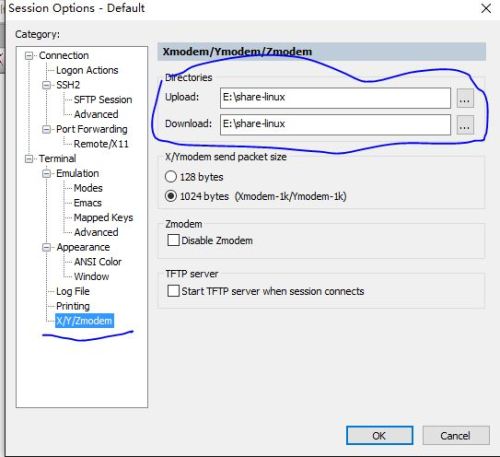
在CRT中设置文件存放的目录:
为了查找方便,上传和下载的目录都放在同一个目录中。
rz命令参数的帮助:
|
1
2
3
4
5
6
7
8
9
10
11
12
13
14
15
16
17
18
19
20
21
22
23
24
25
26
27
28
29
30
31
32
33
34
35
36
37
38
39
40
|
[root@techW ~]# rz --helprz version 0.12.20Usage: rz [options] [filename.if.xmodem]Receive files with ZMODEM/YMODEM/XMODEM protocol (X) = option applies to XMODEM only (Y) = option applies to YMODEM only (Z) = option applies to ZMODEM only -+, --append append to existing files -a, --ascii ASCII transfer (change CR/LF to LF) -b, --binary binary transfer -B, --bufsize N buffer N bytes (N==auto: buffer whole file) -c, --with-crc Use 16 bit CRC (X) -C, --allow-remote-commands allow execution of remote commands (Z) -D, --null write all received data to /dev/null --delay-startup N sleep N seconds before doing anything -e, --escape Escape control characters (Z) -E, --rename rename any files already existing --errors N generate CRC error every N bytes (debugging) -h, --help Help, print this usage message -m, --min-bps N stop transmission if BPS below N -M, --min-bps-time N for at least N seconds (default: 120) -O, --disable-timeouts disable timeout code, wait forever for data --o-sync open output file(s) in synchronous write mode -p, --protect protect existing files -q, --quiet quiet, no progress reports -r, --resume try to resume interrupted file transfer (Z) -R, --restricted restricted, more secure mode -s, --stop-at {HH:MM|+N} stop transmission at HH:MM or in N seconds -S, --timesync request remote time (twice: set local time) --syslog[=off] turn syslog on or off, if possible -t, --timeout N set timeout to N tenths of a second -u, --keep-uppercase keep upper case filenames -U, --unrestrict disable restricted mode (if allowed to) -v, --verbose be verbose, provide debugging information -w, --windowsize N Window is N bytes (Z) -X --xmodem use XMODEM protocol -y, --overwrite Yes, clobber existing file if any --ymodem use YMODEM protocol -Z, --zmodem use ZMODEM protocolshort options use the same arguments as the long ones |
使用 rz -y从windows传一个H3C无线控制器产品文档,如图:
|
1
2
3
4
5
|
[root@techW ~]# rz -yrz waiting to receive.Starting zmodem transfer. Press Ctrl+C to cancel.Transferring H3C无线控制器产品 命令参考(E3703P01_R2509P34_R3709P33_R2609P30_R3509P30_R3120P17)-6W107.chm... 100% 4140 KB 4140 KB/sec 00:00:01 0 Errors |
在linux中查看文件上传的文件:
|
1
2
3
4
5
6
7
8
9
10
11
12
13
14
15
16
|
root@techW ~]# ls -altotal 4224dr-xr-x---. 2 root root 4096 May 24 02:31 .dr-xr-xr-x. 26 root root 4096 May 24 00:14 ..-rw-------. 1 root root 1252 May 16 03:30 anaconda-ks.cfg-rw-------. 1 root root 4065 May 24 01:16 .bash_history-rw-r--r--. 1 root root 18 May 20 2009 .bash_logout-rw-r--r--. 1 root root 176 May 20 2009 .bash_profile-rw-r--r--. 1 root root 176 Sep 23 2004 .bashrc-rw-r--r--. 1 root root 100 Sep 23 2004 .cshrc-rw-r--r--. 1 root root 4240097 Feb 27 2015 H3C无线控制器产品 命令参考(E3703P01_R2509P34_R3709P33_R2609P30_R3509P30_R3120P17)-6W107.chm-rw-r--r--. 1 root root 22179 May 16 03:30 install.log-rw-r--r--. 1 root root 5890 May 16 03:27 install.log.syslog-rw-r--r--. 1 root root 5 May 16 07:04 oldboy.txt-rw-r--r--. 1 root root 129 Dec 4 2004 .tcshrc-rw-------. 1 root root 1106 May 16 13:23 .viminfo |
sz的命令参数帮助:
|
1
2
3
4
5
6
7
8
9
10
11
12
13
14
15
16
17
18
19
20
21
22
23
24
25
26
27
28
29
30
31
32
33
34
35
36
37
38
39
40
41
42
43
44
45
46
47
48
49
50
51
52
|
[root@techW ~]# sz --helpsz version 0.12.20Usage: sz [options] file ... or: sz [options] -{c|i} COMMANDSend file(s) with ZMODEM/YMODEM/XMODEM protocol (X) = option applies to XMODEM only (Y) = option applies to YMODEM only (Z) = option applies to ZMODEM only -+, --append append to existing destination file (Z) -2, --twostop use 2 stop bits -4, --try-4k go up to 4K blocksize --start-4k start with 4K blocksize (doesn't try 8) -8, --try-8k go up to 8K blocksize --start-8k start with 8K blocksize -a, --ascii ASCII transfer (change CR/LF to LF) -b, --binary binary transfer -B, --bufsize N buffer N bytes (N==auto: buffer whole file) -c, --command COMMAND execute remote command COMMAND (Z) -C, --command-tries N try N times to execute a command (Z) -d, --dot-to-slash change '.' to '/' in pathnames (Y/Z) --delay-startup N sleep N seconds before doing anything -e, --escape escape all control characters (Z) -E, --rename force receiver to rename files it already has -f, --full-path send full pathname (Y/Z) -i, --immediate-command CMD send remote CMD, return immediately (Z) -h, --help print this usage message -k, --1k send 1024 byte packets (X) -L, --packetlen N limit subpacket length to N bytes (Z) -l, --framelen N limit frame length to N bytes (l>=L) (Z) -m, --min-bps N stop transmission if BPS below N -M, --min-bps-time N for at least N seconds (default: 120) -n, --newer send file if source newer (Z) -N, --newer-or-longer send file if source newer or longer (Z) -o, --16-bit-crc use 16 bit CRC instead of 32 bit CRC (Z) -O, --disable-timeouts disable timeout code, wait forever -p, --protect protect existing destination file (Z) -r, --resume resume interrupted file transfer (Z) -R, --restricted restricted, more secure mode -q, --quiet quiet (no progress reports) -s, --stop-at {HH:MM|+N} stop transmission at HH:MM or in N seconds --tcp build a TCP connection to transmit files --tcp-server open socket, wait for connection -u, --unlink unlink file after transmission -U, --unrestrict turn off restricted mode (if allowed to) -v, --verbose be verbose, provide debugging information -w, --windowsize N Window is N bytes (Z) -X, --xmodem use XMODEM protocol -y, --overwrite overwrite existing files -Y, --overwrite-or-skip overwrite existing files, else skip --ymodem use YMODEM protocol -Z, --zmodem use ZMODEM protocolshort options use the same arguments as the long ones |
写一个aa.txt文档,将“It's a test”写入到aa.txt:
|
1
2
3
4
|
[root@techW ~]# echo "It's a test " > aa.txt[root@techW ~]# [root@techW ~]# cat aa.txtIt's a test |
将aa.txt上传到Windows中设置好的文件夹:
|
1
2
3
4
5
|
[root@techW ~]# sz -y aa.txtrzStarting zmodem transfer. Press Ctrl+C to cancel.Transferring aa.txt... 100% 13 bytes 13 bytes/sec 00:00:01 0 Errors |
到Windows的文件夹中查看文件:
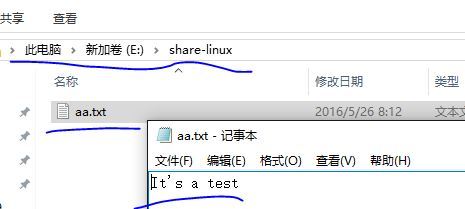
上传和下载文件,OK。
原文地址:http://blog.51cto.com/xtao16/1784300
Linux centos通过安装lszrz用CRT实现与Windows互相传文件的更多相关文章
- NoSql1 在Linux(CentOS)上安装memcached及使用
前言: 今天是初五,生活基本要从过年的节奏中回归到正常的生活了,所以想想也该想想与工作有关的事情了.我之前在工作中会经常使用memcached和redis,但是自己一直没有时间系统的好好看 ...
- Linux(CentOs)下安装Phantomjs + Casperjs
Linux(CentOs)下安装Phantomjs + Casperjs 是参照cnMiss's Blog http://ju.outofmemory.cn/entry/70691的博客进行安装的 1 ...
- linux/centos下安装nginx(rpm安装和源码安装)详细步骤
Centos下安装nginx rpm包 ...
- 分布式文件系统 FastDFS 5.0.5 & Linux CentOS 7 安装配置(单点安装)——第一篇
分布式文件系统 FastDFS 5.0.5 & Linux CentOS 7 安装配置(单点安装)--第一篇 简介 首先简单了解一下基础概念,FastDFS是一个开源的轻量级分布式文件系统,由 ...
- Linux CentOS下安装Tomcat9
本文讲解在Linux CentOS下安装Tomcat9,以及Web项目的部署发布. 环境:阿里云ECS 云服务器Linux CentOS 使用XShell客户端连接服务器,进行操作实践. 1.下载To ...
- 如何在linux CentOS 上安装chrome 谷歌浏览器?
获得linux命令的root权限:http://blog.csdn.net/mddy2001/article/details/76521101. 更改密码在终端中输入:sudo passwd root ...
- Linux CentOS 7 安装PostgreSQL 9.5.17 (源码编译)
近日需要将PostgreSQL数据库从Windows中迁移到Linux中,Linux CentOS 7 安装PostgreSQL 9.5.17 安装过程 特此记录. 安装环境: 数据库:Postgre ...
- 在 Linux 系统中安装Load Generator ,并在windows 调用方法
在 Linux 系统中安装Load Generator ,并在windows 调用 由于公司需要测试系统的最大用户承受能力,所以需要学习使用loadrunner.在安装的时候碰到了不少问题,所以写下此 ...
- Xshell实现Windows上传文件到Linux主机
我是怎么操作的: 1.打开一台本地Linux虚拟机,使用mount 挂载Windows的共享文件夹到Linux上,然后拷贝数据到Linux虚拟机里面:(经常第一步都不顺利,无法挂载Windows的文件 ...
随机推荐
- codesmith设置mysql的连接字符串
.net core,codesmith连不上 server=192.168.3.240;Initial Catalog=tpmdb;User=root;Password=root .net frame ...
- mongodb 分组求最大值
先上代码 db.getCollection("playback").aggregate([ {$match:{"game_record_id":{$in:[68 ...
- Windows下的免安装版MySQL配置
原文地址:https://blog.csdn.net/qq_40277973/article/details/81517479 近日在新的电脑上安装MySQL遇到一些小问题,在此做分享,也作为日后备用 ...
- 嵌入式02 STM32 实验05 蜂鸣器
蜂鸣器:是一种一体化结构的电子讯响器.主要分为分压式蜂鸣器和电磁式蜂鸣器两种类型. 一.有源/无源蜂鸣器(不是指是否带电源,而是有没有自带震荡电路) 1.有源蜂鸣器:有源蜂鸣器自带震荡电路,一通电就会 ...
- day55——django引入、小型django(socket包装的服务器)
day55 吴超老师Django总网页:https://www.cnblogs.com/clschao/articles/10526431.html 请求(网址访问,提交数据等等) request 响 ...
- GIL全局解释锁,死锁,信号量,event事件,线程queue,TCP服务端实现并发
一.GIL全局解释锁 在Cpython解释器才有GIL的概念,不是python的特点 在Cpython解释器中,同一个进程下开启的多线程,同一时刻只能有一个线程执行,无法利用多核优势. 1.GIL介绍 ...
- 为 WPF 程序添加 Windows 跳转列表的支持
原文:为 WPF 程序添加 Windows 跳转列表的支持 Windows 跳转列表是自 Windows 7 时代就带来的功能,这一功能是跟随 Windows 7 的任务栏而发布的.当时应用程序要想用 ...
- WPF 的 VisualBrush 只刷新显示的视觉效果,不刷新布局范围
原文:WPF 的 VisualBrush 只刷新显示的视觉效果,不刷新布局范围 WPF 的 VisualBrush 可以帮助我们在一个控件中显示另一个控件的外观.这是非常妙的功能. 但是本文需要说其中 ...
- Nginx fastcgi_cache权威指南
一.简介 Nginx版本从0.7.48开始,支持了类似Squid的缓存功能.这个缓存是把URL及相关组合当做Key,用Md5算法对Key进行哈希,得到硬盘上对应的哈希目录路径,从而将缓存内容保存在该目 ...
- 2. matplotlib绘制散点图
与绘制直线图的唯一区别:plt.scatter # coding=utf-8 from matplotlib import pyplot as plt from matplotlib import f ...