
Spring Cloud Alibaba学习笔记(12) - 使用Spring Cloud Stream 构建消息驱动微服务
什么是Spring Cloud Stream
一个用于构建消息驱动的微服务的框架
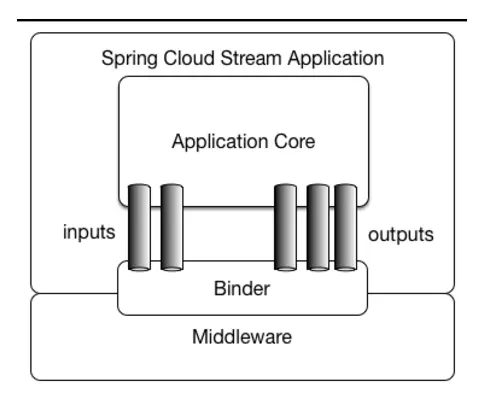
应用程序通过 inputs 或者 outputs 来与 Spring Cloud Stream 中binder 交互,通过我们配置来 binding ,而 Spring Cloud Stream 的 binder 负责与中间件交互。所以,我们只需要搞清楚如何与 Spring Cloud Stream 交互就可以方便使用消息驱动的方式
Spring Cloud Stream编程模型
- Destination Binder(目标绑定器)
- 与消息中间件通信的组件
- Destination Bindings(目标绑定)
- Binding是连接应用程序与消息中间件的桥梁,用于消息的消费和生产,有Binder创建
- Message(消息)
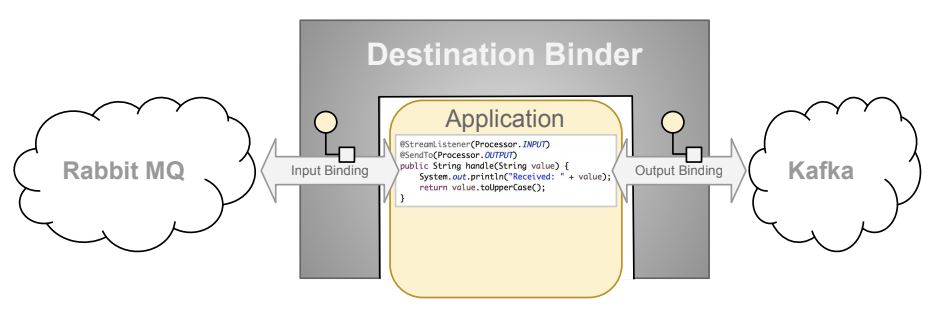
微服务集成了Stream,Stream的Destination Binder创建了两个Binding,左边的Binding连接Rabbit MQ,右边的MQ连接Kafka。
左边的Binding从Rabbit MQ处消费消息,然后经过Application处代码的处理,把处理结果传输给Kafka。【从Rabbit MQ处消费消息,然后经过处理,生产到Kafka】
使用Spring Cloud Stream 实现消息收发
编写生产者
添加依赖
<dependency>

    <groupId>com.alibaba.cloud</groupId>

    <artifactId>spring-cloud-starter-stream-rocketmq</artifactId>

</dependency>
注意groupId为com.alibaba.cloud,而不是org.springframework.cloud
添加注解
在启动类上添加@EnableBinding注解,其中Source用来发送消息
@SpringBootApplication

@EnableBinding(Source.class)

public class Study01Application {

    public static void main(String[] args) {

        SpringApplication.run(Study01Application.class, args);

    }

}
添加配置
rocketmq.binder.name-server RocketMQ控制台地址
output 表示生产者,用于绑定一个topic投递消息
bindings.output.destination 指定topic
spring:

  cloud:

    stream:

      rocketmq:

        binder:

          name-server: 127.0.0.1:9876

      bindings:

        # 生产者

        output:

          # 指定topic

          destination: topic-stream
代码实现
注入Source接口,用来实现消息发送
MessageBuilder构建消息体
@Autowired

private Source source;

@GetMapping("test-stream")

public String testStream() {

    this.source.output()

            .send(

                    MessageBuilder

                            .withPayload("消息体")

                            .build()

            );

    return "testStream";

}
控制台查看
启动项目,请求之后,可以在RocketMQ控制台-消息页面看见topic为topic-stream的消息

编写消费者
添加依赖
同生产者
添加注解
@SpringBootApplication

@EnableBinding(Sink.class)

public class Study02Application {

    public static void main(String[] args) {

        SpringApplication.run(Study02Application.class, args);

    }

}
添加配置
input表示消费者,用于绑定一个topic消费消息
destination指定topic,要与生产者的topic相对应.在使用RocketMQ时,group必填;使用其他MQ时,可以留空
spring:

  cloud:

    stream:

      rocketmq:

        binder:

          name-server: 127.0.0.1:9876

      bindings:

        # 消费者

        input:

          # 指定topic,要与生产者的topic匹配

          destination: topic-stream

          # 根据业务指定

          # 一定要设置,否则会启动报错

          # 如果使用的是其他的MQ,可以留空

          group: group-stream
代码实现
import lombok.extern.slf4j.Slf4j;

import org.springframework.cloud.stream.annotation.StreamListener;

import org.springframework.cloud.stream.messaging.Sink;

import org.springframework.stereotype.Service;

@Service

@Slf4j

public class testStreamConsumer {

    @StreamListener(Sink.INPUT)

    public void receive(String messageBody) {

        log.info("------>" + messageBody);

    }

}
测试结果

Spring Cloud Stream自定义接口
在以上的例子中,我们发现只可以设置一个topic,这显然满足不了实际的生产需求,所以这个时候就需要用到stream的自定义接口来实现多个“input”和“output”绑定不同的topic了。
生产者发送消息时使用的是Source接口里的output方法,而消费者接收消息时使用的是Sink接口里的input方法,并且都需要配置到启动类的@EnableBinding注解里。所以实际上我们需要自定义接口的源码与这两个接口的源码几乎一致,只是名称有所不同而已,使用上也只是将Source和Sink改为自定义的接口即可。
自定义发送消息
自定义消息发送接口
import org.springframework.cloud.stream.annotation.Output;

import org.springframework.messaging.MessageChannel;

/**

 * 自定义发送消息接口

 */

public interface customizeSource {

    String CUSTOMIZE_OUTPUT = "customize-output";

    @Output(CUSTOMIZE_OUTPUT)

    MessageChannel output();

}
修改注解
在启动类的@EnableBinding注解上添加刚刚自定义的消息发送接口
@EnableBinding({Source.class, customizeSource.class})
修改配置
注意customize-output的值一定要与自定义消息发送接口中@Output注解的值相同
cloud:

  stream:

    rocketmq:

      binder:

        name-server: 127.0.0.1:9876

    bindings:

      # 生产者

      output:

        # 指定topic

        destination: topic-stream

      customize-output:

        destination: topic-stream-customize
代码实现
@Autowired

private CustomizeSource customizeSource;

@GetMapping("test-stream-customize")

public String testCustomizeStream() {

    customizeSource.output()

            .send(

                    MessageBuilder

                            .withPayload("消息体")

                            .build()

            );

    return "testStream";

}
验证
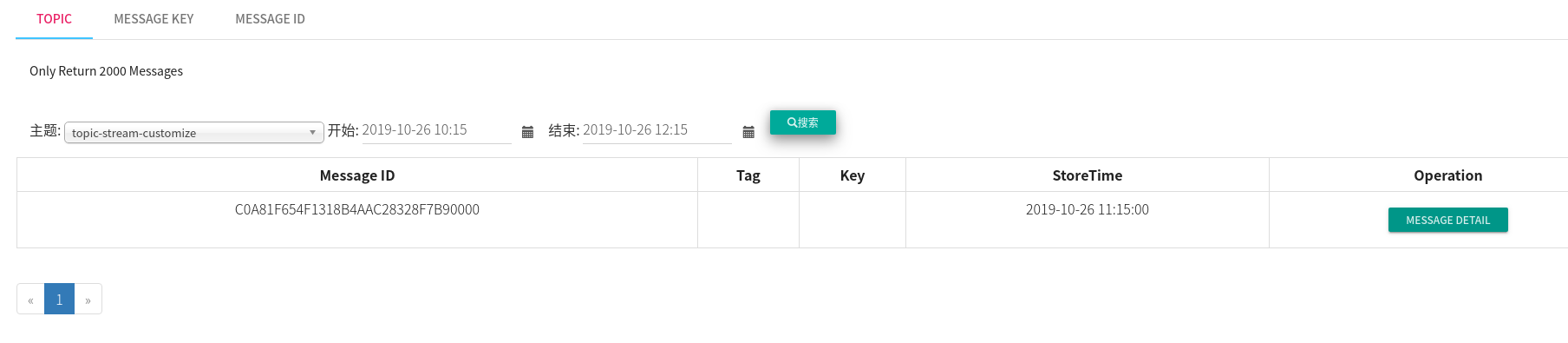
自定义接收消息
自定义消息接收接口
import org.springframework.cloud.stream.annotation.Input;

import org.springframework.messaging.SubscribableChannel;

/**

 * 自定义消费消息接口

 */

public interface CustomizeSink {

    String CUSTOMIZE_INPUT = "customize-input";

    @Input(CUSTOMIZE_INPUT)

    SubscribableChannel input();

}
修改注解
在启动类的@EnableBinding注解上添加刚刚自定义的消息接收接口
@EnableBinding({Sink.class, CustomizeSink.class})
修改配置
注意customize-input的值一定要与自定义消息发送接口中@Input注解的值相同
cloud:

    stream:

      rocketmq:

        binder:

          name-server: 127.0.0.1:9876

      bindings:

        # 消费者

        input:

          # 指定topic,要与生产者的topic匹配

          destination: topic-stream

          # 根据业务指定

          # 一定要设置,否则会启动报错

          # 如果使用的是其他的MQ,可以留空

          group: group-stream

        customize-input:

          destination: topic-stream-customize

          group: group-stream-customize
代码实现
import lombok.extern.slf4j.Slf4j;

import org.springframework.cloud.stream.annotation.StreamListener;

import org.springframework.stereotype.Service;

@Service

@Slf4j

public class CustomizeStreamConsumer {

    @StreamListener(CustomizeSink.CUSTOMIZE_INPUT)

    public void receive(String messageBody) {

        log.info("------>自定义>" + messageBody);

    }

}
验证

PS:总结来说,@EnableBinding注解的Source接口实现了发送消息,Sink接口实现了接收消息.而@EnableBinding还有一个Processor接口,Processor接口继承了Source接口和Sink接口,使用这个接口可以实现收发消息
package org.springframework.cloud.stream.messaging;

public interface Processor extends Source, Sink {

}
Spring Cloud Alibaba学习笔记(12) - 使用Spring Cloud Stream 构建消息驱动微服务的更多相关文章
- 使用 Spring Cloud Stream 构建消息驱动微服务
相关源码: spring cloud demo 微服务的目的: 松耦合 事件驱动的优势:高度解耦 Spring Cloud Stream 的几个概念 Spring Cloud Stream is a ...
- 「 从0到1学习微服务SpringCloud 」08 构建消息驱动微服务的框架 Spring Cloud Stream
系列文章(更新ing): 「 从0到1学习微服务SpringCloud 」01 一起来学呀! 「 从0到1学习微服务SpringCloud 」02 Eureka服务注册与发现 「 从0到1学习微服务S ...
- Spring源码学习笔记12——总结篇,IOC,Bean的生命周期,三大扩展点
Spring源码学习笔记12--总结篇,IOC,Bean的生命周期,三大扩展点 参考了Spring 官网文档 https://docs.spring.io/spring-framework/docs/ ...
- 消息驱动微服务:Spring Cloud Stream
最近在学习Spring Cloud的知识,现将消息驱动微服务:Spring Cloud Stream 的相关知识笔记整理如下.[采用 oneNote格式排版]
- Spring Cloud Alibaba学习笔记(1) - 整合Spring Cloud Alibaba
Spring Cloud Alibaba从孵化器版本毕业:https://github.com/alibaba/spring-cloud-alibaba,记录一下自己学习Spring Cloud Al ...
- Spring Cloud Alibaba学习笔记(23) - 调用链监控工具Spring Cloud Sleuth + Zipkin
随着业务发展,系统拆分导致系统调用链路愈发复杂一个前端请求可能最终需要调用很多次后端服务才能完成,当整个请求陷入性能瓶颈或不可用时,我们是无法得知该请求是由某个或某些后端服务引起的,这时就需要解决如何 ...
- Spring Cloud Alibaba学习笔记(15) - 整合Spring Cloud Gateway
Spring Cloud Gateway 概述 Spring Cloud Gateway 是 Spring Cloud 的一个全新项目,该项目是基于Netty.Reactor以及WEbFlux构建,它 ...
- Spring Cloud Alibaba学习笔记(3) - Ribbon
1.手写一个客户端负载均衡器 在了解什么是Ribbon之前,首先通过代码的方式手写一个负载均衡器 RestTemplate restTemplate = new RestTemplate(); // ...
- Spring Cloud Alibaba学习笔记(24) - Spring Boot Actuator 监控数据可视化:Spring Boot Admin
我们都知道,Spring Boot Actuator 提供监控数据是Json数据,在某种程度来说并不利于分析查看,那么如何将其进行可视化呢?我们有很多种选择,但是目前在这个领域,最流行的是Spring ...
随机推荐
- IPFS系列 多节点搭建 二
IPFS系列 多节点搭建 二 上一篇介绍了IPFS的分布式点对点超媒体传输协议的背景和安装介绍,本篇将继续指导搭建多节点的IPFS私有网络 文件服务.如果没还没开始搭建IPFS节点的小伙伴, 请戳此链 ...
- Jupyter Notebook in a virtual environment (virtualenv)
$ python -m venv projectname $ source projectname/bin/activate (venv) $ pip install ipykernel (venv) ...
- AdapterViewFlipper
使用AdapterViewFiller组件设置图片轮播,该组件可以自动切换view <?xml version="1.0" encoding="utf-8" ...
- Spark通过修改DataFrame的schema给表字段添加注释(转载)
转载自:https://www.jianshu.com/p/e4c90dc08935 1.需求背景 通过Spark将关系型数据库(以Oracle为例)的表同步的Hive表,要求用Spark建表,有字段 ...
- WebMercator和geographic互相转换
方法1:esri的sdk中包含的方法:esri.geometry.geographicToWebMercator() 方法2:自己转换 //经纬度转Web墨卡托 function lonLat2Web ...
- datax实例——全量、增量同步
一.全量同步 本文以mysql -> mysql为示例: 本次测试的表为mysql的系统库-sakila中的actor表,由于不支持目的端自动建表,此处预先建立目的表: CREATE TABLE ...
- Spring Cloud微服务安全实战-1-1 课程导学
- 【Mybatis】MyBatis之配置多数据源(十)
在做项目的过程中,有时候一个数据源是不够,那么就需要配置多个数据源.本例介绍mybatis多数据源配置 前言 一般项目单数据源,使用流程如下: 单个数据源绑定给sessionFactory,再在Dao ...
- hadoop记录-flink测试
1.启动集群 bin/start-cluster.sh 2.jps查看进程 3.打开网页端(192.168.66.128:8081) 4.造数据:nc -lk 9000 5.执行./bin/flink ...
- VS2010/VS2012/VS2015下openGL环境配置(转)
按:按照下述博文,三个例子均成功. https://blog.csdn.net/so_geili/article/details/51685005 请仔细阅读每一个字. 为了学习<OpenGL超 ...