
CPP 替代 PIL 图片处理(缩略图生成)
python中使用PIL(Pyhton Image Library)进行图片处理,好处就是编写简单方便,但是不能很好利用机器多核的特点,于是在项目中决定使用cpp来实现图片处理。
项目中的图片处理主要是生成缩略图。网上收集了一些cpp图片处理库,并进行了对比:
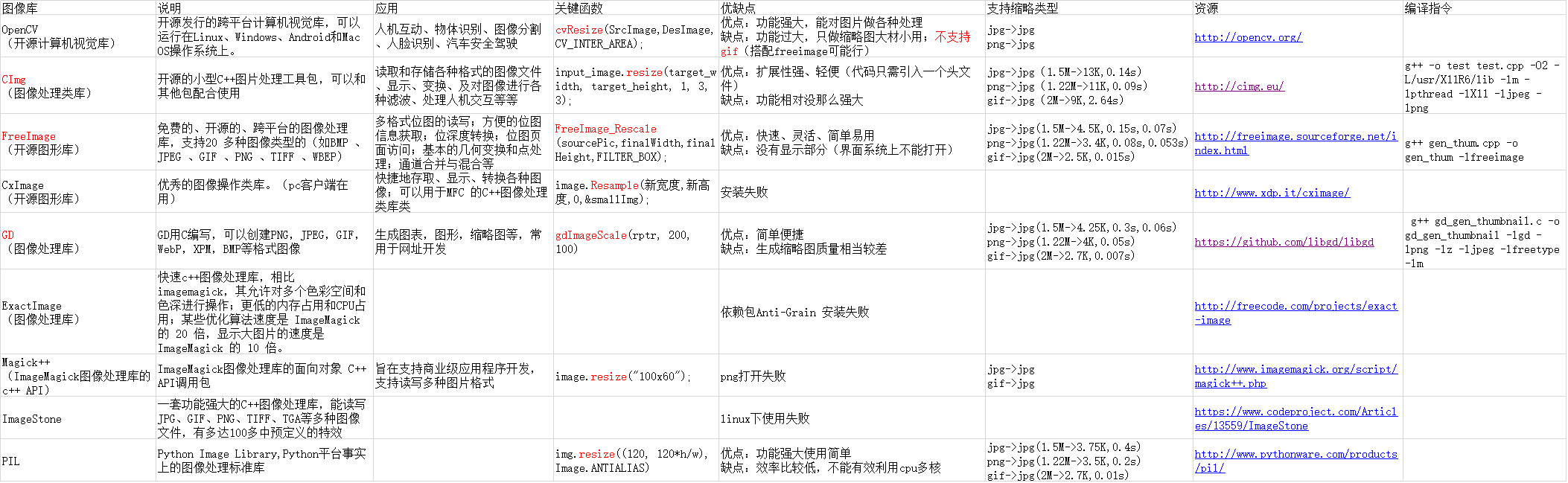
在项目中需要对jpg、png、gif格式的图片进行处理,可行的cpp库有Img、FreeImage、GD,而安装使用后进行效率对比,决定使用FreeImage。
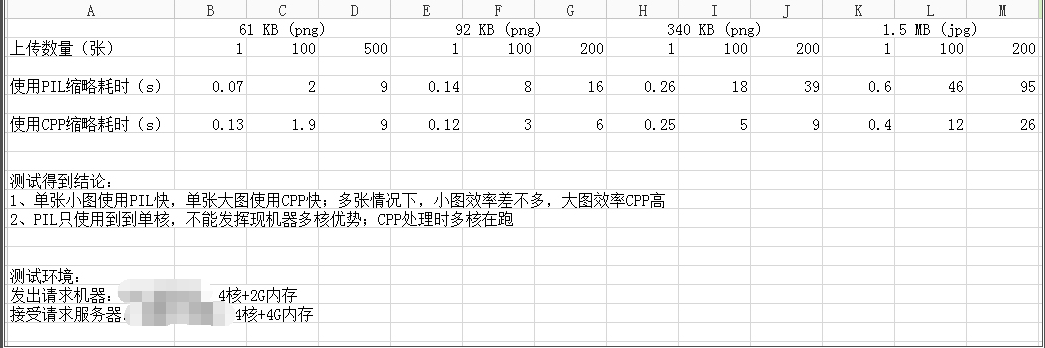
折腾了一个星期,把可用程序完成,并和PIL进行对比(这里是使用python commands库运行上传图片demo,上传时使用threading多进行并发):
注意:
1、测试时上传多张大图片时内存很快用完,所以要测试要排除内存用完的影响,内存耗尽会影响测试。(上传数量控制一下)
2、linux机器上传时,记得ulimit -n 调大文件句柄打开数,以免影响测试。
测试结果还是挺理想,准备正式推广。
FreeImage cpp 缩略图生成代码:
 #include "stdio.h"

 #include "stdlib.h"

 #include "unistd.h"

 #include <sys/time.h>

 #include <sys/stat.h>

 #include "FreeImage.h"

 #ifdef _DEBUG

 #pragma comment(lib, "FreeImaged.lib")

 #else

 #pragma comment(lib, "FreeImage.lib")

 #endif

 #define THUM_TYPE_SMALL 1

 #define THUM_TYPE_MID 2

 const float IMAGE_NEED_CROP_RATIO = 3.0;

 const float IMAGE_CROP_RATIO = 1.76;

 const int MID_IMAGE_LIMIT_SIZE = **;

 struct ImageSize{

     int width;

     int height;

 };

 inline void print_size(ImageSize img_size, const char* str)

 {

     printf("%s : %d %d\n", str, img_size.width, img_size.height);

 }

 inline bool is_long_image(ImageSize img_size)

 {

     if(float(img_size.height) / img_size.width > IMAGE_NEED_CROP_RATIO)

         return true;

     else

         return false;

 }

 inline bool is_panorama_image(ImageSize img_size)

 {

     if(float(img_size.width) / img_size.height > IMAGE_NEED_CROP_RATIO)

         return true;

     else

         return false;

 }

 inline bool is_need_crop(ImageSize img_size)

 {

     if(is_long_image(img_size))

         return true;

     if(is_panorama_image(img_size))

         return true;

     return false;

 }

 inline bool is_need_resize(ImageSize img_size, ImageSize des_img_size)

 {

     int width = img_size.width;

     int height = img_size.height;

     int des_width = des_img_size.width;

     int des_height = des_img_size.height;

     if((width < des_width) && (height < des_height))

         return false;

     else

         return true;

 }

 inline ImageSize get_crop_size(ImageSize img_size)

 {

     if(is_long_image(img_size))

         img_size.height = img_size.width * IMAGE_CROP_RATIO;

     else if(is_panorama_image(img_size))

         img_size.width = img_size.height * IMAGE_CROP_RATIO;

     return img_size;

 }

 inline ImageSize get_resize_size(ImageSize img_size, ImageSize des_img_size)

 {

     int width = img_size.width;

     int height = img_size.height;

     int des_width = des_img_size.width;

     int des_height = des_img_size.height;

     float ratio = 1.0;

     if(height > width)

         ratio = float(des_height) / height;

     else

         ratio = float(des_width) / width;

     img_size.width = width * ratio;

     img_size.height = height * ratio;

     return img_size;

 }

 inline FIBITMAP * get_crop_picture(FIBITMAP *sourcePic)

 {

     int src_width, src_height;

     //获取图片大小

     src_width  = FreeImage_GetWidth(sourcePic);

     src_height = FreeImage_GetHeight(sourcePic);

     struct ImageSize src_size = {src_width, src_height};

     if(!is_need_crop(src_size))

         return sourcePic;

     struct ImageSize crop_size = get_crop_size(src_size);

     //print_size(crop_size, "crop_size");

     FIBITMAP * cropPic = FreeImage_Copy(sourcePic, , , crop_size.width, crop_size.height);

     FreeImage_Unload(sourcePic);

     sourcePic = NULL;

     return cropPic;

 }

 inline FIBITMAP * get_resize_picture(FIBITMAP *sourcePic, ImageSize des_size)

 {

     int src_width, src_height;

     //获取图片大小

     src_width  = FreeImage_GetWidth(sourcePic);

     src_height = FreeImage_GetHeight(sourcePic);

     struct ImageSize src_size = {src_width, src_height};

     if(!is_need_resize(src_size, des_size))

         return sourcePic;

     struct ImageSize resize_size = get_resize_size(src_size, des_size);

     //print_size(resize_size, "resize_size");

     FIBITMAP * resizePic = FreeImage_Rescale(sourcePic, resize_size.width, resize_size.height, FILTER_BOX);

     FreeImage_Unload(sourcePic);

     sourcePic = NULL;

     return resizePic;

 }

 int get_file_size1(const char * src_pic_path)

 {

     struct stat stat_buf;

     stat(src_pic_path, &stat_buf);

     int file_size =  stat_buf.st_size;

     return file_size;

 }

 int get_file_size2(const char * src_pic_path)

 {

     FILE * fp = fopen(src_pic_path, "rb");

     if(fp == NULL)

         return ;

     fseek (fp, , SEEK_END);

     int src_file_size = ftell(fp);

     fclose(fp);

     return src_file_size;

 }

 int gen_symbolic_link(const char *src_pic_path, const char *des_pic_path)

 {

     char cmd[];

     sprintf(cmd, "ln -s %s %s", src_pic_path, des_pic_path);

     int sh_ret = system(cmd);

     return sh_ret;

 }

 int gen_small_thumbnail(const char *src_pic_path, const char *des_pic_path, int des_width, int des_height)

 {

     //printf("gen_small_thumbnail:%s --> %s w:%d, h:%d\n", src_pic_path, des_pic_path, des_width, des_height);

     struct ImageSize des_size = {des_width, des_height};

     FIBITMAP *sourcePic = NULL, *finalPic = NULL;

     FreeImage_Initialise();

     FREE_IMAGE_FORMAT pic_type = FIF_UNKNOWN;

     //获取图片格式

     pic_type = FreeImage_GetFileType (src_pic_path, );

     //printf("xxxxxxx:%d %d \n", pic_type, FIT_BITMAP);

     //是否支持该格式类型

     if(!FreeImage_FIFSupportsReading(pic_type))

         return ;

     //载入图片

     sourcePic = FreeImage_Load(pic_type, src_pic_path, );

     //剪切图片

     sourcePic = get_crop_picture(sourcePic);

     if(!sourcePic)

         return ;

     //缩略图片

     sourcePic = get_resize_picture(sourcePic, des_size);

     if(!sourcePic)

         return ;

     int returnValue = ;

     //位图转换

     finalPic = FreeImage_ConvertTo24Bits(sourcePic);

     //保存图片

     if(!FreeImage_Save(FIF_JPEG, finalPic, des_pic_path, JPEG_DEFAULT))

         returnValue = ;

     //释放资源

     FreeImage_Unload(sourcePic);

     FreeImage_Unload(finalPic);

     sourcePic = NULL;

     finalPic = NULL;

     FreeImage_DeInitialise();

     return returnValue;

 }

 int gen_mid_thumbnail(const char *src_pic_path, const char *des_pic_path, int des_width, int des_height)

 {

     //printf("gen_mid_thumbnail:%s --> %s w:%d, h:%d\n", src_pic_path, des_pic_path, des_width, des_height);

     struct ImageSize des_size = {des_width, des_height};

     FIBITMAP *sourcePic = NULL, *finalPic = NULL;

     FreeImage_Initialise();

     FREE_IMAGE_FORMAT pic_type = FIF_UNKNOWN;

     //获取图片格式

     pic_type = FreeImage_GetFileType (src_pic_path, );

     //printf("xxxxxxx:%d %d \n", pic_type, FIT_BITMAP);

     //是否支持该格式类型

     if(!FreeImage_FIFSupportsReading(pic_type))

         return ;

     //载入图片

     sourcePic = FreeImage_Load(pic_type, src_pic_path, );

     struct ImageSize src_size = {FreeImage_GetWidth(sourcePic), FreeImage_GetHeight(sourcePic)};

     //缩略图片

     int returnValue = ;

     sourcePic = get_resize_picture(sourcePic, des_size);

     if(!sourcePic)

         return ;

     //int src_file_size = get_file_size2(src_pic_path);

     int file_size = get_file_size1(src_pic_path);

     if(is_need_resize(src_size, des_size) || file_size > MID_IMAGE_LIMIT_SIZE){

         //位图转换

         finalPic = FreeImage_ConvertTo24Bits(sourcePic);

         //保存图片

         if(!FreeImage_Save(FIF_JPEG, finalPic, des_pic_path, JPEG_DEFAULT))

             returnValue = ;

     }else{

         int sh_ret = gen_symbolic_link(src_pic_path, des_pic_path);

         //if(src_file_size > MID_IMAGE_LIMIT_SIZE)

         //printf("src_file_size:%d file_size:%d sh:%d\n", src_file_size, file_size, sh_ret);

     }

     //释放资源

     FreeImage_Unload(sourcePic);

     FreeImage_Unload(finalPic);

     sourcePic = NULL;

     finalPic = NULL;

     FreeImage_DeInitialise();

     return returnValue;

 }

 /*

 usage:

     ./cpp_gen_thum src_pic_path des_pic_path height width type

     源文件地址 生成文件地址 目标高 目标宽 类型

 */

 int main(int argc, char* argv[])

 {

     struct timeval t1,t2;

     double timeuse;

     gettimeofday(&t1,NULL);

     int height = atoi(argv[]);

     int width = atoi(argv[]);

     int thum_type = atoi(argv[]);

     int result = ;

     if(thum_type == THUM_TYPE_SMALL){

         result = gen_small_thumbnail(argv[], argv[], height, width);

     }else if(thum_type == THUM_TYPE_MID){

         result = gen_mid_thumbnail(argv[], argv[], height, width);

     }

     printf("%d", result);

 //    int small_res = gen_small_thumbnail(argv[1], argv[2], 120, 120);

 //    int mid_res = gen_mid_thumbnail(argv[1], argv[3], 640, 640);

 //

 //    gettimeofday(&t2,NULL);

 //    timeuse = t2.tv_sec - t1.tv_sec + (t2.tv_usec - t1.tv_usec)/1000000.0;

 //    printf("Use Time:%f small_res:%d filename:%s\n\t\t  mid_res:%d filename:%s\n",

 //        timeuse, small_res, argv[2], mid_res, argv[3]);

     return ;

 }
CPP 替代 PIL 图片处理(缩略图生成)的更多相关文章
- C#图片切割、图片压缩、缩略图生成
C#图片切割.图片压缩.缩略图生成的实现代码 /// 图片切割函数 /// </summary> /// <param name="sourceFile"&g ...
- golang图片裁剪和缩略图生成
直接贴代码了 package main import ( "errors" "fmt" "image" "image/gif&qu ...
- ThinkPHP5.0图片上传生成缩略图实例代码
很多朋友遇到这样一个问题,图片上传生成缩略图,很多人在本机(win)测试成功,上传到linux 服务器后错误. 我也遇到同样的问题.网上一查,有无数的人说是服务器临时文件目录权限问题. 几经思考后,发 ...
- thinkphp图片上传+validate表单验证+图片木马检测+缩略图生成
目录 1.案例 1.1图片上传 1.2进行图片木马检测 1.3缩略图生成 1.4控制器中调用缩略图生成方法 1.案例 前言:在thinkphp框架的Thinkphp/Library/Thin ...
- python随机图片验证码的生成
Python生成随机验证码,需要使用PIL模块. 安装: 1 pip3 install pillow 基本使用 1. 创建图片 1 2 3 4 5 6 7 8 9 from PIL import Im ...
- python 将png图片格式转换生成gif动画
先看知乎上面的一个连接 用Python写过哪些[脑洞大开]的小工具? https://www.zhihu.com/question/33646570/answer/157806339 这个哥们通过爬气 ...
- android实现视频图片取缩略图
取缩略图不等同于缩放图片. 缩放图片是保持不失真的情况下缩放处理,并进行平滑处理. 缩略图则不然,允许失真,目的只是取出图片的轮廓. 保存Bitmap图片 private void saveBitma ...
- Java乔晓松-android中获取图片的缩略图(解决OutOfMemoryError)内存溢出的Bug
由于android获取图片过大是会出现内存溢出的Bug 07-02 05:10:13.792: E/AndroidRuntime(6016): java.lang.OutOfMemoryError 解 ...
- 织梦DEDECMS更换目录后页面内的图片和缩略图无法显示解决方法
http://www.win8f.com/seoyouhua/6609.html 很多人碰到织梦更换目录后内容图片和缩略图无法显示的问题,在此,慧鸿网络特地搜集整理了一篇关于织梦出现缩略图和内容无法显 ...
随机推荐
- Linux 下 的 Oracle,如何安装 tnsname
运行 netca 即可:
- Discover Feature Engineering, How to Engineer Features and How to Get Good at It
Feature engineering is an informal topic, but one that is absolutely known and agreed to be key to s ...
- 【MySQL函数】MySQL 5.5从零开始学第六章
说明:本文总结自:<MySQL 5.5从零开始学>第六章 MySQL中的函数包括: 数学函数.字符串函数.日期和时间函数.条件判断函数.系统信息函数和加密函数等. 函数: 表示对输入参数值 ...
- scrapy 爬取知乎问题、答案 ,并异步写入数据库(mysql)
python版本 python2.7 爬取知乎流程: 一 .分析 在访问知乎首页的时候(https://www.zhihu.com),在没有登录的情况下,会进行重定向到(https://www. ...
- MySQL☞左外链接与右外连接
外链接查询:即要查询有关联关系的数据,还要查询没有关联关系的数据.(个人理解为:表A和表B两个关联的列中)如下图: emmm,简单的来说两个表的关联关系:book.bid=bookshop.id,他们 ...
- Android手机测试-ddms&monitor-抓crash,log
1.安装adb offline解决办法: 原因就是android 4.2以上的版本过高,sdk的adb驱动不匹配,需要升级.我原本的adb是1.0.29,升级为1.0.31,问题就解决了. 2.安装s ...
- JMeter:全面的乱码解决方案【转】
本文是转自https://www.cnblogs.com/mawenqiangios/p/7918583.html 感谢分享者 中文乱码一直都是比较让人棘手的问题,我们在使用Jmeter的过程中, ...
- Phaser3跟随自定义路径移动的赛车 -- iFIERO游戏教程
racingcar 在线预览:http://www.ifiero.com/uploads/phaser/pathrotate/代码: var config = { type: Phaser.AUT ...
- 415. Valid Palindrome【LintCode java】
Description Given a string, determine if it is a palindrome, considering only alphanumeric character ...
- 7个Node.js的Web框架
NodeJS也就是Node,是众所周知的使用javascript构建Web应用框架,它启动一个服务器非常简单,如下: var http = require('http'); http.createSe ...