
C#:在AnyCPU模式下使用CefSharp
------------吾亦无他,唯手熟尔,谦卑若愚,好学若饥-------------
本篇博客讲述如何在AnyCPU模式下使用CefSharp
因为在某些情况下,不得不用AnyCPU,但是CefSharp支持的是86和64位俩种模式,所以在我查阅了很多国内外的资料下,总结出来的一些精华
参考地址:
https://ourcodeworld.com/articles/read/173/how-to-use-cefsharp-chromium-embedded-framework-csharp-in-a-winforms-application
https://github.com/cefsharp/CefSharp/issues/1714
https://github.com/cefsharp/CefSharp.MinimalExample/blob/demo/anycpu/CefSharp.MinimalExample.Wpf/App.xaml.cs
三篇结合就可以实现在AnyCPU下使用CefSharp
简单步骤记录
第一篇博客取其第二个,更改配置的那一块,这块不改,下面的没用,项目起不起来
简述一下:
1.修改为首选32位,

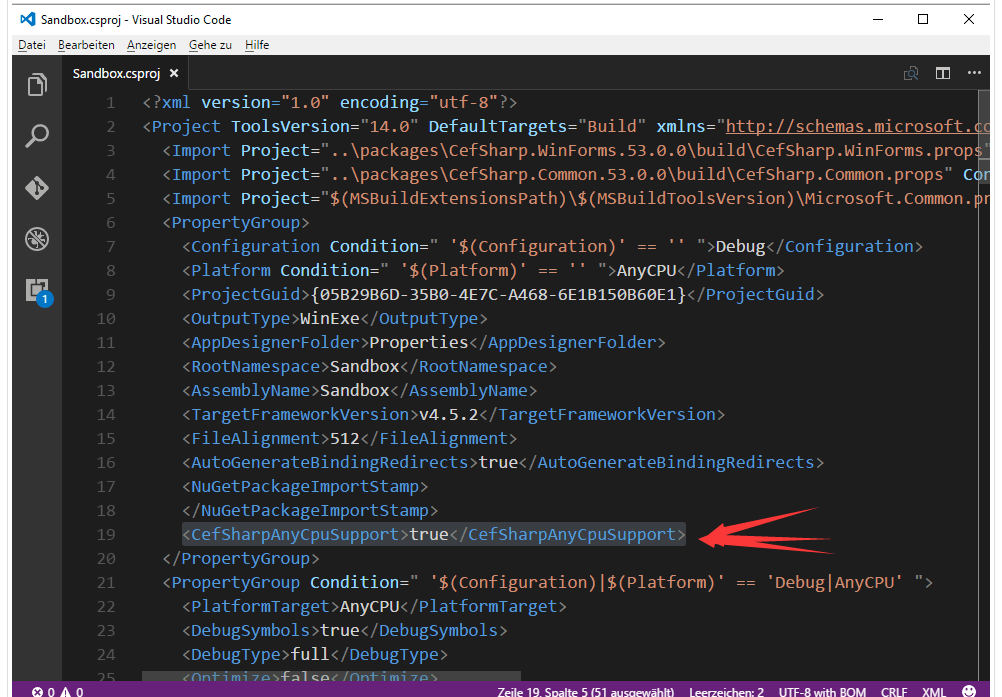
2.在你项目名.csproj文件下,加一段
<CefSharpAnyCpuSupport>true</CefSharpAnyCpuSupport>
位置如下:
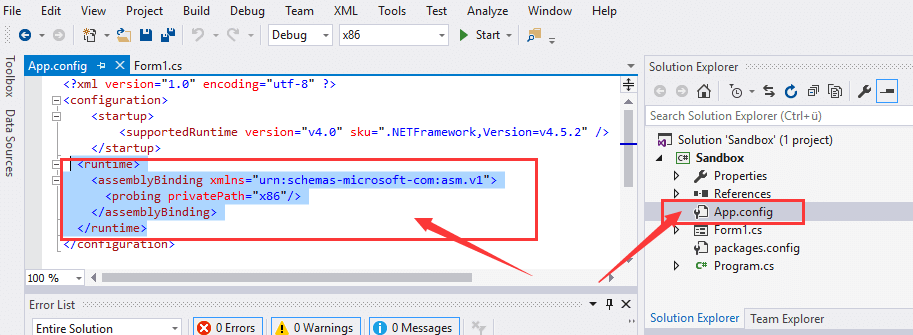
3.在App.config下加一端
<runtime>

    <assemblyBinding xmlns="urn:schemas-microsoft-com:asm.v1">

        <probing privatePath="x86"/>

    </assemblyBinding>

</runtime>
位置如下:
第二篇博客取的精髓在这块,我给放过来
public partial class App : Application

{

    public App()

    {

        //Add Custom assembly resolver

        AppDomain.CurrentDomain.AssemblyResolve += Resolver;

        //Any CefSharp references have to be in another method with NonInlining

        // attribute so the assembly rolver has time to do it's thing.

        InitializeCefSharp();

    }

    [MethodImpl(MethodImplOptions.NoInlining)]

    private static void InitializeCefSharp()

    {

        var settings = new CefSettings();

        // Set BrowserSubProcessPath based on app bitness at runtime

        settings.BrowserSubprocessPath = Path.Combine(AppDomain.CurrentDomain.SetupInformation.ApplicationBase,

                                               Environment.Is64BitProcess ? "x64" : "x86",

                                               "CefSharp.BrowserSubprocess.exe");

        // Make sure you set performDependencyCheck false

        Cef.Initialize(settings, performDependencyCheck: false, browserProcessHandler: null);

    }

    // Will attempt to load missing assembly from either x86 or x64 subdir

    // Required by CefSharp to load the unmanaged dependencies when running using AnyCPU

    private static Assembly Resolver(object sender, ResolveEventArgs args)

    {

        if (args.Name.StartsWith("CefSharp"))

        {

            string assemblyName = args.Name.Split(new[] { ',' }, )[] + ".dll";

            string archSpecificPath = Path.Combine(AppDomain.CurrentDomain.SetupInformation.ApplicationBase,

                                                   Environment.Is64BitProcess ? "x64" : "x86",

                                                   assemblyName);

            return File.Exists(archSpecificPath)

                       ? Assembly.LoadFile(archSpecificPath)

                       : null;

        }

        return null;

    }

}
第三篇博客 就是告诉你using指令怎么引,以及详细的写法,要用的话,还是用第二篇博客的这段代码
using System;

using System.IO;

using System.Reflection;

using System.Runtime.CompilerServices;

using System.Windows;

namespace CefSharp.MinimalExample.Wpf

{

    public partial class App : Application

    {

        public App()

        {

            //Add Custom assembly resolver

            AppDomain.CurrentDomain.AssemblyResolve += Resolver;

            //Any CefSharp references have to be in another method with NonInlining

            // attribute so the assembly rolver has time to do it's thing.

            InitializeCefSharp();

        }

        [MethodImpl(MethodImplOptions.NoInlining)]

        private static void InitializeCefSharp()

        {

            //Perform dependency check to make sure all relevant resources are in our output directory.

            var settings = new CefSettings();

            settings.BrowserSubprocessPath = Path.Combine(AppDomain.CurrentDomain.SetupInformation.ApplicationBase,

                                                   Environment.Is64BitProcess ? "x64" : "x86",

                                                   "CefSharp.BrowserSubprocess.exe");

            Cef.Initialize(settings, performDependencyCheck: false, browserProcessHandler:null);

        }

        // Will attempt to load missing assembly from either x86 or x64 subdir

        // Required by CefSharp to load the unmanaged dependencies when running using AnyCPU

        private static Assembly Resolver(object sender, ResolveEventArgs args)

        {

            if (args.Name.StartsWith("CefSharp"))

            {

                string assemblyName = args.Name.Split(new[] { ',' }, )[] + ".dll";

                string archSpecificPath = Path.Combine(AppDomain.CurrentDomain.SetupInformation.ApplicationBase,

                                                       Environment.Is64BitProcess ? "x64" : "x86",

                                                       assemblyName);

                return File.Exists(archSpecificPath)

                           ? Assembly.LoadFile(archSpecificPath)

                           : null;

            }

            return null;

        }

    }

}
三套组合拳打完,CefSharp就可以在AnyCPU模式下使用了
C#:在AnyCPU模式下使用CefSharp的更多相关文章
- 基于 Vue.js 之 iView UI 框架非工程化实践记要 使用 Newtonsoft.Json 操作 JSON 字符串 基于.net core实现项目自动编译、并生成nuget包 webpack + vue 在dev和production模式下的小小区别 这样入门asp.net core 之 静态文件 这样入门asp.net core,如何
基于 Vue.js 之 iView UI 框架非工程化实践记要 像我们平日里做惯了 Java 或者 .NET 这种后端程序员,对于前端的认识还常常停留在 jQuery 时代,包括其插件在需要时就引 ...
- 微软Azure 经典模式下创建内部负载均衡(ILB)
微软Azure 经典模式下创建内部负载均衡(ILB) 使用之前一定要注意自己的Azure的模式,老版的为cloud service模式,新版为ARM模式(资源组模式) 本文适用于cloud servi ...
- 苹果手机Safari无痕浏览模式下系统登录成功但是页面不跳转
昨天下午,测试提了一个bug,问题是:在苹果手机Safari无痕浏览模式下系统登录成功但是页面不跳转. 思前想后找了半天没思路,后来经过同事的点拨,说可能是禁用了cookie之类的,反正我也没思路就顺 ...
- win10 下visual studio 2015 在调试模式下不能跟踪源文件
win10 下visual studio 2015 在调试模式下不能跟踪源文件,只要一调试就会关闭(隐藏)打开的文档,非常不方便.经过一番折腾,发现是配置的问题. 如果安装多个版本的VS,请删除对应版 ...
- 转:IE兼容模式下 SCRIPT1028: 缺少标识符、字符串或数字
IE兼容模式下 SCRIPT1028: 缺少标识符.字符串或数字例如下面一段代码 var a = { x: 1, y: 2,};alert(a.x);如果在IE的兼容性视图(IE7文档模式 ...
- 【配置】检测到在集成的托管管道模式下不适用的ASP.NET设置的解决方法(非简单设置为【经典】模式)。
× 检测到在集成的托管管道模式下不适用的ASP.NET设置的解决方法(非简单设置为[经典]模式). 我们将ASP.NET程序从IIS6移植到IIS7,可能运行提示以下错误: HTTP 错误 5 ...
- Linux学习之CentOS(二十二)--单用户模式下修改Root用户的密码
在上一篇随笔里面详细讲解了Linux系统的启动过程 (Linux学习之CentOS(二十一)--Linux系统启动详解),我们知道Linux系统的启动级别一共有6种级别,通过 /etc/inittab ...
- MVC开发模式下的用户角色权限控制
前提: MVC开发模式 大概思想: 1.在MVC开发模式下,每个功能都对应着不同的控制器或操作方法名(如修改密码功能可能对应着User/changepd),把每个功能对应的控制器名和操作方法名存到数据 ...
- TreeView 使用方法:(在View.Details模式下)
1.建立TreeView的標題 2.建立TreeView的Item 3.在TreeView的Item中的建立SubItem 如果將各部 ...
随机推荐
- 【[NOI2011]阿狸的打字机】
首先发现这个插入的非常有特点,我们可以直接利用这个特殊的性质在\(Trie\)树上模拟指针的进退 之后得到了\(Trie\)树,先无脑建出\(AC\)机 之后考虑一下如何写暴力 最简单的暴力对于每一个 ...
- Odoo中的约束
转载请注明原文地址:https://www.cnblogs.com/cnodoo/p/9280735.html 一:装饰器约束(字段约束) 装饰器参数指定了约束的字段,当涉及的字段中任一发生改变时触发 ...
- 一步步入门编写PHP扩展
1.写在最前 随着互联网飞速发展,lamp架构的流行,php支持的扩展也越来越多,这样直接促进了php的发展. 但是php也有脚本语言不可避免的问题,性能比例如C等编译型语言相差甚多,所以在考虑性能问 ...
- priority_queue详解
priority_queue是一个安排好的顺序存储的队列,队首是优先级最高的元素. Template<class T , class Container = vector<T> , ...
- uboot 移植 要点
1.第一 首先要 学会 shell 语法 比如 变量的 概念 变量的使用 ,if 语法 ,以及简单 IF 语法(与 或预算),以及 while for 循环 等等语法,才能看得懂 uboot ...
- QT 简单 TCP 通信,发送数据到服务器
1.首先 添加头文件 #include <QtNetwork/QTcpSocket> 并且 在 xxx.pro(xxx指工程的名称) 中QT += core gui下面,添加 下面两句句话 ...
- CCF认证201803-2 碰撞的小球 java代码实现。
问题描述 数轴上有一条长度为L(L为偶数)的线段,左端点在原点,右端点在坐标L处.有n个不计体积的小球在线段上,开始时所有的小球都处在偶数坐标上,速度方向向右,速度大小为1单位长度每秒. 当小球到达线 ...
- FCC Truncate a string 解决方法
三行搞定 function truncate(str, num) { ab = str.length >num?num>3?str.slice(0,num-3)+ "...&qu ...
- javascript 获取排列后的对象建值
function getSortedParameter (parameterObject){ let attributes = []; parameterObject = parameterObjec ...
- TCL-事务
一.含义事务:一条或多条sql语句组成一个执行单位,一组sql语句要么都执行要么都不执行二.特点(ACID)A 原子性:一个事务是不可再分割的整体,要么都执行要么都不执行C 一致性:一个事务可以使数据 ...