
[svc]cfssl模拟https站点-探究浏览器如何校验证书
准备cfssl环境
wget https://pkg.cfssl.org/R1.2/cfssl_linux-amd64 -O     /usr/local/bin/cfssl

wget https://pkg.cfssl.org/R1.2/cfssljson_linux-amd64 -O      /usr/local/bin/cfssljson

wget https://pkg.cfssl.org/R1.2/cfssl-certinfo_linux-amd64 -O /usr/local/bin/cfssl-certinfo

chmod +x /usr/local/bin/cfssl*
生成ca证书
cd;mkdir keys;cd keys

cat > ca-config.json <<EOF

{

  "signing": {

    "default": {

      "expiry": "8760h"

    },

    "profiles": {

      "app": {

        "usages": [

            "signing",

            "key encipherment",

            "server auth",

            "client auth"

        ],

        "expiry": "8760h"

      }

    }

  }

}

EOF

cat > ca-csr.json <<EOF

{

  "CN": "k8s",

  "key": {

    "algo": "rsa",

    "size": 2048

  },

  "names": [

    {

      "C": "CN",

      "ST": "BeiJing",

      "L": "BeiJing",

      "O": "k8s",

      "OU": "System"

    }

  ]

}

EOF

cfssl gencert -initca ca-csr.json | cfssljson -bare ca
生成server证书
cd /root/keys

cat > app-csr.json <<EOF

{

  "CN": "app",

  "hosts": [

    "127.0.0.1",

    "192.168.1.11",

    "app",

    "app.ma.com"

  ],

  "key": {

    "algo": "rsa",

    "size": 2048

  },

  "names": [

    {

      "C": "CN",

      "ST": "BeiJing",

      "L": "BeiJing",

      "O": "k8s",

      "OU": "System"

    }

  ]

}

EOF

cfssl gencert -ca=/root/keys/ca.pem \

  -ca-key=/root/keys/ca-key.pem \

  -config=/root/keys/ca-config.json \

  -profile=app app-csr.json | cfssljson -bare app

openssl x509  -noout -text -in  app.pem
构建https webserver模拟测试
cd /root/

cat > http-server.js <<EOF

var https = require('https');

var fs = require('fs');

var options = {

    key: fs.readFileSync('./keys/app-key.pem'),

    cert: fs.readFileSync('./keys/app.pem')

};

https.createServer(options, function (req, res) {

    res.writeHead(200);

    res.end('hello world');

}).listen(8000);

EOF

yum install nodejs -y

npm install https -g

node http-server.js
访问服务端https://192.168.1.x:8000端口(域已添加本地hosts)
发现

opera浏览器

处理浏览器安全问题
1.导出ca.pem到win7,改名为ca.crt.
2.运行 certmgr.msc 打开证书管理器

3.浏览器访问8000端口(ctrl+shift+del清缓存)
opera浏览器

4.使用apps.ma.com访问,也报错

无SAN(Subject Alternative Name)-CN: app.ma.com-即使地址栏的域名和CN一样也报错
cd /root/keys

rm -rf app*

cat > app-csr.json <<EOF

{

  "CN": "app.ma.com",  #将hosts字段去掉(SAN干掉)

  "key": {

    "algo": "rsa",

    "size": 2048

  },

  "names": [

    {

      "C": "CN",

      "ST": "BeiJing",

      "L": "BeiJing",

      "O": "k8s",

      "OU": "System"

    }

  ]

}

EOF

cfssl gencert -ca=/root/keys/ca.pem \

  -ca-key=/root/keys/ca-key.pem \

  -config=/root/keys/ca-config.json \

  -profile=app app-csr.json | cfssljson -bare app

openssl x509  -noout -text -in  app.pem
无SAN(Subject Alternative Name)-CN: *.ma.com-即使地址栏的域名和CN一样也报错
cd /root/keys

rm -rf app*

cat > app-csr.json <<EOF

{

  "CN": "*.ma.com",

  "key": {

    "algo": "rsa",

    "size": 2048

  },

  "names": [

    {

      "C": "CN",

      "ST": "BeiJing",

      "L": "BeiJing",

      "O": "k8s",

      "OU": "System"

    }

  ]

}

EOF

cfssl gencert -ca=/root/keys/ca.pem \

  -ca-key=/root/keys/ca-key.pem \

  -config=/root/keys/ca-config.json \

  -profile=app app-csr.json | cfssljson -bare app

openssl x509  -noout -text -in  app.pem

SAN含app.ma.com(Subject Alternative Name)-CN: *.ma.com-仅app.ma.com域名可访问
cd /root/keys

rm -rf app*

cat > app-csr.json <<EOF

{

  "CN": "*.ma.com",

  "hosts": [

    "app.ma.com"

  ],

  "key": {

    "algo": "rsa",

    "size": 2048

  },

  "names": [

    {

      "C": "CN",

      "ST": "BeiJing",

      "L": "BeiJing",

      "O": "k8s",

      "OU": "System"

    }

  ]

}

EOF

cfssl gencert -ca=/root/keys/ca.pem \

  -ca-key=/root/keys/ca-key.pem \

  -config=/root/keys/ca-config.json \

  -profile=app app-csr.json | cfssljson -bare app

openssl x509  -noout -text -in  app.pem

cd ..;node http-server.js


SAN含*.ma.com(Subject Alternative Name)-CN: .ma.com-可用任意.ma.com来访问
cd /root/keys

rm -rf app*

cat > app-csr.json <<EOF

{

  "CN": "*.ma.com",

  "hosts": [

    "*.ma.com"

  ],

  "key": {

    "algo": "rsa",

    "size": 2048

  },

  "names": [

    {

      "C": "CN",

      "ST": "BeiJing",

      "L": "BeiJing",

      "O": "k8s",

      "OU": "System"

    }

  ]

}

EOF

cfssl gencert -ca=/root/keys/ca.pem \

  -ca-key=/root/keys/ca-key.pem \

  -config=/root/keys/ca-config.json \

  -profile=app app-csr.json | cfssljson -bare app

openssl x509  -noout -text -in  app.pem

cd ..;node http-server.js

查看互联网上一些证书
汽车之家的通用型(*)证书(而且一个证书对应了多个域名)

谷歌的 www证书


wildcard和san两种证书的区别
wildcard: 可变部分sub-domain:

*.maotai.com

www.maotai.com

bbs.maotai.com

san: 可变部分: subdomain和domain

subdomain

*.ma.com

*.ma.net

*.xx.net
注:一般通用型证书比www证书价格贵一半左右.
浏览器如何验证证书
参考: http://www.cnblogs.com/iiiiher/p/8085698.html
当浏览器使用HTTPS连接到您的服务器时,他们会检查以确保您的SSL证书与地址栏中的主机名称匹配。
浏览器有三种找到匹配的方法:
1.主机名(在地址栏中)与证书主题(Subject)中的通用名称(Common Name)完全匹配。
2.主机名称与通配符通用名称相匹配。例如,www.example.com匹配通用名称* .example.com。
3.主机名 在主题备用名称(SAN: Subject Alternative Name)字段中列出
1.The host name (in the address bar) exactly matches the Common Name in the certificate's Subject.
2.The host name matches a Wildcard Common Name. For example, www.example.com matches the common name *.example.com.
3.The host name is listed in the Subject Alternative Name field.
客户端使用服务端返回的信息验证服务器的合法性,包括:

    证书是否过期

    发型服务器证书的CA是否可靠

    返回的公钥是否能正确解开返回证书中的数字签名

    服务器证书上的域名是否和服务器的实际域名相匹配  -- 要核对CN或SAN,见上

    验证通过后,将继续进行通信,否则,终止通信
在哪里可以查看到san
参考: https://www.digicert.com/subject-alternative-name.htm
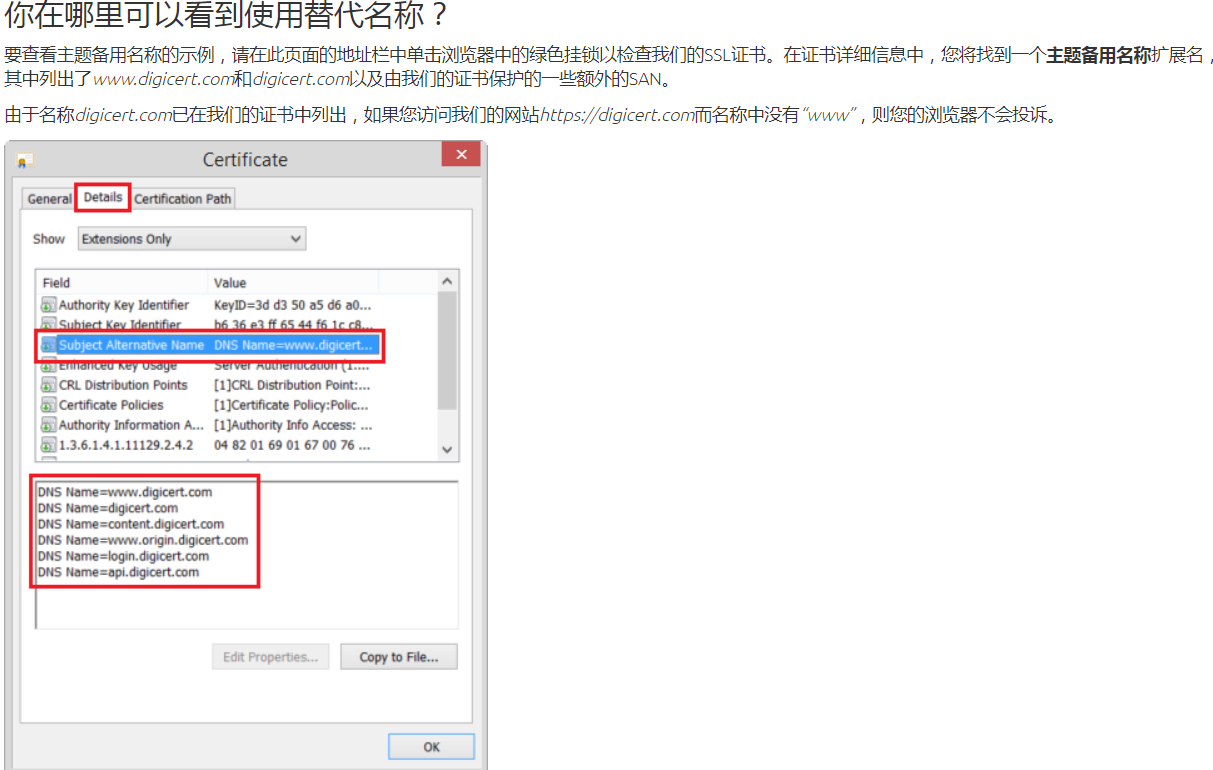
小结: 正因为访问的域名在san列表,所以访问才能被通过校验.
[svc]cfssl模拟https站点-探究浏览器如何校验证书的更多相关文章
- Apache 配置多个HTTPS站点
作中经常会遇到多个站点实现https访问,并指向同一个网页,本文将详解如何在Centos 环境下配置Apache多站点实现HTTPS访问. 准备工作 OS:CentOS release 6.8 (Fi ...
- 如何让HTTPS站点评级达到A+? 还得看这篇HTTPS安全优化配置最佳实践指南
0x00 前言简述 SSL/TLS 简单说明 描述: 当下越来越多的网站管理员为企业站点或自己的站点进行了SSL/TLS配置, SSL/TLS 是一种简单易懂的技术,它很容易部署及运行,但要对其进行安 ...
- 使用Let’s Encrypt轻松配置https站点
使用Let's Encrypt轻松配置https站点 https不仅能提高网站安全,更是被搜索引擎纳入排名的因素之一. 2015年10月份,微博上偶然看到Let's Encrypt 推出了beta版, ...
- curl+个人证书(又叫客户端证书)访问https站点
摘自http://blog.csdn.net/chary8088/article/details/22990741 curl+个人证书(又叫客户端证书)访问https站点 目前,大公司的OA管理系统( ...
- ISA 连接非443端口的https站点提示错误
ISA 连接非443端口的https站点提示错误:12204 The specified Secure Sockets Layer (SSL) port is not allowed. ISA Ser ...
- ACME[free https] Linux中使用curl命令访问https站点4种常见错误和解决方法
free https certification generator https://github.com/Neilpang/acme.sh/wiki/%E8%AF%B4%E6%98%8E 每一种客户 ...
- nginx代理https站点(亲测)
nginx代理https站点(亲测) 首先,我相信大家已经搞定了nginx正常代理http站点的方法,下面重点介绍代理https站点的配置方法,以及注意事项,因为目前大部分站点有转换https的需要所 ...
- iOS 安全:UIWebView访问Https站点防止中间人攻击
尽管Https协议能够提供数据的加密.身份的认证等安全服务,但并不是没有漏洞.HTTPS协议安全隐患的存在可能使用户受到各种极具破坏力的网络攻击.其中中间人攻击(Man In The Middle, ...
- 用curl访问HTTPS站点并登录
开发网站,少不了测试.现在的网站为了加强安全性,都启用了HTTPS协议.所谓HTTPS,也就是HTTP文本在SSL协议中传输.用curl命令行来测试HTTPS站点是个很有用的功能,写点脚本,就可以做功 ...
随机推荐
- HDU 5391 Zball in Tina Town【威尔逊定理】
<题目链接> Zball in Tina Town Problem Description Tina Town is a friendly place. People there care ...
- HDU - 1712 - ACboy needs your help 【分组背包】
<题目链接> 题目大意:有n个课程,现在花M天来学习这些课程,学习每个课程花的天数所得到的价值不同,求M天怎么分配学习才能得到的价值最大.(这些课程得到的价值和所花天数的关系由矩阵给出) ...
- react-router v4 路由规则解析
前言 react-router升级到4之后,跟前面版本比有了很大的差别. 例如包的拆分,动态路由等详细的差别就不说了,各位大神的总结也很到位,详细可以点击看看,All About React Rout ...
- Git中的bash与CMD的区别
Windows在使用git工具时,可以看到有两个命令输入窗: 1. Git CMD 2. Git Bash 两者的区别:Bash是基于CMD的,Bash在CMD的基础上新增了一些命令和功能,故建议使用 ...
- MoreWindows 微软认证专家博客目录(白话算法,C++ STL,windows编程)
为了方便大家查找和学习,现将本人博客中所有博客文章列出目录. (http://blog.csdn.net/morewindows) 一. 白话经典算法 目前有17篇,分为七大排序和经典面试题 ...
- 喵哈哈村的魔法考试 Round #17 题解
喵哈哈村的秘境探险系列. A. 实际上就是求乘积%k是否等于0,显然 a * b % k = (a%k)*(b%k)%k,所以边乘边取模就好了. #include<bits/stdc++.h&g ...
- 在global.asax中启动定时任务
public class MvcApplication : System.Web.HttpApplication { protected void Application_Start() { Area ...
- 关于ADO.Net SqlConnection的性能优化
Connections Database connections are an expensive and limited resource. Your approach to connection ...
- 用delphi制作无界面的activex控件
首先,您要了解: •COM的基本原理 •能被网页调用的非可视ActiveX控件必须是一种至少实现了IOleObject接口的TAutoObject组件 •利用Delphi向导生成的ActiveX控件必 ...
- C#高级编程----错误和异常的总结
错误和异常的总结 因为总结吗,,可能概念啥的比较多,大家要学着适应. 首先是C#中的异常用老处理系统级和用户级的错误状态,是一种结构化,统一的类型安全的处理机制. 因为鄙人开始想走C++的道路,所以搞 ...