
maven超级pom内容
1、位置
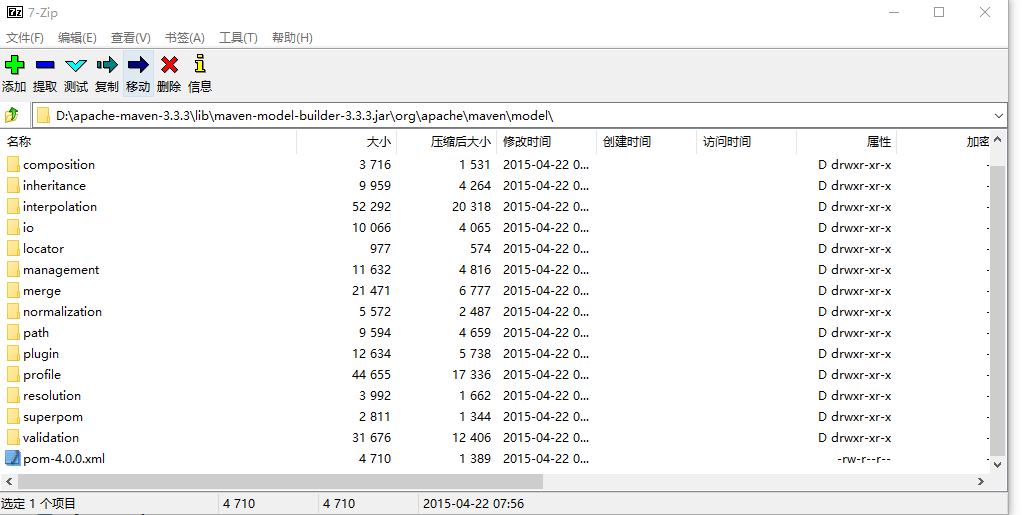
2、内容
<?xml version="1.0" encoding="UTF-8"?>

<!--

Licensed to the Apache Software Foundation (ASF) under one

or more contributor license agreements.  See the NOTICE file

distributed with this work for additional information

regarding copyright ownership.  The ASF licenses this file

to you under the Apache License, Version 2.0 (the

"License"); you may not use this file except in compliance

with the License.  You may obtain a copy of the License at

    http://www.apache.org/licenses/LICENSE-2.0

Unless required by applicable law or agreed to in writing,

software distributed under the License is distributed on an

"AS IS" BASIS, WITHOUT WARRANTIES OR CONDITIONS OF ANY

KIND, either express or implied.  See the License for the

specific language governing permissions and limitations

under the License.

-->

<!-- START SNIPPET: superpom -->

<project>

  <modelVersion>4.0.0</modelVersion>

  <repositories>

    <repository>

      <id>central</id>

      <name>Central Repository</name>

      <url>https://repo.maven.apache.org/maven2</url>

      <layout>default</layout>

      <snapshots>

        <enabled>false</enabled>

      </snapshots>

    </repository>

  </repositories>

  <pluginRepositories>

    <pluginRepository>

      <id>central</id>

      <name>Central Repository</name>

      <url>https://repo.maven.apache.org/maven2</url>

      <layout>default</layout>

      <snapshots>

        <enabled>false</enabled>

      </snapshots>

      <releases>

        <updatePolicy>never</updatePolicy>

      </releases>

    </pluginRepository>

  </pluginRepositories>

  <build>

    <directory>${project.basedir}/target</directory>

    <outputDirectory>${project.build.directory}/classes</outputDirectory>

    <finalName>${project.artifactId}-${project.version}</finalName>

    <testOutputDirectory>${project.build.directory}/test-classes</testOutputDirectory>

    <sourceDirectory>${project.basedir}/src/main/java</sourceDirectory>

    <scriptSourceDirectory>${project.basedir}/src/main/scripts</scriptSourceDirectory>

    <testSourceDirectory>${project.basedir}/src/test/java</testSourceDirectory>

    <resources>

      <resource>

        <directory>${project.basedir}/src/main/resources</directory>

      </resource>

    </resources>

    <testResources>

      <testResource>

        <directory>${project.basedir}/src/test/resources</directory>

      </testResource>

    </testResources>

    <pluginManagement>

      <!-- NOTE: These plugins will be removed from future versions of the super POM -->

      <!-- They are kept for the moment as they are very unlikely to conflict with lifecycle mappings (MNG-4453) -->

      <plugins>

        <plugin>

          <artifactId>maven-antrun-plugin</artifactId>

          <version>1.3</version>

        </plugin>

        <plugin>

          <artifactId>maven-assembly-plugin</artifactId>

          <version>2.2-beta-5</version>

        </plugin>

        <plugin>

          <artifactId>maven-dependency-plugin</artifactId>

          <version>2.8</version>

        </plugin>

        <plugin>

          <artifactId>maven-release-plugin</artifactId>

          <version>2.3.2</version>

        </plugin>

      </plugins>

    </pluginManagement>

  </build>

  <reporting>

    <outputDirectory>${project.build.directory}/site</outputDirectory>

  </reporting>

  <profiles>

    <!-- NOTE: The release profile will be removed from future versions of the super POM -->

    <profile>

      <id>release-profile</id>

      <activation>

        <property>

          <name>performRelease</name>

          <value>true</value>

        </property>

      </activation>

      <build>

        <plugins>

          <plugin>

            <inherited>true</inherited>

            <artifactId>maven-source-plugin</artifactId>

            <executions>

              <execution>

                <id>attach-sources</id>

                <goals>

                  <goal>jar</goal>

                </goals>

              </execution>

            </executions>

          </plugin>

          <plugin>

            <inherited>true</inherited>

            <artifactId>maven-javadoc-plugin</artifactId>

            <executions>

              <execution>

                <id>attach-javadocs</id>

                <goals>

                  <goal>jar</goal>

                </goals>

              </execution>

            </executions>

          </plugin>

          <plugin>

            <inherited>true</inherited>

            <artifactId>maven-deploy-plugin</artifactId>

            <configuration>

              <updateReleaseInfo>true</updateReleaseInfo>

            </configuration>

          </plugin>

        </plugins>

      </build>

    </profile>

  </profiles>

</project>

<!-- END SNIPPET: superpom -->
maven超级pom内容的更多相关文章
- 学习笔记——Maven超级POM
2014-07-04:更新如何在安装程序中找到超级pom文件.Maven有一个超级POM,所有的POM均继承此文件.你可以使用解压工具打开jar文件$M2_HOME/lib/maven-model-b ...
- maven 超级pom位置、maven命令、构件、下载位置、手动打包位置、中央仓库ip
1.超级pom位置 ----> 解压M2_HOME/lib/maven-model-builder-3.5.4.jar 2.运行maven 命令实际上是运行了 java 命令,因为maven插件 ...
- maven的超级pom
对于 Maven3,超级 POM 在文件 %MAVEN_HOME%/lib/maven-model-builder-x.x.x.jar 中的 org/apache/maven/model/pom-4. ...
- Maven的pom文件内容详细理解
<project xmlns="http://maven.apache.org/POM/4.0.0" xmlns:xsi="http://www.w3.org/20 ...
- Maven的pom配置文件
1.1 Maven的pom配置文件 1.1.1 pom文件内容和作用 Pom.xml文件用来设置项目的项目依赖.插件.项目版本等信息,其中必须的是xml的根元 ...
- Maven的pom.xml介绍
6.1 简介 pom.xml文件是Maven进行工作的主要配置文件.在这个文件中我们可以配置Maven项目的groupId.artifactId和version等Maven项目必须的元素:可以配置Ma ...
- Maven的POM.xml配置大全
<?xml version="1.0" encoding="utf-8"?> <project xmlns="http://mave ...
- 史上最全的maven的pom.xml文件详解
<project xmlns="http://maven.apache.org/POM/4.0.0" xmlns:xsi="http://www.w3.org/20 ...
- Maven的pom.xml 配置详解
<project xmlns="http://maven.apache.org/POM/4.0.0" xmlns:xsi="http://www.w3.org/20 ...
随机推荐
- 《剑指offer》-递增数组中找到和为S的(最小)两个元素
题目描述 输入一个递增排序的数组和一个数字S,在数组中查找两个数,是的他们的和正好是S,如果有多对数字的和等于S,输出两个数的乘积最小的. 输出描述: 对应每个测试案例,输出两个数,小的先输出. 首先 ...
- JS高级 - 面向对象3(面向过程改写面向对象)
改写: 1.前提:所有东西都在 onload 里 2.改写:不能有函数嵌套,可以有全局变量 onload --> 构造函数 全局变量 --> 属性 函数 --> 方法 4.改错: t ...
- [转] 插件兼容CommonJS, AMD, CMD 和 原生 JS
模块标准 CommonJS CommonJS 有三个全局变量 module.exports 和 require.但是由于 AMD 也有 require 这个全局变量,故不使用这个变量来进行检测. 如果 ...
- java.lang.RuntimeException: Unable to get provider cn.jpush.android.service.DataProvider
转自:https://blog.csdn.net/u014306335/article/details/80355169 Android Studio 3.1.2 报错: java.lang.Runt ...
- 洛谷 p1434 滑雪【记忆化搜索】
<题目链接> Michael喜欢滑雪.这并不奇怪,因为滑雪的确很刺激.可是为了获得速度,滑的区域必须向下倾斜,而且当你滑到坡底,你不得不再次走上坡或者等待升降机来载你.Michael想知道 ...
- POJ 1279 Art Gallery【半平面交】(求多边形的核)(模板题)
<题目链接> 题目大意: 按顺时针顺序给出一个N边形,求N边形的核的面积. (多边形的核:它是平面简单多边形的核是该多边形内部的一个点集该点集中任意一点与多边形边界上一点的连线都处于这个多 ...
- 使用Future停止超时任务
今天学了下多线程中超时任务的处理,这里和大家分享下,遇到了点问题没能解决,留下来希望大家帮我解疑啊. 在JAVA中停止线程的方法有多种,有一种是结合ExecutorService和Future的使用, ...
- Outlook错误代码
一般错误1 0x80004005 MISC The operation failed Virus Scanner Integration Issue Usually Related To Script ...
- Avahi DOS攻击broadcast-avahi-dos
Avahi DOS攻击broadcast-avahi-dos Avahi是Linux下常用的类DNS服务.它可以帮助主机在没有DNS服务的局域网中,发现基于Zeroconf协议的设备和服务.该工具 ...
- 深度学习中 droupout层是咋回事??
参考这篇博文 博主写的非常好! https://blog.csdn.net/program_developer/article/details/80737724 参考这篇博文 博主写的非常好! ...