
Exception的ToString()方法究竟返回的是什么
最近项目上线后遇到exception没有堆栈信息。所以跟踪一下 源码,其中主要的code如下:
        // Returns the stack trace as a string.  If no stack trace is

        // available, null is returned.

        public virtual String StackTrace

        {

#if FEATURE_CORECLR

            [System.Security.SecuritySafeCritical]

#endif

            get

            {

                // By default attempt to include file and line number info

                return GetStackTrace(true);

            }

        }

        // Computes and returns the stack trace as a string

        // Attempts to get source file and line number information if needFileInfo

        // is true.  Note that this requires FileIOPermission(PathDiscovery), and so

        // will usually fail in CoreCLR.  To avoid the demand and resulting

        // SecurityException we can explicitly not even try to get fileinfo.

        #if FEATURE_CORECLR

        [System.Security.SecurityCritical] // auto-generated

        #endif

        private string GetStackTrace(bool needFileInfo)

        {

            string stackTraceString = _stackTraceString;

            string remoteStackTraceString = _remoteStackTraceString;

#if !FEATURE_CORECLR

            if (!needFileInfo)

            {

                // Filter out file names/paths and line numbers from _stackTraceString and _remoteStackTraceString.

                // This is used only when generating stack trace for Watson where the strings must be PII-free.

                stackTraceString = StripFileInfo(stackTraceString, false);

                remoteStackTraceString = StripFileInfo(remoteStackTraceString, true);

            }

#endif // !FEATURE_CORECLR

            // if no stack trace, try to get one

            if (stackTraceString != null)

            {

                return remoteStackTraceString + stackTraceString;

            }

            if (_stackTrace == null)

            {

                return remoteStackTraceString;

            }

            // Obtain the stack trace string. Note that since Environment.GetStackTrace

            // will add the path to the source file if the PDB is present and a demand

            // for FileIOPermission(PathDiscovery) succeeds, we need to make sure we

            // don't store the stack trace string in the _stackTraceString member variable.

            String tempStackTraceString = Environment.GetStackTrace(this, needFileInfo);

            return remoteStackTraceString + tempStackTraceString;

         }

#if FEATURE_CORECLR

        [System.Security.SecuritySafeCritical]

#endif

        public override String ToString()

        {

            return ToString(true, true);

        }

        #if FEATURE_CORECLR

        [System.Security.SecurityCritical] // auto-generated

        #endif

        private String ToString(bool needFileLineInfo, bool needMessage) {

            String message = (needMessage ? Message : null);

            String s;

            if (message == null || message.Length <= ) {

                s = GetClassName();

            }

            else {

                s = GetClassName() + ": " + message;

            }

            if (_innerException!=null) {

                s = s + " ---> " + _innerException.ToString(needFileLineInfo, needMessage) + Environment.NewLine +

                "   " + Environment.GetResourceString("Exception_EndOfInnerExceptionStack");

            }

            string stackTrace = GetStackTrace(needFileLineInfo);

            if (stackTrace != null)

            {

                s += Environment.NewLine + stackTrace;

            }

            return s;

        }
Exception的StackTrace属性只返回当前对象的站信息,toString方法首先需要获取当前的Message,然后获取内部exception的tostring方法,最后获取 GetStackTrace方法的返回值,该方法主要内容来源于 Environment.GetStackTrace方法,其实现code如下:
        internal static String GetStackTrace(Exception e, bool needFileInfo)

        {

            // Note: Setting needFileInfo to true will start up COM and set our

            // apartment state.  Try to not call this when passing "true"

            // before the EE's ExecuteMainMethod has had a chance to set up the

            // apartment state.  --

            StackTrace st;

            if (e == null)

                st = new StackTrace(needFileInfo);

            else

                st = new StackTrace(e, needFileInfo);

            // Do no include a trailing newline for backwards compatibility

            return st.ToString( System.Diagnostics.StackTrace.TraceFormat.Normal );

        }
调用的是StackTrace的tostring方法,其实现如下:
  internal String ToString(TraceFormat traceFormat)

        {

            bool displayFilenames = true;   // we'll try, but demand may fail

            String word_At = "at";

            String inFileLineNum = "in {0}:line {1}";

            if(traceFormat != TraceFormat.NoResourceLookup)

            {

                word_At = Environment.GetResourceString("Word_At");

                inFileLineNum = Environment.GetResourceString("StackTrace_InFileLineNumber");

            }

            bool fFirstFrame = true;

            StringBuilder sb = new StringBuilder();

            for (int iFrameIndex = ; iFrameIndex < m_iNumOfFrames; iFrameIndex++)

            {

                StackFrame sf = GetFrame(iFrameIndex);

                MethodBase mb = sf.GetMethod();

                if (mb != null)

                {

                    // We want a newline at the end of every line except for the last

                    if (fFirstFrame)

                        fFirstFrame = false;

                    else

                        sb.Append(Environment.NewLine);

                    sb.AppendFormat(CultureInfo.InvariantCulture, "   {0} ", word_At);

                    Type t = mb.DeclaringType;

                     // if there is a type (non global method) print it

                    if (t != null)

                    {

                        sb.Append(t.FullName.Replace('+', '.'));

                        sb.Append(".");

                    }

                    sb.Append(mb.Name);

                    // deal with the generic portion of the method

                    if (mb is MethodInfo && ((MethodInfo)mb).IsGenericMethod)

                    {

                        Type[] typars = ((MethodInfo)mb).GetGenericArguments();

                        sb.Append("[");

                        int k=;

                        bool fFirstTyParam = true;

                        while (k < typars.Length)

                        {

                            if (fFirstTyParam == false)

                                sb.Append(",");

                            else

                                fFirstTyParam = false;

                            sb.Append(typars[k].Name);

                            k++;

                        }

                        sb.Append("]");

                    }

                    // arguments printing

                    sb.Append("(");

                    ParameterInfo[] pi = mb.GetParameters();

                    bool fFirstParam = true;

                    for (int j = ; j < pi.Length; j++)

                    {

                        if (fFirstParam == false)

                            sb.Append(", ");

                        else

                            fFirstParam = false;

                        String typeName = "<UnknownType>";

                        if (pi[j].ParameterType != null)

                            typeName = pi[j].ParameterType.Name;

                        sb.Append(typeName + " " + pi[j].Name);

                    }

                    sb.Append(")");

                    // source location printing

                    if (displayFilenames && (sf.GetILOffset() != -))

                    {

                        // If we don't have a PDB or PDB-reading is disabled for the module,

                        // then the file name will be null.

                        String fileName = null;

                        // Getting the filename from a StackFrame is a privileged operation - we won't want

                        // to disclose full path names to arbitrarily untrusted code.  Rather than just omit

                        // this we could probably trim to just the filename so it's still mostly usefull.

                        try

                        {

                            fileName = sf.GetFileName();

                        }

#if FEATURE_CAS_POLICY

                        catch (NotSupportedException)

                        {

                            // Having a deprecated stack modifier on the callstack (such as Deny) will cause

                            // a NotSupportedException to be thrown.  Since we don't know if the app can

                            // access the file names, we'll conservatively hide them.

                            displayFilenames = false;

                        }

#endif // FEATURE_CAS_POLICY

                        catch (SecurityException)

                        {

                            // If the demand for displaying filenames fails, then it won't

                            // succeed later in the loop.  Avoid repeated exceptions by not trying again.

                            displayFilenames = false;

                        }

                        if (fileName != null)

                        {

                            // tack on " in c:\tmp\MyFile.cs:line 5"

                            sb.Append(' ');

                            sb.AppendFormat(CultureInfo.InvariantCulture, inFileLineNum, fileName, sf.GetFileLineNumber());

                        }

                    }

#if FEATURE_EXCEPTIONDISPATCHINFO

                    if (sf.GetIsLastFrameFromForeignExceptionStackTrace())

                    {

                        sb.Append(Environment.NewLine);

                        sb.Append(Environment.GetResourceString("Exception_EndStackTraceFromPreviousThrow"));

                    }

#endif // FEATURE_EXCEPTIONDISPATCHINFO

                }

            }

            if(traceFormat == TraceFormat.TrailingNewLine)

                sb.Append(Environment.NewLine);

            return sb.ToString();

        }
这个方法最主要的还是 StackFrame sf = GetFrame(iFrameIndex); 它返回跟踪栈的信息。跟踪栈的信息主要来源于StackTrace的构造函数
  public StackTrace(Exception e, bool fNeedFileInfo)

        {

            if (e == null)

                throw new ArgumentNullException("e");

            Contract.EndContractBlock();

            m_iNumOfFrames = ;

            m_iMethodsToSkip = ;

            CaptureStackTrace(METHODS_TO_SKIP, fNeedFileInfo, null, e);

        }
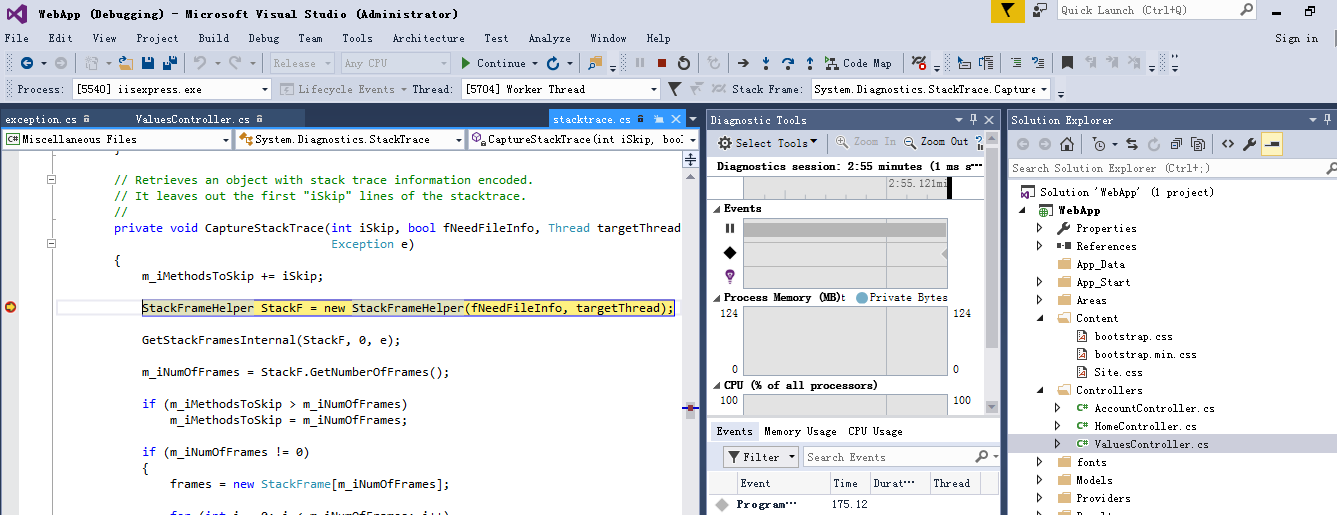
核心实现CaptureStackTrace code如下:
  private void CaptureStackTrace(int iSkip, bool fNeedFileInfo, Thread targetThread,

                                       Exception e)

        {

            m_iMethodsToSkip += iSkip;

            StackFrameHelper StackF = new StackFrameHelper(fNeedFileInfo, targetThread);

            GetStackFramesInternal(StackF, , e);

            m_iNumOfFrames = StackF.GetNumberOfFrames();

            if (m_iMethodsToSkip > m_iNumOfFrames)

                m_iMethodsToSkip = m_iNumOfFrames;

            if (m_iNumOfFrames != )

            {

                frames = new StackFrame[m_iNumOfFrames];

                for (int i = ; i < m_iNumOfFrames; i++)

                {

                    bool fDummy1 = true;

                    bool fDummy2 = true;

                    StackFrame sfTemp = new StackFrame(fDummy1, fDummy2);

                    sfTemp.SetMethodBase(StackF.GetMethodBase(i));

                    sfTemp.SetOffset(StackF.GetOffset(i));

                    sfTemp.SetILOffset(StackF.GetILOffset(i));

#if FEATURE_EXCEPTIONDISPATCHINFO

                    sfTemp.SetIsLastFrameFromForeignExceptionStackTrace(StackF.IsLastFrameFromForeignExceptionStackTrace(i));

#endif // FEATURE_EXCEPTIONDISPATCHINFO

                    if (fNeedFileInfo)

                    {

                        sfTemp.SetFileName(StackF.GetFilename (i));

                        sfTemp.SetLineNumber(StackF.GetLineNumber(i));

                        sfTemp.SetColumnNumber(StackF.GetColumnNumber(i));

                    }

                    frames[i] = sfTemp;

                }

                // CalculateFramesToSkip skips all frames in the System.Diagnostics namespace,

                // but this is not desired if building a stack trace from an exception.

                if (e == null)

                    m_iMethodsToSkip += CalculateFramesToSkip(StackF, m_iNumOfFrames);

                m_iNumOfFrames -= m_iMethodsToSkip;

                if (m_iNumOfFrames < )

                   {

                       m_iNumOfFrames = ;

                   }

            }

            // In case this is the same object being re-used, set frames to null

            else

                frames = null;

        }
顺便提一下,VS在release模式下是可以调试的,也可以获取堆栈信息。
Exception的ToString()方法究竟返回的是什么的更多相关文章
- Object类的toString方法
Object类是所有Java类的祖先.每个类都使用 Object 作为超类.所有对象(包括数组)都实现这个类的方法.在不明确给出超类的情况下,Java会自动把Object作为要定义类的超类 ...
- [Effective JavaScript 笔记]第28条:不要信赖函数对象的toString方法
js函数有一个非凡的特性,即将其源代码重现为字符串的能力. (function(x){ return x+1 }).toString();//"function (x){ return x+ ...
- JS之toString方法
1.JS中几乎每个值都有toString方法,null和undefined除外 2.对于字符串形式的值也可以使用toString()方法,返回该字符串的一个副本 3.toString(radix)方法 ...
- Java中的toString()方法
Java中的toString()方法 目录 Java中的toString()方法 1. 对象的toString方法 2. 基本类型的toString方法 3. 数组的toString ...
- [改善Java代码]推荐覆写toString方法
建议49: 推荐覆写toString方法 为什么要覆写toString方法,这个问题很简单,因为Java提供的默认toString方法不友好,打印出来看不懂,不覆写不行,看这样一段代码: public ...
- C#...何时需要重写ToString()方法?
一般类型,都是继承自System.Object类,默认情况下,object类的ToString方法会返回当前类的类型的字符串表达形式.但也有例外!! DateTime,它就重写ToString方法,D ...
- 打印对象和toString方法
JAVA对象 java对象是都是Object类的实例,都可直接调用该类中定义的方法,这些方法提供了处理java对象的通用方法. > > 6.2.1打印对象和toString方法 先看 ...
- Java之面向对象例子(三) 多态,重写,重载,equals()方法和toString()方法的重写
重写(继承关系) 子类得成员方法和父类的成员方法,方法名,参数类型,参数个数完全相同,这就是子类的方法重写了父类的方法. 重载 在一个类里有两个方法,方法名是完全一样的,参数类型或参数个数不同. 例子 ...
- Effective Java 第三版——12. 始终重写 toString 方法
Tips <Effective Java, Third Edition>一书英文版已经出版,这本书的第二版想必很多人都读过,号称Java四大名著之一,不过第二版2009年出版,到现在已经将 ...
随机推荐
- OCM_第十七天课程:Section7 —》GI 及 ASM 安装配置 _管理和配置 GRID /实施 ASM 故障组 /创建 ACFS 文件系统
注:本文为原著(其内容来自 腾科教育培训课堂).阅读本文注意事项如下: 1:所有文章的转载请标注本文出处. 2:本文非本人不得用于商业用途.违者将承当相应法律责任. 3:该系列文章目录列表: 一:&l ...
- 前端开发必须知道的JS之闭包及应用
本文讲的是函数闭包,不涉及对象闭包(如用with实现).如果你觉得我说的有偏差,欢迎拍砖,欢迎指教. 在前端开发必须知道的JS之原型和继承一文中说过下面写篇闭包,加之最近越来越发现需要加强我的闭包应用 ...
- vue首次赋值不触发watch
可通过其immediate 属性进行配置,默认为false watch:{ "aaa":{ immediate:true, handler:function(){ } }
- webpack中require和import的区别
commonjs同步语法 经典的commonjs同步语法如下: var a = require('./a'); a.show(); 此时webpack会将a.js打包进引用它的文件中.这是最普遍的情形 ...
- Tronado
Tornado 是 FriendFeed 使用的可扩展的非阻塞式 web 服务器及其相关工具的开源版本.这个 Web 框架看起来有些像web.py 或者 Google 的 webapp,不过为了能有效 ...
- LINQ学习之旅 (四)
LINQ to SQL语句之Group By/Having和Exists/In/Any/All/Contains 1.Group By/Having操作符 适用场景:分组数据,为我们查找数据缩小范围. ...
- Ext.js入门(二)
ExtJs OOP基础 一:ExtJs中的面向对象 1.ExtJs中命名空间的定义 Ext中的命名空间类似于C#中的namespace和java中的包,用来对工程中的类进行更好的 ...
- HDU Tody HDU2112
不想用floyd了 也不一定适合 floyd只能处理小数据 dijkstra算法 wa了很久 一个是dijkstra里面的u 导致RE了无数次 下标溢出 还有就是注意细节 当起点和终点 ...
- 【Java】 剑指offer(24) 反转链表
本文参考自<剑指offer>一书,代码采用Java语言. 更多:<剑指Offer>Java实现合集 题目 定义一个函数,输入一个链表的头结点,反转该链表并输出反转后链表的头 ...
- C++对文本文件的读取和输出
本文转载自xmh_free 自己浏览了上方的博客,主要整理了一下关于C++对文件的输入输出方法,如果想看C语言的输入输出方法,可浏览上述链接的博客 C++读写函数 在C++中,对文件的操作是通过str ...