
nexus和maven的安装与配置
如果用普通用户安装就需要创建用户 属组例
groupadd configer //创建用户组
useradd -g configer configer //创建用户并指定用户组
passwd configer //为用户分配密码
cd /opt
mkdir maven #创建maven目录
chown -R configer:configer /opt/maven #属组属主改为普通用户
chmod 755 /opt/maven #修改为755 的 权限
su -l configer #切换到普通用户下 进行操作
我这里是用root用户操作的就不需要以上的操作了
创建存放macen的目录
mkdir -p /newtouch/maven
将软件上传

将软件移到新建的目录里

解压maver的软件

配置maven的环境变量 可以配置/etc/profile 全局的 我配置的是root用户的
vim /root/.bash_profile 在最后加以下几条
export PATH
M2_HOME=/newtouch/maven/apache-maven-3.5.2
export M2_HOME
PATH=$PATH:$M2_HOME/bin
export PATH
申明生效
source /root/.bash_profile
查看一下信息 也可以mvn -v

修改maven的配置文件制定maven的仓库
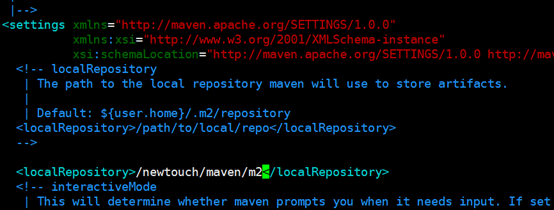
然后创建指定的目录
mkdir /newtouch/maven/m2
搭建nexus私服
在newtouch目录下创建nexus的目录并将之前移到maven目录先的nexus软件移过来

解压软件

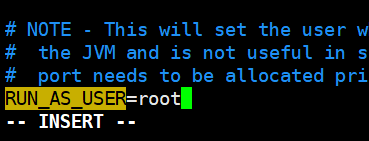
启动nexus 报一下错误是没有指定用户

修改配置文件指定root用户
Vim /newtouch/nexus/nexus-2.12.0-01/bin/nexus(最好不要设为root)
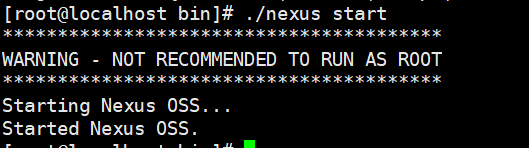
就可以启动
在maven的配置文件中配置
Vim /newtouch/maven/apache-maven-3.5.2/conf/settings.xml
<settings>
<profiles>
<profile>
<id>nexus</id>
<repositories>
<repository>
<id>central-snapshots</id>
<url>http://localhost:8081/nexus/content/groups/public-snapshots</url>
<releases><enabled>false</enabled></releases>
<snapshots><enabled>true</enabled></snapshots>
</repository>
<repository>
<id>central-releases</id>
<!-- url原为http://central,指向http://repos.d.xxx.com/nexus/content/groups/public 其中xxx一般为公司名--->
<url>http://localhost:8081/nexus/content/groups/public</url>
<!-- 表示可以从此仓库下载release版本 -->
<releases><enabled>true</enabled></releases>
<!-- 表示不可以从此仓库下载snapshot版本 -->
<snapshots><enabled>false</enabled></snapshots>
</repository>
</repositories>
<!-- 插件仓库 -->
<pluginRepositories>
<pluginRepository>
<id>central-snapshots</id>
<url>http://localhost:8081/nexus/content/groups/public-snapshots</url>
<releases><enabled>false</enabled></releases>
<snapshots><enabled>true</enabled></snapshots>
</pluginRepository>
<pluginRepository>
<id>central-releases</id>
<url>http://localhost:8081/nexus/content/groups/public</url>
<releases><enabled>true</enabled></releases>
<snapshots><enabled>false</enabled></snapshots>
</pluginRepository>
</pluginRepositories>
<servers>
<server>
<!--配置所有的releases版本构件部署Nexus的releases仓库中-->
<id>nexus-releases</id>
<username>admin</username>
<password>admin123</password>
</server>
<server>
<!--配置所有的snapshot版本构件部署到Nexus的Snapshots仓库中-->
<id>nexus-snapshots</id>
<username>admin</username>
<password>admin123</password>
</server>
</servers>
</profile>
<!-- 配置activeProfiles后,此处添加snapshots,可以使snapshots被搜索到。-->
</profiles>
<!--添加id,激活profile。-->
<activeProfiles>
<activeProfile>nexus</activeProfile>
</activeProfiles>
</settings>
也可以安装好maven后不修改配置文件在要启动的用户下~/.m2/settings.xml(初始状态下该文件不存在),编辑上面内容就OK
浏览器属ip:8081/nexus 就可以默认用户:admin 密码:admin123
nexus和maven的安装与配置的更多相关文章
- Maven的安装、配置及使用入门
Maven的安装.配置及使用入门 本书代码下载 大家可以从我的网站下载本书的代码:http://www.juvenxu.com/mvn-in-action/,也可以通过我的网站与我取得联系,欢迎大家与 ...
- Maven(1)-安装和配置
Maven(1)-安装和配置 一.本机必须安装好Jdk 二 .maven下载 http://maven.apache.org/download.cgi ,下载后把maven-bin解压到自己的目录即可 ...
- 一.Maven的安装和配置整理
Maven的安装和配置 1.1安装 进入Maven官网的下载页面:http://maven.apache.org/download.cgi选择当前最新版本:" ...
- Java·Maven的安装与配置
阅文时长 | 0.58分钟 字数统计 | 937.6字符 主要内容 | 1.引言&背景 2.Maven的下载与安装 3.Maven全局配置 4.Settings.xml文件的配置 5.远程仓库 ...
- 1.Maven的安装及配置
1 Maven 介绍 Maven这个词可以翻译为“知识的积累”,也可以翻译为“专家”或“内行”.本书将介绍Maven这一跨平台的项目管理工具.作为Apache组织中的一个颇为成功的开源项目,Maven ...
- Maven的安装、配置及使用入门+maven安装报错:JAVA_HOME【申明:来源于网络】
Maven的安装.配置及使用入门+maven安装报错:JAVA_HOME[申明:来源于网络] Maven的安装.配置及使用入门:http://www.cnblogs.com/dcba1112/arch ...
- 【工具学习】——Maven的安装与配置
[含义] 什么是构建? 构建,英文build.构建包括编译.运行.生成文档.打包.部署等等工作内容,如果我们每天手工去干这些事情,那会浪费很多的时间.因此,构建管理工具应运而生. maven,作为项目 ...
- linux ---maven的安装和配置
linux下的maven的安装和配置:本人使用的是apache-maven-3.3.9-bin.tar.gz------安装maven的前提是JDK安装成功:java -version 测试一下--J ...
- Maven的安装与配置(eclipse,idea)
Maven的安装与配置 一.需要准备的东西 1. JDK 2. Maven程序包 3. Eclipse 4. Idea 二.下载与安装 1. 前往https://maven.apache.org/ ...
随机推荐
- centos命令行系列之centos6防火墙的关闭以及开启
输入:cat /etc/issue 查看版本 (一)通过service命令 注:service命令开启以及关闭防火墙为即时生效,下次重启机器的时候会自动复原 查看防火墙状态:service ipt ...
- 一、集合框架(Collection和Collections的区别)
一.Collection和Map 是一个接口 Collection是Set,List,Queue,Deque的接口 Set:无序集合,List:链表,Queue:先进先出队列,Deque:双向链表 C ...
- new 和 delete
new 和 delete 众所周知,C中的malloc和free是用来申请和释放内存的,相应的C++中也有对应的申请和释放内存的操作,即是new和delete,但是C++的new和delete比C中的 ...
- LSTM UEBA异常检测——deeplog里其实提到了,就是多分类LSTM算法,结合LSTM预测误差来检测异常参数
结合CNN的可以参考:http://fcst.ceaj.org/CN/article/downloadArticleFile.do?attachType=PDF&id=1497 除了行为,其他 ...
- python截取字符串
str = ‘0123456789’ print str[0:3] #截取第一位到第三位的字符 print str[:] #截取字符串的全部字符 print str[6:] #截取第七个字符到结尾 p ...
- elasticsearch设置外部可访问
修改/config/elasticsearch.yml文件,增加如下配置: network.host: 0.0.0.0 浏览器访问http://192.168.17.134:9200/效果: 实际操作 ...
- get url img
selenium 1● 了解selenium 这个是做 web页面测试,模拟用户测试 =====> pip install selenium 安装 2● django 用于接 ...
- CSS3 的box-shadow进阶之 - 基础知识篇
box-shadow被认为是CSS3最好的特性之一,发挥想象力,搭配其它属性,可以做出很多好看的效果(如下图,将会放在下一篇文章讲解),这篇文章主要讲一下box-shadow的基础知识. ...
- vs2017 Mariadb/mysql之旅
记录vs2017使用 ef6+mysql的开发 填坑之旅.我的环境 vm+centos7+ docker-ce+mariadb+vs2017 总的原则是MySql.Data.Entity 要和 mys ...
- flask-security(一)快速入门
很多例程都是基于flask-sqlalchemy的. 但是我使用sqlalchemy,并没有使用sqlalchemy,看中的也就是flask的灵活性. 暂时写flask的程序,但是为了以后写别的程序方 ...