
uni-app上传图片和文件
如图所示:
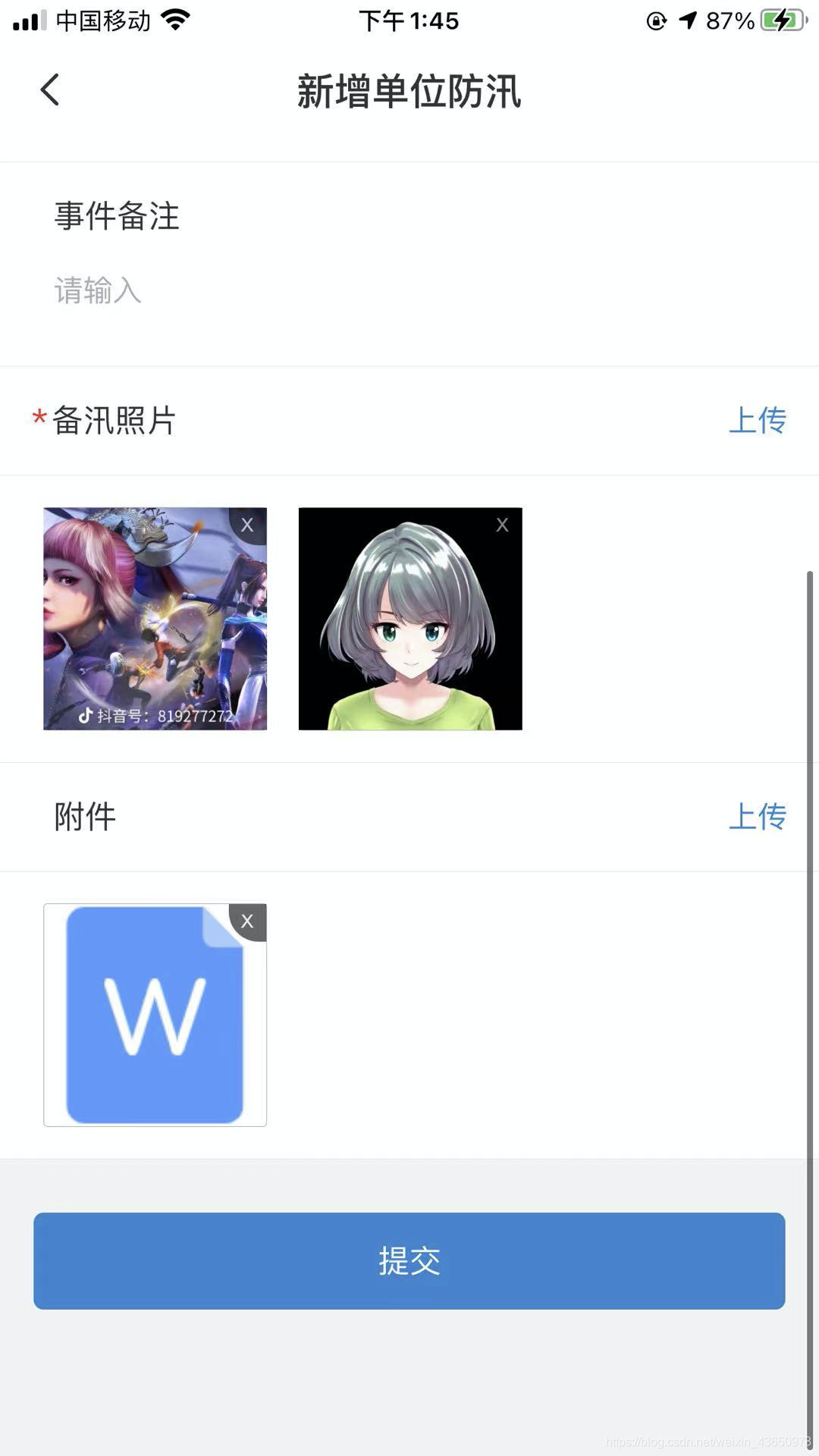
上传图片,使用的是uni.chooseImage这个官方api,count 数量根据自己的需求来,我们是最多只能上传9张
          uploadImgEvent(){

             uni.chooseImage({

                    count: 10 - this.uploadImgsList.length,

                    success: (res) => {

                    this.uploadImgsList.unshift(...res.tempFiles.map(item => ({

                        picturePath: item.path

                    })));

                    if(this.uploadImgsList.length == 10) this.uploadImgsList.pop();

                    }

            });

            },
uploads(){

    const _this = this;

return  Promise.all(_this.uploadImgsList.map(item=>_this.uploadImage(item.picturePath))).then(res=>{

            return res.map(item=>({

                 fileName:item.fileName,

                 filePath:item.url

            }))

   })

},

uploadImage(url) {

    return new Promise(async (resolve, reject) => {

        uni.uploadFile({

            url: await getUploadUrl(), //后台地址

            filePath: url,

            name: 'file',

            success: (uploadFileRes) => {

                resolve(JSON.parse(uploadFileRes.data));

            }

        })

    })

},
提交给后代的数据
//提交
async submitFlood(){
let photoList = await this.uploads();
}
打印photoList如图:

上传文件使用的LFile 这个插件 https://ext.dcloud.net.cn/plugin?id=4109
根据官网案例来
         //上传附件

            uploadFile() {

                const that = this;

                if(that.imgUploadList.length >= 9){

                    this.$mHelper.toast('最多上传9张')

                    return;

                }

                that.$refs.lFile.upload({

                        // #ifdef APP-PLUS

                        currentWebview: that.$mp.page.$getAppWebview(),

                        // #endif

                        url: 'xxxxxx', //你的上传附件接口地址

                        name: 'file'

                        },

                    });

            },
         //上传成功

            upSuccess(res) {

                let url = res.root.url;

                let name = res.root.originalName;

                let fileType = this.isFileType(res.root.type);

                let size = res.root.size;

                if(fileType == 'image'){

                    this.imgUploadList.push({url,name,fileType,size});

                }else{

                    this.fileUploadList.push({url,name,fileType,size})

                }

            },

         //根据文件后缀名来判断,展示对应的图标

        isImage(type){

                return ['png','jpg','jpeg','gif','svg'].includes(type.toLowerCase());

            },

            isDocx(type){

                return ['doc','docx'].includes(type.toLowerCase());

            },

            isXsls(type){

                return ['xsls','xsl'].includes(type.toLowerCase());

            },

            isText(type){

                return ['text','txt'].includes(type.toLowerCase());

            },

            isFileType(type){

                if(this.isImage(type)) return 'image';

                if(this.isXsls(type)) return 'excel';

                if(type == 'pdf') return 'pdf';

                if(this.isDocx(type)) return 'word';

                if(this.isText(type)) return "text";

                // return "#icon-file-b--6";

            },

           //文件预览

            previewFile(item){

                uni.downloadFile({

                    url: item.url,

                    success: (res) => {

                        let filePath = res.tempFilePath;

                        uni.openDocument({

                            filePath: filePath,

                            success: (res) => {

                                console.log('打开文档成功');

                            }

                        })

                    }

                })

            },
uni-app上传图片和文件的更多相关文章
- web app上传图片
很就很久以前,web app上传图片需要通过cordova插件,那时候好像还叫phonegap. 后来一个html标签就可以了 <input type="file" clas ...
- Ionic app 上传图片之webApi接口
App上传图片对应的webApi服务端是怎么处理的呢? using System; using System.Collections.Generic; using System.Diagnostics ...
- flask上传图片或者文件
在flask unittest自动化测试中如何上传图片或者文件 import StringIO picture = StringIO.StringIO(open('/home/admin/Pictur ...
- 查看真机的APP沙盒文件
1.Xcode --> window --> devices -->左边选择设备 右下边选择要查看的app 双击应用可查看目录 点击设置按钮,选 Download Container ...
- 用AJAX实现上传图片或者文件的方法
大家好,我是小C,最近在项目中用到ajax上传图片文件,本篇我们就说说ajax上传文件. 我们平时用到的AJAX,大部分都是传几个参数就可以了.简单说就是传几个字符串. $.ajax({ url: u ...
- sau交流学习社区--在element-ui中新建FormData对象组合上传图片和文件的文件对象,同时需要携带其他参数
今天有一个坑,同时要上传图片和文件,而且图片要展示缩略图,文件要展示列表. 我的思路是: 首先,只上传附件照片,这个直接看ele的官方例子就行,不仅仅上传附件照片,还同时上传其他参数. 然后,再做上传 ...
- python 全栈开发,Day129(玩具开机提示语,为多个玩具发送点播,聊天界面,app录音,app与服务器端文件传输,简单的对话)
一.玩具开机提示语 先下载github代码,下面的操作,都是基于这个版本来的! https://github.com/987334176/Intelligent_toy/archive/v1.2.zi ...
- django的所有app放在一个文件夹下便于管理
1.新建一个python Package,名字叫apps 2.拖拽以后的app到apps文件夹下,把Search for references勾选去掉,重要重要重要!!!! 3.右键点击apps文件夹 ...
- Facebook App 的头文件会有更多的收获
最近在看一些 App 架构相关的文章,也看了 Facebook 分享的两个不同时期的架构(2013 和 2014),于是就想一窥 Facebook App 的头文件,看看会不会有更多的收获,确实有,还 ...
- ajax 提交所有表单内容及上传图片(文件),以及单独上传某个图片(文件)
我以演示上传图片为例子: java代码如下(前端童鞋可以直接跳过看下面的html及js): package com.vatuu.web.action; import java.io.File; imp ...
随机推荐
- F12 Preserve log 查看之前的api接口返回数据,只有火狐浏览器能用
F12 Preserve log 查看之前的api接口返回数据,只有火狐浏览器能用
- ThinkPHP 3.2.3
说明手册 https://www.kancloud.cn/manual/thinkphp/1706 下载地址 https://gitee.com/liu21st/thinkphp32 thinkPHP ...
- 【机器学习】统计学习方法读书笔记-EM算法(期望最大化算法)
Expectation Maximization,EM算法是带有隐变量的概率模型参数的极大似然估计(MLE为给定参数,观测数据出现/生成的可能性). 如下为<统计机器学习>中对应EM算法的 ...
- 基于英特尔® Gaudi® 2 AI 加速器的文本生成流水线
随着生成式人工智能 (Generative AI,GenAI) 革命的全面推进,使用 Llama 2 等开源 transformer 模型生成文本已成为新风尚.人工智能爱好者及开发人员正在寻求利用此类 ...
- day11-2-内置Tomcat的配置和切换
SpringBoot内置Tomcat的配置和切换 1.基本介绍 SpringBoot支持的webServer:Tomcat,Jetty,Undertow 因为在spring-boot-starter- ...
- C++实现常用的文件操作
①输出到文本文件(txt) 1 #include<iostream> 2 #include<fstream> 3 using namespace std; 4 int main ...
- 09.Java数据算法
好消息 博客笔记大汇总[15年10月到至今],包括Java基础及深入知识点,Android技术博客,Python学习笔记等等,还包括平时开发中遇到的bug汇总,当然也在工作之余收集了大量的面试题,长期 ...
- 三维模型OBJ格式轻量化压缩在大规模场景的加载和渲染的作用分析
三维模型OBJ格式轻量化压缩在大规模场景的加载和渲染的作用分析 OBJ格式是一种常用的三维模型文件格式,它存储了三维模型的几何信息和纹理坐标等相关属性.在大规模场景中加载和渲染三维模型时,OBJ格式的 ...
- TP6框架--EasyAdmin学习笔记:项目初始化+环境配置
最近在研究一个基于TP6的框架EasyAdmin,这里分享下我的开发心得 首先要获取原始项目文件 这里是git地址 https://github.com/zhongshaofa/easyadmin 项 ...
- KingbaseES V8R6 集群运维案例--备库timeline not contain minimum recovery point故障
案例现象: KingbaseES V8R6集群备库启动后,加入集群失败,sys_log日志信息提示,如下图所示: 适用版本: kingbaseES V8R6 一.问题分析 在timeline对应的 ...