
GO 中的时间操作(time & dateparse)【GO 基础】
〇、前言
日常开发过程中,对于时间的操作可谓是无处不在,但是想实现时间自由还是不简单的,多种时间格式容易混淆,那么本文将进行梳理,一起学习下。
官方提供的库是 time,功能很全面,本文也会详细介绍。
还有另外一个开源库 dateparse,使用起来比较方便,本文也会将加入示例测试出结果,以展示其优点。
一、time 库
1.1 Time 类型的结构
go 通过time.Now()来取当前时间,打印出来如下:
2023-09-15 17:59:14.2642387 +0800 CST m=+0.010202701这里存在两个疑点:1)表示秒级的数值为什么默认为 7 位? 2)最后边的 m=... 代表什么?
1)对于时间戳来说,一般采用秒级或毫秒级。采用浮点数或定点数来表示小数部分,需要一定的字节数来存储,而为了在大多数应用场景下满足足够的精度,一般会选择使用7位数字来表示毫秒级的小数部分,从而达到既满足绝大多数需求又占用尽量上的存储。
2)m 就是 Monotonic Clocks,意思是单调时间的,所谓单调,就是只会不停的往前增长,不受校时操作的影响,这个时间是自进程启动以来的秒数。
在 go1.9 之后,结构更新为:
type Time struct {

	wall uint64

	ext  int64

	loc *Location

}
Time 结构体中由三部分组成,loc 比较明了,表示时区,wall 和 ext 所存储的信息规则相对复杂,根据文档的介绍总结成了下图:

golang 中的 Time 结构,不像很多语言保存 Unix 时间戳(也就是最早只能表示到 1970 年 1 月 1 日),而是至少可以安全的表示 1885 年以来的时间。
下面来取当前时间测试下:
package main

import (

	"encoding/json"

	"fmt"

	"time"

)

func main() {

	now := time.Now() // 取当前时间

	time_now := now

	fmt.Println(time_now)

	for i := 0; i < 5; i++ { // 循环 0~4 共 5 此

		time_now = time_now.Add(1 * time.Second) // 每次加 1 秒

		fmt.Println(time_now)

	}

	encodeNow, _ := json.Marshal(now) // 转 json 编码

	decodeNow := time.Time{}

	json.Unmarshal(encodeNow, &decodeNow) // 将 json 编码转回 Time

	fmt.Println(decodeNow)

	equal_r := now.Equal(decodeNow)

	fmt.Println(equal_r)

}
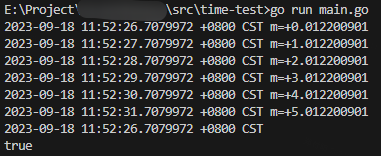
结果如下,可见循环了五次,每次 m 的值都加 1,json 编码转换后的时间中 m 参数消失:
1.2 获取当前时间与格式化
1.2.1 取当前时间
回去当前时间的方法很简单:
now := time.Now()

fmt.Println(now)

// 2023-09-18 13:51:40.8480546 +0800 CST m=+0.008992401

fmt.Println(now.String())

// 2023-09-18 13:51:40.8480546 +0800 CST m=+0.008992401
1.2.2 时间格式化
Go 语言提供了时间类型格式化函数 Format(),需要注意的是 Go 语言格式化时间模板不是常见的 Y-m-d H:i:s,而是 2006-01-02 15:04:05,也很好记忆(2006 1 2 3 4 5)。
func (t Time) Format(layout string) string { }time 库中,定义了年、月、日、时、分、秒、周、时区的多种表现形式,如下:
- 年: 06/2006
- 月: 1/01/Jan/January
- 日: 2/02/_2
- 时: 3/03/15/PM/pm/AM/am
- 分: 4/04
- 秒: 5/05
- 周: Mon/Monday
- 时区:-07/-0700/Z0700/Z07:00/-07:00/MST
这些格式的形式配置,可以根据自己的需求自由组合,一下是部分组合的测试:
package main

import (

	"fmt"

	"time"

)

func main() {

	now := time.Now()

	fmt.Println(now)

	fmt.Println("2006-01-02 15:04:05             output:", now.Format("2006-01-02 15:04:05"))

	fmt.Println("2006-01-02                      output:", now.Format("2006-01-02"))

	fmt.Println("01-02-2006                      output:", now.Format("01-02-2006"))

	fmt.Println("15:03:04                        output:", now.Format("15:03:04"))

	fmt.Println("2006/01/02 15:04                output:", now.Format("2006/01/02 15:04"))

	fmt.Println("15:04 2006/01/02                output:", now.Format("15:04 2006/01/02"))

	fmt.Println("2006#01#02                      output:", now.Format("2006#01#02"))

	fmt.Println("2006$01$02                      output:", now.Format("2006$01$02"))

	fmt.Println("2006-01-02 15:04:05.000         output:", now.Format("2006-01-02 15:04:05.000"))

	fmt.Println("2006-01-02 15:04:05.000000000   output:", now.Format("2006-01-02 15:04:05.000000000"))

	fmt.Println("2006-January-02 15:04:05 Monday output:", now.Format("2006-January-02 15:04:05 Monday"))

	fmt.Println("2006-Jan-02 15:04:05 Mon        output:", now.Format("2006-Jan-02 15:04:05 Mon"))

	fmt.Println("2006-1-2 3:4:5 PM               output:", now.Format("2006-1-2 3:4:5 PM"))

}
字符串类型的日期转 Time:
package main

import (

	"fmt"

	"time"

)

func main() {

	t, _ := time.ParseInLocation("2006-01-02", "2023-09-18", time.Local) // time.Local 指定本地时间

	fmt.Println(t)

	t, _ = time.ParseInLocation("2006-01-02 15:04:05", "2023-09-18 17:46:13", time.Local)

	fmt.Println(t)

	t, _ = time.ParseInLocation("2006-01-02 15:04:05", "2023-09-18", time.Local)

	fmt.Println(t) // 当时间字符串和标准字符串不统一时,转化失败

}
1.2.3 取日期的单个值
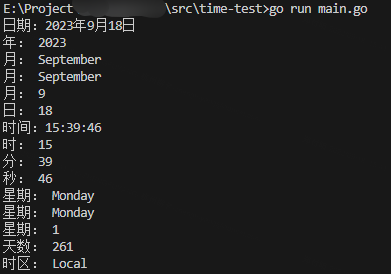
日期的组成部分比较多,下面来尝试取出各个部分的值:
package main

import (

	"fmt"

	"time"

)

func main() {

	now := time.Now()

	// 返回日期

	year, month, day := now.Date()

	fmt.Printf("日期:%d年%d月%d日\n", year, month, day)

	fmt.Println("年:", now.Year()) // int

	fmt.Println("月:", now.Month()) // time.Month

	fmt.Println("月:", now.Month().String())

	fmt.Println("月:", int(now.Month()))

	fmt.Println("日:", now.Day()) // int

	// 时分秒

	hour, minute, second := now.Clock()

	fmt.Printf("时间:%d:%d:%d\n", hour, minute, second)

	fmt.Println("时:", now.Hour()) // int

	fmt.Println("分:", now.Minute()) // int

	fmt.Println("秒:", now.Second()) // int

	fmt.Println("星期:", now.Weekday()) // time.Weekday

	fmt.Println("星期:", now.Weekday().String()) // 不能得到 一、二。。。

	fmt.Println("星期:", int(now.Weekday()))     // 可以通过取得的 1、2。。。来计算是周几

	fmt.Println("天数:", now.YearDay()) // int

	fmt.Println("时区:", now.Location())

}
1.3 日期的计算
计算之前或之后一段时间:
package main

import (

	"fmt"

	"time"

)

func main() {

	now := time.Now()

	fmt.Println(now, "(当前时间)")

	// func (t Time) AddDate(years int, months int, days int) Time

	m0 := now.AddDate(1, 1, 1)

	fmt.Println(m0, "(now.AddDate(1,1,1))")

	m00 := now.AddDate(0, 1, 1)

	fmt.Println(m00, "(now.AddDate(0,1,1))")

	// func ParseDuration(s string) (Duration, error)

	// s string:"ns", "us" (or "µs"), "ms", "s", "m", "h"

	t1, _ := time.ParseDuration("1h1m1s") // 亦可:48h1m1s

	m1 := now.Add(t1)

	fmt.Println(m1, "(1小时1分1s之后)")

	t2, _ := time.ParseDuration("-1h1m1s")

	m2 := now.Add(t2)

	fmt.Println(m2, "(1小时1分1s之前)")

	t3, _ := time.ParseDuration("-1h")

	m3 := now.Add(t3 * 3)

	fmt.Println(m3, "(3小时之前)")

}
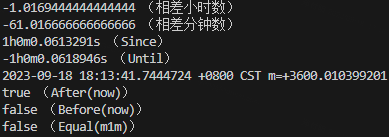
时间差和比较时间大小:
package main

import (

	"fmt"

	"time"

)

func main() {

	now := time.Now()

	fmt.Println(now, "(当前时间)")

	// func (t Time) Sub(u Time) Duration // 取时间差对象

	sub1 := now.Sub(m1)

	fmt.Println(sub1.Hours(), "(相差小时数)")

	fmt.Println(sub1.Minutes(), "(相差分钟数)")

	// time.Since(t Time) Duration // 返回当前时间与 t 的时间差,返回值是 Duration

	// time.Until(t Time) Duration // 返回 t 与当前时间的时间差,返回值是 Duration

	t1s, _ := time.ParseDuration("-1h")

	m1s := now.Add(t1s)

	fmt.Println(time.Since(m1s), "(Since)")

	fmt.Println(time.Until(m1s), "(Until)")

	// func (t Time) Before(u Time) bool // 如果 t 代表的时间点在 u 之前,返回真;否则返回假

	// func (t Time) After(u Time) bool // 如果 t 代表的时间点在 u 之后,返回真;否则返回假

	// func (t Time) Equal(u Time) bool // 比较时间是否相等,相等返回真;否则返回假

	t1m, _ := time.ParseDuration("1h")

	m1m := now.Add(t1m)

	fmt.Println(m1m)

	fmt.Println(m1m.After(now), "(After(now))")

	fmt.Println(m1m.Before(now), "(Before(now))")

	fmt.Println(now.Equal(m1m), "(Equal(m1m))")

}
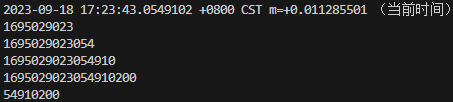
1.4 时间戳
如何取时间戳:
package main

import (

	"fmt"

	"time"

)

func main() {

	now := time.Now()

	fmt.Println(now, "(当前时间)")

	// 取时间戳

	fmt.Println(now.Unix())       // 当前时间戳

	fmt.Println(now.UnixMilli())  // 毫秒级时间戳

	fmt.Println(now.UnixMicro())  // 微秒级时间戳

	fmt.Println(now.UnixNano())   // 纳秒级时间戳

	fmt.Println(now.Nanosecond()) // 时间戳小数部分 单位:纳秒

}
时间戳与时间的简单转换:
package main

import (

	"fmt"

	"time"

)

func main() {

	now := time.Now()

	fmt.Println(now, "(当前时间)")

	unix := now.Unix()

	fmt.Println(unix, "(秒级时间戳)")

	t := time.Unix(unix, 0)

	fmt.Println(t, "(原时间)")

	t = time.Unix(unix, 1) // 在时间戳的基础上,加 1 纳秒

	fmt.Println(t, "(加 1 纳秒)")

	micro_unix := now.UnixMicro()

	fmt.Println(micro_unix, "(微秒级时间戳)")

	t1 := time.UnixMicro(micro_unix)

	fmt.Println(t1)

}
参考:https://zhuanlan.zhihu.com/p/362936088 https://zhuanlan.zhihu.com/p/145009400 https://zhuanlan.zhihu.com/p/47754783
二、dateparse 库
dateparse 库的作用主要就是将不同格式的字符串类型的时间,转为 Time 时间类型。源码地址:https://github.com/araddon/dateparse
根据本文1.2.2 章节中第二部分 的转换方法,并不能用于全部字符串日期的转换,容易出现转换失败的情况。另外需要根据源日期的格式组织标准日期的格式,也会增加工作量。但是,当用上 dateparse 库后,这一切将变的非常简单。
dateparse 库,就是将各种类型的日期格式字符串,转换成同样的格式,参考:2006-01-02 15:04:05 +0000 UTC。
具体引用的方法是func ParseLocal(datestr string, opts ...ParserOption) (time.Time, error){ },调用示例为Time_date_output := dateparse.ParseLocal(str_date_input)。
以下代码是 github 上源码中的示例,供参考:
package main

import (

	"flag"

	"fmt"

	"time"

	"github.com/scylladb/termtables"

	"github.com/araddon/dateparse"

)

var examples = []string{

	"May 8, 2009 5:57:51 PM",

	"oct 7, 1970",

	"oct 7, '70",

    ...

}

var (

	timezone = ""

)

func main() {

	flag.StringVar(&timezone, "timezone", "UTC", "Timezone aka `America/Los_Angeles` formatted time-zone")

	flag.Parse() // 取命令行参数 timezone

	if timezone != "" {

		loc, err := time.LoadLocation(timezone)

		if err != nil {

			panic(err.Error())

		}

		time.Local = loc // 将默认的本地值修改为输入的本地参数

	}

	table := termtables.CreateTable()

	table.AddHeaders("Input", "Parsed, and Output as %v")

	for _, dateExample := range examples { // 循环全部日期格式字符串,并输出转换后的格式

		t, err := dateparse.ParseLocal(dateExample)

		if err != nil {

			panic(err.Error())

		}

		table.AddRow(dateExample, fmt.Sprintf("%v", t))

	}

	fmt.Println(table.Render())

}

/*

+-------------------------------------------------------+-----------------------------------------+

| Input                                                 | Parsed, and Output as %v                |

+-------------------------------------------------------+-----------------------------------------+

| May 8, 2009 5:57:51 PM                                | 2009-05-08 17:57:51 +0000 UTC           |

| oct 7, 1970                                           | 1970-10-07 00:00:00 +0000 UTC           |

| oct 7, '70                                            | 1970-10-07 00:00:00 +0000 UTC           |

| oct. 7, 1970                                          | 1970-10-07 00:00:00 +0000 UTC           |

| oct. 7, 70                                            | 1970-10-07 00:00:00 +0000 UTC           |

| Mon Jan  2 15:04:05 2006                              | 2006-01-02 15:04:05 +0000 UTC           |

| Mon Jan  2 15:04:05 MST 2006                          | 2006-01-02 15:04:05 +0000 MST           |

| Mon Jan 02 15:04:05 -0700 2006                        | 2006-01-02 15:04:05 -0700 -0700         |

| Monday, 02-Jan-06 15:04:05 MST                        | 2006-01-02 15:04:05 +0000 MST           |

| Mon, 02 Jan 2006 15:04:05 MST                         | 2006-01-02 15:04:05 +0000 MST           |

| Tue, 11 Jul 2017 16:28:13 +0200 (CEST)                | 2017-07-11 16:28:13 +0200 +0200         |

| Mon, 02 Jan 2006 15:04:05 -0700                       | 2006-01-02 15:04:05 -0700 -0700         |

| Mon 30 Sep 2018 09:09:09 PM UTC                       | 2018-09-30 21:09:09 +0000 UTC           |

| Mon Aug 10 15:44:11 UTC+0100 2015                     | 2015-08-10 15:44:11 +0000 UTC           |

| Thu, 4 Jan 2018 17:53:36 +0000                        | 2018-01-04 17:53:36 +0000 UTC           |

| Fri Jul 03 2015 18:04:07 GMT+0100 (GMT Daylight Time) | 2015-07-03 18:04:07 +0100 GMT           |

| Sun, 3 Jan 2021 00:12:23 +0800 (GMT+08:00)            | 2021-01-03 00:12:23 +0800 +0800         |

| September 17, 2012 10:09am                            | 2012-09-17 10:09:00 +0000 UTC           |

| September 17, 2012 at 10:09am PST-08                  | 2012-09-17 10:09:00 -0800 PST           |

| September 17, 2012, 10:10:09                          | 2012-09-17 10:10:09 +0000 UTC           |

| October 7, 1970                                       | 1970-10-07 00:00:00 +0000 UTC           |

| October 7th, 1970                                     | 1970-10-07 00:00:00 +0000 UTC           |

| 12 Feb 2006, 19:17                                    | 2006-02-12 19:17:00 +0000 UTC           |

| 12 Feb 2006 19:17                                     | 2006-02-12 19:17:00 +0000 UTC           |

| 14 May 2019 19:11:40.164                              | 2019-05-14 19:11:40.164 +0000 UTC       |

| 7 oct 70                                              | 1970-10-07 00:00:00 +0000 UTC           |

| 7 oct 1970                                            | 1970-10-07 00:00:00 +0000 UTC           |

| 03 February 2013                                      | 2013-02-03 00:00:00 +0000 UTC           |

| 1 July 2013                                           | 2013-07-01 00:00:00 +0000 UTC           |

| 2013-Feb-03                                           | 2013-02-03 00:00:00 +0000 UTC           |

| 06/Jan/2008:15:04:05 -0700                            | 2008-01-06 15:04:05 -0700 -0700         |

| 06/Jan/2008 15:04:05 -0700                            | 2008-01-06 15:04:05 -0700 -0700         |

| 3/31/2014                                             | 2014-03-31 00:00:00 +0000 UTC           |

| 03/31/2014                                            | 2014-03-31 00:00:00 +0000 UTC           |

| 08/21/71                                              | 1971-08-21 00:00:00 +0000 UTC           |

| 8/1/71                                                | 1971-08-01 00:00:00 +0000 UTC           |

| 4/8/2014 22:05                                        | 2014-04-08 22:05:00 +0000 UTC           |

| 04/08/2014 22:05                                      | 2014-04-08 22:05:00 +0000 UTC           |

| 4/8/14 22:05                                          | 2014-04-08 22:05:00 +0000 UTC           |

| 04/2/2014 03:00:51                                    | 2014-04-02 03:00:51 +0000 UTC           |

| 8/8/1965 12:00:00 AM                                  | 1965-08-08 00:00:00 +0000 UTC           |

| 8/8/1965 01:00:01 PM                                  | 1965-08-08 13:00:01 +0000 UTC           |

| 8/8/1965 01:00 PM                                     | 1965-08-08 13:00:00 +0000 UTC           |

| 8/8/1965 1:00 PM                                      | 1965-08-08 13:00:00 +0000 UTC           |

| 8/8/1965 12:00 AM                                     | 1965-08-08 00:00:00 +0000 UTC           |

| 4/02/2014 03:00:51                                    | 2014-04-02 03:00:51 +0000 UTC           |

| 03/19/2012 10:11:59                                   | 2012-03-19 10:11:59 +0000 UTC           |

| 03/19/2012 10:11:59.3186369                           | 2012-03-19 10:11:59.3186369 +0000 UTC   |

| 2014/3/31                                             | 2014-03-31 00:00:00 +0000 UTC           |

| 2014/03/31                                            | 2014-03-31 00:00:00 +0000 UTC           |

| 2014/4/8 22:05                                        | 2014-04-08 22:05:00 +0000 UTC           |

| 2014/04/08 22:05                                      | 2014-04-08 22:05:00 +0000 UTC           |

| 2014/04/2 03:00:51                                    | 2014-04-02 03:00:51 +0000 UTC           |

| 2014/4/02 03:00:51                                    | 2014-04-02 03:00:51 +0000 UTC           |

| 2012/03/19 10:11:59                                   | 2012-03-19 10:11:59 +0000 UTC           |

| 2012/03/19 10:11:59.3186369                           | 2012-03-19 10:11:59.3186369 +0000 UTC   |

| 2014:3:31                                             | 2014-03-31 00:00:00 +0000 UTC           |

| 2014:03:31                                            | 2014-03-31 00:00:00 +0000 UTC           |

| 2014:4:8 22:05                                        | 2014-04-08 22:05:00 +0000 UTC           |

| 2014:04:08 22:05                                      | 2014-04-08 22:05:00 +0000 UTC           |

| 2014:04:2 03:00:51                                    | 2014-04-02 03:00:51 +0000 UTC           |

| 2014:4:02 03:00:51                                    | 2014-04-02 03:00:51 +0000 UTC           |

| 2012:03:19 10:11:59                                   | 2012-03-19 10:11:59 +0000 UTC           |

| 2012:03:19 10:11:59.3186369                           | 2012-03-19 10:11:59.3186369 +0000 UTC   |

| 2014年04月08日                                        | 2014-04-08 00:00:00 +0000 UTC           |

| 2006-01-02T15:04:05+0000                              | 2006-01-02 15:04:05 +0000 UTC           |

| 2009-08-12T22:15:09-07:00                             | 2009-08-12 22:15:09 -0700 -0700         |

| 2009-08-12T22:15:09                                   | 2009-08-12 22:15:09 +0000 UTC           |

| 2009-08-12T22:15:09.988                               | 2009-08-12 22:15:09.988 +0000 UTC       |

| 2009-08-12T22:15:09Z                                  | 2009-08-12 22:15:09 +0000 UTC           |

| 2017-07-19T03:21:51:897+0100                          | 2017-07-19 03:21:51.897 +0100 +0100     |

| 2019-05-29T08:41-04                                   | 2019-05-29 08:41:00 -0400 -0400         |

| 2014-04-26 17:24:37.3186369                           | 2014-04-26 17:24:37.3186369 +0000 UTC   |

| 2012-08-03 18:31:59.257000000                         | 2012-08-03 18:31:59.257 +0000 UTC       |

| 2014-04-26 17:24:37.123                               | 2014-04-26 17:24:37.123 +0000 UTC       |

| 2013-04-01 22:43                                      | 2013-04-01 22:43:00 +0000 UTC           |

| 2013-04-01 22:43:22                                   | 2013-04-01 22:43:22 +0000 UTC           |

| 2014-12-16 06:20:00 UTC                               | 2014-12-16 06:20:00 +0000 UTC           |

| 2014-12-16 06:20:00 GMT                               | 2014-12-16 06:20:00 +0000 UTC           |

| 2014-04-26 05:24:37 PM                                | 2014-04-26 17:24:37 +0000 UTC           |

| 2014-04-26 13:13:43 +0800                             | 2014-04-26 13:13:43 +0800 +0800         |

| 2014-04-26 13:13:43 +0800 +08                         | 2014-04-26 13:13:43 +0800 +0800         |

| 2014-04-26 13:13:44 +09:00                            | 2014-04-26 13:13:44 +0900 +0900         |

| 2012-08-03 18:31:59.257000000 +0000 UTC               | 2012-08-03 18:31:59.257 +0000 UTC       |

| 2015-09-30 18:48:56.35272715 +0000 UTC                | 2015-09-30 18:48:56.35272715 +0000 UTC  |

| 2015-02-18 00:12:00 +0000 GMT                         | 2015-02-18 00:12:00 +0000 UTC           |

| 2015-02-18 00:12:00 +0000 UTC                         | 2015-02-18 00:12:00 +0000 UTC           |

| 2015-02-08 03:02:00 +0300 MSK m=+0.000000001          | 2015-02-08 03:02:00 +0300 +0300         |

| 2015-02-08 03:02:00.001 +0300 MSK m=+0.000000001      | 2015-02-08 03:02:00.001 +0300 +0300     |

| 2017-07-19 03:21:51+00:00                             | 2017-07-19 03:21:51 +0000 UTC           |

| 2014-04-26                                            | 2014-04-26 00:00:00 +0000 UTC           |

| 2014-04                                               | 2014-04-01 00:00:00 +0000 UTC           |

| 2014                                                  | 2014-01-01 00:00:00 +0000 UTC           |

| 2014-05-11 08:20:13,787                               | 2014-05-11 08:20:13.787 +0000 UTC       |

| 2020-07-20+08:00                                      | 2020-07-20 00:00:00 +0800 +0800         |

| 3.31.2014                                             | 2014-03-31 00:00:00 +0000 UTC           |

| 03.31.2014                                            | 2014-03-31 00:00:00 +0000 UTC           |

| 08.21.71                                              | 1971-08-21 00:00:00 +0000 UTC           |

| 2014.03                                               | 2014-03-01 00:00:00 +0000 UTC           |

| 2014.03.30                                            | 2014-03-30 00:00:00 +0000 UTC           |

| 20140601                                              | 2014-06-01 00:00:00 +0000 UTC           |

| 20140722105203                                        | 2014-07-22 10:52:03 +0000 UTC           |

| 171113 14:14:20                                       | 2017-11-13 14:14:20 +0000 UTC           |

| 1332151919                                            | 2012-03-19 10:11:59 +0000 UTC           |

| 1384216367189                                         | 2013-11-12 00:32:47.189 +0000 UTC       |

| 1384216367111222                                      | 2013-11-12 00:32:47.111222 +0000 UTC    |

| 1384216367111222333                                   | 2013-11-12 00:32:47.111222333 +0000 UTC |

+-------------------------------------------------------+-----------------------------------------+

*/
GO 中的时间操作(time & dateparse)【GO 基础】的更多相关文章
- JAVA中的时间操作
java中的时间操作不外乎这四种情况: 1.获取当前时间 2.获取某个时间的某种格式 3.设置时间 4.时间的运算 好,下面就针对这四种情况,一个一个搞定. 一.获取当前时间 有两种方式可以获得,第一 ...
- Robot Framework:RF中对时间操作的datetime库常用关键字
[转自:http://blog.csdn.net/r455678/article/details/52993765] 1.对固定日期进行操作,增加或减去单位时间或者时间段 2.对两个时间段进行操作 3 ...
- 【转】 robotframework(rf)中对时间操作的datetime库常用关键字
转自http://blog.csdn.net/r455678/article/details/52993765 DateTime库是robotframework内置的库 1.对固定日期进行操作,增加或 ...
- robotframework(rf)中对时间操作的datetime库常用关键字
1.对固定日期进行操作,增加或减去单位时间或者时间段 2.对两个时间段进行操作 3.对时间格式转化,获取时间戳. 4.从完整时间中取指定年月日等 5.对时间类型进行格式化 6.获取当前时间或者指定时区 ...
- Oracle中对时间操作的一些总结
sysdate+(5/24/60/60) 在系统时间基础上延迟5秒 sysdate+5/24/60 在系统时间基础上延迟5分钟 sysdate+5/24 在系统时间基础上延迟5小时 sysdate+5 ...
- PostgreSQL中的时间操作总结
取当前日期的函数: (1) 取当前时间:select now() (2) 取当前时间的日期: select current_date (3) 取当前具体时间(不含日 ...
- java时间操作
这篇讲的也很专业:http://soft.zdnet.com.cn/software_zone/2007/1129/660028.shtml java中的时间操作不外乎这四种情况: 1.获取当前时间 ...
- //四舍五入//得到倒序//比较字符串//拦截时间,实现超时锁屏//判断是否越狱//配置PodFile//Storyboard中跳转操作//处理不可逆的push界面操作
//处理不可逆的push界面操作 VerifyRealNameViewController *verifyRealNameCtrl = [VerifyRealNameViewController vi ...
- SQL导入txt以及SQL中的时间格式操作
原文:SQL导入txt以及SQL中的时间格式操作 MySQL中导入txt的指令为: load data local infile "路径名称" into table "表 ...
- java8中的接口与时间操作
java8中接口可以有默认方法(用default修饰,可以有多个)和静态方法了. public interface Tran { default public String getName() { r ...
随机推荐
- Bash 编程
原文:https://seankross.com/the-unix-workbench/bash-programming.html[1] 数学 创建math.sh: #!/usr/bin/env ba ...
- hosts文件妙用,提升网站访问速度!
一.背景 在讲解hosts文件之前,我们先了解下IP地址与域名的关系. 1.IP地址与域名的关系 IP(Internet Protocol)是一种规定互联网中数据传输的协议,每台连接到互联网中的计算机 ...
- C++面试八股文:了解sizeof操作符吗?
某日二师兄参加XXX科技公司的C++工程师开发岗位第10面: 面试官:了解sizeof操作符吗? 二师兄:略微了解(不就是求大小的嘛..) 面试官:请讲以下如何使用sizeof? 二师兄:sizeof ...
- 8. 自定义映射resultMap
在 Mybatis 中,resultType 和 resultMap 都用于定义查询结果的映射关系.它们的使用场景如下: resultType resultType 用于指定返回结果的数据类型,通 ...
- Dlang 与 C 语言交互(二)
Dlang 与 C 语言交互(二) 随着需求不断增加,发现好像需要更多的东西了.在官网上找不到资料,四处拼凑才有了本文的分享. 上一文(DLang 与 C 语言交互(一) - jeefy - 博客园) ...
- uniapp微信小程序转支付宝小程序踩坑(持续更新)
首先第一个,真有被折磨到! // 微信正常使用,支付宝不行 <image src="https://static.dabapiao.com/images/coupon-index.pn ...
- SQL Sever Josn相互转化
正向转化: SELECT TOP 2 StudentID, Name AS "name", Sex AS "urname" FROM dbo.student F ...
- github上传文件报错failed to push some refs解决
报错内容,不能推送文件到github上 error: failed to push some refs to github地址 原因是github项目与本地文件夹一些关键文件的确实,比如.git,re ...
- 《架构整洁之道》学习笔记 Part 2 编程范式
计算机编程发展至今,一共只有三个编程范式: 结构化编程 面向对象编程 函数式编程 编程范式和软件架构的关系 结构化编程是各个模块的算法实现基础 多态(面向对象编程)是跨越架构边界的手段 函数式编程是规 ...
- linux内核编译中常用的目标(二)
文章目录 一. 目标 all 或者 空 二. 目标 vmlinux 三. 目标 modules 四. 目标 Image/zImage/uImage 1.Image和zImage的区别 2.uImage ...