
AutoMaper使用
使用 AutoMapper 进行赋值
一. 什么是 AutoMapper
AutoMapper是对象到对象的映射工具。在完成映射规则之后,AutoMapper可以将源对象转换为目标对象。
二. AutoMapper 安装使用
1.安装 AutoMapper
Vs2015及以上版本右键解决方案--->管理Nuget方案中输入AutoMaper选择对应.NETFRAMEWORK支持版本进行安装。
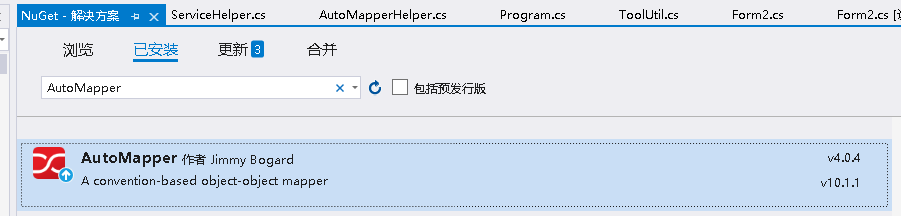
2.引入 AutoMapperHelper AutoMapper 扩展帮助类
 /// <summary>

/// AutoMapper扩展帮助类

/// </summary>

public static class AutoMapperHelper

{

    /// <summary>

    ///  类型映射

    /// </summary>

    public static T MapTo<T>(this object obj)

    {

        if (obj == null) return default(T);

        Mapper.CreateMap(obj.GetType(), typeof(T));

        return Mapper.Map<T>(obj);

    }

    /// <summary>

    /// 集合列表类型映射

    /// </summary>

    public static List<TDestination> MapToList<TDestination>(this IEnumerable source)

    {

        foreach (var first in source)

        {

            var type = first.GetType();

            Mapper.CreateMap(type, typeof(TDestination));

            break;

        }

        return Mapper.Map<List<TDestination>>(source);

    }

    /// <summary>

    /// 集合列表类型映射

    /// </summary>

    public static List<TDestination> MapToList<TSource, TDestination>(this IEnumerable<TSource> source)

    {

        //IEnumerable<T> 类型需要创建元素的映射

        Mapper.CreateMap<TSource, TDestination>();

        return Mapper.Map<List<TDestination>>(source);

    }

    /// <summary>

    /// 类型映射

    /// </summary>

    public static TDestination MapTo<TSource, TDestination>(this TSource source, TDestination destination)

        where TSource : class

        where TDestination : class

    {

        if (source == null) return destination;

        Mapper.CreateMap<TSource, TDestination>();

        return Mapper.Map(source, destination);

    }

    /// <summary>

    /// DataReader映射

    /// </summary>

    public static IEnumerable<T> DataReaderMapTo<T>(this IDataReader reader)

    {

        Mapper.Reset();

        Mapper.CreateMap<IDataReader, IEnumerable<T>>();

        return Mapper.Map<IDataReader, IEnumerable<T>>(reader);

    }

}
两个对象:
        //这里是原对象

         public class datas

        {

        public string appKey { get; set; }

        public string kpzdbs { get; set; }

        public string jqbh { get; set; }

        public string fpqqlsh { get; set; }

        public string kplx { get; set; }

        public string fplxdm { get; set; }

        public string zsfs { get; set; }

        public string tspzbs { get; set; }

        public string xfsh { get; set; }

        public string xfmc { get; set; }

        public string xfdzdh { get; set; }

        public string xfyhzh { get; set; }

        public string gfmc { get; set; }

        public string gfsh { get; set; }

        public string gfdzdh { get; set; }

        public string gfyhzh { get; set; }

        public string gfsjh { get; set; }

        public string gfdzyx { get; set; }

        public string qdbz { get; set; }

        public string bz { get; set; }

        public string kpr { get; set; }

        public string skr { get; set; }

        public string fhr { get; set; }

        public string jshj { get; set; }

        public string hjje { get; set; }

        public string hjse { get; set; }

        public string sblx { get; set; }

    }

   //这里是被赋值的对象

    public class datasdto : datas

    {

        public List<fyxm> fyxm { get; set; }

        public string sign { get; set; }

    }
赋值使用:
    //原赋值对象

    datas datasmodel = new datas();

    //被赋值对象

    datasdto dtoDatasdtomodel = new datasdto();

    //赋值

    dtoDatasdtomodel = datasmodel.MapTo(dtoDatasdtomodel);
结语
AutoMapper 是一款强大的对象映射器,本文只是项目中的一个简单实例,用于记录学习,有错误的地方希望大佬能给予指出,会及时修改。
官方文档:https://docs.automapper.org/en/latest/
AutoMaper使用的更多相关文章
- EF AutoMaper
Mapper.CreateMap<Source,Dest>(); 该方法已弃用,使用下面这个 Mapper.Initialize(x=>x.CreateMap<Source,D ...
- C# AutoMaper使用自定义主键
有时候实际业务中主键不一定叫Id,比如示例数据库Northwind中的RegionID,TerritoryID等,本示例用Abp框架并以Northwind数据库Region表为数据依据 一.在Core ...
- C# AutoMaper简单使用
AutoMapper它是一种对象与对象之间的映射器,让AutoMapper有意思的就是在于它提供了一些将类型A映射到类型B这种无聊的实例,只要B遵循AutoMapper已经建立的惯例,那么大多数情况下 ...
- AutoMapper搬运工之初探AutoMapper
写在前面 知道AutoMapper很久了,但是一直没有用,最近刚好有个场景需要就用了,果然是利器.看了git上的wiki,发现内容其实wiki上写的很全面了,深入的暂时还没挖掘到.不过和群里的朋友交流 ...
- 使用C#设计Fluent Interface
我们经常使用的一些框架例如:EF,Automaper,NHibernate等都提供了非常优秀的Fluent Interface, 这样的API充分利用了VS的智能提示,而且写出来的代码非常整洁.我们如 ...
- Core 1.0中的管道-中间件模式
ASP.NET Core 1.0中的管道-中间件模式 SP.NET Core 1.0借鉴了Katana项目的管道设计(Pipeline).日志记录.用户认证.MVC等模块都以中间件(Middlewar ...
- C#中设计Fluent API
C#中设计Fluent API 我们经常使用的一些框架例如:EF,Automaper,NHibernate等都提供了非常优秀的Fluent API, 这样的API充分利用了VS的智能提示,而且写出来的 ...
- AutoMapper使用说明
1.引用命名空间 using AutoMapper;using AutoMapper.Mappers; 2.实体类和dto public class Order { public int orderi ...
- 使用NPOI导出Excel引发异常(IsReadOnly = “book.IsReadOnly”引发了类型“System.NotImplementedException”的异常)
前言: 本人调式npoi导入.导出试用成功后,引入到项目中,导入完美运行,但是导出怎么样都看不到现在的页面,而且浏览器和后台都没有报任务错误,让人好事纳闷,后来去调式,发现在除了一个IsReadOnl ...
- .Net 事件总线之Autofac解耦
事件总线是通过一个中间服务,剥离了常规事件的发布与订阅(消费)强依赖关系的一种技术实现.事件总线的基础知识可参考圣杰的博客[事件总线知多少] 本片博客不再详细概述事件总线基础知识,核心点放置使用Aut ...
随机推荐
- 总结:软件开发的3个方向 与 嵌入式Linux学习路线(驱动方向)
--- title: 嵌入式Linux学习路线图(驱动方向) date: 2020-05-09 07:17:58 categories: tags: - embeded - summary - arm ...
- Windows 7操作系统全面解析与实用技巧
Win7操作系统 一.操作系统的概述 1.1操作系统的概念 操作系统(operating system,简称OS)一组控制和管理计算机系统的硬件和软件资源.控制程序执行.改善人机界面.合理地组织计算机 ...
- InfluxDB 常用基本配置,启用账号密码登录,配置指定端口登录
打开安装目录下的 influxdb.conf 找到 http 节点 配置完成后再安装目录下使用命令启动 influxdb influxd --config influxdb.conf 启动完成后,基本 ...
- AI Agent框架(LLM Agent):LLM驱动的智能体如何引领行业变革,应用探索与未来展望
AI Agent框架(LLM Agent):LLM驱动的智能体如何引领行业变革,应用探索与未来展望 1. AI Agent(LLM Agent)介绍 1.1. 术语 Agent:"代理&qu ...
- .NET 6 Entity Framework Core Db First(2) 增删改查
基础代码 在Program.cs注入DemoContext 新建HomeController,继承ControllerBase 添加Controller特性,[ApiController] [Rout ...
- HIVE从入门到精通------(1)hive的基本操作
1.开启hive 1.首先在master的/usr/local/soft/下启动hadoop: master : start-all.sh start-all.sh 2.在另一个master(2)上监 ...
- SpringBoot目录文件结构和官方推荐的目录规范、静态资源访问
目录讲解 src/main/java:存放代码 src/main/resourcces static:存放静态文件,比如css.js.image,(访问方式:http://localhost:8080 ...
- ArkTS基础知识
[习题]ArkTS基础知识 及格分85/ 满分100 判断题 1. 循环渲染ForEach可以从数据源中迭代获取数据,并为每个数组项创建相应的组件. 正确(True)错误(False) 回答正确 ...
- Packer构建openStack镜像
目录 使用Packer自动化构建镜像 使用Packer自动化构建镜像 openstack插件安装:OpenStack | Integrations | Packer | HashiCorp Devel ...
- Vue 结合html2canvas和jsPDF实现html页面转pdf
结合html2canvas和jsPDF实现html页面转pdf By:授客 QQ:103355122 实践环境 win10 Vue 2.9.6 axios 0.18.0 html2ca ...