
python面向对象(选课系统)
一、需求分析(课程与班级合为一体)
    -管理员视图
        -1.注册
        -2.登录
        -3.创建学校
        -4.创建课程(先选择学校)
        -5.创建讲师
    -学员视图
        -1.注册
        -2.登录功能
        -3.选择校区
        -4.选择课程(先选择校区,再选择校区中的某一门课程)
            - 学生选择课程,课程也选择学生
        -5.查看分数
    -讲师视图
        -1.登录
        -2.查看教授课程
        -3.选择教授课程
        -4.查看课程下学生
        -5.修改学生分数
二、程序的架构设计
  -conf
    -setting.py
  -core
    -src.py
    -admin.py
    -student.py
    -teacher.py
  -interface
    -admin_interface.py
    -student_interface.py
    -teacher_interface.py
    -common_interface.py
  -db
    -models.py
    -db_handler.py
  -lib
    -common.py
  -start.py
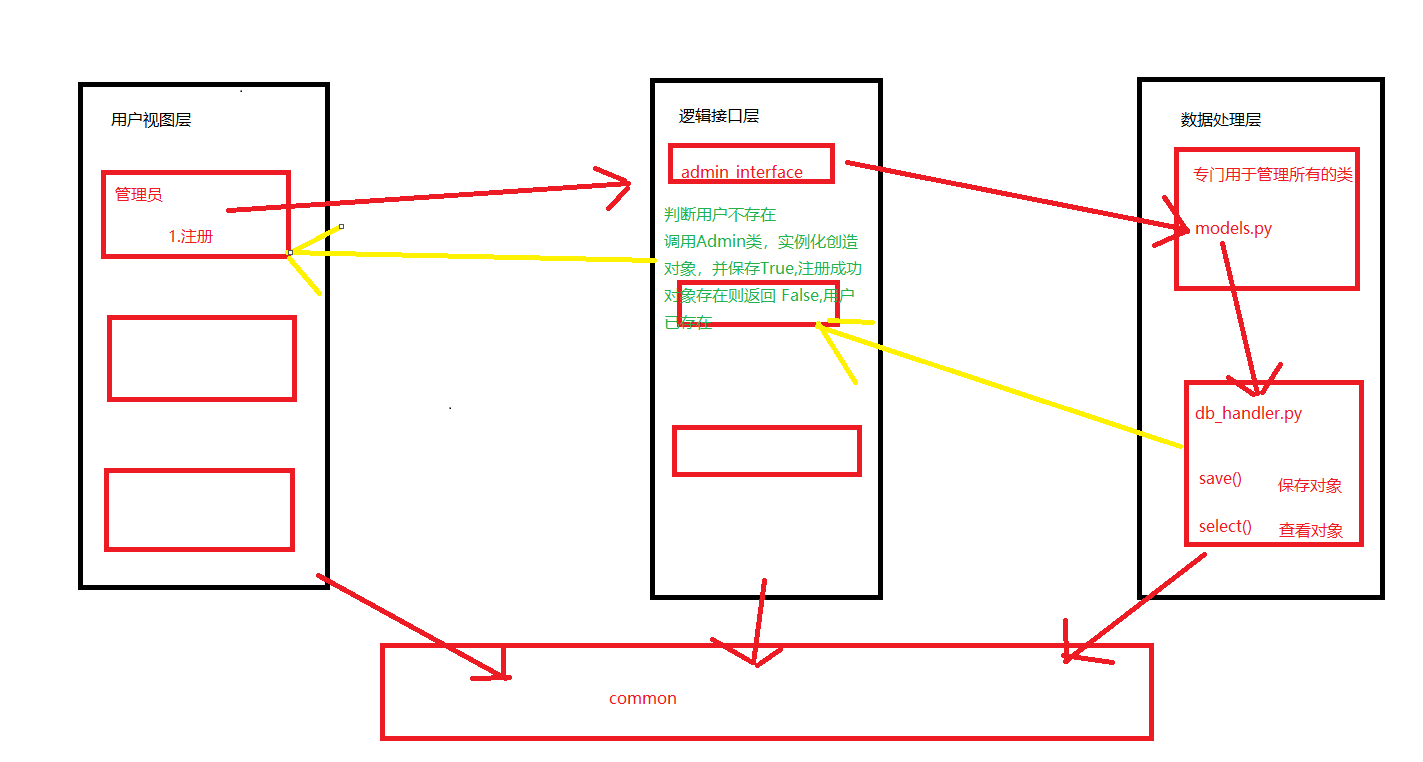
核心三层架构设计:用户视图层、逻辑接口层、数据处理层
难点是数据处理层的models.py中的几个类关系处理好
-conf
    -setting.py
import os

BASE_PATH = os.path.dirname(os.path.abspath(os.path.dirname(__file__)))

DB_PATH = os.path.join(

    BASE_PATH, 'db'

)

print(DB_PATH)
-core
    -src.py
from core import admin

from core import student

from core import teacher

func_dic = {

    '1': admin.admin_view,

    '2': student.student_view,

    '3': teacher.teacher_view

}

def run():

    while True:

        print('''

        -----------欢迎来到选课系统--------

                    1.管理员功能

                    2.学生功能

                    3.老师功能

        ---------------end----------------

        ''')

        choice = input('请输入功能编号:').strip()

        if choice == 'q':

            break

        if choice not in func_dic:

            print('输入有误,请重新输入!')

            continue

        func_dic.get(choice)()
-admin.py
from interface import admin_interface

from interface import common_interface

from lib import common

admin_info = {'user': None}

# 管理员注册

def register():

    while True:

        username = input('请输入用户名:').strip()

        password = input('请输入密码:').strip()

        re_password = input('请输入密码:').strip()

        if password == re_password:

            # 调用接口层,管理员注册接口

            flag, msg = admin_interface.admin_register_interface(

                username, password

            )

            if flag:

                print(msg)

                break

            else:

                print(msg)

        else:

            print('两次密码输入不一样,请重新输入!')

# 管理员登录

def login():

    while True:

        username = input('请输入用户名:').strip()

        password = input('请输入密码:').strip()

        # 1.调用管理员登录接口

        flag, msg = common_interface.login_interface(

            username, password, user_type='admin'

        )

        if flag:

            print(msg)

            # 记录当前用户登录状态

            # 可变类型不需要global

            admin_info['user'] = username

            break

        else:

            print(msg)

            register()

# 管理员创建学校

@common.auth('admin')

def create_school():

    while True:

        # 1.让用户输入学校的名称与地址

        school_name = input('请输入学校名称:').strip()

        school_addr = input('请输入学校地址: ').strip()

        # 2.调用接口,保存学校

        flag, msg = admin_interface.admin_creat_school_interface(

            # 学校名、学校地址、创建学校

            school_name, school_addr, admin_info.get('user')

        )

        if flag:

            print(msg)

            break

        else:

            print(msg)

# 管理员创建课程

@common.auth('admin')

def create_course():

    while True:

        # 1.让管理员先选择学校

        flag, school_list_or_msg = common_interface.get_all_school_interface()

        if not flag:

            print(school_list_or_msg)

            break

        else:

            for index, school_name in enumerate(school_list_or_msg):

                print('编号:{}  学校名:{}'.format(index, school_name))

        choice = input('请输入学校编号:').strip()

        if not choice.isdigit():

            print('请输入数字')

            continue

        choice = int(choice)

        if choice not in range(len(school_list_or_msg)):

            print('请输入正确编号!')

            continue

        # 获取选择后的学校名字

        school_name = school_list_or_msg[choice]

        # 2.选择学校后,再输入课程名称

        course_name = input('请输入需要创建的课程名称:').strip()

        # 3.调用创建课程接口,让管理员去创建课程

        flag, msg = admin_interface.admin_create_course_interface(

            # 传递学校的目的,是为了关联课程

            school_name, course_name, admin_info.get('user')

        )

        if flag:

            print(msg)

            break

        else:

            print(msg)

# 管理员创建老师

@common.auth('admin')

def create_teacher():

    while True:

        # 1.让管理员创建老师

        teacher_name = input('请输入老师名称:').strip()

        # 调用创建老师接口,让管理员创建老师

        flag, msg = admin_interface.admin_create_teacher_interface(teacher_name, admin_info.get('user'))

        if flag:

            print(msg)

            break

        else:

            print(msg)

    pass

func_dict = {

    '1': register,

    '2': login,

    '3': create_school,

    '4': create_course,

    '5': create_teacher

}

# 管理员视图函数

def admin_view():

    while True:

        print('''

        -1.注册

        -2.登录

        -3.创建学校

        -4.创建课程

        -5.创建讲师

        ''')

        choice = input('请输入功能编号:').strip()

        if choice == 'q':

            break

        if choice not in func_dict:

            print('输入有误,请重新输入!')

            continue

        func_dict.get(choice)()
-student.py
from lib import common

from interface import student_interface

from interface import common_interface

student_info = {'user': None}

# 学生注册

def register():

    while True:

        username = input('请输入用户名:').strip()

        password = input('请输入密码:').strip()

        re_password = input('请输入密码:').strip()

        if password == re_password:

            # 调用接口层,管理员注册接口

            flag, msg = student_interface.student_register_interface(

                username, password

            )

            if flag:

                print(msg)

                break

            else:

                print(msg)

                break

        else:

            print('两次密码输入不一样,请重新输入!')

# 学生登录

def login():

    while True:

        username = input('请输入账号:').strip()

        password = input('请输入密码:').strip()

        # 如果账号存在,登录成功

        # 如果账号不存在,请重新注册

        flag, msg = common_interface.login_interface(

            username, password, user_type='student')

        if flag:

            print(msg)

            student_info['user'] = username

            break

        else:

            print(msg)

            register()

# 学生选择校区

@common.auth('student')

def choice_school():

    while True:

        # 1、获取所有学校,让学生选择

        flag, school_list = common_interface.get_all_school_interface()

        if not flag:

            print(school_list)

            break

        for index, school_name in enumerate(school_list):

            print('编号:{}  学校名:{}'.format(index, school_name))

        # 2、让学生输入学校编号

        choice = input('请输入选择的学校编号:').strip()

        if not choice.isdigit():

            print('输入有误!')

            continue

        choice = int(choice)

        if choice not in range(len(school_list)):

            print('输入有误!')

            continue

        school_name = school_list[choice]

        # 3、开始调用学生选择学校接口

        flag, msg = student_interface.add_school_interface(

            school_name, student_info.get('user')

        )

        if flag:

            print(msg)

            break

        else:

            print(msg)

# 学生选择课程

@common.auth('student')

def choice_course():

    while True:

        # 1、先获取"当前学生"所在学校的课程列表

        flag, course_list = student_interface.get_course_list_interface(

            student_info['user']

        )

        # 2、打印课程列表,并让用户选择课程

        if not flag:

            print(course_list)

            break

        else:

            for index, course_name in enumerate(course_list):

                print('编号:{}  课程名称:{} !'.format(index, course_name))

        choice = input('请输入课程编号:').strip()

        if not choice.isdigit():

            print('请输入正确编号')

            continue

        choice = int(choice)

        if choice not in range(len(course_list)):

            print('输入有误')

            continue

        course_name = course_list[choice]

        # 3、调用学生选择课程接口

        flag, msg = student_interface.add_course_interface(

            course_name, student_info['user']

        )

        if flag:

            print(msg)

            break

        else:

            print(msg)

# 查看分数

@common.auth('student')

def check_score():

    score = student_interface.check_score_interface(

        student_info['user']

    )

    if not score:

        print('没有选择课程!')

    print(score)

func_dict = {

    '1': register,

    '2': login,

    '3': choice_school,

    '4': choice_course,

    '5': check_score

}

def student_view():

    while True:

        print('''

        -1.注册

        -2.登录功能

        -3.选择校区

        -4.选择课程

        -5.查看分数

        ''')

        choice = input('请输入功能编号:').strip()

        if choice == 'q':

            break

        if choice not in func_dict:

            print('输入有误,请重新输入!')

            continue

        func_dict.get(choice)()
-teacher.py
from lib import common

from interface import common_interface

from interface import teacher_interface

teacher_info = {'user': None}

# 老师登录

def login():

    while True:

        username = input('请输入账号:').strip()

        password = input('请输入密码:').strip()

        # 如果账号存在,登录成功

        # 如果账号不存在,请重新注册

        flag, msg = common_interface.login_interface(

            username, password, user_type='teacher')

        if flag:

            print(msg)

            teacher_info['user'] = username

            break

        else:

            print(msg)

# 查看教授课程

@common.auth('teacher')

def check_course():

    flag, course_list_from_tea = teacher_interface.check_course_interface(

        teacher_info['user']

    )

    if flag:

        print(course_list_from_tea)

    else:

        print(course_list_from_tea)

# 选择教授课程

@common.auth('teacher')

def choose_course():

    while True:

        # 1、先打印所有学校,并选择学校

        flag, school_list = common_interface.get_all_school_interface()

        if not flag:

            print(school_list)

            break

        for index, school_name in enumerate(school_list):

            print('编号:{}---学校名称:{}'.format(index, school_name))

        choice = input('请输入编号:').strip()

        if not choice.isdigit():

            print('输入有误')

            continue

        choice = int(choice)

        if choice not in range(len(school_list)):

            print('输入有误')

            continue

        school_name = school_list[choice]

        # 2、从选择的学校中获取所有的课程

        flag2, course_list = teacher_interface.choice_school_interface(

            school_name)

        if not flag2:

            print(course_list)

            break

        for index2, course_name in enumerate(course_list):

            print('编号:{}---课程:{}'.format(index2, course_name))

        choice2 = input('请输入课程编号:').strip()

        if not choice2.isdigit():

            print('输入有误')

            continue

        choice2 = int(choice2)

        if choice2 not in range(len(course_list)):

            print('输入有误')

            continue

        course_name = course_list[choice2]

        # 3、调用选择教授课程接口,将该课程添加到老师课程列表中

        flag3, msg = teacher_interface.add_teacher_course(

            course_name, teacher_info['user']

        )

        if flag3:

            print(msg)

            break

        else:

            print(msg)

# 查看课程下学生

@common.auth('teacher')

def check_stu_from_course():

    while True:

        # 1、选择课程

        flag, course_list = teacher_interface.check_course_interface(

            teacher_info['user']

        )

        if not flag:

            print(course_list)

            break

        for index, course_name in enumerate(course_list):

            print('编号:{}---课程:{}'.format(index, course_name))

        choice = input('请输入编号:')

        if not choice.isdigit():

            print('输入有误')

            continue

        choice = int(choice)

        if choice not in range(len(course_list)):

            print('输入有误')

            continue

        course_name = course_list[choice]

        # 2、查看课程下的学生

        flag, student_list = teacher_interface.check_stu_from_course(

            course_name, teacher_info['user']

        )

        if flag:

            print(student_list)

            break

        else:

            print(student_list)

# 修改学生课程分数

@common.auth('teacher')

def change_score_from_student():

    # 1、上一步的基础上选择出学生

    while True:

        # 1、选择课程

        flag, course_list = teacher_interface.check_course_interface(

            teacher_info['user']

        )

        if not flag:

            print(course_list)

            break

        for index, course_name in enumerate(course_list):

            print('编号:{}---课程:{}'.format(index, course_name))

        choice = input('请输入编号:')

        if not choice.isdigit():

            print('输入有误')

            continue

        choice = int(choice)

        if choice not in range(len(course_list)):

            print('输入有误')

            continue

        course_name = course_list[choice]

        # 2、查看课程下的学生

        flag, student_list = teacher_interface.check_stu_from_course(

            course_name, teacher_info['user']

        )

        if not flag:

            print(student_list)

            break

        for index, student_name in enumerate(student_list):

            print('编号:{}---学生:{}'.format(index, student_name))

        choice = input('请输入编号:')

        if not choice.isdigit():

            print('输入有误')

            continue

        choice = int(choice)

        if choice not in range(len(student_list)):

            print('输入有误')

            continue

        student_name = student_list[choice]

        # 2、调用修改学生分数接口修改分数

        change_score = input('请输入修改的分数').strip()

        if not change_score.isdigit():

            print('输入有误')

            continue

        change_score = int(change_score)

        flag, msg = teacher_interface.change_score_from_student_interface(

            course_name, student_name, change_score, teacher_info['user']

        )

        if flag:

            print(msg)

            break

func_dict = {

    '1': login,

    '2': check_course,

    '3': choose_course,

    '4': check_stu_from_course,

    '5': change_score_from_student

}

def teacher_view():

    while True:

        print('''

        -1.登录

        -2.查看教授课程

        -3.选择教授课程

        -4.查看课程下学生

        -5.修改学生分数

        ''')

        choice = input('请输入功能编号:').strip()

        if choice == 'q':

            break

        if choice not in func_dict:

            print('输入有误,请重新输入!')

            continue

        func_dict.get(choice)()
逻辑接口层省略
数据处理层(设计好几个类的关系)
-db
    -models.py
from db import db_handler

# 父类,让所有子类都继承select 与 save 方法

class Base:

    # 查看数据--->登录、查看数据库

    @classmethod

    def select(cls, username):  # Admin,username

        obj = db_handler.select_data(cls, username)

        return obj

    # 保存数据----》注册、保存、更新数据

    def save(self):

        # 让db_handle中的save_data帮我保存对象数据

        db_handler.save_data(self)

# 管理员类

class Admin(Base):

    # 调用类的时候触发

    # username,password

    def __init__(self, user, pwd):

        # 给当前对象赋值

        self.user = user

        self.pwd = pwd

    # 创建学校

    def create_school(self, school_name, school_addr):

        # 该方法内部来调用学校类实例化的得到对象,并保存

        school_obj = School(school_name, school_addr)

        school_obj.save()

    # 创建课程

    def create_course(self, school_obj, course_name):

        # 1.该方法内部调用课程类实例化的得到对象,并保存

        course_obj = Course(course_name)

        course_obj.save()

        # 2.获取当前学校对象,并将课程添加到课程列表中

        school_obj.course_list.append(course_name)

        # 3.更新学校数据

        school_obj.save()

    # 创建讲师

    def create_teacher(self, teacher_name, admin_name, teacher_pwd='123'):

        # 1.调用老师类,实例化得到老师对象,并保存

        teacher_obj = Teacher(teacher_name, teacher_pwd)

        teacher_obj.save()

        pass

# 学校类

class School(Base):

    def __init__(self, name, addr):

        # 必须写self.user,因为db_handler里面的save_data统一规范

        self.user = name

        self.addr = addr

        # 课程列表:每所学校都应该有相应的课程

        self.course_list = []

class Student(Base):

    def __init__(self, name, pwd):

        self.user = name

        self.pwd = pwd

        # 每个学生只能有一个校区

        self.school = None

        # 一个学生可以选择多门课程

        self.course_list = []

        # 学生课程分数

        self.score = {}  # {'course_name:0}

    def add_school(self, school_name):

        self.school = school_name

        self.save()

    def add_course(self, course_name):

        # 1、学生课程列表添加课程

        self.course_list.append(course_name)

        # 2、给学生选择的课程设置默认分数

        self.score[course_name] = 0

        self.save()

        # 2、学生选择的课程对象,添加学生

        course_obj = Course.select(course_name)

        course_obj.student_list.append(

            self.user

        )

        course_obj.save()

class Course(Base):

    def __init__(self, course_name):

        # 必须写self.user,因为db_handler里面的save_data统一规范

        self.user = course_name

        # 课程列表:每所学校都应该有相应的课程

        self.student_list = []

class Teacher(Base):

    def __init__(self, teacher_name, teacher_pwd):

        self.user = teacher_name

        # self.pwd需要统一

        self.pwd = teacher_pwd

        self.course_list_from_tea = []

    # 老师添加课程方法

    def add_teacher_course(self, course_name):

        self.course_list_from_tea.append(course_name)

        self.save()

    # 老师参看课程方法

    def get_course(self, course_name):

        course_obj = Course.select(course_name)

        student_list = course_obj.student_list

        return student_list

    # 老师修改学生分数方法

    def change_score(self, course_name, student_name, change_score):

        student_obj = Student.select(student_name)

        student_obj.score[course_name] = change_score

        student_obj.save()
-db_handler.py
import os

import pickle

from conf import settings

# 保存数据

def save_data(obj):

    # 1.获取对象的保存文件夹路径

    # 以类名当做文件夹的名字

    # obj.__class__:获取当前对象的类

    # obj.__class__.__name__:获取类的名字

    class_name = obj.__class__.__name__

    user_dir_path = os.path.join(

        settings.DB_PATH, class_name

    )

    # 2.判断文件夹是否存在,不存在则创建文件夹

    if not os.path.exists(user_dir_path):

        os.mkdir(user_dir_path)

    # 3.拼接当前用户的pickle文件路径,以用户名作为文件名

    user_path = os.path.join(

        user_dir_path, obj.user  # 当前用户名字

    )

    # 4.打开文件,保存对象,通过pickle

    with open(user_path, 'wb') as f:

        pickle.dump(obj, f)

# 查看数据

def select_data(cls, username):  # 类,username

    # 由cls类获取类名

    class_name = cls.__name__

    user_dir_path = os.path.join(

        settings.DB_PATH, class_name

    )

    # 2.判断文件夹是否存在,不存在则创建文件夹

    if not os.path.exists(user_dir_path):

        os.mkdir(user_dir_path)

    # 3.拼接当前用户的pickle文件路径,以用户名作为文件名

    user_path = os.path.join(

        user_dir_path, username  # 当前用户名字

    )

    # 4.判断文件如果存在,再打开,并返回,若不存在,则代表用户不存在

    if os.path.exists(user_path):

        # 5.打开文件,获取对象

        with open(user_path, 'rb') as f:

            obj = pickle.load(f)

            return obj
python面向对象(选课系统)的更多相关文章
- [ python ] 面向对象 - 选课系统
根据源程序进行改写: 原程序地址:http://www.cnblogs.com/lianzhilei/p/5985333.html 如有侵权立即删除. 感谢原作者将完整的代码提供参考. ...
- Python作业-选课系统
目录 Python作业-选课系统 days6作业-选课系统: 1. 程序说明 2. 思路和程序限制 3. 选课系统程序目录结构 4. 测试帐户说明 5. 程序测试过程 title: Python作业- ...
- python之选课系统详解[功能未完善]
作业需求 思路:1.先写出大体的类,比如学校类,学生类,课程类-- 2.写出类里面大概的方法,比如学校类里面有创建讲师.创建班级-- 3.根据下面写出大致的代码,并实现其功能 遇到的困 ...
- python编辑选课系统
一.需求分析 1. 创建北京.上海 2 所学校 2. 创建linux , python , go 3个课程 , linux\py 在北京开, go 在上海开 3. 课程包含,周期,价格,通过学校创建课 ...
- Python作业选课系统(第六周)
作业需求: 角色:学校.学员.课程.讲师.完成下面的要求 1. 创建北京.上海 2 所学校 2. 创建linux , python , go 3个课程 , linux\py 在北京开, go 在上海开 ...
- Python 28 选课系统的讲解
1.首先我们要对每一个新的项目有一个明确的思路,脑子是好东西,但是好记性不如烂笔头,所以,要把能想到的都写下来 2.然后就是创建项目的整体结构框架,比如说:conf ( 配置文件 ) .core ( ...
- 一个简单的python选课系统
下面介绍一下自己写的python程序,主要是的知识点为sys.os.json.pickle的模块应用,python程序包的的使用,以及关于类的使用. 下面是我的程序目录: bin是存放一些执行文件co ...
- python实现学生选课系统 面向对象的应用:
一.要求: 选课系统 管理员: 创建老师:姓名.性别.年龄.资产 创建课程:课程名称.上课时间.课时费.关联老师 使用pickle保存在文件 学生: 学生:用户名.密码.性别.年龄.选课列表[].上课 ...
- python 面向对象 class 老男孩选课系统
要求:1. 创建北京.上海 2 所学校 class2. 创建linux , python , go 3个课程 , linux\py 在北京开, go 在上海开3. 课程包含,周期,价格,通过学校创建课 ...
- python基础-10 程序目录结构 学生选课系统面向对象练习
一 程序目录结构 1 bin文件夹 二进制文件.代码程序 2 conf 配置文件 3 帮助文档 4 头文件库文件等 二 学生选课系统部分代码 未完待续 1 包内的__init__.py文件 在包 ...
随机推荐
- P2898 [USACO08JAN] Haybale Guessing G 题解
题目传送门 前置知识 二分答案 | 并查集 解法 对条件的合法性判断其他题解已经讲得很明白了,这里不再赘述.这里主要讲一下用并查集实现黑白染色问题. 以下内容称被覆盖为黑色,不被覆盖为白色. 本题因为 ...
- NC19832 1408
题目链接 题目 题目描述 小m曾经给小t和小s讲过一个奇怪的故事.这个故事叫做1408.故事的大体内容如下. 主人公迈克·安瑟林(约翰·库萨克饰)是一个恐怖小说家.将装神弄鬼作为本职工作的迈克,平日里 ...
- Jsp+Servlet实现文件上传下载(四)--下载文件
接着上一篇讲: Jsp+Servlet实现文件上传下载(三)--删除上传文件 点击打开链接 本章来实现一下下载文件功能,同时优化了一下上一章中的代码. 废话少说,上代码 ------------ ...
- 【Android 逆向】【ARM汇编】 函数的栈帧
1. 函数的调用约定 ARM32 参数1-4 放入r0-r3 剩下的入栈,函数返回值放入r0 ARM64 参数1-8 放入X0-X7 剩下的入栈,函数返回值放入X0 (浮点数是放入 Dn 或 Sn) ...
- PicGo如何设置阿里云图床
打开阿里云官网.注册并且登录.然后产品下拉列表里面通过搜索或者直接找到存储.对象存储OSS 默认你已经激活了,然后进入到控制台里面. 注意事项 Bucket名称需要全英文,不能有大写字母 服务器选国内 ...
- 第一百一十五篇: JS集合引用类型Map
好家伙,本篇为<JS高级程序设计>第六章"集合引用类型"学习笔记 1.Map ECMAScript6以前,在JavaScript中实现"键/值" ...
- kafka节点故障恢复原理
Kafka的LEO和HW LEO LEO是Topic每一个副本的最后的偏移量offset+1 HW(高水位线) High WaterMark是所有副本中,最小的LEO Follower副本所在节点宕机 ...
- linux系统信息命令笔记
1,时间和日期 2,磁盘信息 4,进程概念介绍 4.1,ps 基本命令使用 ps aux 显示内容太多了.一般用ps a 或 ps au 4.2, top命令的基本使用 top 可以动态的显示运行中的 ...
- [manjaro linux] 安装完成之后的配置工作,以及常用软件的安装
emmm 很久没有更新了,绝对不是丢掉了博客帐号,有时间还是要好好装饰以下博客的... https://zhuanlan.zhihu.com/p/114296129 看到很多过程 sudo pacma ...
- Java 小练习 创建类 + 调用(1)
1 package com.bytezero.exer; 2 3 /** 4 * 5 * @Description 6 * @author Bytezero·zhenglei! Email:42049 ...