
Langchain-Chatchat项目:1.2-Baichuan2项目整体介绍
由百川智能推出的新一代开源大语言模型,采用2.6万亿Tokens的高质量语料训练,在多个权威的中文、英文和多语言的通用、领域benchmark上取得同尺寸最佳的效果,发布包含有7B、13B的Base和经过PPO训练的Chat版本,并提供了Chat版本的4bits量化。
一.Baichuan2模型
Baichuan2模型在通用、法律、医疗、数学、代码和多语言翻译六个领域的中英文和多语言权威数据集上对模型进行了广泛测试。

二.模型推理
1.Chat模型
>>> import torch
>>> from transformers import AutoModelForCausalLM, AutoTokenizer
>>> from transformers.generation.utils import GenerationConfig
>>> tokenizer = AutoTokenizer.from_pretrained("baichuan-inc/Baichuan2-13B-Chat", use_fast=False, trust_remote_code=True)
>>> model = AutoModelForCausalLM.from_pretrained("baichuan-inc/Baichuan2-13B-Chat", device_map="auto", torch_dtype=torch.bfloat16, trust_remote_code=True)
>>> model.generation_config = GenerationConfig.from_pretrained("baichuan-inc/Baichuan2-13B-Chat")
>>> messages = []
>>> messages.append({"role": "user", "content": "解释一下“温故而知新”"})
>>> response = model.chat(tokenizer, messages)
>>> print(response)
"温故而知新"是一句中国古代的成语,出自《论语·为政》篇。这句话的意思是:通过回顾过去,我们可以发现新的知识和理解。换句话说,学习历史和经验可以让我们更好地理解现在和未来。

这句话鼓励我们在学习和生活中不断地回顾和反思过去的经验,从而获得新的启示和成长。通过重温旧的知识和经历,我们可以发现新的观点和理解,从而更好地应对不断变化的世界和挑战。
2.Base模型
>>> from transformers import AutoModelForCausalLM, AutoTokenizer
>>> tokenizer = AutoTokenizer.from_pretrained("baichuan-inc/Baichuan2-13B-Base", trust_remote_code=True)
>>> model = AutoModelForCausalLM.from_pretrained("baichuan-inc/Baichuan2-13B-Base", device_map="auto", trust_remote_code=True)
>>> inputs = tokenizer('登鹳雀楼->王之涣\n夜雨寄北->', return_tensors='pt')
>>> inputs = inputs.to('cuda:0')
>>> pred = model.generate(**inputs, max_new_tokens=64, repetition_penalty=1.1)
>>> print(tokenizer.decode(pred.cpu()[0], skip_special_tokens=True))
登鹳雀楼->王之涣
夜雨寄北->李商隐
3.命令行工具方式和网页demo方式
python cli_demo.py
streamlit run web_demo.py
三.模型微调
1.依赖安装
如需使用LoRA等轻量级微调方法需额外安装peft,如需使用xFormers进行训练加速需额外安装xFormers,如下所示:
git clone https://github.com/baichuan-inc/Baichuan2.git
cd Baichuan2/fine-tune
pip install -r requirements.txt
2.单机训练
下面是一个微调Baichuan2-7B-Base的单机训练例子,训练数据data/belle_chat_ramdon_10k.json来自multiturn_chat_0.8M采样出的1万条,如下所示:
hostfile=""
deepspeed --hostfile=$hostfile fine-tune.py  \
    --report_to "none" \
    --data_path "data/belle_chat_ramdon_10k.json" \
    --model_name_or_path "baichuan-inc/Baichuan2-7B-Base" \
    --output_dir "output" \
    --model_max_length 512 \
    --num_train_epochs 4 \
    --per_device_train_batch_size 16 \
    --gradient_accumulation_steps 1 \
    --save_strategy epoch \
    --learning_rate 2e-5 \
    --lr_scheduler_type constant \
    --adam_beta1 0.9 \
    --adam_beta2 0.98 \
    --adam_epsilon 1e-8 \
    --max_grad_norm 1.0 \
    --weight_decay 1e-4 \
    --warmup_ratio 0.0 \
    --logging_steps 1 \
    --gradient_checkpointing True \
    --deepspeed ds_config.json \
    --bf16 True \
    --tf32 True
3.多机训练
多机训练只需要给一下hostfile,同时在训练脚本里面指定hosftfile的路径:
hostfile="/path/to/hostfile"
deepspeed --hostfile=$hostfile fine-tune.py  \
    --report_to "none" \
    --data_path "data/belle_chat_ramdon_10k.json" \
    --model_name_or_path "baichuan-inc/Baichuan2-7B-Base" \
    --output_dir "output" \
    --model_max_length 512 \
    --num_train_epochs 4 \
    --per_device_train_batch_size 16 \
    --gradient_accumulation_steps 1 \
    --save_strategy epoch \
    --learning_rate 2e-5 \
    --lr_scheduler_type constant \
    --adam_beta1 0.9 \
    --adam_beta2 0.98 \
    --adam_epsilon 1e-8 \
    --max_grad_norm 1.0 \
    --weight_decay 1e-4 \
    --warmup_ratio 0.0 \
    --logging_steps 1 \
    --gradient_checkpointing True \
    --deepspeed ds_config.json \
    --bf16 True \
    --tf32 True
其中,hostfile内容如下所示:
ip1 slots=8
ip2 slots=8
ip3 slots=8
ip4 slots=8
....
4.轻量化微调
如需使用仅需在上面的脚本中加入参数--use_lora True,LoRA具体的配置可见fine-tune.py脚本。使用LoRA微调后可以使用下面的命令加载模型:
from peft import AutoPeftModelForCausalLM
model = AutoPeftModelForCausalLM.from_pretrained("output", trust_remote_code=True)
四.其它
1.对Baichuan1的推理优化迁移到Baichuan2
用户只需要利用以下脚本离线对Baichuan2模型的最后一层lm_head做归一化,并替换掉lm_head.weight即可。替换完后,就可以像对Baichuan1模型一样对转换后的模型做编译优化等工作:
import torch
import os
ori_model_dir = 'your Baichuan 2 model directory'
# To avoid overwriting the original model, it's best to save the converted model to another directory before replacing it
new_model_dir = 'your normalized lm_head weight Baichuan 2 model directory'
model = torch.load(os.path.join(ori_model_dir, 'pytorch_model.bin'))
lm_head_w = model['lm_head.weight']
lm_head_w = torch.nn.functional.normalize(lm_head_w)
model['lm_head.weight'] = lm_head_w
torch.save(model, os.path.join(new_model_dir, 'pytorch_model.bin'))
2.中间Checkpoints
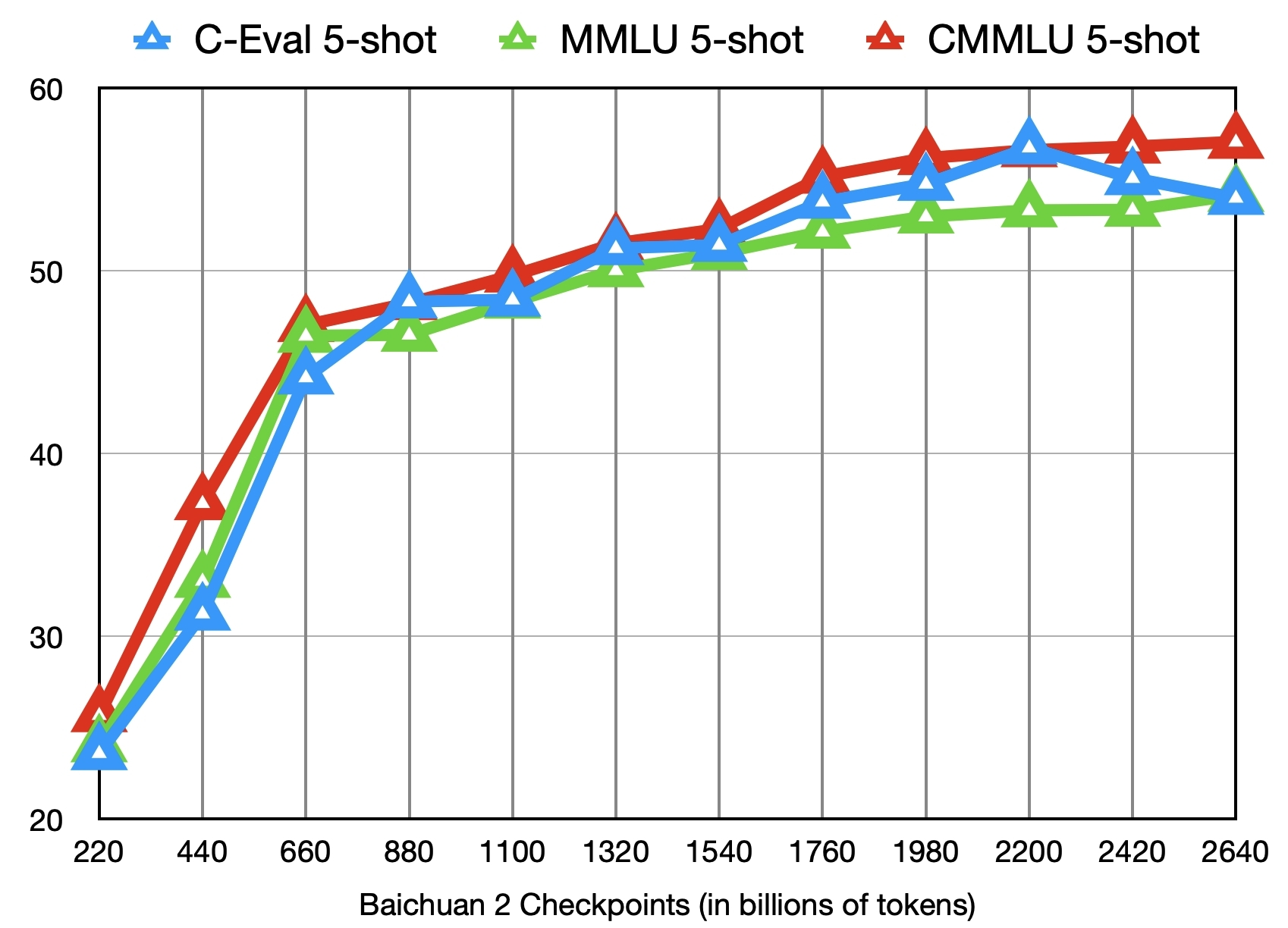
下图给出了这些checkpoints在C-Eval、MMLU、CMMLU三个benchmark上的效果变化:
参考文献:
[1]https://github.com/baichuan-inc/Baichuan2
[2]baichuan-inc:https://huggingface.co/baichuan-inc
[3]https://huggingface.co/baichuan-inc/Baichuan2-7B-Intermediate-Checkpoints
[4]Baichuan 2: Open Large-scale Language Models:https://arxiv.org/abs/2309.10305
Langchain-Chatchat项目:1.2-Baichuan2项目整体介绍的更多相关文章
- Maven搭建SpringMVC+MyBatis+Json项目(多模块项目)
一.开发环境 Eclipse:eclipse-jee-luna-SR1a-win32; JDK:jdk-8u121-windows-i586.exe; MySql:MySQL Server 5.5; ...
- Java项目转换成Web项目
阐述:有时候我们在Eclipse中导入一个web项目,发现导入到项目中后变成一个Java项目,这让人很蛋疼.本篇主要讲述怎样将这个本该为web项目的Java项目变身回去,以及一些在导入过程中遇到的一些 ...
- (转)项目迁移_.NET项目迁移到.NET Core操作指南
原文地址:https://www.cnblogs.com/heyuquan/p/dotnet-migration-to-dotnetcore.html 这篇文章,汇集了大量优秀作者写的关于" ...
- Android快乐贪吃蛇游戏实战项目开发教程-01项目概述与目录
一.项目简介 贪吃蛇是一个很经典的游戏,也很适合用来学习.本教程将和大家一起做一个Android版的贪吃蛇游戏. 我已经将做好的案例上传到了应用宝,无病毒.无广告,大家可以放心下载下来把玩一下.应用宝 ...
- Mysql查找所有项目开始时间比之前项目结束时间小的项目ID
这是之前遇到过的一道sql面试题,供参考学习: 查找所有项目开始时间比之前项目结束时间小的项目ID mysql> select * from t2; +----+---------------- ...
- 如何把maven项目转成web项目
创建Web工程,使用eclipse ee创建maven web工程 1.右键项目,选择Project Facets,点击Convert to faceted from 2.更改Dynamic Web ...
- Mvc项目架构分享之项目扩展
Mvc项目架构分享之项目扩展 Contents 系列一[架构概览] 0.项目简介 1.项目解决方案分层方案 2.所用到的技术 3.项目引用关系 系列二[架构搭建初步] 4.项目架构各部分解析 5.项目 ...
- eclipse 项目修改和更新项目,回退版本,解决分支的冲突的办法
一个关于git的图 1.我在github建立了3个分支. 2.把其中一个分支拉到本地. 项目修改提交到远程库 3.修改完代码以后commit项目,点击项目右击->team->commit ...
- MVC+Ef项目(2) 如何更改项目的生成顺序;数据库访问层Repository仓储层的实现
我们现在先来看看数据库的生成顺序 居然是 Idal层排在第一,而 web层在第二,model层反而在第三 了 我们需要把 coomon 公用层放在第一,Model层放在第二,接下来是 Idal ...
- maven3常用命令、java项目搭建、web项目搭建详细图解
http://blog.csdn.net/edward0830ly/article/details/8748986 ------------------------------maven3常用命令-- ...
随机推荐
- 轻量通讯协议 --- MQTT
介绍 一.MQTT简介 MQTT(Message Queuing Telemetry Transport) 是一种轻量级的消息传输协议,通常用于在物联网(IoT)和传感器网络中进行通信.它设计用于在低 ...
- Java多线程编程的优点和缺点
优点: 加快响应用户的时间:多线程允许并发执行多个任务,可以充分利用多核处理器,从而提高程序的性能和响应速度.比如我们经常用的迅雷下载,都喜欢多开几个线程去下载,谁都不愿意用一个线程去下载,为什么呢? ...
- tunm, 一种对标JSON的二进制数据协议
Tunm simple binary proto 一种对标JSON的二进制数据协议 支持的数据类型 基本支持的类型 "u8", "i8", "u16& ...
- js仿百度搜索框
1.js仿百度搜索框 <!DOCTYPE html> <html> <head> <meta charset="utf-8"> &l ...
- 解密长短时记忆网络(LSTM):从理论到PyTorch实战演示
本文深入探讨了长短时记忆网络(LSTM)的核心概念.结构与数学原理,对LSTM与GRU的差异进行了对比,并通过逻辑分析阐述了LSTM的工作原理.文章还详细演示了如何使用PyTorch构建和训练LSTM ...
- 后缀数组 (SA) 学习笔记
写得很草率的一篇东西. 后缀排序 #include<bits/stdc++.h> #define il inline using namespace std; il int read() ...
- Radius+OpenLdap+USG防火墙认证
1.1.安装OpenLdap # 在数据目录创建ldap文件存放ldap的配置文件 mkdir -p /data/ldap/{data,conf} docker run -p 389:389 -p 6 ...
- Office XXE攻击
一.什么是Office XXE攻击 Office XXE攻击是xxe攻击的一种,由于.xlsx与.docx是基于xml文件存储内容的,后端在解析这些xml时自然也会存在xxe攻击的可能. 这里是.xl ...
- vue3.0父级组件调用子组件方法
vue3.0父级组件调用子组件方法 场景:在页面开发过程中,我经常涉及到不同组件之间的元素和方法的调用.就此记录在vue3.0项目,也是我开发的开源项目中的实现方式. 父级组件调用子级 1.应用场景 ...
- 阿里云上的rds 的隔离级别read committed 而不是repeatable-read设置原因
阿里云上的rds 的隔离级别 是read committed ,而不是原生mysql的"可重复读(repeatable-read)",他们是基于什么原因这样设置的? show va ...