
[译]Stairway to Integration Services Level 12 - 高级日志配置
介绍
本文中,我们将结合之前学习的时间冒泡,日志记录,以及复制模型.建立一个自定义的SSIS包日志模型.
SSIS Task事件回顾 Reviewing SSIS Task Events
在做实验之前我们更改一下 Precedence.dtsx SSIS 包的设置. 把 Precedence.dtsx SSIS 包的 DisableEventHandlers 属性改为True

Figure 2
屏蔽内置日志 Disable Built-In Logging
首先我们要移除已经存在的日志配置.点击SSIS 下拉菜单然后点击 Logging :

Figure 7
Configure SSIS Logs 显示以后点击Delete 按钮删掉之前的文本日志配置 .

Figure 8
从技术上来说,刚才的步骤做了以后.日志就不会记录了. 不过我有洁癖,所以把Containers这边的复选框也取消选择了
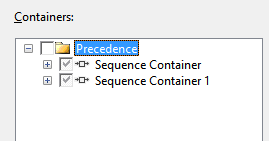
Figure 9
同样的可以把 file connection manager 也删掉

Figure 10
我们把Level 11配置的东西都删掉. 执行一下包,没问题就继续下面操作.
事件冒泡回顾 Event Bubbling, a Review
这里省略不翻译了,有需要的朋友可以看之前的章节
[译]Stairway to Integration Services Level 10 - 高级事件活动
父子模型日志记录的准备 Preparing for Parent-Child SSIS Design Pattern Logging
首先我们需要一个数据库和表来记录日志. 先创建一个名为 “SSISStairwayConfig”数据库. 代码如下:
Use master

go

/* SSISStairwayConfig database */

If Not Exists(Select name

              From sys.databases

              Where name = 'SSISStairwayConfig')

 begin

  print 'Creating SSISStairwayConfig database'

  Create Database SSISStairwayConfig

  print 'SSISStairwayConfig database created'

 end

Else

 print 'SSISStairwayConfig database already exists.'

print ''

go
Listing 1
接着创建 “lg” schema 和“SSISErrors” 表:
Use SSISStairwayConfig

go

/* log schema */

If Not Exists(Select name

              From sys.schemas

              Where name = 'lg')

 begin

  print 'Creating lg schema'

  declare @sql varchar(100) = 'Create Schema lg'

  exec(@sql)

  print 'Lg schema created'

 end

Else

 print 'Lg schema already exists.'

print ''

/* lg.SSISErrors table */

If Not Exists(Select s.name + '.' + t.name

              From sys.tables t

              Join sys.schemas s

                On s.schema_id = t.schema_id

              Where s.name = 'lg'

                And t.name = 'SSISErrors')

 begin

  print 'Creating lg.SSISErrors table'

  Create Table lg.SSISErrors

  (

    ID int identity(1,1)

     Constraint PK_SSISErrors Primary Key Clustered

   ,ErrorDateTime datetime Not Null

     Constraint DF_logSSISErrors_ErrorDateTime

      Default(GetDate())

   ,ErrorDescription varchar(max) Null

   ,ErrorCode int Null

   ,SourceName varchar(255) Null

  )

  print 'Lg.SSISErrors created'

 end

Else

 print 'Lg.SSISErrors table already exists.'

print ''
Listing 2
记录父子SSIS设计日志 Applying the Parent-Child SSIS Design Pattern to Logging
打开Parent.dtsx SSIS 包,然后定位到 OnError 事件处理:

Figure 18
脱一个 Execute SQL Task到 OnError 事件处理界面然后与 Script Task 连起来:

Figure 19
打开 Execute SQL Task Editor 然后把 ConnectionType 属性改为 ADO.NET :

Figure 20
点开 Connection 属性下拉框,点击 “<New connection…>” :

Figure 21
点了以后会生成一个新的 ADO.NET Connection Manager 在Connection Managers 标签下面可以看到 :

Figure 22
Configure ADO.NET Connection Manager 编辑框:

Figure 23
点击New按钮配置一个新的数据连接. 选择我们刚才创建好的数据库

Figure 26
点几 OK 按钮关闭 Connection Manager 编辑器,返回Configure ADO.NET Connection Manager 显示如下:

Figure 27
数据连接会记录在你的配置文件里面. 以后部署好SSIS包依旧可以使用.

Figure 28
在 SQLStatement 属性里面输入以下代码 :
Insert Into lg.SSISErrors

(ErrorCode

,ErrorDescription

,SourceName)

Values

(@ErrorCode

,@ErrorDescription

,@SourceName)
Listing 3
这个我们创建的插入语句包含了三个参数 : ErrorCode, ErrorDescription, and SourceName. 点击parameter mapping 也来映射变量,点击Add按钮,配置如下图:

Figure 30
System::ErrorCode SSIS 变量的类型为 Int32 (integer) 与插入语句中的 @ErrorCode 参数映射.
Direction 包含 Input, Output, 和 Return 值. Data Type 字段包含 ADO.Net 的数据类型 . (这个根据我们之前设置 Connection Type的不同而不同)
用ADO.Net 而 OLEDB 连接类型是有原因的: 在SQL语句和ADO.Net里面我都可以使用参数名. 而用 OLEDB 的话我不得不在SQL语句里面打上问号 . 而引用参数的时候还得打上编号( 0是第一个问号,1是第二个问号…. ) 我觉得 ADO.Net 语法更清楚.
再把另外两个参数也映射一下.

Figure 32
执行 Parent.dtsx SSIS 包 :

Figure 33
验证一下数据库中是否记录了错误 日志
Use SSISStairwayConfig

go

Select *

 From lg.SSISErrors
Listing 4
结果如下 :

Figure 34
原文链接:
http://www.sqlservercentral.com/articles/Integration+Services+(SSIS)/96657/
项目文件:
My_First_SSIS_Project_After_Step_12.rar
[译]Stairway to Integration Services Level 12 - 高级日志配置的更多相关文章
- [译]Stairway to Integration Services Level 10 - 高级事件活动
介绍 在前一篇文章中我们介绍了故障容差相关的 MaximumErrorCount 和 ForceExecutionResult 属性. 同时我们学习了SSIS Control Flow task e ...
- [译]Stairway to Integration Services Level 16 – Flexible Source Locations (多文件导入)
介绍 在本文中我们将利用SSIS参数,变量 以及 Foreach Loop Container 从多个源动态导入数据. 开始前我们先下载一些数据.WeatherData_Dec08_Apr09.zip ...
- [译]Stairway to Integration Services Level 11 - 日志配置
介绍 在前一个章节我们讨论了事先行为,分享了如何操作默认的行为和时间冒泡,并且介绍了父子模型. 本文中,我们会配置SSIS日志. 进行简单及高级日志配置,存储,和检索的实验.并且生成自定义日志信息. ...
- [译]Stairway to Integration Services Level 9 - Control Flow Task Errors
介绍 在本文中,我们会实验 MaximumErrorCount和ForceExecutioResult 故障容差属性,并且还要学习Control Flow task errors, event han ...
- [译]Stairway to Integration Services Level 8 - SSIS 工作流管理高级
介绍 在前两个章节我们,建立了一个新的SSIS包,简单的使用了一下scripting还有优先约束,并且测试了MaxConcurrentExecutables 属性. 同时实验了 “On Succe ...
- [译]Stairway to Integration Services Level 18 – 部署和执行
介绍 在本文中,我们要创建一个SSIS Catalog 实例,部署我们的项目,并且运行 weather data loader 包. SSIS 2012 部署模型 SSIS 2012 Deploy ...
- [译]Stairway to Integration Services Level 13 - SSIS 变量回顾
介绍 在前一篇中我们组合了已经学过的事件冒泡 event bubbling, 日志记录 logging, 和父子模型 Parent-Child pattern 建立了自定义的SSIS包日志记录. 本文 ...
- [译]Stairway to Integration Services Level 6 - SSIS 工作流管理基础
简介 在之前的章节中,我们学习了增量载入数据. 本文中.我们通过优先约束(Precedence Constraints)来管理SSIS的工作流. 添加一个SSIS包 图 1 将新建的Package1. ...
- [译]Stairway to Integration Services Level 5 - 增量删除数据
在 dbo.Contact中添加一行记录 Use AdventureWorks go Insert Into dbo.Contact (FirstName, MiddleName, LastName, ...
随机推荐
- Linux中的盘符问题
在windows 中像 C.D.E.F这些都可以当盘符,就是说对应了我们所看到的C盘,D盘,E盘,F盘.然而是不是只能加26个硬盘了呢? 盘符到硬盘也只是一个对映关系,我们也是可以建立从一个文件夹到一 ...
- Angularjs基础教程
Angularjs-基础教程 一些angualr的基础概念,适合入门. 1.下载 推荐 bower 或 npm 安装. bower install angular bower install angu ...
- slave 成为master 时候执行的操作notify_master /etc/keepalived/send_master.sh
slave:/root# cat /etc/keepalived/keepalived.conf global_defs { router_id MySQL-ha } vrrp_instance VI ...
- mysql null值问题
mysql> create table test( sn int, -> `createdTime` datetime NOT NULL COMMENT '创建时间', -> `up ...
- Microsoft Azure 负载平衡服务
Microsoft Azure 为在其中托管的虚拟机(IaaS) 和云服务(PaaS) 提供负载平衡服务.负载平衡支持应用程序伸缩,并且提供应用程序故障恢复以及其他优势. 可以通过以下方式访问负 ...
- solaris 操作系统配置联网
1. 设置主机名: etc/hostname.vmxnet0 hannick 2.设置主机名和ip地址的映射: etc/hosts 127.0.0.1 localhost 192.108.1.123 ...
- 理解Android的layout和measure
在Android UI开发中,总会有情况需要自定义View和View Group. 什么是View?就是Android中一个基本视图单位,一个Button是一个view, 一个Layout, 也是一个 ...
- Head First SQL笔记
看的时候总结了一下,如下: Chapter 1: 创建数据库 CREATE DATABASE database_name; 使用数据库 USE database_name; 创建表 CRATE TAB ...
- php中0,空,null和false的区别
<? $str1 = null; $str2 = false; echo $str1==$str2 ? ‘相等’ : ‘不相等’; $str3 = ""; $str4 = 0 ...
- Redis的入门Demo(java)
java代码部分参考了:http://www.runoob.com/redis/redis-java.html 在java中使用Redis,需要引入Redis驱动,就是jedis-2.1.0.jar, ...