
[译]Stairway to Integration Services Level 12 - 高级日志配置
介绍
本文中,我们将结合之前学习的时间冒泡,日志记录,以及复制模型.建立一个自定义的SSIS包日志模型.
SSIS Task事件回顾 Reviewing SSIS Task Events
在做实验之前我们更改一下 Precedence.dtsx SSIS 包的设置. 把 Precedence.dtsx SSIS 包的 DisableEventHandlers 属性改为True

Figure 2
屏蔽内置日志 Disable Built-In Logging
首先我们要移除已经存在的日志配置.点击SSIS 下拉菜单然后点击 Logging :

Figure 7
Configure SSIS Logs 显示以后点击Delete 按钮删掉之前的文本日志配置 .

Figure 8
从技术上来说,刚才的步骤做了以后.日志就不会记录了. 不过我有洁癖,所以把Containers这边的复选框也取消选择了
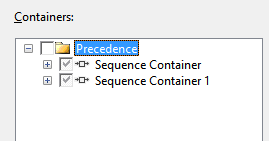
Figure 9
同样的可以把 file connection manager 也删掉

Figure 10
我们把Level 11配置的东西都删掉. 执行一下包,没问题就继续下面操作.
事件冒泡回顾 Event Bubbling, a Review
这里省略不翻译了,有需要的朋友可以看之前的章节
[译]Stairway to Integration Services Level 10 - 高级事件活动
父子模型日志记录的准备 Preparing for Parent-Child SSIS Design Pattern Logging
首先我们需要一个数据库和表来记录日志. 先创建一个名为 “SSISStairwayConfig”数据库. 代码如下:
Use master

go

/* SSISStairwayConfig database */

If Not Exists(Select name

              From sys.databases

              Where name = 'SSISStairwayConfig')

 begin

  print 'Creating SSISStairwayConfig database'

  Create Database SSISStairwayConfig

  print 'SSISStairwayConfig database created'

 end

Else

 print 'SSISStairwayConfig database already exists.'

print ''

go
Listing 1
接着创建 “lg” schema 和“SSISErrors” 表:
Use SSISStairwayConfig

go

/* log schema */

If Not Exists(Select name

              From sys.schemas

              Where name = 'lg')

 begin

  print 'Creating lg schema'

  declare @sql varchar(100) = 'Create Schema lg'

  exec(@sql)

  print 'Lg schema created'

 end

Else

 print 'Lg schema already exists.'

print ''

/* lg.SSISErrors table */

If Not Exists(Select s.name + '.' + t.name

              From sys.tables t

              Join sys.schemas s

                On s.schema_id = t.schema_id

              Where s.name = 'lg'

                And t.name = 'SSISErrors')

 begin

  print 'Creating lg.SSISErrors table'

  Create Table lg.SSISErrors

  (

    ID int identity(1,1)

     Constraint PK_SSISErrors Primary Key Clustered

   ,ErrorDateTime datetime Not Null

     Constraint DF_logSSISErrors_ErrorDateTime

      Default(GetDate())

   ,ErrorDescription varchar(max) Null

   ,ErrorCode int Null

   ,SourceName varchar(255) Null

  )

  print 'Lg.SSISErrors created'

 end

Else

 print 'Lg.SSISErrors table already exists.'

print ''
Listing 2
记录父子SSIS设计日志 Applying the Parent-Child SSIS Design Pattern to Logging
打开Parent.dtsx SSIS 包,然后定位到 OnError 事件处理:

Figure 18
脱一个 Execute SQL Task到 OnError 事件处理界面然后与 Script Task 连起来:

Figure 19
打开 Execute SQL Task Editor 然后把 ConnectionType 属性改为 ADO.NET :

Figure 20
点开 Connection 属性下拉框,点击 “<New connection…>” :

Figure 21
点了以后会生成一个新的 ADO.NET Connection Manager 在Connection Managers 标签下面可以看到 :

Figure 22
Configure ADO.NET Connection Manager 编辑框:

Figure 23
点击New按钮配置一个新的数据连接. 选择我们刚才创建好的数据库

Figure 26
点几 OK 按钮关闭 Connection Manager 编辑器,返回Configure ADO.NET Connection Manager 显示如下:

Figure 27
数据连接会记录在你的配置文件里面. 以后部署好SSIS包依旧可以使用.

Figure 28
在 SQLStatement 属性里面输入以下代码 :
Insert Into lg.SSISErrors

(ErrorCode

,ErrorDescription

,SourceName)

Values

(@ErrorCode

,@ErrorDescription

,@SourceName)
Listing 3
这个我们创建的插入语句包含了三个参数 : ErrorCode, ErrorDescription, and SourceName. 点击parameter mapping 也来映射变量,点击Add按钮,配置如下图:

Figure 30
System::ErrorCode SSIS 变量的类型为 Int32 (integer) 与插入语句中的 @ErrorCode 参数映射.
Direction 包含 Input, Output, 和 Return 值. Data Type 字段包含 ADO.Net 的数据类型 . (这个根据我们之前设置 Connection Type的不同而不同)
用ADO.Net 而 OLEDB 连接类型是有原因的: 在SQL语句和ADO.Net里面我都可以使用参数名. 而用 OLEDB 的话我不得不在SQL语句里面打上问号 . 而引用参数的时候还得打上编号( 0是第一个问号,1是第二个问号…. ) 我觉得 ADO.Net 语法更清楚.
再把另外两个参数也映射一下.

Figure 32
执行 Parent.dtsx SSIS 包 :

Figure 33
验证一下数据库中是否记录了错误 日志
Use SSISStairwayConfig

go

Select *

 From lg.SSISErrors
Listing 4
结果如下 :

Figure 34
原文链接:
http://www.sqlservercentral.com/articles/Integration+Services+(SSIS)/96657/
项目文件:
My_First_SSIS_Project_After_Step_12.rar
[译]Stairway to Integration Services Level 12 - 高级日志配置的更多相关文章
- [译]Stairway to Integration Services Level 10 - 高级事件活动
介绍 在前一篇文章中我们介绍了故障容差相关的 MaximumErrorCount 和 ForceExecutionResult 属性. 同时我们学习了SSIS Control Flow task e ...
- [译]Stairway to Integration Services Level 16 – Flexible Source Locations (多文件导入)
介绍 在本文中我们将利用SSIS参数,变量 以及 Foreach Loop Container 从多个源动态导入数据. 开始前我们先下载一些数据.WeatherData_Dec08_Apr09.zip ...
- [译]Stairway to Integration Services Level 11 - 日志配置
介绍 在前一个章节我们讨论了事先行为,分享了如何操作默认的行为和时间冒泡,并且介绍了父子模型. 本文中,我们会配置SSIS日志. 进行简单及高级日志配置,存储,和检索的实验.并且生成自定义日志信息. ...
- [译]Stairway to Integration Services Level 9 - Control Flow Task Errors
介绍 在本文中,我们会实验 MaximumErrorCount和ForceExecutioResult 故障容差属性,并且还要学习Control Flow task errors, event han ...
- [译]Stairway to Integration Services Level 8 - SSIS 工作流管理高级
介绍 在前两个章节我们,建立了一个新的SSIS包,简单的使用了一下scripting还有优先约束,并且测试了MaxConcurrentExecutables 属性. 同时实验了 “On Succe ...
- [译]Stairway to Integration Services Level 18 – 部署和执行
介绍 在本文中,我们要创建一个SSIS Catalog 实例,部署我们的项目,并且运行 weather data loader 包. SSIS 2012 部署模型 SSIS 2012 Deploy ...
- [译]Stairway to Integration Services Level 13 - SSIS 变量回顾
介绍 在前一篇中我们组合了已经学过的事件冒泡 event bubbling, 日志记录 logging, 和父子模型 Parent-Child pattern 建立了自定义的SSIS包日志记录. 本文 ...
- [译]Stairway to Integration Services Level 6 - SSIS 工作流管理基础
简介 在之前的章节中,我们学习了增量载入数据. 本文中.我们通过优先约束(Precedence Constraints)来管理SSIS的工作流. 添加一个SSIS包 图 1 将新建的Package1. ...
- [译]Stairway to Integration Services Level 5 - 增量删除数据
在 dbo.Contact中添加一行记录 Use AdventureWorks go Insert Into dbo.Contact (FirstName, MiddleName, LastName, ...
随机推荐
- XML实例入门1
虽然网上会有XML入门或者多少天教会XML,一般都是从普通的功能概念开始啰嗦,个人还是比较喜欢从实例开始,遇到不懂直接查(不过这次选了一个比较难得例子,研究了好久^_^).刚开始看了一个vc6.0XM ...
- MySQL 关闭子表的外键约束检察
准备: 定义一个教师表.一个学生表:在学生表中引用教师表ID create table teachers(teacherID int not null auto_increment primary k ...
- MFC 动态创建控件
动态控件是指在需要时由Create()创建的控件,这与预先在对话框中放置的控件是不同的. 一.创建动态控件: 为了对照,我们先来看一下静态控件的创建. 放置静态控件时必须先建立一个容器,一 ...
- BZOJ 1037 [ZJOI2008]生日聚会Party(单调DP)
[题目链接] http://www.lydsy.com/JudgeOnline/problem.php?id=1037 [题目大意] 现在有n个男生,m个女生排成一行,要求不存在一个区间男女之差大于k ...
- perl笔记
更精确的空白字符串匹配 1.水平空白字符 Perl5.10之前,使用\s这种分类,不够精确,容易导致意料外的结果: Perl5.10中引入\h字符组,用来匹配任意水平空白字符(包括Unicode字符集 ...
- 180行ruby代码搞定游戏2048
最今在玩2048这款小游戏,游戏逻辑简单,很适合我这样的对于游戏新入行的人来实现逻辑.于是选择了最拿手的ruby语言来实现这款小游戏的主要逻辑.还是挺简单的,加起来4小时左右搞定. 上代码: requ ...
- 2045不容易系列之(3)—— LELE的RPG难题
Problem Description人称“AC女之杀手”的超级偶像LELE最近忽然玩起了深沉,这可急坏了众多“Cole”(LELE的粉丝,即”可乐”),经过多方打探,某资深Cole终于知道了原因,原 ...
- win7系统无线 VirtualBox rehat 32位linux 下 host-only模式相互通信及上网 配置
虚拟机环境:virtualBox虚拟环境 redhat 32位 主机环境 : win7 无线路由 模式: host-only win7下nat模式原先的设置基于 有网线连接的情形下,在使用了无线路由之 ...
- poj 3304 计算几何
大意: 是否存在一条直线,使所有线段在直线上的投影至少交与一点 思路: 转换为是否存在一条直线与所有的线段相交,做这条直线的垂线,那么垂线即为所求 **/ #include <iostream& ...
- C单链表实现
/* * LinkNode.c * * Created on: Jan 14, 2014 * Author: root */ #include <stdlib.h> #include &l ...