
复习知识点:UITableView和UICollectionView的常用属性
UITableView
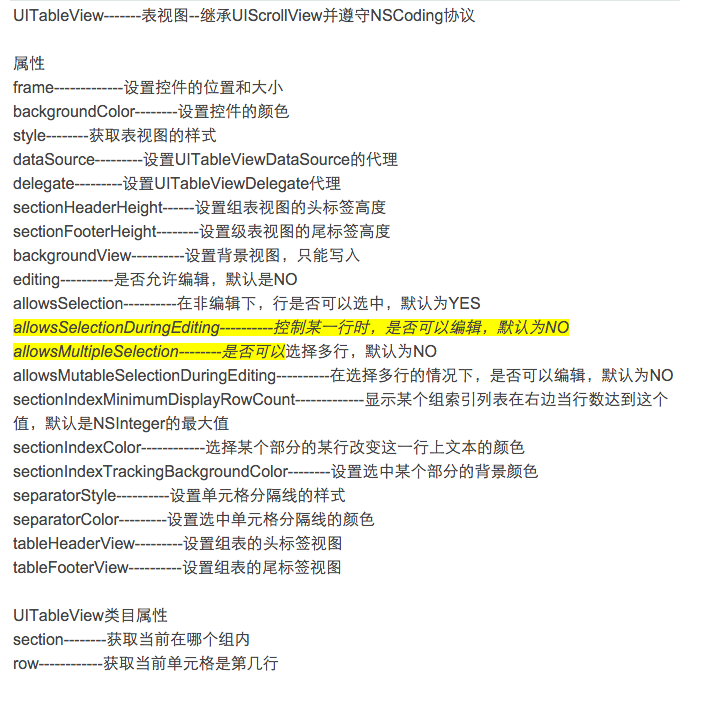
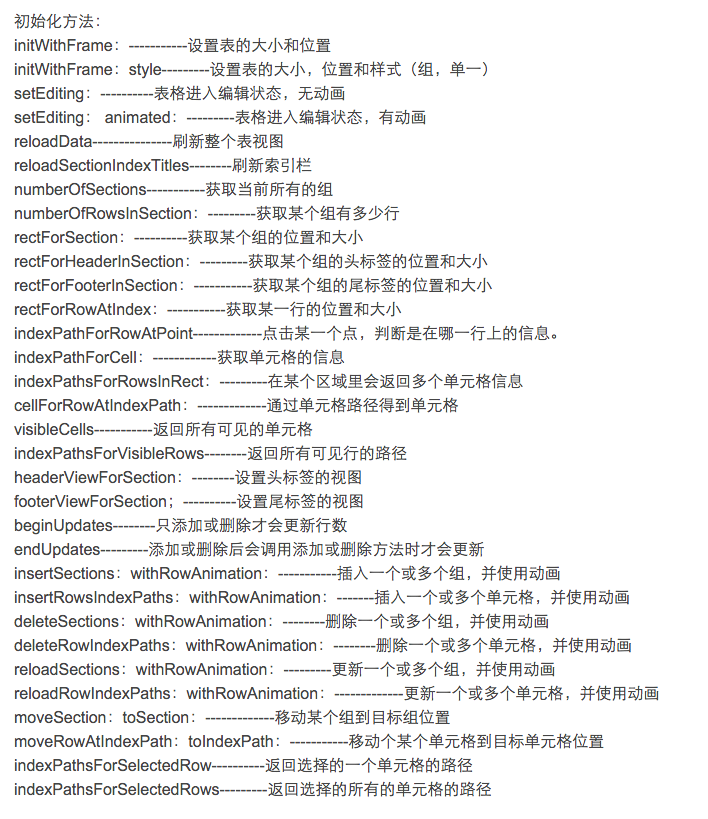
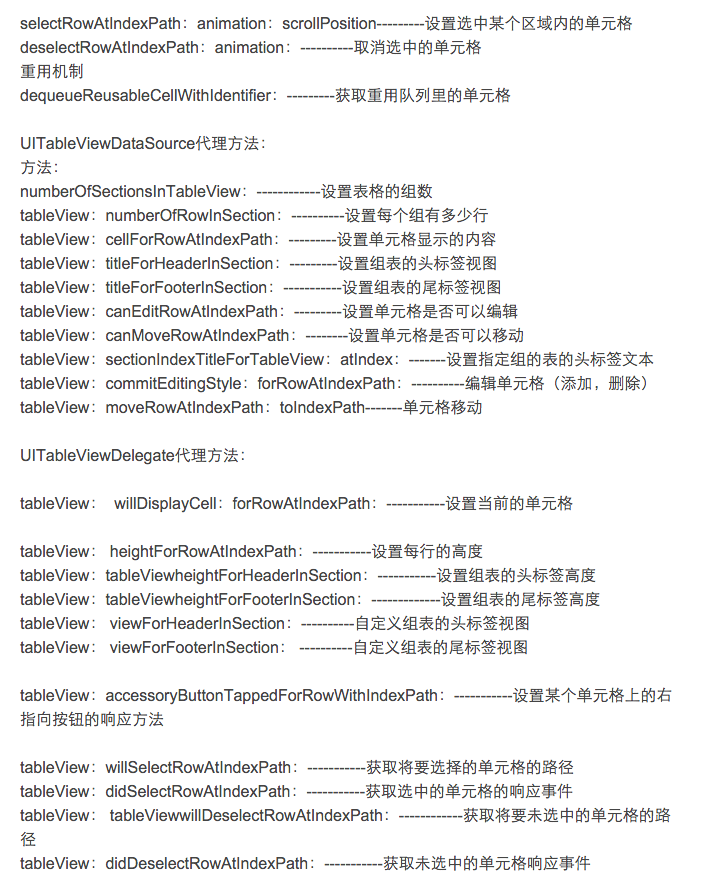
UICollectionView
//UICollectionViewLayout
//UICollectionViewLayout决定了UICollectionView如何显示在界面上,Apple提供了一个最简单的默认layout对象:UICollectionViewFlowLayout。
//Flow Layout是一个Cells的线性布局方案,并具有页面和页脚。其可定制的内容如下:
//itemSize属性
//设定全局的Cell尺寸,如果想要单独定义某个Cell的尺寸,可以使用下面方法:
- (CGSize)collectionView:(UICollectionView *)collectionView layout:(UICollectionViewLayout*)collectionViewLayout sizeForItemAtIndexPath:(NSIndexPath *)indexPath;
//minimumLineSpacing属性
//设定全局的行间距,如果想要设定指定区内Cell的最小行距,可以使用下面方法:
- (CGFloat)collectionView:(UICollectionView *)collectionView layout:(UICollectionViewLayout *)collectionViewLayout minimumLineSpacingForSectionAtIndex:(NSInteger)section;
//minimumInteritemSpacing属性
//设定全局的Cell间距,如果想要设定指定区内Cell的最小间距,可以使用下面方法:
- (CGFloat)collectionView:(UICollectionView *)collectionView layout:(UICollectionViewLayout*)collectionViewLayout minimumInteritemSpacingForSectionAtIndex:(NSInteger)section;
//scrollDirection属性
//设定滚动方向,有UICollectionViewScrollDirectionVertical和UICollectionViewScrollDirectionHorizontal两个值。
//headerReferenceSize属性与footerReferenceSize属性
//设定页眉和页脚的全局尺寸,需要注意的是,根据滚动方向不同,header和footer的width和height中只有一个会起作用。如果要单独设置指定区内的页面和页脚尺寸,可以使用下面方法:
- (CGSize)collectionView:(UICollectionView *)collectionView layout:(UICollectionViewLayout*)collectionViewLayout referenceSizeForHeaderInSection:(NSInteger)section;
- (CGSize)collectionView:(UICollectionView *)collectionView layout:(UICollectionViewLayout*)collectionViewLayout referenceSizeForFooterInSection:(NSInteger)section;
//sectionInset属性
//设定全局的区内边距,如果想要设定指定区的内边距,可以使用下面方法:
- (UIEdgeInsets)collectionView:(UICollectionView *)collectionView layout:(UICollectionViewLayout*)collectionViewLayout insetForSectionAtIndex:(NSInteger)section;
//++++++++++++++++++++++++++++++++++++++++++++++++++++++++++++++++++++++++++++++++++++++++++++++++++++++++++++++++++++++++++++++
//UICollectionViewDataSource
//返回collection view里区(section)的个数,如果没有实现该方法,将默认返回1:
- (NSInteger)numberOfSectionsInCollectionView:(UICollectionView *)collectionView
//返回指定区(section)包含的数据源条目数(number of items),该方法必须实现:
- (NSInteger)collectionView:(UICollectionView *)collectionView numberOfItemsInSection:(NSInteger)section
//返回某个indexPath对应的cell,该方法必须实现:
- (UICollectionViewCell *)collectionView:(UICollectionView *)collectionView cellForItemAtIndexPath:(NSIndexPath *)indexPath
{
UICollectionViewCell *cell = [collectionView dequeueReusableCellWithReuseIdentifier:@"myCell" forIndexPath:indexPath];
if(indexPath.section==0)
{
cell.backgroundColor = [UIColor redColor];
}
else if(indexPath.section==1)
{
cell.backgroundColor = [UIColor greenColor];
}
return cell;
}
//UICollectionViewCell结构上相对比较简单,由下至上:
//
//首先是cell本身作为容器view
//然后是一个大小自动适应整个cell的backgroundView,用作cell平时的背景
//再其次是selectedBackgroundView,是cell被选中时的背景
//最后是一个contentView,自定义内容应被加在这个view上
//为collection view添加一个补充视图(页眉或页脚)
- (UICollectionReusableView *)collectionView:(UICollectionView *)collectionView viewForSupplementaryElementOfKind:(NSString *)kind atIndexPath:(NSIndexPath *)indexPath
//设定页眉的尺寸
- (CGSize)collectionView:(UICollectionView *)collectionView layout:(UICollectionViewLayout*)collectionViewLayout referenceSizeForHeaderInSection:(NSInteger)section
//设定页脚的尺寸
- (CGSize)collectionView:(UICollectionView *)collectionView layout:(UICollectionViewLayout*)collectionViewLayout referenceSizeForFooterInSection:(NSInteger)section
//添加页眉和页脚以前需要注册类和标识:
- (void)registerClass:(Class)viewClass forSupplementaryViewOfKind:(NSString *)elementKind withReuseIdentifier:(NSString *)identifier
//设定指定区内Cell的最小行距,也可以直接设置UICollectionViewFlowLayout的minimumLineSpacing属性
- (CGFloat)collectionView:(UICollectionView *)collectionView layout:(UICollectionViewLayout *)collectionViewLayout minimumLineSpacingForSectionAtIndex:(NSInteger)section
//设定指定区内Cell的最小间距,也可以直接设置UICollectionViewFlowLayout的minimumInteritemSpacing属性
- (CGFloat)collectionView:(UICollectionView *)collectionView layout:(UICollectionViewLayout*)collectionViewLayout minimumInteritemSpacingForSectionAtIndex:(NSInteger)section;
//UICollectionViewDelegate
//当指定indexPath处的item被选择时触发
- (void)collectionView:(UICollectionView *)collectionView didSelectItemAtIndexPath:(NSIndexPath *)indexPath
//P.s. 当你删除或添加元素时,一定要更新numberOfItemsInSection的返回情况。
//当指定indexPath处的item被取消选择时触发,仅在允许多选时被调用
- (void)collectionView:(UICollectionView *)collectionView didDeselectItemAtIndexPath:(NSIndexPath *)indexPath
//下面是三个和高亮有关的方法:
//事件的处理顺序如下:
//
//手指按下
//shouldHighlightItemAtIndexPath (如果返回YES则向下执行,否则执行到这里为止)
//didHighlightItemAtIndexPath (高亮)
//手指松开
//didUnhighlightItemAtIndexPath (取消高亮)
//shouldSelectItemAtIndexPath (如果返回YES则向下执行,否则执行到这里为止)
//didSelectItemAtIndexPath (执行选择事件)
//如果只是简单实现点击后cell改变显示状态,只需要在cellForItemAtIndexPath方法里返回cell时,指定cell的selectedBackgroundView
- (BOOL)collectionView:(UICollectionView *)collectionView shouldHighlightItemAtIndexPath:(NSIndexPath *)indexPath
- (void)collectionView:(UICollectionView *)collectionView didHighlightItemAtIndexPath:(NSIndexPath *)indexPath
- (void)collectionView:(UICollectionView *)collectionView didUnhighlightItemAtIndexPath:(NSIndexPath *)indexPath
复习知识点:UITableView和UICollectionView的常用属性的更多相关文章
- 12-27 UITableView常用属性及方法
UITableView也有自己的代理协议,它本身继承自UIScrollView 一:代理要遵守代理协议<UITableViewDelegate>,代理协议中的代理方法: 1.改变某一行的行 ...
- UITableView的常用属性和cell的内存优化
UITableView的常用属性: 分割线颜色设置: 1> 设置separatorStyle: 分割线的颜色 方法:tableView.separatorStyle = UITableViewC ...
- UITableView常用属性和方法 - 永不退缩的小白菜
UITableView常用属性和方法 - 永不退缩的小白菜 时间 2014-05-27 01:21:00 博客园精华区原文 http://www.cnblogs.com/zhaofucheng11 ...
- JavaEE期末复习知识点总结
JavaEE期末复习知识点总结 Java企业应用开发环境 Maven的基础概念 Maven是一个项目管理工具,可以对 Java 项目进行构建.依赖管理 Maven仓库 Maven 仓库是项目中依赖的第 ...
- RumTime实践之--UITableView和UICollectionView缺省页的实现
有关RunTime的知识点已经看过很久了,但是一直苦于在项目中没有好的机会进行实际运用,俗话说"光说不练假把式",正好最近在项目中碰到一个UITableView和UICollect ...
- CSS样式常用属性整理
web工程师是最近5年刚刚兴起的一门高薪职业,人们的专注度越来越高. 那么前端除了学习html标签之外还需要掌握什么知识点呢? 为大家整理了一个和HTML标签密不可分的知识要点--<CSS样式常 ...
- UITableView和UICollectionView的Cell高度的几种设置方式
UITableViewCell 1.UITableView的Cell高度默认由rowHeight属性指定一个低优先级的隐式约束 2.XIB中可向UITableViewCell的contentView添 ...
- iOS 8自动调整UITableView和UICollectionView布局
本文转载自:http://tech.techweb.com.cn/thread-635784-1-1.html 本文讲述了UITableView.UICollectionView实现 self-siz ...
- iOS中UITableView和UICollectionView的默认空态页
项目中想实现空态页风格统一控制的效果,就封装了一个默认空态页,使用的技术点有:1 方法替换 ,2 给分类(Category)添加属性. 我们知道,扩展(extension)可以给类添加私有变量和方法. ...
随机推荐
- ubuntu之iptables
1.更新iptables并立即生效: a.保存当前设置:iptables-save > /etc/iptables.up.rules b.修改iptables规则: 例如: -I INPUT - ...
- 2015 5.16 C# 继承和多态
类的层次结构有两种基本的构造方式 自顶向下 自底向上 基类的保护成员是指允许派生类的方法代码访问,而不是指通过派生类的对象访问 如果基类中的字段通过公有且可读写的属性进行了封装,那么建议将字段定义 ...
- 跳出for循环
如下面,有两个循环,break只能退出一个for循环,不能直接跳过第二个for循环 for (Type type : types) { for (Type t : types2) { if (some ...
- Windows NTService 后台框架封装
对于后台运行的程序,比如基于C/S架构的服务器.各种监控系统的程序.或者是程序额外的功能需要后台运行来实现,在Windows平台中,服务经常会用到,这种对于需要24×7运行的程序是必备的,至少本人经常 ...
- Java学习之equals和hashcode的关系
两个对象值相同(x.equals(y) == true),但却可有不同的hash code,这句话对不对? 答:不对,如果两个对象x和y满足x.equals(y) == true,它们的哈希码(has ...
- .net format 中 大括号{}处理
1.string string.format(string format,object arg0) 错误:因为方法中使用{n}做占位符号了,所以其他需要括号{}的地方,就需要{{}}
- Linux下 保存 git账号密码
一.通过文件方式 1.在~/下, touch创建文件 .git-credentials, 用vim编辑此文件,输入内容格式: touch .git-credentials vim .git-crede ...
- C++获取当前机器内网IP地址
/*头文件*/ #include "winsock2.h" #pragma comment(lib,"ws2_32.lib") /*Hui 获取当前服务器IP* ...
- angulajs 当input使用 bootstrap的email类型时,如果是无效的email格式,则ng-model无效的情况
当使用bootstrap的如下input时 <input type="email" ng-model="userid"> 如果输入的内容是无效的em ...
- 过目不忘JS正则表达式(转)
正则表达式,有木有人像我一样,学了好几遍却还是很懵圈,学的时候老明白了,学完了忘光了.好吧,其实还是练的不够,所谓温故而知新,可以为师矣,今天就随我来复习一下这傲娇的正则表达式吧. 为啥要有正则表达式 ...