
12、NFC技术:读写NFC标签中的Uri数据
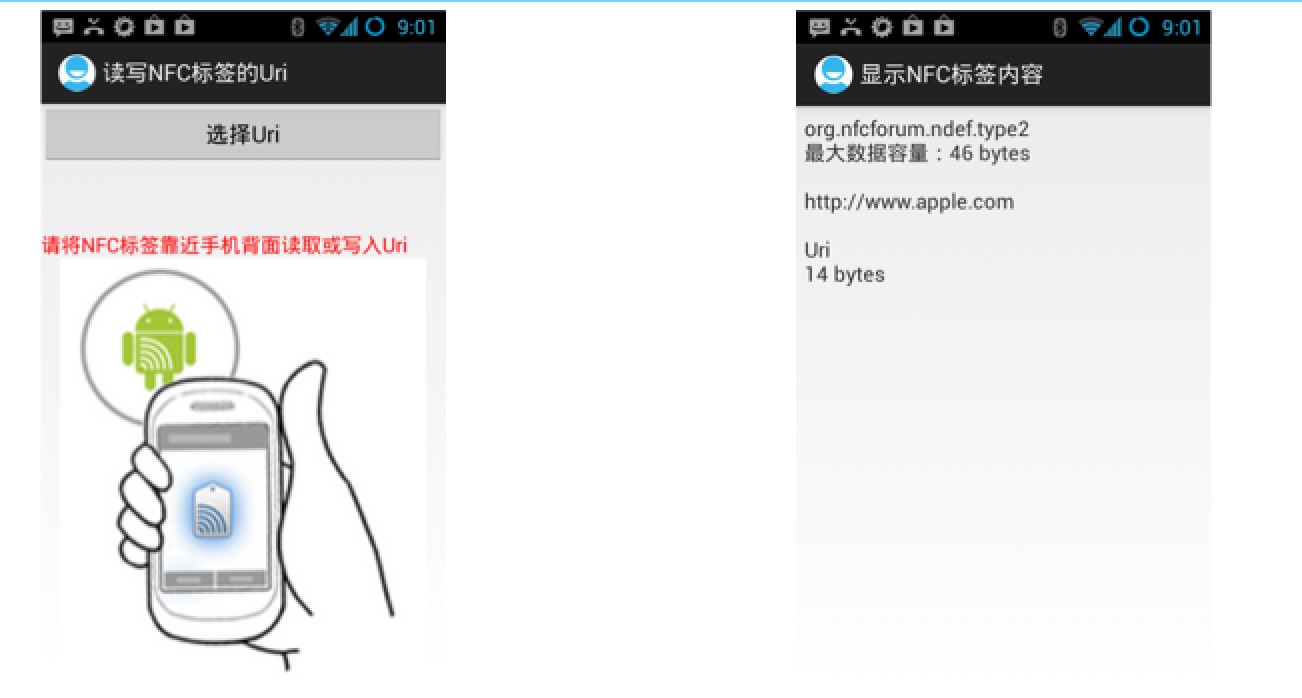
功能实现,如下代码所示:
读写NFC标签的Uri 主Activity
 import cn.read.write.uri.library.UriRecord;

 import android.app.Activity;

 import android.content.Intent;

 import android.nfc.NdefMessage;

 import android.nfc.NdefRecord;

 import android.nfc.NfcAdapter;

 import android.nfc.Tag;

 import android.nfc.tech.Ndef;

 import android.os.Bundle;

 import android.view.View;

 import android.widget.TextView;

 import android.widget.Toast;

 /**

  * 读写NFC标签的Uri

  * @author dr

  *

  */

 public class ReadWriteUriMainActivity extends Activity {

     private TextView mSelectUri;

     private String mUri;

     @Override

     public void onCreate(Bundle savedInstanceState) {

         super.onCreate(savedInstanceState);

         setContentView(R.layout.activity_read_write_uri_main);

         mSelectUri = (TextView) findViewById(R.id.textview_uri);

     }

     public void onClick_SelectUri(View view) {

         Intent intent = new Intent(this, UriListActivity.class);

         startActivityForResult(intent, 1);

     }

     @Override

     protected void onActivityResult(int requestCode, int resultCode, Intent data) {

         if (requestCode == 1 && resultCode == 1) {

             mUri = data.getStringExtra("uri");

             mSelectUri.setText(mUri);

         }

     }

     public void onNewIntent(Intent intent) {

         if (mUri == null) {

             Intent myIntent = new Intent(this, ShowNFCTagContentActivity.class);

             myIntent.putExtras(intent);

             myIntent.setAction(NfcAdapter.ACTION_NDEF_DISCOVERED);

             startActivity(myIntent);

         } else {  // write nfc

             Tag tag = intent.getParcelableExtra(NfcAdapter.EXTRA_TAG);

             NdefMessage ndefMessage = new NdefMessage(

                     new NdefRecord[] { createUriRecord(mUri) });

             if (writeTag(ndefMessage, tag)) {

                 mUri = null;

                 mSelectUri.setText("");

             }

         }

     }

     public NdefRecord createUriRecord(String uriStr) {

         byte prefix = 0;

         for (Byte b : UriRecord.URI_PREFIX_MAP.keySet()) {

             String prefixStr = UriRecord.URI_PREFIX_MAP.get(b).toLowerCase();

             if ("".equals(prefixStr))

                 continue;

             if (uriStr.toLowerCase().startsWith(prefixStr)) {

                 prefix = b;

                 uriStr = uriStr.substring(prefixStr.length());

                 break;

             }

         }

         byte[] data = new byte[1 + uriStr.length()];

         data[0] = prefix;

         System.arraycopy(uriStr.getBytes(), 0, data, 1, uriStr.length());

         NdefRecord record = new NdefRecord(NdefRecord.TNF_WELL_KNOWN,

                 NdefRecord.RTD_URI, new byte[0], data);

         return record;

     }

     boolean writeTag(NdefMessage message, Tag tag) {

         int size = message.toByteArray().length;

         try {

             Ndef ndef = Ndef.get(tag);

             if (ndef != null) {

                 ndef.connect();

                 if (!ndef.isWritable()) {

                     return false;

                 }

                 if (ndef.getMaxSize() < size) {

                     return false;

                 }

                 ndef.writeNdefMessage(message);

                 Toast.makeText(this, "ok", Toast.LENGTH_LONG).show();

                 return true;

             }

         } catch (Exception e) {

             // TODO: handle exception

         }

         return false;

     }

 }
读写NFC标签的Uri 主xml
 <?xml version="1.0" encoding="utf-8"?>

 <LinearLayout xmlns:android="http://schemas.android.com/apk/res/android"

     android:layout_width="match_parent"

     android:layout_height="match_parent"

     android:orientation="vertical" >

     <Button

         android:layout_width="match_parent"

         android:layout_height="wrap_content"

         android:onClick="onClick_SelectUri"

         android:text="选择Uri" />

     <TextView

         android:id="@+id/textview_uri"

         android:layout_width="match_parent"

         android:layout_height="wrap_content"

         android:textSize="16sp" />

     <TextView

         android:layout_width="match_parent"

         android:layout_height="wrap_content"

         android:layout_marginTop="30dp"

         android:text="请将NFC标签靠近手机背面读取或写入Uri"

         android:textColor="#F00"

         android:textSize="16sp" />

     <ImageView

         android:layout_width="match_parent"

         android:layout_height="match_parent"

         android:src="@drawable/read_nfc_tag" />

 </LinearLayout>
显示URI列表Activity
 import android.app.ListActivity;

 import android.content.Intent;

 import android.os.Bundle;

 import android.view.View;

 import android.widget.AdapterView;

 import android.widget.AdapterView.OnItemClickListener;

 import android.widget.ArrayAdapter;

 /**

  * 显示URI列表

  * @author dr

  *

  */

 public class UriListActivity extends ListActivity implements

         OnItemClickListener {

     private String uris[] = new String[] { "http://www.google.com",

             "http://www.apple.com", "http://developer.apple.com",

             "http://www.126.com", "ftp://192.168.17.160",

             "https://192.168.17.120", "smb://192.168.17.100" };

     @Override

     public void onCreate(Bundle savedInstanceState) {

         super.onCreate(savedInstanceState);

         ArrayAdapter<String> arrayAdapter = new ArrayAdapter<String>(this,

                 android.R.layout.simple_list_item_1, android.R.id.text1, uris);

         setListAdapter(arrayAdapter);

         getListView().setOnItemClickListener(this);

     }

     @Override

     public void onItemClick(AdapterView<?> parent, View view, int position,

             long id) {

         Intent intent = new Intent();

         intent.putExtra("uri", uris[position]);

         setResult(1, intent);

         finish();

     }

 }
显示NFC标签内容Activity
 import android.app.Activity;

 import android.nfc.NdefMessage;

 import android.nfc.NdefRecord;

 import android.nfc.NfcAdapter;

 import android.nfc.Tag;

 import android.nfc.tech.Ndef;

 import android.os.Bundle;

 import android.os.Parcelable;

 import android.widget.TextView;

 import cn.read.write.uri.library.UriRecord;

 /**

  * 显示NFC标签内容

  * @author dr

  *

  */

 public class ShowNFCTagContentActivity extends Activity {

     private TextView mTagContent;

     private Tag mDetectedTag;

     private String mTagText;

     @Override

     public void onCreate(Bundle savedInstanceState) {

         super.onCreate(savedInstanceState);

         setContentView(R.layout.activity_show_nfctag_content);

         mTagContent = (TextView) findViewById(R.id.textview_tag_content);

         mDetectedTag = getIntent().getParcelableExtra(NfcAdapter.EXTRA_TAG);

         Ndef ndef = Ndef.get(mDetectedTag);

         mTagText = ndef.getType() + "\n max size:" + ndef.getMaxSize()

                 + " bytes\n\n";

         readNFCTag();

         mTagContent.setText(mTagText);

     }

     private void readNFCTag() {

         if (NfcAdapter.ACTION_NDEF_DISCOVERED.equals(getIntent().getAction())) {

             Parcelable[] rawMsgs = getIntent().getParcelableArrayExtra(

                     NfcAdapter.EXTRA_NDEF_MESSAGES);

             NdefMessage ndefMessage = null;

             int contentSize = 0;

             if (rawMsgs != null) {

                 if (rawMsgs.length > 0) {

                     ndefMessage = (NdefMessage) rawMsgs[0];

                     contentSize = ndefMessage.toByteArray().length;

                 } else {

                     return;

                 }

             }

             try {

                 NdefRecord ndefRecord = ndefMessage.getRecords()[0];

                 UriRecord uriRecord = UriRecord.parse(ndefRecord);

                 mTagText += uriRecord.getUri().toString() + "\n\nUri\n"

                         + contentSize + " bytes";

             } catch (Exception e) {

                 // TODO: handle exception

             }

         }

     }

 }
显示NFC标签内容xml
 <LinearLayout xmlns:android="http://schemas.android.com/apk/res/android"

     android:layout_width="match_parent"

     android:layout_height="match_parent"

     android:orientation="vertical" >

     <TextView

         android:id="@+id/textview_tag_content"

         android:layout_width="match_parent"

         android:layout_height="wrap_content"

         android:layout_margin="6dp"

         android:textSize="16sp" />

 </LinearLayout>
AndroidManifest.xml
 <manifest xmlns:android="http://schemas.android.com/apk/res/android"

     package="cn.eoe.read.write.uri"

     android:versionCode="1"

     android:versionName="1.0" >

     <uses-sdk

         android:minSdkVersion="15"

         android:targetSdkVersion="15" />

     <uses-permission android:name="android.permission.NFC" />

     <application

         android:icon="@drawable/ic_launcher"

         android:label="@string/app_name"

         android:theme="@style/AppTheme" >

         <activity

             android:name=".ReadWriteUriMainActivity"

             android:label="读写NFC标签的Uri"

             android:launchMode="singleTask" >

             <intent-filter>

                 <action android:name="android.intent.action.MAIN" />

                 <category android:name="android.intent.category.LAUNCHER" />

             </intent-filter>

             <intent-filter>

                 <action android:name="android.nfc.action.NDEF_DISCOVERED" />

                 <category android:name="android.intent.category.DEFAULT" />

                 <data android:scheme="http" />

                 <data android:scheme="https" />

                 <data android:scheme="ftp" />

             </intent-filter>

             <intent-filter>

                 <action android:name="android.nfc.action.NDEF_DISCOVERED" />

                 <category android:name="android.intent.category.DEFAULT" />

                 <data android:mimeType="text/plain" />

             </intent-filter>

         </activity>

         <activity

             android:name="cn.eoe.read.write.uri.ShowNFCTagContentActivity"

             android:label="显示NFC标签内容" />

         <activity

             android:name="cn.eoe.read.write.uri.UriListActivity"

             android:label="选择Uri" />

     </application>

 </manifest>
DEMO下载地址:http://download.csdn.net/detail/androidsj/7680247
12、NFC技术:读写NFC标签中的Uri数据的更多相关文章
- 10、NFC技术:读写NFC标签中的文本数据
代码实现过程如下: 读写NFC标签的纯文本数据.java import java.nio.charset.Charset; import java.util.Locale; import androi ...
- android官方技术文档翻译——Case 标签中的常量字段
本文译自androd官方技术文档<Non-constant Fields in Case Labels>,原文地址:http://tools.android.com/tips/non-co ...
- 11、NFC技术:NDEF Uri格式解析
NDEF Uri格式规范 与NDEF文本格式一样,存储在NFC标签中的Uri也有一定的格式 http://www.nfc-forum.org/specs/spec_dashboard 编写可以解析Ur ...
- 【NFC】Android NFC API Reference中英文
0 Near Field Communication Near Field Communication (NFC) is a set of short-range wireless technol ...
- 6、Android中的NFC技术
Android对NFC技术的支持 Android2.3.1(API Level = 9)开始支持NFC技术,但Android2.x和Android3.x对NFC的支持非常有限.而从Android4.0 ...
- 7、NFC技术:让Android自动运行程序
用于描述NDEF格式数据的两个重要的类 NdefMessage:描述NDEF格式的信息 NdefRecord:描述NDEF信息的一个信息段 NdefMessage和NdefRecord是Androi ...
- Android NFC技术(三)——初次开发Android NFC你须知道NdefMessage和NdefRecord
Android NFC技术(三)--初次开发Android NFC你须知道NdefMessage和NdefRecord 这最近也是有好多天没写博客了,除了到处张罗着搬家之外,依旧还是许许多多的琐事阻碍 ...
- 9、NFC技术:NDEF文本格式解析
NDEF文本格式规范 不管什么格式的数据本质上都是由一些字节组成的.对于NDEF文本格式来说.这些数据的第1个字节描述了数据的状态,然后若干个字节描述文本的语言编码,最后剩余字节表示文本数据. ...
- iso15693芯片读写工具套件 icode-slix2读写 nfc type 5 tag读写
iso15693芯片读写工具套件 icode-slix2读写 nfc type 5 tag读写校验套件 iso15693工具套件支持icode-slix,icode-slix2芯片的读写,支持iso1 ...
随机推荐
- JLink 软件复位、Halt及运行小工具
调试硬件时常常需要复位目标芯片,每次断电上电太麻烦,又不喜欢总打开segger的命令行,于是就搞了这个小工具: QT绿色软件,解压即可运行,打开JLinkRST.exe,点击Connect即可通过 ...
- try catch语句在VC下的处理
使用VC编译QT程序碰到一个问题: 我在.h文件里定义: LoadingWidget* w;然后.cpp文件里定义: void MyClass::ModifyTask(){ // w = ...
- Java 虚拟机体系结构
众所周知,Java源代码被编译器编译成class文件.而并不是底层操作系统可以直接执行的二进制指令(比如Windows OS的.exe文件).因此,我们需要有一种平台可以解释class文件并运行它.而 ...
- Oracle Demo ->> CREATE TABLE
Demo One CREATE TABLE employees_demo ( employee_id ) , first_name ) , last_name ) CONSTRAINT emp_las ...
- Intellij IDEA的Hibernate简单应用
1.创建数据库及其表 create database demo; use demo; CREATE TABLE `user` ( `id` int(10) unsigned NOT NULL ...
- ubuntu下搭建hive(包括hive的web接口)记录
Hive版本 0.12.0(独立模式) Hadoop版本 1.12.1 Ubuntu 版本 12.10 今天试着搭建了hive,差点迷失在了网上各种资料中,现在把我的经验分享给大家,亲手实践过,但未必 ...
- ajax练习习题三搜索
做一个汽车搜索页面 <!DOCTYPE html PUBLIC "-//W3C//DTD XHTML 1.0 Transitional//EN" "http://w ...
- 易犯的PHP小错误及相应分析
变量声明如果在一条语句中声明一个变量,如下所示:$var = 'value'; 编译器首先会求出语句右半部分的值,恰恰正是语句的这一部分常常会引发错误.如果使用的语法不正确,就会出现解析错误. 解析错 ...
- 关于RotateAnimation的各构造方法的参数
本文以RotateAnimation的构造方法 讲解. RotateAnimation(float fromDegrees, float toDegrees) 其他构造器的旋转也可参考这副图. Rot ...
- Windows Live Writer配置测试
文字可以了 不知道代码怎么发布