
12、NFC技术:读写NFC标签中的Uri数据
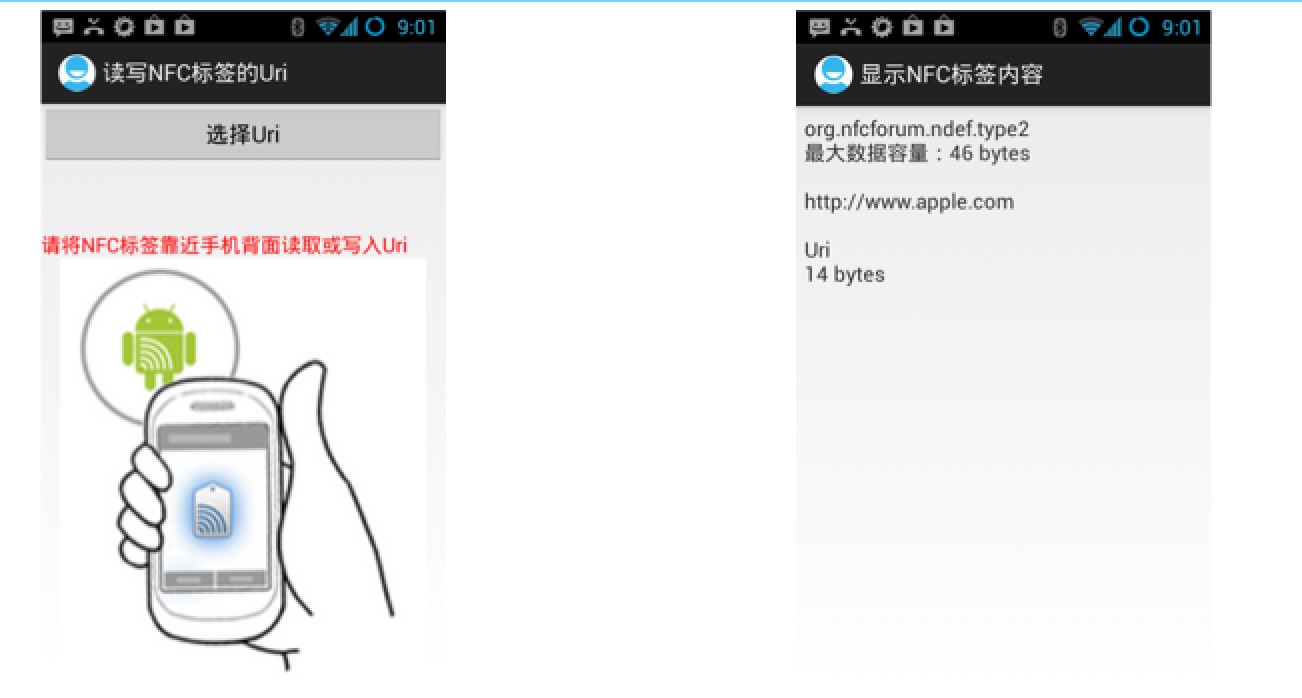
功能实现,如下代码所示:
读写NFC标签的Uri 主Activity
 import cn.read.write.uri.library.UriRecord;

 import android.app.Activity;

 import android.content.Intent;

 import android.nfc.NdefMessage;

 import android.nfc.NdefRecord;

 import android.nfc.NfcAdapter;

 import android.nfc.Tag;

 import android.nfc.tech.Ndef;

 import android.os.Bundle;

 import android.view.View;

 import android.widget.TextView;

 import android.widget.Toast;

 /**

  * 读写NFC标签的Uri

  * @author dr

  *

  */

 public class ReadWriteUriMainActivity extends Activity {

     private TextView mSelectUri;

     private String mUri;

     @Override

     public void onCreate(Bundle savedInstanceState) {

         super.onCreate(savedInstanceState);

         setContentView(R.layout.activity_read_write_uri_main);

         mSelectUri = (TextView) findViewById(R.id.textview_uri);

     }

     public void onClick_SelectUri(View view) {

         Intent intent = new Intent(this, UriListActivity.class);

         startActivityForResult(intent, 1);

     }

     @Override

     protected void onActivityResult(int requestCode, int resultCode, Intent data) {

         if (requestCode == 1 && resultCode == 1) {

             mUri = data.getStringExtra("uri");

             mSelectUri.setText(mUri);

         }

     }

     public void onNewIntent(Intent intent) {

         if (mUri == null) {

             Intent myIntent = new Intent(this, ShowNFCTagContentActivity.class);

             myIntent.putExtras(intent);

             myIntent.setAction(NfcAdapter.ACTION_NDEF_DISCOVERED);

             startActivity(myIntent);

         } else {  // write nfc

             Tag tag = intent.getParcelableExtra(NfcAdapter.EXTRA_TAG);

             NdefMessage ndefMessage = new NdefMessage(

                     new NdefRecord[] { createUriRecord(mUri) });

             if (writeTag(ndefMessage, tag)) {

                 mUri = null;

                 mSelectUri.setText("");

             }

         }

     }

     public NdefRecord createUriRecord(String uriStr) {

         byte prefix = 0;

         for (Byte b : UriRecord.URI_PREFIX_MAP.keySet()) {

             String prefixStr = UriRecord.URI_PREFIX_MAP.get(b).toLowerCase();

             if ("".equals(prefixStr))

                 continue;

             if (uriStr.toLowerCase().startsWith(prefixStr)) {

                 prefix = b;

                 uriStr = uriStr.substring(prefixStr.length());

                 break;

             }

         }

         byte[] data = new byte[1 + uriStr.length()];

         data[0] = prefix;

         System.arraycopy(uriStr.getBytes(), 0, data, 1, uriStr.length());

         NdefRecord record = new NdefRecord(NdefRecord.TNF_WELL_KNOWN,

                 NdefRecord.RTD_URI, new byte[0], data);

         return record;

     }

     boolean writeTag(NdefMessage message, Tag tag) {

         int size = message.toByteArray().length;

         try {

             Ndef ndef = Ndef.get(tag);

             if (ndef != null) {

                 ndef.connect();

                 if (!ndef.isWritable()) {

                     return false;

                 }

                 if (ndef.getMaxSize() < size) {

                     return false;

                 }

                 ndef.writeNdefMessage(message);

                 Toast.makeText(this, "ok", Toast.LENGTH_LONG).show();

                 return true;

             }

         } catch (Exception e) {

             // TODO: handle exception

         }

         return false;

     }

 }
读写NFC标签的Uri 主xml
 <?xml version="1.0" encoding="utf-8"?>

 <LinearLayout xmlns:android="http://schemas.android.com/apk/res/android"

     android:layout_width="match_parent"

     android:layout_height="match_parent"

     android:orientation="vertical" >

     <Button

         android:layout_width="match_parent"

         android:layout_height="wrap_content"

         android:onClick="onClick_SelectUri"

         android:text="选择Uri" />

     <TextView

         android:id="@+id/textview_uri"

         android:layout_width="match_parent"

         android:layout_height="wrap_content"

         android:textSize="16sp" />

     <TextView

         android:layout_width="match_parent"

         android:layout_height="wrap_content"

         android:layout_marginTop="30dp"

         android:text="请将NFC标签靠近手机背面读取或写入Uri"

         android:textColor="#F00"

         android:textSize="16sp" />

     <ImageView

         android:layout_width="match_parent"

         android:layout_height="match_parent"

         android:src="@drawable/read_nfc_tag" />

 </LinearLayout>
显示URI列表Activity
 import android.app.ListActivity;

 import android.content.Intent;

 import android.os.Bundle;

 import android.view.View;

 import android.widget.AdapterView;

 import android.widget.AdapterView.OnItemClickListener;

 import android.widget.ArrayAdapter;

 /**

  * 显示URI列表

  * @author dr

  *

  */

 public class UriListActivity extends ListActivity implements

         OnItemClickListener {

     private String uris[] = new String[] { "http://www.google.com",

             "http://www.apple.com", "http://developer.apple.com",

             "http://www.126.com", "ftp://192.168.17.160",

             "https://192.168.17.120", "smb://192.168.17.100" };

     @Override

     public void onCreate(Bundle savedInstanceState) {

         super.onCreate(savedInstanceState);

         ArrayAdapter<String> arrayAdapter = new ArrayAdapter<String>(this,

                 android.R.layout.simple_list_item_1, android.R.id.text1, uris);

         setListAdapter(arrayAdapter);

         getListView().setOnItemClickListener(this);

     }

     @Override

     public void onItemClick(AdapterView<?> parent, View view, int position,

             long id) {

         Intent intent = new Intent();

         intent.putExtra("uri", uris[position]);

         setResult(1, intent);

         finish();

     }

 }
显示NFC标签内容Activity
 import android.app.Activity;

 import android.nfc.NdefMessage;

 import android.nfc.NdefRecord;

 import android.nfc.NfcAdapter;

 import android.nfc.Tag;

 import android.nfc.tech.Ndef;

 import android.os.Bundle;

 import android.os.Parcelable;

 import android.widget.TextView;

 import cn.read.write.uri.library.UriRecord;

 /**

  * 显示NFC标签内容

  * @author dr

  *

  */

 public class ShowNFCTagContentActivity extends Activity {

     private TextView mTagContent;

     private Tag mDetectedTag;

     private String mTagText;

     @Override

     public void onCreate(Bundle savedInstanceState) {

         super.onCreate(savedInstanceState);

         setContentView(R.layout.activity_show_nfctag_content);

         mTagContent = (TextView) findViewById(R.id.textview_tag_content);

         mDetectedTag = getIntent().getParcelableExtra(NfcAdapter.EXTRA_TAG);

         Ndef ndef = Ndef.get(mDetectedTag);

         mTagText = ndef.getType() + "\n max size:" + ndef.getMaxSize()

                 + " bytes\n\n";

         readNFCTag();

         mTagContent.setText(mTagText);

     }

     private void readNFCTag() {

         if (NfcAdapter.ACTION_NDEF_DISCOVERED.equals(getIntent().getAction())) {

             Parcelable[] rawMsgs = getIntent().getParcelableArrayExtra(

                     NfcAdapter.EXTRA_NDEF_MESSAGES);

             NdefMessage ndefMessage = null;

             int contentSize = 0;

             if (rawMsgs != null) {

                 if (rawMsgs.length > 0) {

                     ndefMessage = (NdefMessage) rawMsgs[0];

                     contentSize = ndefMessage.toByteArray().length;

                 } else {

                     return;

                 }

             }

             try {

                 NdefRecord ndefRecord = ndefMessage.getRecords()[0];

                 UriRecord uriRecord = UriRecord.parse(ndefRecord);

                 mTagText += uriRecord.getUri().toString() + "\n\nUri\n"

                         + contentSize + " bytes";

             } catch (Exception e) {

                 // TODO: handle exception

             }

         }

     }

 }
显示NFC标签内容xml
 <LinearLayout xmlns:android="http://schemas.android.com/apk/res/android"

     android:layout_width="match_parent"

     android:layout_height="match_parent"

     android:orientation="vertical" >

     <TextView

         android:id="@+id/textview_tag_content"

         android:layout_width="match_parent"

         android:layout_height="wrap_content"

         android:layout_margin="6dp"

         android:textSize="16sp" />

 </LinearLayout>
AndroidManifest.xml
 <manifest xmlns:android="http://schemas.android.com/apk/res/android"

     package="cn.eoe.read.write.uri"

     android:versionCode="1"

     android:versionName="1.0" >

     <uses-sdk

         android:minSdkVersion="15"

         android:targetSdkVersion="15" />

     <uses-permission android:name="android.permission.NFC" />

     <application

         android:icon="@drawable/ic_launcher"

         android:label="@string/app_name"

         android:theme="@style/AppTheme" >

         <activity

             android:name=".ReadWriteUriMainActivity"

             android:label="读写NFC标签的Uri"

             android:launchMode="singleTask" >

             <intent-filter>

                 <action android:name="android.intent.action.MAIN" />

                 <category android:name="android.intent.category.LAUNCHER" />

             </intent-filter>

             <intent-filter>

                 <action android:name="android.nfc.action.NDEF_DISCOVERED" />

                 <category android:name="android.intent.category.DEFAULT" />

                 <data android:scheme="http" />

                 <data android:scheme="https" />

                 <data android:scheme="ftp" />

             </intent-filter>

             <intent-filter>

                 <action android:name="android.nfc.action.NDEF_DISCOVERED" />

                 <category android:name="android.intent.category.DEFAULT" />

                 <data android:mimeType="text/plain" />

             </intent-filter>

         </activity>

         <activity

             android:name="cn.eoe.read.write.uri.ShowNFCTagContentActivity"

             android:label="显示NFC标签内容" />

         <activity

             android:name="cn.eoe.read.write.uri.UriListActivity"

             android:label="选择Uri" />

     </application>

 </manifest>
DEMO下载地址:http://download.csdn.net/detail/androidsj/7680247
12、NFC技术:读写NFC标签中的Uri数据的更多相关文章
- 10、NFC技术:读写NFC标签中的文本数据
代码实现过程如下: 读写NFC标签的纯文本数据.java import java.nio.charset.Charset; import java.util.Locale; import androi ...
- android官方技术文档翻译——Case 标签中的常量字段
本文译自androd官方技术文档<Non-constant Fields in Case Labels>,原文地址:http://tools.android.com/tips/non-co ...
- 11、NFC技术:NDEF Uri格式解析
NDEF Uri格式规范 与NDEF文本格式一样,存储在NFC标签中的Uri也有一定的格式 http://www.nfc-forum.org/specs/spec_dashboard 编写可以解析Ur ...
- 【NFC】Android NFC API Reference中英文
0 Near Field Communication Near Field Communication (NFC) is a set of short-range wireless technol ...
- 6、Android中的NFC技术
Android对NFC技术的支持 Android2.3.1(API Level = 9)开始支持NFC技术,但Android2.x和Android3.x对NFC的支持非常有限.而从Android4.0 ...
- 7、NFC技术:让Android自动运行程序
用于描述NDEF格式数据的两个重要的类 NdefMessage:描述NDEF格式的信息 NdefRecord:描述NDEF信息的一个信息段 NdefMessage和NdefRecord是Androi ...
- Android NFC技术(三)——初次开发Android NFC你须知道NdefMessage和NdefRecord
Android NFC技术(三)--初次开发Android NFC你须知道NdefMessage和NdefRecord 这最近也是有好多天没写博客了,除了到处张罗着搬家之外,依旧还是许许多多的琐事阻碍 ...
- 9、NFC技术:NDEF文本格式解析
NDEF文本格式规范 不管什么格式的数据本质上都是由一些字节组成的.对于NDEF文本格式来说.这些数据的第1个字节描述了数据的状态,然后若干个字节描述文本的语言编码,最后剩余字节表示文本数据. ...
- iso15693芯片读写工具套件 icode-slix2读写 nfc type 5 tag读写
iso15693芯片读写工具套件 icode-slix2读写 nfc type 5 tag读写校验套件 iso15693工具套件支持icode-slix,icode-slix2芯片的读写,支持iso1 ...
随机推荐
- iOS开发--邮箱,电话号码,身份证正则表达式验证
//邮箱 + (BOOL) validateEmail:(NSString *)email { NSString *emailRegex = @"[A-Z0-9a-z._%+-]+@ ...
- qt之透明提示框(模拟qq) (非常漂亮)
Qt实现类似QQ的登录失败的提示框,主要涉及窗口透明并添加关闭按钮,以及图标和信息的显示等. 直接上代码: #include "error_widget.h" ErrorWidge ...
- qt中如何启动其他应用程序(如果不成功,还有许多原因即QProcess::ProcessError可供分析)
类 QDesktopServices 提供的方法 访问 常用的桌面 服务 , 如 浏览 器 . 播放器. 电子邮件客户端 . 我们 使用 QDesktopServices :: openUrl(url ...
- QWidget的六个刷新函数(居然有QWidget::erase函数,且并不产生绘制事件)
Qt paintevent事件 一.主要理解一下几个方法和属性: 1.QWidget * QScrollView::viewport () const 2.void QWidget::paintE ...
- iOS 苹果真机鉴定
iPhone 4S(GSM) 16GB 黑色序列号:DX4KN69EDTC0设备名称:iPhone 4S容 量:16GB颜 色:黑色类 型:iPhone4,1代 号:n94ap型 号:MD235激活状 ...
- IDEA中利用JUnit进行单元测试
打开IntelliJ IDEA工具,Alt+Ctrl+S,打开设置窗口,点击进入Plugins. 从插件资源库中搜索JunitGenerator V2.0版本
- 开发ProxyServer的时候如何在一台PC上调试
为了测试在真实的网络环境下你的ProxyServer性能如何,而你手头又只有一台电脑,怎么办? 打开你的ProxyServer(我用java写的,因此ProxyServer的进程是javaw.exe) ...
- ThinkPad L421 如何禁用触摸板
控制面板 - 硬件和声音 - 鼠标 . 选中如下图所示的 UltraNav 选项卡. 将 启用 TouchPad 前的 √ 去掉即可. 如果没有 UltraNav 这一选项卡,可至联想官网下载相关驱动 ...
- sysfs实例
转自:http://blog.chinaunix.net/u1/51562/showart_1076295.html 一:前言 在设备模型中,sysfs文件系统用来表示设备的结构.将设备的层次结构形象 ...
- MVC列表页通过CheckBox进行批量选择删除
1.Html代码,将所有CheckBox包含于删除表单,并且所有列表项的CheckBox使用相同的Name,并且Value设置为数据项主键ID @using (Html.BeginForm(" ...