
How to join a Ubuntu to Windows Domain
My testing environment:
Windows Server 2012 R2 Essentials:
With AD and standalone DC in one single box.
Ubuntu:
ubuntu-12.04.1-desktop-amd64
Basically, I was following Jack's awsome blog to do it:
https://www.linux.com/learn/tutorials/336477:how-to-join-a-ubuntu-machine-to-a-windows-domain
Notes:
1. You only need likewise for this task. Trying to install likewise and winbind at the same machine will throw you some PAM error. I personally used likewise-open and likewise-open-gui insteand of likewise-open5 or likewise-open5-gui
2. Use the workaround provided by Gary(https://answers.launchpad.net/ubuntu/+source/likewise-open/+question/214599) if you meet name server error:
'
open /etc/nsswitch.conf as root and modify line:
hosts: files mdns4_minimal [NOTFOUND=return] dns mdns4
move dns before mdns4_minimal so that it reads:
hosts: files dns mdns4_minimal [NOTFOUND=return] mdns4
'
3. To get the log-in screen for domain users, you will need the trick provided by Ahatius(http://askubuntu.com/questions/170325/enable-domain-login-on-login-screen)
'
Acutally adding a greeter-hide-users=true to /etc/lightdm/lightdm.conf was enough (it disables the history of users on the login screen and adds a field where you have to enter username and password).
'
-----------------------------------
No matter how you try, sometimes you can't escape the clutches of Microsoft and Windows. You might have a fortress of Linux solitude at home, but unless you are one of the lucky ones working in a Linux-only environment, you are going to have to interact with Windows.
One of the trickiest aspects of getting Linux to play well with Windows is the Windows Domain. For the longest time this was a challenge most were simply not ready (or able) to handle. This task required a very deep understanding of Samba and how to get Samba to communicate with that Windows domain. Even armed with that knowledge, this wouldn't always work. Even after hours of editing your/etc/samba/smb.conf file, you found yourself stumped until you simply gave up.
That is, until now. Fortunately, things have continued to get easier on the Linux operating system to where even what was once the most challenging tasks are mundane. One such tool that has made the challenge of joining a Windows domain is Likewise Open. Using Likewise Open's handy GUI tool (that also comes with an equally hand command line version) you can quickly and easily connect a Linux machine to a Windows domain.
What you will need
- An already running Ubuntu installation (I prefer 10.04, but 9.10 should work fine).
- Domain name: This will be your company domain.
- DNS: If your machine uses something like OpenDNS, you might need to have the IP address(es) of your company DNS server(s).
- Access: You are going to need authentication credentials for an account that is able to join a domain.
- GROUP: You will need to know the group your user belongs to on the domain.
Installation
This is simple. Follow these steps to get both the GUI and command line tools installed:
- Open up the Add/Remove Software tool.
- Search for "likewise open".
- Marke likewise-open5, likewise-open5-gui, and winbind for installation (the Add/Remove tool will pick up any necessary dependencies for you).
- Click Apply to install (and Apply to accept any dependencies).
That's it. You are now ready to join your Windows domain. Let's tackle this via command line first.
Joining using the command line
You will be surprised how easy this is to do. Open up a terminal window and issue the following command:
sudo domainjoin-cli join DOMAIN_NAME USER
Where DOMAIN_NAME is the name of the Windows domain you want to join and USER is the user you authenticate with. You will be prompted for your user password and, upon successful authentication, you will have officially joined that domain! You should be able to do things like browse all machines on your network domain as well as connect to your Exchange server using Evolution!
Now if you want to leave the domain you can do so equally as easy with the command:
sudo domainjoin-cli leave
This will drop you from the domain you are currently joined. Now let's take a look at the same task from the GUI tool.
GUI goodness
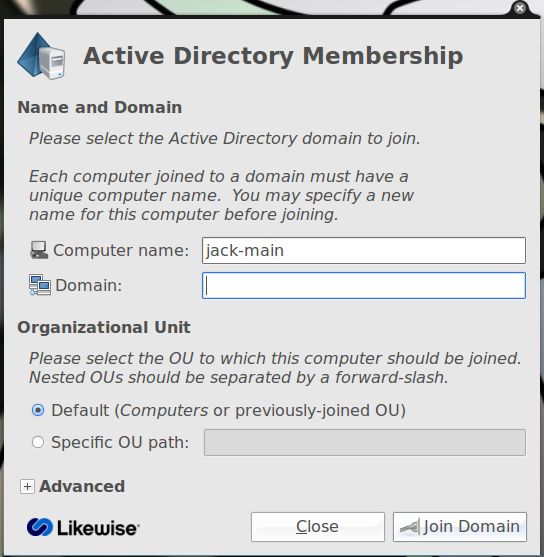
Figure 1
To start up the GUI click F2 and enterdomainjoin-gui to open up the graphical tool (see Figure 1). This should be fairly straight-forward. You can name your computer what you want but you do have to use the exact domain name you would use to connect a Windows machine to your domain. In other words, if you domain is DOMAIN.LOCAL then useDOMAIN.LOCAL. If your domain is just DOMAINthen just use DOMAIN. As well, if you have to use an OU (Ogranizational Unit) to connect, make sure you have that correct.
Once you have the information entered click Connect and an authentication window will appear. In this window you must enter your username and your password as you would enter them when connecting on a Windows machine. After you enter your credentials click OK and Likewise Open will attempt to connect.
Upon successful authentication you will be a part of your company domain. Congratulations!
Logging in
Now log out of your desktop and log back in with your domain credentials. This most likely will mean you will log in with the username in the DOMAIN\user configuration. You can also log in to your local machine by logging in with the standard username and password on your local system.
Sudo issues
You will find, when logged into your domain, that your user doesn't have sudo privileges. This means you will not be able to install software and administer various tasks/tools. You can fix this by making an addition to the /etc/sudoers file. Do this with the following warning: You can really mess up your system with an improperly configured /etc/sudoers file...so use caution!
Open up the /etc/sudoers file and look for the line:
#Members of the Admin group may gain root privileges and do the following:
Under this line add the following:
%DOMAIN\GROUP ALL=(ALL) ALL
Where DOMAIN is the actual domain and GROUP is the group your user belongs to on the domain.
Now log out and log back in and your domain user should have sudoer privileges.
Final thoughts
I remember the days when joining a Windows domain was something very few could manage. Now anyone who can install an application can join a Windows domain. The method I describe has worked for me flawlessly on a number of domains. If you have trouble connecting to your domain, post the information below (just don't break company policy by posting information that should not be made public) and see how quickly any given member of the Linux.com community comes to the rescue. Bazinga!
How to join a Ubuntu to Windows Domain的更多相关文章
- Join/remove server into/from windows domain PS script
Join server into windows domain PS script $username = "ad-domain\admin" $Password = " ...
- remote desktop connect btw Mac, Windows, Linux(Ubuntu) Mac,Windows,Linux之间的远程桌面连接
目录 I. 预备 II. Mac连接Windows III. Windows连接Mac IV. Windows连接Ubuntu V. Mac连接Ubuntu VI. Ubuntu连接Mac VII, ...
- 在ubuntu on windows 上安装jekyll
已知问题 安装ruby之后,重新启动ubuntu on windows,输入ruby命令,提示找不到. 发现的解决办法 执行下面命令 source /home/xxxx/.rvm/scripts/rv ...
- 解决Ubuntu和Windows的文件乱码问题(转载)
解决Ubuntu和Windows的文件乱码问题(debian也通用) 1.转换文件内容编码 Windows下天生的纯文本文件,其中文编码为GBK,在Ubuntu下显示为乱码,可以使用iconv命令 ...
- [2014.5.22][UBUNTU]Ubuntu与Windows系统时间不同步的问题
安装Ubuntu+Windows双系统时会遇到Windows和Ubuntu系统时间不同步的问题,这是由于Windows系统默认读取主板bios等硬件系统时间作为OS的当地时间;而MAc,Linux类的 ...
- Ubuntu和Windows设备共享
http://blog.csdn.net/pipisorry/article/details/51725942 蓝牙设备如键盘.鼠标都可以. 装的双系统win7和Ubuntu,如果只使用一个系统,蓝牙 ...
- Ubuntu和Windows双系统的安装
本菜鸡的ACM生涯大概是结束了 最有希望的EC和焦作也顺利的铁了,一路走来还是怪自己不努力,整日整日的划水,算了,铁牌退役,也是自己应有的惩罚,静下心来吧 下面介绍如何装windows10和Ubunt ...
- Ubuntu登录Windows Server 2008r2 密码总是错误与NLA验证
日期:2013-05-22 经过一天的折腾,终于能够用Ubuntu登录Windows server 2008 R2 了. 寝室里面用小本子,装的ubuntu,实验室的服务器是win server0 ...
- Ubuntu和Windows相互共享文件夹
一.Ubuntu访问Windows共享文件夹 1.对需要共享文件夹右击->属性->共享 2.选择要与其共享的用户,选择好用户点击有点添加按钮添加,然后点击下方的共享按钮 3.完成共享 4. ...
随机推荐
- DPDK多核多线程机制简析
DPDK通过在多核设备上,创建多个线程,每个线程绑定到单独的核上,减少线程调度的开销,以提高性能. DPDK的线程分为控制线程和数据线程,控制线程一般绑定到MASTER核上,主要是接受用户配置,并传递 ...
- ThinkPHP5中Session的使用
由于用惯了ThinkPHP之前的版本,一想到要用Session就直接用$_SESSION来存取,今天看了ThinkPHP5的手册,才发现原来这么用时不安全滴.ThinKPHP5对Session进行了封 ...
- 如何利用CSS代码使图片和文字在同一行显示且对齐
对于初学css的新手朋友来说,经常会遇到这样一个问题,当文字和图片出现在同一行或者同一个div里面的时候,在浏览器中运行出来的显示效果往往是在不同的行,那么,我们怎么才能利用CSS代码使图片和文字在同 ...
- Ninject依赖注入——构造函数的注入
1.Ninject简介 Ninject是基于.Net平台的依赖注入框架,它能够将应用程序分离成一个个高内聚.低耦合(loosely-coupled, highly-cohesive)的模块,然后以一种 ...
- centos查看设置端口开放状态
centos查看端口是否已开放/etc/init.d/iptables status centos开放端口/sbin/iptables -I INPUT -p tcp --dport 8000 -j ...
- nexcel 读取 excel
procedure TfrmUserV3.ImportUser(const AFileName: string); var book :IXLSWorkBook; ws : IXLSWorkSheet ...
- SHOW SLAVE STATUS几个常见参数
--显示当前读取的Master节点二进制日志文件和文件位置,对应线程I/O thread Master_Log_File: mysql-bin.000011 Read_Master_Log_Pos: ...
- Ztack学习笔记(4)-系统网络分析
协调器的组网,终端设备和路由设备发现网络以及加入网络 //第一步:Z-Stack 由 main()函数开始执行,main()函数共做了 2 件事:一是系统初始化,另外一件是开始执行轮转查询式操作系统 ...
- activiti
http://activiti.org/designer/archived/ eclipse plugin
- C基础 数据序列化简单使用和讨论
前言 C中对序列化讨论少, 因为很多传输的内容都有自己解析的轮子. 对于序列化本质是统一编码, 统一解码的方式. 本文探讨是一种简单的序列化方案. 保证不同使用端都能解析出正确结果. 在文章一开始, ...