
Android 滚动视图(ScollView)
1.介绍
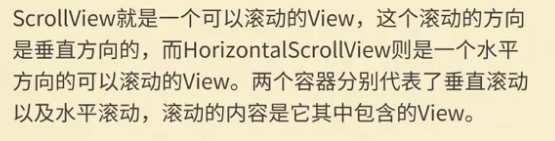
2.使用技巧
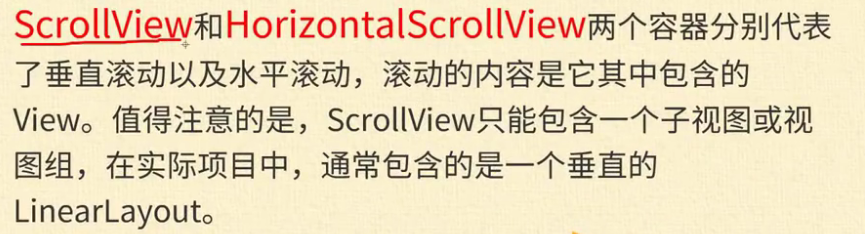
3.xml文件代码
<?xml version="1.0" encoding="utf-8"?>

<LinearLayout xmlns:android="http://schemas.android.com/apk/res/android"

    xmlns:app="http://schemas.android.com/apk/res-auto"

    xmlns:tools="http://schemas.android.com/tools"

    android:layout_width="match_parent"

    android:layout_height="match_parent"

    android:orientation="vertical"

    tools:context=".MainActivity">

    <ScrollView

        android:layout_width="match_parent"

        android:layout_height="300dp">

        <LinearLayout

            android:layout_width="match_parent"

            android:layout_height="wrap_content"

            android:orientation="vertical">

            <TextView

                android:id="@+id/textView"

                android:layout_width="wrap_content"

                android:layout_height="wrap_content"

                android:layout_weight="1"

                android:text="TextView" />

            <ImageView

                android:id="@+id/imageView"

                android:layout_gravity="center"

                android:layout_width="100dp"

                android:layout_height="100dp"

                android:layout_weight="1"

                app:srcCompat="@mipmap/img01" />

            <ImageView

                android:id="@+id/imageView2"

                android:layout_gravity="center"

                android:layout_width="100dp"

                android:layout_height="100dp"

                android:layout_weight="1"

                app:srcCompat="@mipmap/img02" />

            <ImageView

                android:id="@+id/imageView3"

                android:layout_gravity="center"

                android:layout_width="100dp"

                android:layout_height="100dp"

                android:layout_weight="1"

                app:srcCompat="@mipmap/img03" />

            <ImageView

                android:id="@+id/imageView4"

                android:layout_width="100dp"

                android:layout_height="100dp"

                android:layout_gravity="center"

                android:layout_weight="1"

                app:srcCompat="@mipmap/img04" />

            <ImageView

                android:id="@+id/imageView5"

                android:layout_gravity="center"

                android:layout_width="100dp"

                android:layout_height="100dp"

                android:layout_weight="1"

                app:srcCompat="@mipmap/img05" />

            <ImageView

                android:id="@+id/imageView6"

                android:layout_gravity="center"

                android:layout_width="100dp"

                android:layout_height="100dp"

                android:layout_weight="1"

                app:srcCompat="@mipmap/img06" />

            <ImageView

                android:id="@+id/imageView7"

                android:layout_gravity="center"

                android:layout_width="100dp"

                android:layout_height="100dp"

                android:layout_weight="1"

                app:srcCompat="@mipmap/img07" />

        </LinearLayout>

    </ScrollView>

    <HorizontalScrollView

        android:layout_width="wrap_content"

        android:layout_height="wrap_content">

        <LinearLayout

            android:layout_width="wrap_content"

            android:layout_height="wrap_content"

            android:orientation="horizontal">

            <TextView

                android:id="@+id/textView8"

                android:layout_width="wrap_content"

                android:layout_height="wrap_content"

                android:layout_weight="1"

                android:text="TextView" />

            <ImageView

                android:id="@+id/imageView9"

                android:layout_width="100dp"

                android:layout_height="100dp"

                android:layout_gravity="center"

                android:layout_weight="1"

                app:srcCompat="@mipmap/img01" />

            <ImageView

                android:id="@+id/imageView10"

                android:layout_width="100dp"

                android:layout_height="100dp"

                android:layout_gravity="center"

                android:layout_weight="1"

                app:srcCompat="@mipmap/img02" />

            <ImageView

                android:id="@+id/imageView11"

                android:layout_width="100dp"

                android:layout_height="100dp"

                android:layout_gravity="center"

                android:layout_weight="1"

                app:srcCompat="@mipmap/img03" />

            <ImageView

                android:id="@+id/imageView12"

                android:layout_width="100dp"

                android:layout_height="100dp"

                android:layout_gravity="center"

                android:layout_weight="1"

                app:srcCompat="@mipmap/img04" />

            <ImageView

                android:id="@+id/imageView13"

                android:layout_width="100dp"

                android:layout_height="100dp"

                android:layout_gravity="center"

                android:layout_weight="1"

                app:srcCompat="@mipmap/img05" />

            <ImageView

                android:id="@+id/imageView14"

                android:layout_width="100dp"

                android:layout_height="100dp"

                android:layout_gravity="center"

                android:layout_weight="1"

                app:srcCompat="@mipmap/img06" />

            <ImageView

                android:id="@+id/imageView15"

                android:layout_width="100dp"

                android:layout_height="100dp"

                android:layout_gravity="center"

                android:layout_weight="1"

                app:srcCompat="@mipmap/img07" />

        </LinearLayout>

    </HorizontalScrollView>

</LinearLayout>
Android 滚动视图(ScollView)的更多相关文章
- Anroid组件滚动视图(ScollView)简单使用
ScollView应用展示 在xml文件中添加滚动视图 activity_main.xml <?xml version="1.0" encoding="utf-8& ...
- Android——滚动视图(ScrollView)图片视图(ImageView)、状态开关按钮(ToggleButton)、时钟
xml <?xml version="1.0" encoding="utf-8"?> <!--滚动视图--> <ScrollVie ...
- android 滚动视图(ScrollView)
为了可以让内嵌布局管理器之中加入多个显示的组件,而且又保证程序不这么冗余,所以可以通过 Activity程序进行控制,向内嵌布局管理器中添加多个组件. ScrollView提供一个显示的容器,可以包含 ...
- Android 自学之滚动视图ScrollView
滚动视图ScrollView由FarmeLayout派生而出,他就是一个用于为普通组件添加垂直滚动条的组件:ScrollView里面最多包含一个组件,而ScrollView的作用就是为该组件添加一个垂 ...
- Android应用--新浪微博客户端新特性滚动视图和启动界面实现
新浪微博客户端新特性滚动视图和启动界面实现 2013年8月20日新浪微博客户端开发之启动界面实现 前言: 使用过新浪微博客户端的童鞋都清楚,客户端每一次升级之后第一次启动界面就会有新特性的介绍,用户通 ...
- 【Android】10.5 滚动视图(RecyclerView)
分类:C#.Android.VS2015: 创建日期:2016-02-19 一.简介 滚动视图(RecyclerView)的用法与布局控件的用法类似,唯一不同的是,所有布局控件中都可以包含多个组件,而 ...
- 从零開始学android<ScrollView滚动视图.十八.>
因为手机屏幕的高度有限.所以假设面对组件要显示多组信息的时候,ScrollView视图(滚动视图)能够有效的安排这些组件,浏览时能够自己主动的进行滚屏的操作. android.widget.Scrol ...
- Android零基础入门第61节:滚动视图ScrollView
原文:Android零基础入门第61节:滚动视图ScrollView 前面几期学习了ProgressBar系列组件.ViewAnimator系列组件.Picker系列组件和时间日期系列组件,接下来几期 ...
- Android中通过Java代码实现ScrollView滚动视图-以歌词滚动为例
场景 实现效果如下 注: 博客: https://blog.csdn.net/badao_liumang_qizhi 关注公众号 霸道的程序猿 获取编程相关电子书.教程推送与免费下载. 实现 将布局改 ...
随机推荐
- java基础之集合:List Set Map的概述以及使用场景
本文的整体思路以及部分文字来源:来源一 和 来源二 Java集合类的基本概念: 首先大家要明白集合为什么会出现: 在编程中,常常需要集中存放多个数据.从传统意义上讲,数组是我们的一个很好的选择,前提是 ...
- PHP内核介绍及扩展开发指南—Extensions 的编写(下)
第一个参数是HashTable,在1.2.3节提到Zend使用HashTable来存储PHP函数,function_table用于指 定从哪个HashTable中获取函数.通常应该用CG(functi ...
- mongo_2 $in 和 $all 区别
in 只需满足( )内的某一个值即可, 而$all 必须满足[ ]内的所有值, > db.table1.find({}); { "_id" : ObjectId(" ...
- C++获取时间并命名为文件名
#include <time.h> char pStrPath1[20];time_t currTime;struct tm *mt;Mat saveImg1; currTime = ti ...
- 682. Baseball Game 棒球游戏 按字母处理
[抄题]: You're now a baseball game point recorder. Given a list of strings, each string can be one of ...
- 717. 1-bit and 2-bit Characters最后一位数是否为0
[抄题]: We have two special characters. The first character can be represented by one bit 0. The secon ...
- 基于Nginx实现集群原理
1)安装Nginx 2)配置多个Tomcat,并修改端口号(两个端口号不一样即可) 3)在Nginx的Nginx.conf添加如下配置:
- ROS naviagtion analysis: costmap_2d--Costmap2D
博客转载自:https://blog.csdn.net/u013158492/article/details/50492506 Costmap2D是存储地图数据的父类.真正的地图数据就存储在数据成员u ...
- Windows Chocolatey
一.简介 Chocolatey是Windows下包管理工具,可以使用 Chocolatey 来安装应用程序. 二.安装 1)在线安装:参见 主页 官网:https://chocolatey.org ...
- logistic growth model . 求解方法 (高斯牛顿法)
https://www.stat.tamu.edu/~jnewton/604/chap4.pdf http://www.metla.fi/silvafennica/full/sf33/sf334327 ...