
SpringBoot Maven打包项目JAR/WAR
安装Maven
1. 登录 http://maven.apache.org/download.cgi
2. 下载 maven 压缩包
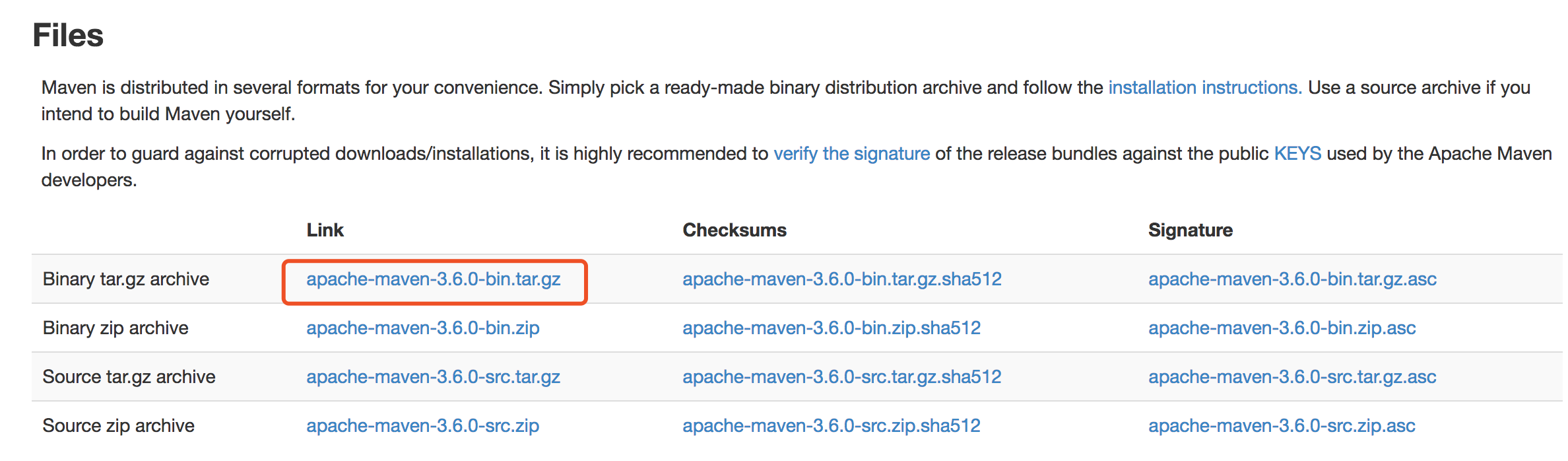
3. 解压apache-maven-3.6.0-bin.tar.gz 到一个目录(我这里是MAC,解压到“/Users/shongbing/Applications/apache-maven-3.6.0”)
4. 配置环境变量(MAC环境变量)
cd ~
vim .bash_profile
在最后增加两行:
export MAVEN_HOME=/Users/shongbing/Applications/apache-maven-3.6.0
export PATH=$PATH:$MAVEN_HOME/bin
source .bash_profile
5. 测试是否安装成功
mvn -v
Maven打包命令介绍
mvn clean package 依次执行了clean、resources、compile、testResources、testCompile、test、jar(打包)等7个阶段;
mvn clean install 依次执行了clean、resources、compile、testResources、testCompile、test、jar(打包)、install等8个阶段;
mvn clean deploy 依次执行了clean、resources、compile、testResources、testCompile、test、jar(打包)、install、deploy等9个阶段。
由上面的分析可知主要区别如下:
package命令完成了项目编译、单元测试、打包功能,但没有把打好的可执行jar包(war包或其它形式的包)布署到本地maven仓库和远程maven私服仓库;
install命令完成了项目编译、单元测试、打包功能,同时把打好的可执行jar包(war包或其它形式的包)布署到本地maven仓库,但没有布署到远程maven私服仓库;
deploy命令完成了项目编译、单元测试、打包功能,同时把打好的可执行jar包(war包或其它形式的包)布署到本地maven仓库和远程maven私服仓库。
配置mainClass
需要在pom.xml中增加configruation配置mainClass
 <build>

    <plugins>

        <plugin>

            <groupId>org.springframework.boot</groupId>

            <artifactId>spring-boot-maven-plugin</artifactId>

            <configuration>

                <mainClass>com.vmware.firstappdemo.FirstAppDemoApplication</mainClass>

            </configuration>

        </plugin>

    </plugins>

</build>
第一种:打包为JAR
1. 打开命令行进入项目根目录,运行命令:mvn -Dmaven.test.skip -U clean package
shongbing-a01:~ shongbing$ cd Downloads/first-app-demo

shongbing-a01:first-app-demo shongbing$ mvn -Dmaven.test.skip -U clean package

[INFO] Scanning for projects...

[INFO]

[INFO] ---------------------< com.vmware:first-app-demo >----------------------

[INFO] Building first-app-demo 0.0.-SNAPSHOT

[INFO] --------------------------------[ jar ]---------------------------------

[INFO]

[INFO] --- maven-clean-plugin:3.1.:clean (default-clean) @ first-app-demo ---

[INFO]

[INFO] --- maven-resources-plugin:3.1.:resources (default-resources) @ first-app-demo ---

[INFO] Using 'UTF-8' encoding to copy filtered resources.

[INFO] Copying  resource

[INFO] Copying  resource

[INFO]

[INFO] --- maven-compiler-plugin:3.8.:compile (default-compile) @ first-app-demo ---

[INFO] Changes detected - recompiling the module!

[INFO] Compiling  source files to /Users/shongbing/Downloads/first-app-demo/target/classes

[INFO]

[INFO] --- maven-resources-plugin:3.1.:testResources (default-testResources) @ first-app-demo ---

[INFO] Not copying test resources

[INFO]

[INFO] --- maven-compiler-plugin:3.8.:testCompile (default-testCompile) @ first-app-demo ---

[INFO] Not compiling test sources

[INFO]

[INFO] --- maven-surefire-plugin:2.22.:test (default-test) @ first-app-demo ---

[INFO] Tests are skipped.

[INFO]

[INFO] --- maven-jar-plugin:3.1.:jar (default-jar) @ first-app-demo ---

[INFO] Building jar: /Users/shongbing/Downloads/first-app-demo/target/first-app-demo-0.0.-SNAPSHOT.jar

[INFO]

[INFO] --- spring-boot-maven-plugin:2.1..RELEASE:repackage (repackage) @ first-app-demo ---

[INFO] Replacing main artifact with repackaged archive

[INFO] ------------------------------------------------------------------------

[INFO] BUILD SUCCESS

[INFO] ------------------------------------------------------------------------

[INFO] Total time:  3.278 s

[INFO] Finished at: --13T14::+:

[INFO] ------------------------------------------------------------------------
2. 运行jar包测试, java -jar xxxx.jar
shongbing-a01:first-app-demo shongbing$ cd target/

shongbing-a01:target shongbing$ java -jar first-app-demo-0.0.1-SNAPSHOT.jar

  .   ____          _            __ _ _

 /\\ / ___'_ __ _ _(_)_ __  __ _ \ \ \ \

( ( )\___ | '_ | '_| | '_ \/ _` | \ \ \ \

 \\/  ___)| |_)| | | | | || (_| |  ) ) ) )

  '  |____| .__|_| |_|_| |_\__, | / / / /

 =========|_|==============|___/=/_/_/_/

 :: Spring Boot ::        (v2.1.2.RELEASE)

-- ::42.805  INFO  --- [           main] c.v.f.FirstAppDemoApplication            : Starting FirstAppDemoApplication v0.0.1-SNAPSHOT on shongbing-a01.vmware.com with PID  (/Users/shongbing/Downloads/first-app-demo/target/first-app-demo-0.0.-SNAPSHOT.jar started by shongbing in /Users/shongbing/Downloads/first-app-demo/target)

-- ::42.808  INFO  --- [           main] c.v.f.FirstAppDemoApplication            : No active profile set, falling back to default profiles: default

-- ::44.419  INFO  --- [           main] o.s.b.web.embedded.netty.NettyWebServer  : Netty started on port(s):

-- ::44.424  INFO  --- [           main] c.v.f.FirstAppDemoApplication            : Started FirstAppDemoApplication in 2.239 seconds (JVM running for 2.869)
第二种:打包为WAR
1. 在pom.xml的“modelVersion”后添加 <packaging>war</packaging>
2. 在目录 src/main/ 中创建目录 webapp/WEB-INF,然后在WEB-INF中添加 web.xml(内容为空)
3. 打开命令行进入项目根目录,运行命令:mvn -Dmaven.test.skip -U clean package
shongbing-a01:first-app-demo shongbing$ mvn -Dmaven.test.skip -U clean package

[INFO] Scanning for projects...

[INFO]

[INFO] ---------------------< com.vmware:first-app-demo >----------------------

[INFO] Building first-app-demo 0.0.-SNAPSHOT

[INFO] --------------------------------[ war ]---------------------------------

[INFO]

[INFO] --- maven-clean-plugin:3.1.:clean (default-clean) @ first-app-demo ---

[INFO] Deleting /Users/shongbing/Downloads/first-app-demo/target

[INFO]

[INFO] --- maven-resources-plugin:3.1.:resources (default-resources) @ first-app-demo ---

[INFO] Using 'UTF-8' encoding to copy filtered resources.

[INFO] Copying  resource

[INFO] Copying  resource

[INFO]

[INFO] --- maven-compiler-plugin:3.8.:compile (default-compile) @ first-app-demo ---

[INFO] Changes detected - recompiling the module!

[INFO] Compiling  source files to /Users/shongbing/Downloads/first-app-demo/target/classes

[INFO]

[INFO] --- maven-resources-plugin:3.1.:testResources (default-testResources) @ first-app-demo ---

[INFO] Not copying test resources

[INFO]

[INFO] --- maven-compiler-plugin:3.8.:testCompile (default-testCompile) @ first-app-demo ---

[INFO] Not compiling test sources

[INFO]

[INFO] --- maven-surefire-plugin:2.22.:test (default-test) @ first-app-demo ---

[INFO] Tests are skipped.

[INFO]

[INFO] --- maven-war-plugin:3.2.:war (default-war) @ first-app-demo ---

[INFO] Packaging webapp

[INFO] Assembling webapp [first-app-demo] in [/Users/shongbing/Downloads/first-app-demo/target/first-app-demo-0.0.-SNAPSHOT]

[INFO] Processing war project

[INFO] Copying webapp resources [/Users/shongbing/Downloads/first-app-demo/src/main/webapp]

[INFO] Webapp assembled in [ msecs]

[INFO] Building war: /Users/shongbing/Downloads/first-app-demo/target/first-app-demo-0.0.-SNAPSHOT.war

[INFO]

[INFO] --- spring-boot-maven-plugin:2.1..RELEASE:repackage (repackage) @ first-app-demo ---

[INFO] Replacing main artifact with repackaged archive

[INFO] ------------------------------------------------------------------------

[INFO] BUILD SUCCESS

[INFO] ------------------------------------------------------------------------

[INFO] Total time:  3.981 s

[INFO] Finished at: --13T14::+:

[INFO] ------------------------------------------------------------------------
4. 运行WAR包
shongbing-a01:target shongbing$ java -jar first-app-demo-0.0.1-SNAPSHOT.war

  .   ____          _            __ _ _

 /\\ / ___'_ __ _ _(_)_ __  __ _ \ \ \ \

( ( )\___ | '_ | '_| | '_ \/ _` | \ \ \ \

 \\/  ___)| |_)| | | | | || (_| |  ) ) ) )

  '  |____| .__|_| |_|_| |_\__, | / / / /

 =========|_|==============|___/=/_/_/_/

 :: Spring Boot ::        (v2.1.2.RELEASE)

-- ::17.380  INFO  --- [           main] c.v.f.FirstAppDemoApplication            : Starting FirstAppDemoApplication v0.0.1-SNAPSHOT on shongbing-a01.vmware.com with PID  (/Users/shongbing/Downloads/first-app-demo/target/first-app-demo-0.0.-SNAPSHOT.war started by shongbing in /Users/shongbing/Downloads/first-app-demo/target)

-- ::17.386  INFO  --- [           main] c.v.f.FirstAppDemoApplication            : No active profile set, falling back to default profiles: default

-- ::19.401  INFO  --- [           main] o.s.b.web.embedded.netty.NettyWebServer  : Netty started on port(s):

-- ::19.409  INFO  --- [           main] c.v.f.FirstAppDemoApplication            : Started FirstAppDemoApplication in 2.594 seconds (JVM running for 3.183)
SpringBoot Maven打包项目JAR/WAR的更多相关文章
- 用maven打包项目成war文件
打开pom.xml,右键选择Run As -> Maven package就可以自动打包成war文件了.
- 关于使用IDEA,使用Maven打包项目
关于使用IDEA,使用Maven打包项目 在近期的一个接口项目中,使用的是SpringBoot + Maven的配置, 由于使用IDEA不久,不太熟悉使用Maven进行项目打包.记录一下. 由于使用的 ...
- spring boot 使用maven和fat jar/war运行应用程序的对比
文章目录 简介 Spring Boot Maven Plugin 使用Maven命令来运行应用程序 作为fat jar/war包运行应用程序 详解War文件 详解jar文件 如何选择 使用maven和 ...
- 使用maven打包项目遇到错误: http://cwiki.apache.org/confluence/display/MAVEN/MojoExecutionException
今天在使用maven打包项目时遇到一个错误: [ERROR] Failed to execute goal org.apache.maven.plugins:maven-compiler-plugin ...
- spring-boot子模块打包的jar中去掉BOOT-INF文件夹
1.spring-boot maven打包,一般pom.xml文件里会加 <plugin> <groupId>org.springframework.boot</grou ...
- springboot maven打包插件
<build> <plugins> <!-- springboot maven打包--> <plugin> <groupId>org.spr ...
- springboot项目打包成jar/war包
springboot项目打包过程中包含第三方jar 开发IDE是IntelliJ IDEA,数据库是mysql,内置服务器tomcat. 打包步骤: 1. 确定项目调试运行没问题 2. 将第三方jar ...
- springBoot 项目 jar/war打包 并运行
一:idea 打jar 包 简述:springboor 项目最好的打包方式就是打成jar ,下边就是简单的过程 1.打开idea工具 ,选着要打开的项目, 然后打开view--> too ...
- Maven三种打包方式jar war pom
1.pom工程 用在父级工程或聚合工程中.用来做jar包的版本控制.必须指明这个聚合工程的打包方式为pom 2.war工程 将会打包成war,发布在服务器上的工程.如网站或服务.在SpringBoot ...
随机推荐
- js instanceof (2)
instanceof运算符可以用来判断某个构造函数的prototype属性是否存在另外一个要检测对象的原型链上.实例一:普遍用法 A instanceof B :检测B.prototype是否存在于参 ...
- [Unity热更新]tolua# & LuaFramework(一):基础
一.tolua# c#调用lua:LuaState[变量名/函数名] 1.LuaState a.执行lua代码段 DoString(string) DoFile(.lua文件名) Require(.l ...
- IDEA : Git Pull Failed 解决(IDEA中使用stash功能)
一.问题: 本地要commit代码,commit之前需pull代码,但pull提示冲突.如下 Git Pull Failed Your local changes would be overwritt ...
- Linux下带宽流量工具iftop实践
在Linux/类Unix系统中可以使用top查看系统资源.进程.内存占用等信息.查看网络状态可以使用netstat.nmap等工具.若要查看实时的网络流量,监控TCP/IP连接等,则可以使用iftop ...
- 集合遍历的时候删除List
在Java中有时候我们会需要对List里面的符合某种业务的数据进行删除,但是如果不了解里面的机制就容易掉入“陷阱”导致遗漏或者程序异常.本文以代码例子的方式进行说明该问题. 1.采用索引下标遍历的方式 ...
- UTF-8, UTF-16, UTF-32 & BOM
FAQ - UTF-8, UTF-16, UTF-32 & BOM http://www.unicode.org/faq/utf_bom.html General questions, rel ...
- Django 路由系统(URL)
介绍 Django 1.11版本 URLConf官方文档 URL配置(URLconf)就像Django 所支撑网站的目录.它的本质是URL与要为该URL调用的视图函数之间的映射表. 你就是以这种方式告 ...
- Django中_Meta 部分用法
周一了,就不长篇大论了,给大家分享一个很实用的知识点,希望大家周末过得开心,愉快,诗和远方在等着你们.而我还在苦逼的撸代码,只为了应付眼前的苟且! model.UserInfo._meta.app_l ...
- CSDN论坛停站维护公告
各位亲爱的用户: CSDN论坛将于2014年11月9日23点至11月10日8点进行积分系统的升级,升级期间会影响大家的正常訪问和操作.给大家带来不便,敬请广大用户谅解. ...
- JS单例
s = (function S(){ var bean; function get(){ if(bean){ return bean }else{ bean = T(); return bean; } ...