
Linux入门-第三周
1、总结vim命令行模式常见快捷方式,以及vim查找,替换的方法
vim [options] [file ..]
+# 打开文件后,让光标处于第#行的行首,(默认行尾)
举例vim +10 /etc/passwd (光标调至第十行)如下图

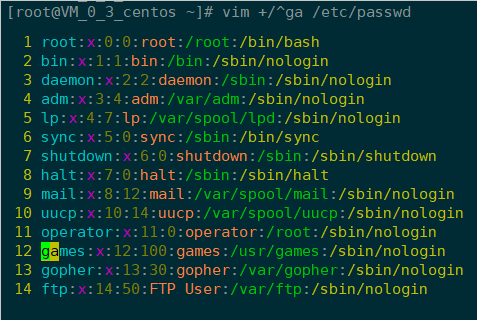
+/PATTERN打开文件后,直接让光标处于第一个被PATTERN匹配到的行的行首
举例vim +/ga /etc/passwd (让光标置于ga开头的行)如下图
-d file1 file2 ... 比较多个文件

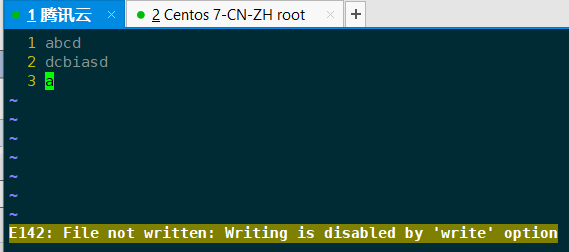
-m file 只读方式打开文件(即使修改后:wq!也无法修改文件)
vim 常用快捷键
| 按键 | 功能 | 命令模式跳转按键 | 功能 |
| i | insert 在光标所在处插入 | h | 左 |
| l | 在当前光标所在行的行首插入 | i | 右 |
| a | append,在光标所在处后面输入 | j | 下 |
| A | 在当前光标所在行的行尾输入 | k | 上 |
| o | 在当前光标所在行的下方打开一个新行 | #command | 跳转由#指定的个数的字符 |
| O | 在当前光标所在行的上方打开一个新行 | w | 下一个单词的词首 |
| Esc | 从插入模式转换到命令模式 | e | 当前或下一个单词的词尾 |
| : | 拓展命令模式 | b | 当前或前一个单词的词首 |
| Esc,enter | 拓展命令模式转到命令模式 | #command | 由#指定一次跳转的单词数 |
| :q | 退出(拓展命令模式) | H | 页首 |
| :q! | 强制退出,不保存修改(拓展命令模式) | M | 页中间行 |
| :wq | 保存并退出(拓展命令模式) | L | 页低 |
| :x | 保存并退出(拓展命令模式) | zt | 将光标所在当前行移动到屏幕顶端 |
| ZZ | 保存并退出(命令模式) | zz | 将光标所在当前行移到屏幕中间 |
| ZQ | 不保存退出(命令模式) | zb | 将光标所在当前行移到屏幕底端 |
下图是一张VIM的键盘布局图以供参考

命令模式:查找
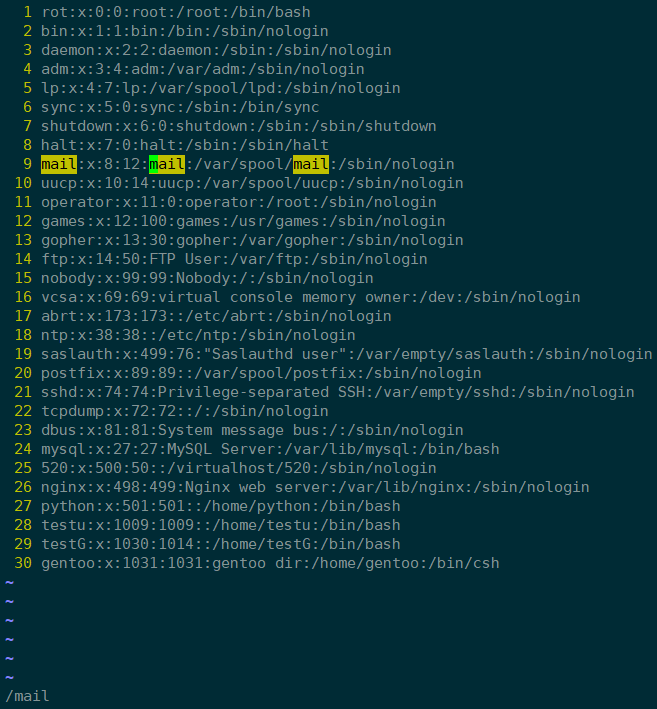
/PATTERN:从当前光标所在处向文件尾部查找
?PATTERN:从当前光标所在处向文件首部查找
n:与命令同方向
N:与命令反方向
拓展命令模式:查找并替换
s: 在扩展模式下完成查找替换操作
格式:s/要查找的内容/替换为的内容/修饰符
要查找的内容:可使用模式
替换为的内容:不能使用模式,但可以使用\1, \2, ...等后向引用符号;还可以使用“&”引用前面查找时查找到的整个内容
修饰符:
i: 忽略大小写
g: 全局替换;默认情况下,每一行只替换第一次出现
gc:全局替换,每次替换前询问
举例:全局查找var替换为user

2、总结脚本中运算符、逻辑运算以及用法
Bash 支持很多运算符,包括算数运算符、关系运算符、布尔运算符、字符串运算符和文件测试运算符。
原生bash不支持简单的数学运算,但是可以通过其他命令来实现,例如awk和expr,expr最常用
awk:Aho, Weinberger, Kernighan,报告生成器,格式化文本输出;awk 是一种很棒的语言,它适合文本处理和报表生成,其语法较为常见,借鉴了某些语言的一些精华,如 C 语言等。在 linux 系统日常处理工作中,发挥很重要的作用,掌握了 awk将会使你的工作变的高大上。 awk 是三剑客的老大,利剑出鞘,必会不同凡响。
expr命令是一个手工命令行计数器,用于在UNIX/LINUX下求表达式变量的值,一般用于整数值,也可用于字符串。
例如两个数相加:
 [root@localhost data]# val=`expr  + `

 [root@localhost data]# echo "Total value : $val"

 Total value :

 [root@localhost data]#
算术运算符:
举例:
 [root@VM_0_3_centos ~]# x=

 [root@VM_0_3_centos ~]# y=

 [root@VM_0_3_centos ~]# s=`expr $x + $y`

 [root@VM_0_3_centos ~]# echo "x + y = $s"

 x + y =

 [root@VM_0_3_centos ~]#

 [root@VM_0_3_centos ~]# s=`expr $y - $x`

 [root@VM_0_3_centos ~]# echo "y - x = $s"

 y - x =

 [root@VM_0_3_centos ~]#

 [root@VM_0_3_centos ~]# s=`expr $y \* $x`

 [root@VM_0_3_centos ~]# echo "y * x = $s"

 y * x =

 [root@VM_0_3_centos ~]#

 [root@VM_0_3_centos ~]# s=`expr $y / $x`

 [root@VM_0_3_centos ~]# echo "y / x = $s"

 y / x =

 [root@VM_0_3_centos ~]#

 [root@VM_0_3_centos ~]# s=`expr $y % $x`

 [root@VM_0_3_centos ~]# echo "y % x = $s"

 y % x =

 [root@VM_0_3_centos ~]#

 [root@VM_0_3_centos ~]# if [ $x == $y ]

 > then

 > echo "x is equal to y"

 > fi

 [root@VM_0_3_centos ~]# if [ $x != $y ]

 > then

 > echo "x is not equal to y"

 > fi

 x is not equal to y

 [root@VM_0_3_centos ~]#
| 运算符 | 说明 | 举例 |
| + | 加法 | `expr $x + $y`结果为15 |
| - | 减法 | `expr $x - $ y`结果为-5 |
| * | 乘法 | `expr $x \* $y`结果为50 |
| / | 除法 | `expr $x / $y`结果为2 |
| % | 取于 | `expr $x % $y`结果为0 |
| = | 赋值 | x=$y 把变量y的值赋给x |
| == | 相等,用于比较两个数字,相同则输出true | [ $x == $y ] 返回 false |
| != | 不相等。用于比较两个数字,不相同则输出ture | [ $x == $y ] 返回 true |
注意:条件表达式要放在方括号之间,并且要有空格,例如 [$x==$y] 是错误的,必须写成 [ $x == $y ]。
关系运算符: -eq -ne -gt -lt -ge -le
举例
 [root@VM_0_3_centos ~]# #!/bin/sh

 [root@VM_0_3_centos ~]# x=

 [root@VM_0_3_centos ~]# y=

 [root@VM_0_3_centos ~]# if [ $x -eq $y ]

 > then

 > echo "$x -eq $y : x is equal to y"

 > else

 > echo "$x -eq $y: x is not equal to y"

 > fi

  -eq : x is not equal to y

 [root@VM_0_3_centos ~]# if [ $x -ne $y ]

 > then

 > echo "$x -ne $y: x is not equal to y"

 > else

 > echo "$x -ne $y : x is equal to y"

 > fi

  -ne : x is not equal to y

 [root@VM_0_3_centos ~]# if [ $x -gt $y ]

 > then

 > echo "$x -gt $y: x is greater than y"

 > else

 > echo "$x -gt $y: x is not greater than y"

 > fi

  -gt : x is not greater than y

 [root@VM_0_3_centos ~]# if [ $x -lt $y ]

 > then

 > echo "$x -lt $y: x is less than y"

 > else

 > echo "$x -lt $y: x is not less than y"

 > fi

  -lt : x is less than y

 [root@VM_0_3_centos ~]# if [ $x -ge $y ]

 > then

 > echo "$x -ge $y: x is greater or equal to y"

 > else

 > echo "$x -ge $y: x is not greater or equal to y"

 > fi

  -ge : x is not greater or equal to y

 [root@VM_0_3_centos ~]# if [ $x -le $y ]

 > then

 > echo "$x -le $y: x is less or equal to y"

 > else

 > echo "$x -le $y: x is not less or equal to y"

 > fi

  -le : x is less or equal to y

 [root@VM_0_3_centos ~]#
| 运算符 | 说明 | 举例 |
| -eq | 检查两个数是否相等,相等返回true |
[ $x -eq $y ] 返回true |
| -ne | 检查两个数是否相等,不相等返回true |
[ $x -ne $y ] 返回true |
| -gt | 检查左边的数是否大于右边的,如果大于,返回true |
[ $x -gt $y ] 返回true |
| -lt | 检查左边的数是否小于右边的,如果小于,返回true |
[ $x -lt $y ] 返回true |
| -ge | 检查左边的数是否大于等于右边的,如果大于等于,则返回true |
[ $x -gr $y ] 返回true |
| -le | 检查左边的数是否小于等于右边的,如果小于等于,则返回true |
[ $x -le $y ] 返回true |
布尔运算符: ! -0 -a
举例:
 [root@VM_0_3_centos ~]# #!/bin/sh

 [root@VM_0_3_centos ~]# x=

 [root@VM_0_3_centos ~]# y=

 [root@VM_0_3_centos ~]# if [ $x != $y ]

 > then

 > echo "$x != $y : x is not equal to y"

 > else

 > echo "$x != $y: x is equal to y"

 > fi

  !=  : x is not equal to y

 [root@VM_0_3_centos ~]# if [ $x -lt  -a $y -gt  ]

 > then

 > echo "$x -lt 100 -a $y -gt 15 : returns true"

 > else

 > echo "$x -lt 100 -a $y -gt 15 : returns false"

 > fi

  -lt  -a  -gt  : returns false

 [root@VM_0_3_centos ~]# if [ $x -lt  -o $y -gt  ]

 > then

 > echo "$x -lt 100 -o $y -gt 100 : returns true"

 > else

 > echo "$x -lt 100 -o $y -gt 100 : returns false"

 > fi

  -lt  -o  -gt  : returns true

 [root@VM_0_3_centos ~]# if [ $x -lt  -o $y -gt  ]

 > then

 > echo "$x -lt 100 -o $y -gt 100 : returns true"

 > else

 > echo "$x -lt 100 -o $y -gt 100 : returns false"

 > fi

  -lt  -o  -gt  : returns false

 [root@VM_0_3_centos ~]#
| 运算符 | 说明 | 举例 |
| ! | 非运算,表达式为true则返回false,否则返回true | [ !false ]返回true |
| -o | 或运算,有一个表达式为true,就返回true | [ $x -lt 100 -o $y -gt 100 ] 返回true |
| -a | 与运算,两个表达式都为true,才返回true | [ $x -lt 5 -o $y -gt 100 ] 返回false |
字符串运算符: = != -z -n str
举例:
 [root@VM_0_3_centos ~]# #!/bin/sh

 [root@VM_0_3_centos ~]# x="qwer"

 [root@VM_0_3_centos ~]# y="asdf"

 [root@VM_0_3_centos ~]# if [ $x = $y ]

 > then

 > echo "$x = $y : x is equal to y "

 > else

 > echo "$x = $y: x is not equal to y "

 > fi

 qwer = asdf: x is not equal to y

 [root@VM_0_3_centos ~]# if [ $x != $y ]

 > then

 > echo "$x != $y : x is not equal to y "

 > else

 > echo "$x != $y: x is equal to y "

 > fi

 qwer != asdf : x is not equal to y

 [root@VM_0_3_centos ~]# if [ -z $x ]

 > then

 > echo "-z $x : string length is zero"

 > else

 > echo "-z $x : string length is not zero"

 > fi

 -z qwer : string length is not zero

 [root@VM_0_3_centos ~]# if [ -n $x ]

 > then

 > echo "-n $x : string length is not zero"

 > else

 > echo "-n $x : string length is zero"

 > fi

 -n qwer : string length is not zero

 [root@VM_0_3_centos ~]# if [ $x ]

 > then

 > echo "$x : string is not empty"

 > else

 > echo "$x : string is empty"

 > fi

 qwer : string is not empty

 [root@VM_0_3_centos ~]#
| 运算符 | 说明 | 举例 |
| = | 检测两个字符串是否相等,相等返回true | [ $x = $y ] 返回false |
| != | 检测两个字符串是否相等,不相等返回true | [ $x != $y ]返回true |
| -z | 检测字符串长度是否为0,为0返回true | [ -z $x ]返回false |
| -n | 检测字符串长度是否为0,不为0返回true | [ -z $x ]返回ture |
| str | 检测字符串是否为空,不为空返回true | [ $x ] 返回true |
文件测试运算符: -b -c -d -f -g -k -p -u -r -w -x -s -e
举例
 [root@VM_0_3_centos ~]# #!/bin/sh

 [root@VM_0_3_centos ~]# file="/data/bash.shcho"

 [root@VM_0_3_centos ~]# if [ -r $file ]

 > then

 > echo "File has read access"

 > else

 > echo "File does not have read access"

 > fi

 File does not have read access

 [root@VM_0_3_centos ~]# if [ -w $file ]

 > then

 > echo "File has write permission"

 > else

 > echo "File does not have write permission"

 > fi

 File does not have write permission

 [root@VM_0_3_centos ~]# if [ -x $file ]

 > then

 > echo "File has execute permission"

 > else

 > echo "File does not have execute permission"

 > fi

 File does not have execute permission

 [root@VM_0_3_centos ~]# if [ -f $file ]

 > then

 > echo "File is an ordinary file"

 > else

 > echo "This is sepcial file"

 > fi

 This is sepcial file

 [root@VM_0_3_centos ~]# if [ -d $file ]

 > then

 > echo "File is a directory"

 > else

 > echo "This is not a directory"

 > fi

 This is not a directory

 [root@VM_0_3_centos ~]# if [ -s $file ]

 > then

 > echo "File size is zero"

 > else

 > echo "File size is not zero"

 > fi

 File size is not zero

 [root@VM_0_3_centos ~]# if [ -e $file ]

 > then

 > echo "File exists"

 > else

 > echo "File does not exist"

 > fi

 File does not exist

 [root@VM_0_3_centos ~]# if [ -b $file ]

 > then

 > echo "File is Block device file"

 > else

 > echo "File is not Block device file"

 > fi

 File is not Block device file

 [root@VM_0_3_centos ~]# if [ -c $file ]

 > then

 > echo "File Character device file"

 > else

 > echo "File not Character device file"

 > fi

 File not Character device file

 [root@VM_0_3_centos ~]# if [ -g $file ]

 > then

 > echo "File set SGID"

 > else

 > echo "File not set SGID"

 > fi

 File not set SGID

 [root@VM_0_3_centos ~]# if [ -k $file ]

 > then

 > echo "File set sticky bit"

 > else

 > echo "File not set sticky bit"

 > fi

 File not set sticky bit

 [root@VM_0_3_centos ~]# if [ -p $file ]

 > then

 > echo "File is A named pipe"

 > else

 > echo "File not is named pipe"

 > fi

 File not is named pipe

 [root@VM_0_3_centos ~]# if [ -u $file ]

 > then

 > echo "File set SUID"

 > else

 > echo "File not set SUID"

 > fi

 File not set SUID

 [root@VM_0_3_centos ~]#
| 操作符 | 说明 | 举例 |
| -b file | 检测文件是否是块设备文件,如果是,则返回true | [ -b $file ] 返回false |
| -c file | 检测文件是否是字符设备文件,如果是,则返回true | [ -c $file ] 返回false |
| -d file | 检测文件是否是目录,如果是,则返回true | [ -d $file ] 返回false |
| -f flie | 检测文件是否是普通文件,如果是,则返回true | [ -f $file ] 返回true |
| -g file | 检测文件是否设置了SGID位,如果是,则返回true | [ -g $file ] 返回false |
| -k file | 检测文件是否设置了Sticky Bit,如果是,则返回true | [ -k $file ] 返回false |
| -p file | 检测文件是否是具名管道。如果是,则返回true | [ -p $file ] 返回false |
| -u file | 检测文件是否设置了SUID位,如果是,则返回true | [ -u $file ] 返回false |
| -r file | 检测文件是否可读,如果是,则返回true | [ -r $file ] 返回false |
| -w file | 检测文件是否可写,如果是,则返回true | [-w $file ] 返回false |
| -x file | 检测文件是否可执行,如果是,则返回true | [ -x $file ] 返回false |
| -s file | 检测文件是否位空,不为空返回true | [ -s $file ] 返回true |
| -e file | 检测文件是否存在,如果是,则返回true | [ -e $file ] 返回false |
3、编写脚本/root/bin/backup.sh,可实现每日将/etc/目录备份到 /root/etcYYYY-mm-dd中
 [root@VM_0_3_centos data]# cd /root/

 [root@VM_0_3_centos ~]# ll

 total

 drwxr-xr-x.  root   root        Apr   : etc2019--

 [root@VM_0_3_centos ~]# cat /data/backup.sh

 #!/bin/bash

 today=`date +%F`

 echo "starting backup"

 cp -av /etc/ /root/etc$today

 echo "backup iss finished"

 unset today

 [root@VM_0_3_centos ~]#
4、编写脚本/root/bin/nologin.sh和login.sh,实现禁止和充许普通用户登录系统
 [root@VM_0_3_centos bin]# bash /root/bin/nologin.sh

 already can not access

 [root@VM_0_3_centos bin]# bash /root/bin/login.sh

 already can access

 [root@VM_0_3_centos bin]# cat login.sh

 #!/bin/bash

 [ -f /date/nologin ] && (rm -f /data/nologin;echo " delete /data/nologin success") || echo "already can access"

 [root@VM_0_3_centos bin]# cat nologin.sh

 #!/bin/bash

 [ -f /data/nologin ] && echo "already can not access"||(touch /data/nologin $$echo "create  /data/nologin success")

 [root@VM_0_3_centos bin]#
5、编写脚本/root/bin/disk.sh,显示当前硬盘分区中空间利用率最大的值
 [root@VM_0_3_centos bin]# vim disk.sh

 [root@VM_0_3_centos bin]# cat disk.sh

 #!/bin/bash

 disk_usage=`df|grep "/dev/vd"|egrep -o "\<[[:digit:]]+%" |tr -d %|sort -n |tail -n1`

 echo "The max disk used is $disk_usage"

 unset disk_usage

 [root@VM_0_3_centos bin]# bash /root/bin/disk.sh

 The max disk used is

 [root@VM_0_3_centos bin]# df

 Filesystem     1K-blocks    Used Available Use% Mounted on

 /dev/vda1            % /

 [root@VM_0_3_centos bin]#
Linux入门-第三周的更多相关文章
- 20135302魏静静——linux课程第三周实验及总结
linux课程第三周实验及总结 一.实验:跟踪分析Linux内核的启动过程 使用gdb跟踪调试内核从start_kernel到init进程启动 使用实验楼的虚拟机打开shell cd LinuxKer ...
- linux入门教程(三) Linux操作系统的安装
因为笔者一直都是使用CentOS,所以这次安装系统也是基于CentOS的安装.把光盘插入光驱,设置bios光驱启动.进入光盘的欢迎界面. 其中有两个选项,可以直接按回车,也可以在当前界面下输入 lin ...
- Linux入门基础(三):Linux用户及权限基础
用户基础 用户和组 每个用户都拥有一个userid 每个用户都属于一个主组,属于一个或多个附属组 每个组拥有一个groupid 每个进程以一个用户身份运行,受该用户可访问资源限制 每个可登陆用户拥有一 ...
- Linux入门-第六周
1.总结IP地址规划 IP地址的合理规划是网络设计中最重要的一环,在大型网络中必须对IP地址进行统一规划并得到实施.IP地址规划的好坏影响到网络路由协议算法的效率,影响到网络的性能,影响到网络的拓展, ...
- Linux入门-第五周
1.磁盘lvm管理,完成下面要求,并写出详细过程: 1) 创建一个至少有两个PV组成的大小为20G的名为testvg的VG;要求PE大小 为16MB, 而后在卷组中创建大小为5G的逻辑卷testlv; ...
- Linux学习系列之Linux入门(三)gcc学习
GCC(GNU Compiler Collection,GNU编译器套装),是一套由GNU开发的编程语言编译器.它是一套以GPL及LGPL许可证所发布的自由软件,也是GNU计划的关键部分,亦是自由的类 ...
- Linux入门(三)搭建服务器linux运行环境LAMP/LNMP
本文内容主要根据慕课网教学视频整理,原链接http://www.imooc.com/learn/170 我用的linux系统是ubuntu 12.04 LTS 虚拟机是VMware Workstat ...
- Linux入门-第八周
1.用shell脚本实现自动登录机器 #!/usr/bin/expectset ip 192.168.2.192set user rootset password rootspawn ssh $use ...
- Linux入门-第七周
1.编写脚本实现传入进程PID,查看对应进程/proc下CPU.内存指标. #!/bin/bash read -p "Input PID Value: " pid #读取PID进程 ...
随机推荐
- OLEDB事务
学过数据的人一般都知道事务的重要性,事务是一种对数据源的一系列更新进行分组或者批处理以便当所有更新都成功时同时提交更新,或者任意一个更新失败时进行回滚将数据库中的数据回滚到执行批处理中的所有操作之前的 ...
- Android DiskLruCache完全解析,硬盘缓存的最佳方案 --转载
概述 记得在很早之前,我有写过一篇文章 Android高效加载大图.多图解决方案,有效避免程序OOM,这篇文章是翻译自Android Doc的,其中防止多图OOM的核心解决思路就是使用LruCache ...
- java面试题之----mysql表优化方案
本文转载自segmentfault,原文链接:https://segmentfault.com/a/1190000006158186. 当MySQL单表记录数过大时,增删改查性能都会急剧下降,可以参考 ...
- eclipse中copy qualified name使用方式
转载自:原文:https://blog.csdn.net/love20yh/article/details/81328202 copy qualified name得到的结果可以有2类: 1./use ...
- jQuery Mobile 移动 web 应用程序框架
在这里我们主要讲一下如何引用jQuery Mobile(引用了jQuery Mobile,你就能引用jQuery Mobile里已经封装好的代码,让开发更加快捷简单) 从 CDN 引用 jQuery ...
- Asterisk 对wav格式的支持
经过测试wav格式文件仅支持PCM 8000kHz 16bit 单声道,非常蛋疼的一个原因,排查了好久! 关于C#支持的一些格式(Mono 单声道 .Stereo 立体声道) // Standard ...
- 【Spring实战】—— 4 Spring中bean的init和destroy方法讲解
本篇文章主要介绍了在spring中通过配置init-method和destroy-method方法来实现Bean的初始化和销毁时附加的操作. 在java中,我们并不需要去管理内存或者变量,而在C或C+ ...
- leetcode 198、打家劫舍
You are a professional robber planning to rob houses along a street. Each house has a certain amount ...
- 动态规划(DP),最大矩阵和
题目链接:http://acm.zju.edu.cn/onlinejudge/showProblem.do?problemId=74 http://poj.org/problem?id=1050 解题 ...
- html默认样式重置
几个著名的重置css goal https://meyerweb.com/eric/tools/css/reset/ 雅虎 https://yuilibrary.com/yui/docs/cssr ...