
.net服务器端发起请求封装
写一个静态类封装类似客户端的请求
 public static class HttpHelper

    {

        #region Get

        public static string HttpGet(string url, Encoding encoding = null)

        {

            WebClient client = new WebClient

            {

                Encoding = encoding ?? Encoding.UTF8

            };

            return client.DownloadString(url);

        }

        /// <summary>

        /// Get请求的泛型类返回固定类型

        /// </summary>

        /// <typeparam name="T"></typeparam>

        /// <param name="url"></param>

        /// <param name="encoding"></param>

        /// <returns></returns>

        public static T GetJson<T>(string url, Encoding encoding = null)

        {

            string input = HttpGet(url, encoding);

            JavaScriptSerializer serializer = new JavaScriptSerializer();

            return serializer.Deserialize<T>(input);

        }

        /// <summary>

        /// Get请求返回json字符串

        /// </summary>

        /// <param name="url"></param>

        /// <param name="encoding"></param>

        /// <returns></returns>

        public static string GetJsonStr(string url, Encoding encoding = null)

        {

            string input = HttpGet(url, encoding);

            return input;

        }

        #endregion

        #region Post

        /// <summary>

        /// 构造url的参数ajax的data值

        /// </summary>

        /// <param name="dic"></param>

        /// <returns></returns>

        public static string GetUrlStr(Dictionary<string, string> dic)

        {

            StringBuilder sb = new StringBuilder();

            foreach (var item in dic)

            {

                sb.AppendFormat("{0}={1}&", item.Key, item.Value);

            }

            string urlStr = sb.Remove(sb.Length - , ).ToString();

            return urlStr;

        }

        /// <summary>

        /// 发送post请求

        /// </summary>

        /// <param name="postData"></param>

        /// <param name="postUrl"></param>

        /// <returns></returns>

        public static string PostJsonStr(string postData, string postUrl)

        {

            HttpWebRequest request = (HttpWebRequest)WebRequest.Create(postUrl);

            byte[] data = Encoding.GetEncoding("gbk").GetBytes(postData);

            request.Method = "POST";

            request.ContentType = "application/x-www-form-urlencoded";

            request.ContentLength = data.Length;

            using (Stream stream = request.GetRequestStream())

            {

                stream.Write(data, , data.Length);

            }

            HttpWebResponse response = (HttpWebResponse)request.GetResponse();

            string responseString = new StreamReader(response.GetResponseStream(), Encoding.GetEncoding("utf-8")).ReadToEnd();

            return responseString;

        }

        #endregion

    }
注意引用的命名空间
using AutoO2O.BLL;

using AutoO2O.Common;

using AutoO2O.Models;

using System;

using System.Collections.Generic;

using System.IO;

using System.Linq;

using System.Net;

using System.Text;

using System.Threading;

using System.Timers;

using System.Web.Mvc;
将请求的结果转化输出给ajax请求
    protected string Write<T>(string callBack, string paramName, object o)

        {

            Newtonsoft.Json.JsonSerializerSettings jSetting = new Newtonsoft.Json.JsonSerializerSettings();

            jSetting.NullValueHandling = NullValueHandling.Ignore;

            if (string.IsNullOrEmpty(callBack) && string.IsNullOrEmpty(paramName))

                return JsonConvert.SerializeObject(o, jSetting);

            else if (!string.IsNullOrEmpty(callBack))

                return callBack + "(" + JsonConvert.SerializeObject(o, jSetting) + ");";

            else

                return "var " + paramName + " = " + JsonConvert.SerializeObject(o, jSetting) + ";";

        }
辅助测试
 public class MyClass

    {

        public string Name { get; set; }

        public string JC { get; set; }

    }
   public string MyTest()

        {

            string callBack = Request["callback"] + "";

            //string ss =GetJsonStr("http://192.168.5.88:8888/test/GetD/24");

            //return Write<MyClass>(callBack, "", ss);

            Dictionary<string, string>dic=new Dictionary<string,string>();

            dic.Add("id","");

            string param = HttpHelper.GetUrlStr(dic);

            string result = HttpHelper.PostJsonStr(param, "http://192.168.5.88:8888/test/GetD");

            return Write<string>(callBack, "", result);

        }
静态页面请求
   $.ajax({

            url: 'http://192.168.5.88:8022/test/MyTest',

            dataType: 'jsonp',

            contetType:'text',

            success: function (res) {

                debugger;

            }

        })
调试
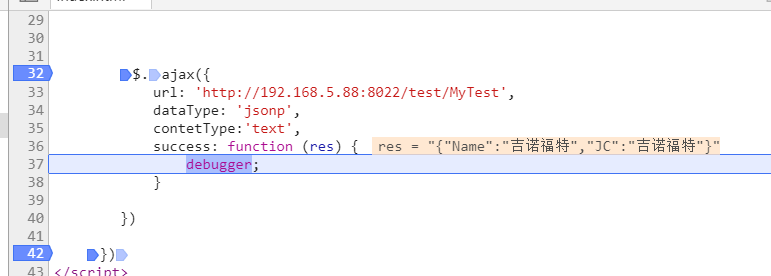
显然请求成功
.net服务器端发起请求封装的更多相关文章
- CTF SSRF(服务器端伪造请求)
目录 CTF SSRF(服务器端伪造请求) 一.概念 二.危害 三.漏洞挖掘与判断 四.相关函数 五.IP绕过 六.Gopher协议 1.使用限制 2.构造payload CTF SSRF(服务器端伪 ...
- Elasticsearch High Level Rest Client 发起请求的过程分析
本文讨论的是JAVA High Level Rest Client向ElasticSearch6.3.2发送请求(index操作.update.delete--)的一个详细过程的理解,主要涉及到Res ...
- PHP Request请求封装
/** * Request请求封装 * Class Request * @package tool */ class Request { // curl 请求错误码 protected static ...
- axios请求封装和异常统一处理
前端网络请求封装前端采用了axios来处理网络请求,为了避免在每次请求时都去判断各种各样的网络情况,比如连接超时.服务器内部错误.权限不足等等不一而足,我对axios进行了简单的封装,这里主要使用了a ...
- Vue: axios 请求封装及设置默认域名前缀 (for Vue 2.0)
1. 实现效果 以get方法向http://192.168.32.12:8080/users 发起请求.获取数据并进行处理 this.apiGet('/users', {}) .then((res) ...
- javascript 异步请求封装成同步请求
此方法是异步请求封装成同步请求,加上token验证,环境试用微信小程序,可以修改文件中的ajax,进行封装自己的,比如用axios等 成功码采用标准的 200 到 300 和304 ,需要可以自行修改 ...
- flutter dio网络请求封装实现
flutter dio网络请求封装实现 文章友情链接: https://juejin.im/post/6844904098643312648 在Flutter项目中使用网络请求的方式大致可分为两种 ...
- Ajax向服务器端发送请求
Ajax向服务器端发送请求 Ajax的应用场景 页面上拉加载更多数据 列表数据无刷新分页 表单项离开焦点数据验证 搜索框提示文字下拉列表 Ajax运行原理 Ajax 相当于浏览器发送请求与接收响应的代 ...
- Vue2使用Axios发起请求教程详细
当你看到该文章时希望你已知晓什么是跨域请求以及跨域请求的处理,本文不会赘述 本文后台基于Springboot2.3进行搭建,Controller中不会写任何业务逻辑仅用于配合前端调试 Controll ...
随机推荐
- C3P0连接池一些基本配置
C3P0连接池配置 数据库连接是一个耗费大量资源且相当慢的操作,所以为了提高性能和连接速度,诞生了连接池这样的概念. 在多用户并发操作过程中,连接池尤为重要. 它是将那些已连接的数据库连接存放在一个容 ...
- codeforces734E
题目连接:http://codeforces.com/contest/734/problem/E E. Anton and Tree time limit per test 3 seconds mem ...
- HDU 1280 前m大的数(排序,字符串)
前m大的数 Time Limit: 2000/1000 MS (Java/Others) Memory Limit: 65536/32768 K (Java/Others)Total Sub ...
- Scala 实现快速排序和归并排序
def quickSort1(array: Array[Int]): Array[Int] = { def swap(x: Int, y: Int): Unit = { val tmp = array ...
- Codeforces #428 Div2 D
#428 Div2 D 题意 给出一些数,现在要求找出一些数满足 \(i_1 < i_2 < i_3 < ... < i_k\) 以及 \(gcd(a_{i_1}, a_{i_ ...
- View Controller Basics学习记录
1.UIView,UIScreen ,UIWindow的区别? UIScreen是关于设备的尺寸大小.UIWindow是在UIScreen上作画的区域.UIView是在uiwindow上draw视图. ...
- luogu P1056 排座椅
题目描述 上课的时候总会有一些同学和前后左右的人交头接耳,这是令小学班主任十分头疼的一件事情.不过,班主任小雪发现了一些有趣的现象,当同学们的座次确定下来之后,只有有限的D对同学上课时会交头接耳.同学 ...
- Linux下判断字符串长度
方法1:使用wc -L命令 wc -L可以获取到当前行的长度,因此对于单独行的字符串可以用这个简单的方法获取,另外wc -l则是获取当前字符串内容的行数. echo 'abc' |wc -L 注意:这 ...
- 开源用户界面和布局的套件XiaoCai.WinformUI(美化用户界面利器)
发布一款开源用户界面和布局的套件,请朋友们多提提宝贵建议! XiaoCai.WinformUI主要是解决用户界面和布局的套件,能够快速进行合理性布局,美化用户界面. 因为之前发布到谷歌里,好多朋友都说 ...
- React Conf 2017 干货总结 1: React + ES next = ♥
React Conf 2017在加利福尼亚州的圣克拉拉万豪酒店圆满落幕,这已经是Facebook举办的第三届React官方大会了.虽然不能参会,但是作为前端开发者,我们当然不能错过这个绝佳的学习契机. ...