
.net服务器端发起请求封装
写一个静态类封装类似客户端的请求
 public static class HttpHelper

    {

        #region Get

        public static string HttpGet(string url, Encoding encoding = null)

        {

            WebClient client = new WebClient

            {

                Encoding = encoding ?? Encoding.UTF8

            };

            return client.DownloadString(url);

        }

        /// <summary>

        /// Get请求的泛型类返回固定类型

        /// </summary>

        /// <typeparam name="T"></typeparam>

        /// <param name="url"></param>

        /// <param name="encoding"></param>

        /// <returns></returns>

        public static T GetJson<T>(string url, Encoding encoding = null)

        {

            string input = HttpGet(url, encoding);

            JavaScriptSerializer serializer = new JavaScriptSerializer();

            return serializer.Deserialize<T>(input);

        }

        /// <summary>

        /// Get请求返回json字符串

        /// </summary>

        /// <param name="url"></param>

        /// <param name="encoding"></param>

        /// <returns></returns>

        public static string GetJsonStr(string url, Encoding encoding = null)

        {

            string input = HttpGet(url, encoding);

            return input;

        }

        #endregion

        #region Post

        /// <summary>

        /// 构造url的参数ajax的data值

        /// </summary>

        /// <param name="dic"></param>

        /// <returns></returns>

        public static string GetUrlStr(Dictionary<string, string> dic)

        {

            StringBuilder sb = new StringBuilder();

            foreach (var item in dic)

            {

                sb.AppendFormat("{0}={1}&", item.Key, item.Value);

            }

            string urlStr = sb.Remove(sb.Length - , ).ToString();

            return urlStr;

        }

        /// <summary>

        /// 发送post请求

        /// </summary>

        /// <param name="postData"></param>

        /// <param name="postUrl"></param>

        /// <returns></returns>

        public static string PostJsonStr(string postData, string postUrl)

        {

            HttpWebRequest request = (HttpWebRequest)WebRequest.Create(postUrl);

            byte[] data = Encoding.GetEncoding("gbk").GetBytes(postData);

            request.Method = "POST";

            request.ContentType = "application/x-www-form-urlencoded";

            request.ContentLength = data.Length;

            using (Stream stream = request.GetRequestStream())

            {

                stream.Write(data, , data.Length);

            }

            HttpWebResponse response = (HttpWebResponse)request.GetResponse();

            string responseString = new StreamReader(response.GetResponseStream(), Encoding.GetEncoding("utf-8")).ReadToEnd();

            return responseString;

        }

        #endregion

    }
注意引用的命名空间
using AutoO2O.BLL;

using AutoO2O.Common;

using AutoO2O.Models;

using System;

using System.Collections.Generic;

using System.IO;

using System.Linq;

using System.Net;

using System.Text;

using System.Threading;

using System.Timers;

using System.Web.Mvc;
将请求的结果转化输出给ajax请求
    protected string Write<T>(string callBack, string paramName, object o)

        {

            Newtonsoft.Json.JsonSerializerSettings jSetting = new Newtonsoft.Json.JsonSerializerSettings();

            jSetting.NullValueHandling = NullValueHandling.Ignore;

            if (string.IsNullOrEmpty(callBack) && string.IsNullOrEmpty(paramName))

                return JsonConvert.SerializeObject(o, jSetting);

            else if (!string.IsNullOrEmpty(callBack))

                return callBack + "(" + JsonConvert.SerializeObject(o, jSetting) + ");";

            else

                return "var " + paramName + " = " + JsonConvert.SerializeObject(o, jSetting) + ";";

        }
辅助测试
 public class MyClass

    {

        public string Name { get; set; }

        public string JC { get; set; }

    }
   public string MyTest()

        {

            string callBack = Request["callback"] + "";

            //string ss =GetJsonStr("http://192.168.5.88:8888/test/GetD/24");

            //return Write<MyClass>(callBack, "", ss);

            Dictionary<string, string>dic=new Dictionary<string,string>();

            dic.Add("id","");

            string param = HttpHelper.GetUrlStr(dic);

            string result = HttpHelper.PostJsonStr(param, "http://192.168.5.88:8888/test/GetD");

            return Write<string>(callBack, "", result);

        }
静态页面请求
   $.ajax({

            url: 'http://192.168.5.88:8022/test/MyTest',

            dataType: 'jsonp',

            contetType:'text',

            success: function (res) {

                debugger;

            }

        })
调试
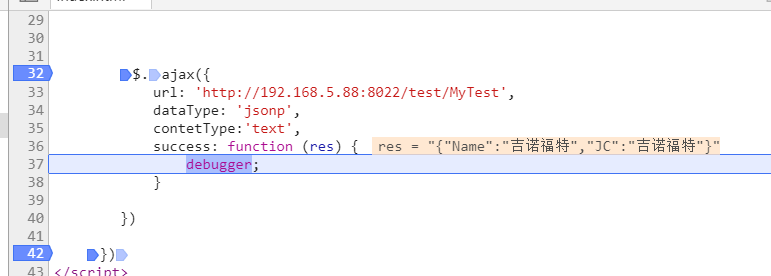
显然请求成功
.net服务器端发起请求封装的更多相关文章
- CTF SSRF(服务器端伪造请求)
目录 CTF SSRF(服务器端伪造请求) 一.概念 二.危害 三.漏洞挖掘与判断 四.相关函数 五.IP绕过 六.Gopher协议 1.使用限制 2.构造payload CTF SSRF(服务器端伪 ...
- Elasticsearch High Level Rest Client 发起请求的过程分析
本文讨论的是JAVA High Level Rest Client向ElasticSearch6.3.2发送请求(index操作.update.delete--)的一个详细过程的理解,主要涉及到Res ...
- PHP Request请求封装
/** * Request请求封装 * Class Request * @package tool */ class Request { // curl 请求错误码 protected static ...
- axios请求封装和异常统一处理
前端网络请求封装前端采用了axios来处理网络请求,为了避免在每次请求时都去判断各种各样的网络情况,比如连接超时.服务器内部错误.权限不足等等不一而足,我对axios进行了简单的封装,这里主要使用了a ...
- Vue: axios 请求封装及设置默认域名前缀 (for Vue 2.0)
1. 实现效果 以get方法向http://192.168.32.12:8080/users 发起请求.获取数据并进行处理 this.apiGet('/users', {}) .then((res) ...
- javascript 异步请求封装成同步请求
此方法是异步请求封装成同步请求,加上token验证,环境试用微信小程序,可以修改文件中的ajax,进行封装自己的,比如用axios等 成功码采用标准的 200 到 300 和304 ,需要可以自行修改 ...
- flutter dio网络请求封装实现
flutter dio网络请求封装实现 文章友情链接: https://juejin.im/post/6844904098643312648 在Flutter项目中使用网络请求的方式大致可分为两种 ...
- Ajax向服务器端发送请求
Ajax向服务器端发送请求 Ajax的应用场景 页面上拉加载更多数据 列表数据无刷新分页 表单项离开焦点数据验证 搜索框提示文字下拉列表 Ajax运行原理 Ajax 相当于浏览器发送请求与接收响应的代 ...
- Vue2使用Axios发起请求教程详细
当你看到该文章时希望你已知晓什么是跨域请求以及跨域请求的处理,本文不会赘述 本文后台基于Springboot2.3进行搭建,Controller中不会写任何业务逻辑仅用于配合前端调试 Controll ...
随机推荐
- 从1到整数n中1出现的次数
题目:输入一个整数n,求从1到n这n个整数的十进制表示中1出现的次数.例如输入12,从1到12这些整数中包含1的数字有1,10,11和12共出现了5次. 不考虑时间效率的解法: int Numbe ...
- <div>之定位
在使用盒子模型的过程中,如何放置各种类型的“盒子”,就存在定位.浮动等问题.下面就日常运用过程中出现过的情况总结如下(陆续加入中....) 一.图片直接做<div>的背景 在<div ...
- mysql 游标的使用
游标是什么?? 游标是一个存储在MySQL服务器上的数据库查询,它不是一条select语句,而是被该语句所检索出来的结果集. 使用游标 在介绍如何创建游标之前,先说明下如何使用游标. 使用游标涉及几个 ...
- HDU 多校1.12
- HDU 1060 Leftmost Digit (数论,快速幂)
Given a positive integer N, you should output the leftmost digit of N^N. InputThe input contains se ...
- 一个Sqrt函数引发的血案
源码下载地址:http://diducoder.com/sotry-about-sqrt.html 好吧,我承认我标题党了,不过既然你来了,就认真看下去吧,保证你有收获. 我们平时经常会有一些数据运算 ...
- 【动态规划】Gym - 100923A - Por Costel and Azerah
azerah.in / azerah.out Por Costel the Pig has received a royal invitation to the palace of the Egg-E ...
- 6.4(java学习笔记)转换流
一.乱码问题 我们来看下列例子: public class ConStream { //当前平台默认采用GBK public static void main(String[] args){ Stri ...
- Visual Studio 断点无法命中怎么办?
经常远程调试服务器打断点是空心的,很抓狂,正确的方法应该是 #if DEBUG if (System.Diagnostics.Debugger.IsAttached) { System.Diagnos ...
- IE11快捷键 双击没反应的解决办法
WIN + R,regedit,找到 HKEY_CURRENT_USER\Software\Microsoft\Internet Explorer\Main 对左侧树Main节点右键——权限. 正常情 ...