
VS2017 - Winform 简单托盘小程序
界面比较简单,主要两个button 一个NotifyIcon 和 右键菜单 控件,
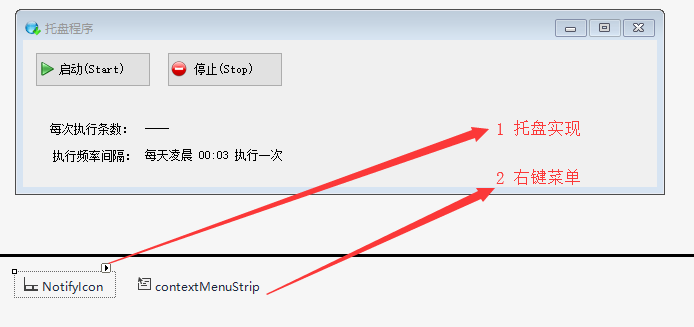
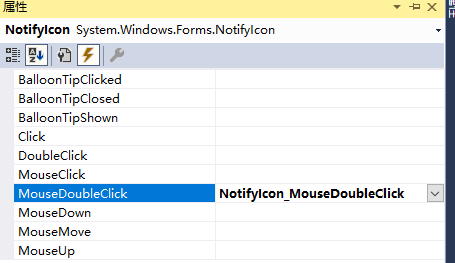
NotifyIcon 属性,如下:

并为NotifyIcon指定了DoubleClick事件:
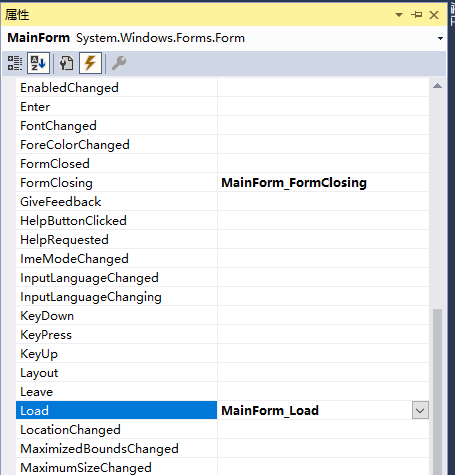
主窗体增加两个事件:
整体代码如下:
using Pallet_Common;

using System;

using System.Collections.Generic;

using System.ComponentModel;

using System.Configuration;

using System.Data;

using System.Diagnostics;

using System.Drawing;

using System.Linq;

using System.Text;

using System.Threading.Tasks;

using System.Windows.Forms;

namespace Pallet_01

{

    public partial class MainForm : Form

    {

        public MainForm()

        {

            InitializeComponent();

            this.btnEnd.Enabled = false;

            this.停止ToolStripMenuItem.Enabled = false;

        }

        private void MainForm_Load(object sender, EventArgs e)

        {

            this.btnEnd.Enabled = false;

            this.Resize += MainForm_Resize;

        }

        //单击窗体最小化时窗体隐藏

        void MainForm_Resize(object sender, EventArgs e)

        {

            if (this.WindowState == FormWindowState.Minimized)

            {

                this.Hide();

            }

        }

        private void NotifyIcon_MouseDoubleClick(object sender, MouseEventArgs e)

        {

            this.Show(); // 窗体显现

            this.WindowState = FormWindowState.Normal; //窗体回复正常大小

        }

        private void btnStart_Click(object sender, EventArgs e)

        {

            Scheduler.StartUp();

            this.btnStart.Enabled = false;

            this.btnEnd.Enabled = true;

            this.启动ToolStripMenuItem.Enabled = false;

            this.停止ToolStripMenuItem.Enabled = true;

            string pageSize = ConfigurationManager.AppSettings["PageSize"];

            this.lblCount.Text = pageSize + " 条";

            this.lblCount.Update();

        }

        private void btnEnd_Click(object sender, EventArgs e)

        {

            Scheduler.Stop();

            this.btnStart.Enabled = true;

            this.btnEnd.Enabled = false;

            this.启动ToolStripMenuItem.Enabled = true;

            this.停止ToolStripMenuItem.Enabled = false;

            this.lblCount.Text = "----";

            this.lblCount.Update();

        }

        private void MainForm_FormClosing(object sender, FormClosingEventArgs e)

        {

            if (MessageBox.Show("是否确认退出程序?", "退出", MessageBoxButtons.OKCancel, MessageBoxIcon.Question) == DialogResult.OK)

            {

                //关闭所有的线程,释放占用内存

                this.Dispose();

                this.Close();

            }

            else

            {

                e.Cancel = true;

            }

        }

        #region 右键菜单事件

        private void 启动ToolStripMenuItem_Click(object sender, EventArgs e)

        {

            Scheduler.StartUp();

            this.btnStart.Enabled = false;

            this.btnEnd.Enabled = true;

            this.启动ToolStripMenuItem.Enabled = false;

            this.停止ToolStripMenuItem.Enabled = true;

        }

        private void 停止ToolStripMenuItem_Click(object sender, EventArgs e)

        {

            Scheduler.Stop();

            this.btnStart.Enabled = true;

            this.btnEnd.Enabled = false;

            this.启动ToolStripMenuItem.Enabled = true;

            this.停止ToolStripMenuItem.Enabled = false;

        }

        private void 退出ToolStripMenuItem_Click(object sender, EventArgs e)

        {

            if (MessageBox.Show("是否确认退出程序?", "退出", MessageBoxButtons.OKCancel, MessageBoxIcon.Question) == DialogResult.OK)

            {

                // 关闭所有的线程,释放占用内存

                this.Dispose();

                this.Close();

            }

        }

        #endregion

    }

}
其中打开一个程序后,不允许再次打开,也就是运行后,只能运行一个,如下:
using System;

using System.Collections.Generic;

using System.Linq;

using System.Threading;

using System.Threading.Tasks;

using System.Windows.Forms;

namespace Pallet_01

{

    static class Program

    {

        /// <summary>

        /// 应用程序的主入口点。

        /// </summary>

        [STAThread]

        static void Main()

        {

            bool bCreateNew;

            Mutex m = new Mutex(false, "Pallent_01", out bCreateNew);

            if (bCreateNew)

            {

                Application.EnableVisualStyles();

                Application.SetCompatibleTextRenderingDefault(false);

                Application.Run(new MainForm());

            }

        }

    }

}
VS2017 - Winform 简单托盘小程序的更多相关文章
- 输出多行字符的一个简单JAVA小程序
public class JAVA { public static void main(String[] args) { System.out.println("-------------- ...
- 简单的小程序实现ATM机操作
简单的小程序实现ATM机操作 代码如下: package Day06; import java.util.Scanner; public class TestAccount { public stat ...
- python -----一个简单的小程序(监控电脑内存,cpu,硬盘)
一个简单的小程序 用函数实现!~~ 实现: cpu 使用率大于百分之50 时 , C 盘容量不足5 G 时, 内存 低于2G 时. 出现以上其中一种情况,发送自动报警邮件! 主要运用 到了两个 模 ...
- 3.2 Lucene实战:一个简单的小程序
在讲解Lucene索引和检索的原理之前,我们先来实战Lucene:一个简单的小程序! 一.索引小程序 首先,new一个java project,名字叫做LuceneIndex. 然后,在project ...
- Python3的tkinter写一个简单的小程序
一.这个学期开始学习python,但是看了python2和python3,最后还是选择了python3 本着熟悉python的原因,并且也想做一些小程序来增加自己对python的熟练度.所以写了一个简 ...
- Python绘制PDF文件~超简单的小程序
Python绘制PDF文件 项目简介 这次项目很简单,本次项目课,代码不超过40行,主要是使用 urllib和reportlab模块,来生成一个pdf文件. reportlab官方文档 http:// ...
- WinForm版图像编辑小程序(实现图像拖动、缩放、旋转、抠图)
闲暇之余,开发一个图片编辑小程序.程序主要特点就是可方便的对多个图像编辑,实现了一些基本的操作.本文主要介绍一下程序的功能.设计思路. 执行程序 下载地址: 百度网盘.https://pan.baid ...
- 用python写个简单的小程序,编译成exe跑在win10上
每天的工作其实很无聊,早知道应该去IT公司闯荡的.最近的工作内容是每逢一个整点,从早7点到晚11点,去查一次客流数据,整理到表格中,上交给素未蒙面的上线,由他呈交领导查阅. 人的精力毕竟是有限的,所以 ...
- .NET WinForm画树叶小程序
看了一片文章(http://keleyi.com/a/bjac/nurox416.htm),是使用分型画树叶,代码是Java的,因为Java很久没弄了,改用C#实现,下载地址: 画树叶小程序下载 核心 ...
随机推荐
- ( 转 ) 什么是 JWT -- JSON WEB TOKEN
什么是JWT Json web token (JWT), 是为了在网络应用环境间传递声明而执行的一种基于JSON的开放标准((RFC 7519).该token被设计为紧凑且安全的,特别适用于分布式站点 ...
- [xsy2978]Product of Roots
$\newcommand{align}[1]{\begin{align*}#1\end{align*}}$题意:给出$f(x)=\prod\limits_{i=1}^n(a_ix+1)$和$g(x)= ...
- 【置换群】Codeforces Round #393 (Div. 1) A. Pavel and barbecue
就是先看排列p,必须满足其是一个环,才满足题意.就处理出有几个环,然后把它们合起来,答案就是多少. 然后再看序列b,自己稍微画一画就会发现,如果有偶数个1肯定是不行哒,否则,它就会再置换一圈回到它自己 ...
- 【权值分块】bzoj3685 普通van Emde Boas树
权值分块,虽然渐进复杂度不忍直视,但其极小的常数使得实际运行起来比平衡树快,大多数情况和递归版权值线段树差不多,有时甚至更快.但是被zkw线段树完虐. #include<cstdio> # ...
- 【匈牙利算法】BZOJ1059-[ZJOI2007]矩阵游戏
[题目大意] 给出一个局部染色的矩阵,问能否通过交换行或者列使得最后又一条对角线全部被染色过? [思路] 无论如何交换,同一行的格子依然在同一行,同一列的格子依然在同一列.所以只需找出n个行号列号均不 ...
- 利用Java位运算符,完成Unsigned转换(无符号)
方案二:利用Java位运算符,完成Unsigned转换. 正常情况下,Java提供的数据类型是有符号signed类型的,可以通过位运算的方式得到它们相对应的无符号值,参见几个方法中的代码: publi ...
- Android修改状态栏颜色全方位教程
关键字:状态栏着色 透明状态栏 沉浸式 白底黑字 Github Demo:https://github.com/imflyn/Eyes 参考文章: Android-transulcent-status ...
- pomise的简单用法
1.then的基本简单用法,当异步获取完数据后就会自动执行then的方法 function runAsync1(){ var p = new Promise(function(resolve, rej ...
- Linux查找并删除重复文件的命令行fdupes工具,dupeGuru图形工具
查了几十个网页,找到这个接近满意的解决方案http://unix.stackexchange.com/questions/146197/fdupes-delete-files-aft... 不过正则里 ...
- How to backup a remote PostgreSQL db and restore it locally?
pg_dump and pg_restore 来备份和恢复数据库中的数据. 原文: https://ksearch.wordpress.com/2012/09/28/how-to-backup-a- ...